Dental Clinic Management Software Development in Erode: Complete Guide
Running a dental clinic involves much more than scheduling appointments. Every day, dentists and clinic administrators coordinate patient registrations, consultations, treatment plans, follow-up visits, billing, inventory and patient communication.
When these activities are managed through notebooks, spreadsheets or disconnected applications, clinic staff may spend additional time searching for records, checking appointment availability and preparing reports.
For example, a dental clinic in Erode may have multiple dentists, several treatment chairs and patients visiting for consultations, cleaning, orthodontic reviews or other dental procedures. The reception team needs to organize appointments while clinicians need access to relevant treatment histories.
A well-designed dental clinic management software system in Erode can help bring these administrative and clinical recordkeeping activities into a structured digital platform.
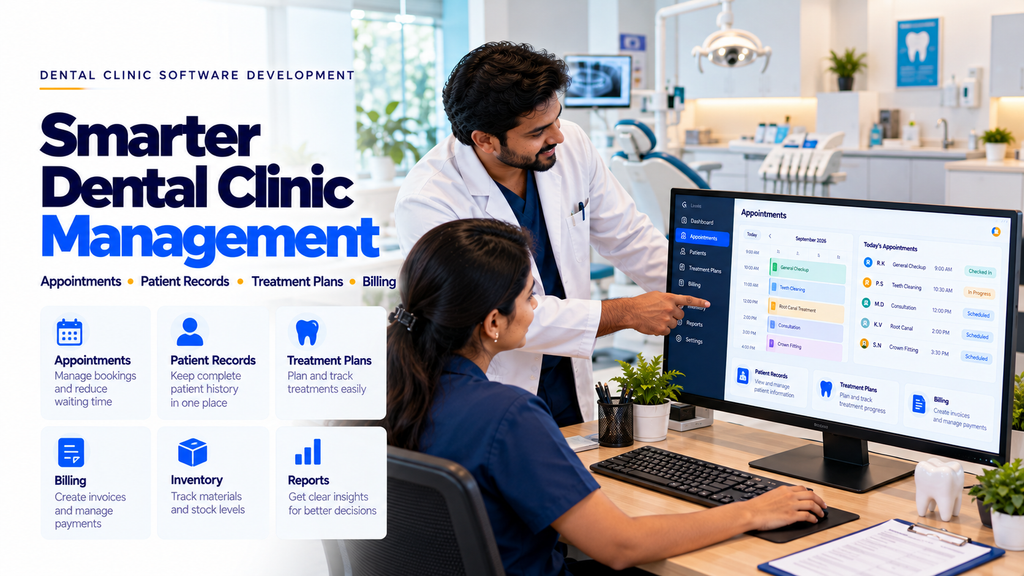
Custom dental software may include appointment scheduling, patient registration, dental charting, treatment planning, billing, inventory tracking, reminders and management dashboards.
This guide explains the main modules, development process, security considerations, cost factors and practical requirements involved in building dental clinic management software.
What Is Dental Clinic Management Software?
Dental clinic management software is a digital application designed to support the administrative and recordkeeping needs of dental practices.
Depending on the clinic’s requirements, the software may manage:
- Patient registration
- Appointment scheduling
- Dentist and chair availability
- Clinical history
- Dental charting
- Treatment plans
- Procedure records
- Prescription documentation
- Billing and payment records
- Inventory management
- Patient communication
- Clinic reports
Clinical documentation and treatment decisions must remain under the responsibility of qualified dental professionals.
Why Dental Clinics in Erode Need Management Software
Dental practices may start with a simple appointment book and basic billing records. As patient volume, staff numbers and treatment services grow, managing everything manually can become more difficult.
Common operational challenges include:
- Overlapping appointment requests
- Difficulty locating previous patient records
- Incomplete treatment history
- Manual follow-up scheduling
- Disconnected billing information
- Limited visibility into pending payments
- Difficulty tracking dental materials
- Time-consuming daily reports
A clinic management platform can help organize these activities when its workflows match how the practice operates.
1. Patient Registration and Profile Management
Patient registration is one of the foundation modules of a dental clinic management system.
It may include:
- Unique patient identification
- Patient name and contact details
- Relevant medical and dental history
- Emergency contact information
- Consent records
- Appointment history
- Treatment history
Only information needed for legitimate clinic purposes should be collected and stored.
2. Dental Appointment Management
Appointment scheduling helps reception staff organize patient visits and dentist availability.
Potential features include:
- Daily, weekly and monthly calendar views
- Appointment booking
- Rescheduling
- Cancellation handling
- Dentist assignment
- Appointment duration settings
- Visit status tracking
- Conflict prevention
3. Online Dental Appointment Booking
Dental clinics may allow patients to request appointments through their websites.
Online booking features may include:
- Service selection
- Preferred dentist selection
- Available appointment slots
- Booking request submission
- Confirmation notifications
- Rescheduling requests
The booking system should avoid exposing other patients’ appointment details.
4. Multi-Dentist Scheduling
Clinics with multiple dentists may require separate schedules for each practitioner.
Potential features include:
- Dentist-specific calendars
- Working hours
- Leave and unavailability
- Consultation duration
- Appointment assignment
- Schedule conflict checks
5. Dental Chair Management
Some dental clinics operate multiple treatment chairs.
Chair scheduling may help coordinate available treatment spaces.
Possible features include:
- Chair identification
- Chair availability
- Appointment-to-chair assignment
- Procedure duration planning
- Chair maintenance status
Scheduling rules should reflect the clinic’s actual facilities and clinical processes.
6. Electronic Dental Patient Records
Electronic dental records can help authorized clinicians access relevant patient information.
Records may include:
- Patient history
- Previous consultations
- Clinical notes
- Dental charts
- Treatment plans
- Procedure documentation
- Attachments and reports
- Follow-up recommendations
Clinical records should be accurate, appropriately protected and maintained according to applicable professional and legal requirements.
7. Dental Charting Software
Dental charting helps clinicians document the condition of individual teeth and related findings.
Custom dental charting features may include:
- Interactive tooth chart
- Tooth-specific clinical notes
- Procedure history
- Chart updates
- Clinician attribution
- Record version history
Dental charting terminology and workflows should be validated by qualified dental professionals.
8. Dental Treatment Plan Management
Treatment planning involves documenting proposed care, estimated costs and planned visits.
A treatment planning module may support:
- Proposed procedures
- Tooth or region selection
- Planned appointment sequence
- Estimated treatment cost
- Patient consent records
- Treatment status tracking
The software should document professional decisions rather than independently determine treatment.
9. Procedure and Treatment History
Dental clinics may need a structured record of completed procedures.
Possible features include:
- Procedure date
- Responsible clinician
- Procedure category
- Clinical notes
- Related treatment plan
- Follow-up status
Access should be restricted to appropriately authorized clinic personnel.
10. Prescription Record Management
Dental software may include a module for qualified practitioners to document prescriptions.
Potential features include:
- Prescription records
- Authorized clinician identification
- Patient record association
- Prescription history
- Printable prescription documents
Prescribing decisions, medication selection and dosage must remain under the responsibility of qualified practitioners. The software should not issue independent prescriptions.
11. Dental Imaging and Attachment Management
Dental clinics may need to associate authorized imaging records and other documents with patient profiles.
Possible features include:
- Image attachment
- Document upload
- Record categorization
- Clinician notes
- Secure access
- Attachment history
Imaging integration requirements depend on the clinic’s equipment, supported file formats and available interfaces.
12. Dental Billing and Invoice Management
Billing software can help reception and accounts staff organize treatment charges and payments.
Potential features include:
- Service price lists
- Invoice preparation
- Payment recording
- Partial payments
- Outstanding balance tracking
- Receipts
- Billing reports
Tax handling and invoice formats should be configured according to applicable requirements.
13. Treatment Package Management
Some dental clinics may offer multi-visit treatment plans or defined service packages.
Software features may include:
- Package definition
- Included services
- Planned visits
- Payment milestones
- Remaining visit tracking
- Package status
Clinical suitability and treatment decisions must be determined by qualified practitioners.
14. Patient Payment Tracking
Dental practices may need to track payments across multiple appointments.
Possible features include:
- Invoice payment status
- Advance payments
- Partial payments
- Outstanding balances
- Payment history
- Receipt generation
Financial records should be protected by appropriate permissions and audit controls.
15. Dental Inventory Management
Dental clinics use consumables, instruments and other supplies.
An inventory module may help track:
- Material names
- Stock quantities
- Purchase records
- Supplier details
- Low-stock alerts
- Expiry dates where relevant
- Stock adjustments
Inventory records should support, not replace, appropriate clinical safety and stock handling procedures.
16. Dental Supplier and Purchase Management
Clinics may need to coordinate purchases from multiple suppliers.
Potential features include:
- Supplier profiles
- Purchase requests
- Purchase orders
- Goods receipt records
- Purchase history
- Supplier payment status
17. Appointment Reminder Automation
Appointment reminders may help clinics communicate scheduled visits.
Possible notification channels include:
- SMS
- Authorized WhatsApp Business services
Messages should follow applicable consent and platform requirements.
Reminders should avoid unnecessarily disclosing sensitive health information.
18. Dental Follow-Up Management
Some dental treatments involve multiple visits or scheduled reviews.
Software may help staff manage:
- Follow-up dates
- Pending appointment requests
- Recall schedules
- Missed appointment follow-ups
- Clinician-assigned review tasks
Clinical follow-up intervals should be determined by qualified dental professionals.
19. Patient Communication Management
Clinics may use software to organize administrative communication with patients.
Possible features include:
- Appointment confirmations
- Rescheduling notifications
- General clinic announcements
- Payment receipts
- Support requests
Communication preferences and privacy requirements should be respected.
20. Patient Portal Development
A secure patient portal may allow patients to access selected information.
Depending on the clinic’s policies, features may include:
- Appointment information
- Booking requests
- Approved treatment summaries
- Invoices and receipts
- Profile updates
- Secure communication
Patient identity verification and access controls are essential.
21. Dental Clinic Reception Dashboard
Reception employees need quick access to daily administrative activities.
A reception dashboard may show:
- Today’s appointments
- Upcoming patient arrivals
- Waiting patients
- Appointment changes
- Pending invoices
- Follow-up tasks
The dashboard should prioritize usability and minimize unnecessary exposure of clinical information.
22. Dentist Dashboard
A dentist dashboard may provide authorized access to relevant clinical and scheduling information.
Possible features include:
- Assigned appointments
- Patient history
- Clinical notes
- Dental charts
- Treatment plans
- Follow-up schedules
Only appropriately authorized users should access clinical records.
23. Dental Clinic Admin Panel
A custom administrative panel may help clinic management configure and monitor business operations.
Possible modules include:
- Clinic settings
- Staff accounts
- Roles and permissions
- Appointment configuration
- Service lists
- Billing settings
- Inventory
- Supplier records
- Reports
- Audit logs
Administrative access should be protected with strong authentication and appropriate permissions.
24. Staff and Department Management
Larger dental practices may need to manage several staff categories.
Examples include:
- Dentists
- Dental assistants
- Receptionists
- Clinic administrators
- Inventory personnel
- Accounts staff
Software may support staff profiles, assigned responsibilities and authorized access.
25. Multi-Branch Dental Clinic Management
Dental organizations with more than one branch may require centralized management.
Potential features include:
- Branch-specific appointments
- Staff assignment
- Branch inventory
- Branch reporting
- Centralized administration
- Controlled patient record access
Cross-branch access to patient records should follow appropriate privacy and authorization policies.
26. Dental Laboratory Workflow Management
Clinics working with external or internal dental laboratories may need to track lab-related requests.
Potential features include:
- Lab work requests
- Order status
- Expected completion dates
- Vendor or lab assignment
- Delivery tracking
- Associated treatment records
Clinical specifications should be provided and verified by qualified dental professionals.
27. Dental Clinic Reporting Dashboard
Management reports can help clinic administrators review operational activity.
Possible reports include:
- Daily appointments
- Completed visits
- Cancelled appointments
- Outstanding invoices
- Inventory status
- Service activity
- Staff scheduling
Reports should be based on accurate records and protected by appropriate access permissions.
28. Dental Clinic Software vs General Hospital Management Software
| Dental Clinic Software | General Hospital Software |
|---|---|
| Dental charting and tooth-specific records | Broader medical records and specialty workflows |
| Dental treatment plans | General clinical treatment workflows |
| Dentist and chair scheduling | Multi-department resource scheduling |
| Dental procedure history | Wider clinical procedure records |
| Dental lab coordination | Broader laboratory and diagnostic integrations |
The appropriate system depends on the facility’s actual services and operational requirements.
29. Ready-Made vs Custom Dental Clinic Software
| Ready-Made Software | Custom Dental Software |
|---|---|
| Predefined features | Features based on clinic requirements |
| May offer faster setup | Requires development and testing |
| Customization depends on provider | Supports tailored workflows |
| Often subscription-based | May involve development and maintenance costs |
| Integrations depend on vendor support | Can use supported APIs and custom integrations |
Clinics should compare total cost, data portability, security, support and required features before selecting a solution.
30. Dental Clinic Software Architecture
A custom dental clinic management platform may include:
- Responsive web application
- Secure backend
- Patient database
- Appointment management
- Clinical record modules
- Billing module
- Inventory module
- Notification services
- Role-based permissions
- Reporting system
- Audit logging
- Backup and recovery
31. Mobile-Friendly Dental Clinic Software
Clinic staff may need access to selected features from smartphones or tablets.
A responsive application may support:
- Appointment calendars
- Patient search
- Schedule updates
- Administrative notifications
- Billing status
- Management reports
Mobile access to clinical information requires suitable security controls.
32. Dental Clinic Website Integration
A dental clinic website may be connected to selected management software features.
Possible integrations include:
- Online appointment requests
- Service information
- General enquiry forms
- Appointment confirmations
- Secure patient portal access
Public website features should not expose private patient records or internal clinic systems.
33. Dental Clinic Software Security
Dental clinic software may process sensitive health and personal information.
Important security controls include:
- Strong authentication
- Role-based access
- Encryption in transit and at rest where appropriate
- Secure session handling
- Input validation
- Audit logs
- Secure file uploads
- Backup and recovery
- Access monitoring
- Incident response procedures
Security should be considered throughout development rather than added only before deployment.
34. Patient Data Privacy and Compliance
Dental clinics should review applicable Indian privacy, healthcare recordkeeping and professional requirements before deploying software.
Important considerations include:
- Appropriate patient notices and consent where required
- Purpose-based data collection
- Minimum necessary data access
- Secure record storage
- Data retention policies
- Authorized data sharing
- Patient access and correction procedures where applicable
- Vendor data handling agreements
Applicable obligations depend on the organization, data processing activities and current legal requirements. Legal and clinical compliance should be reviewed by qualified professionals.
35. Backup and Disaster Recovery
Clinic software should have appropriate backup and recovery arrangements.
Potential safeguards include:
- Scheduled backups
- Protected backup storage
- Recovery testing
- Access-controlled restoration
- Documented recovery procedures
Clinics should define acceptable recovery times and data loss limits based on operational needs.
36. Custom Dental Software Development Process
- Requirement Analysis: Understand clinic workflows.
- Clinical Review: Validate treatment record and charting requirements with qualified dentists.
- Module Planning: Define appointments, records, billing and inventory features.
- UI/UX Design: Design reception, dentist and admin dashboards.
- Database Design: Structure patient and operational records.
- Backend Development: Implement secure application logic.
- Frontend Development: Build responsive interfaces.
- Integration: Connect approved website and notification services.
- Security Testing: Review access controls and data handling.
- Functional Testing: Test realistic clinic workflows.
- Deployment: Release the system.
- Training: Train authorized clinic staff.
- Maintenance: Monitor and improve the application.
37. Suggested Dental Clinic Software Modules
| Module | Main Purpose |
|---|---|
| Patient Management | Registration and patient profiles |
| Appointment Management | Booking and scheduling |
| Dental Charting | Tooth-specific clinical documentation |
| Treatment Planning | Clinician-approved treatment records |
| Billing | Invoices and payment tracking |
| Inventory | Dental supplies and stock records |
| Laboratory Management | Dental lab work coordination |
| Patient Communication | Administrative reminders and notifications |
| Staff Management | Staff accounts and responsibilities |
| Reports | Operational reporting |
| Admin Panel | Settings, permissions and monitoring |
38. How Much Does Dental Clinic Management Software Development Cost in Erode?
Development cost depends on the required modules and project complexity.
Factors include:
- Number of users
- Single-branch or multi-branch requirements
- Appointment scheduling complexity
- Dental charting functionality
- Clinical record requirements
- Billing and payment features
- Inventory management
- Patient portal requirements
- Website integration
- Data migration
- Security requirements
- Hosting and maintenance
Clinics should request a detailed quotation separating development charges, infrastructure costs, integrations and recurring maintenance.
39. How Long Does Dental Software Development Take?
Development timelines depend on the scope, number of modules, integrations, data migration and testing requirements.
A basic appointment and billing system generally requires less development effort than a full dental hospital management platform with clinical records, dental charting, laboratory workflows and multiple branches.
Milestones and acceptance criteria should be defined before development begins.
40. How to Choose a Dental Clinic Software Development Company in Erode
Before selecting a development provider, consider:
- Understanding of dental clinic workflows
- Ability to build custom software modules
- Security and privacy practices
- Clinical workflow validation
- Responsive UI design
- Integration capabilities
- Data migration planning
- Testing procedures
- Staff training
- Maintenance arrangements
A suitable provider should work with clinic staff and qualified dental professionals to validate important requirements.
41. Dental Clinic Software Development Across Erode District
Dental clinics and healthcare businesses across Erode district may require software solutions based on their operational needs.
Relevant locations include:
- Erode
- Perundurai
- Bhavani
- Anthiyur
- Gobichettipalayam
- Sathyamangalam
- Modakkurichi
- Kodumudi
- Nambiyur
- Chennimalai
- Kavindapadi
- Ammapettai
- Arachalur
- Sivagiri
- Punjai Puliampatti
- Thalavadi
- Solar
- Surampatti
- Veerappanchatram
- Nasiyanur
Software features should reflect the clinic’s size, staff structure, treatment services and existing systems.
42. Common Dental Software Development Mistakes
- Ignoring actual clinic workflows
- Using complicated appointment interfaces
- Failing to prevent scheduling conflicts
- Implementing dental charting without clinician validation
- Using weak patient data access controls
- Ignoring record audit history
- Failing to plan data migration
- Skipping mobile usability testing
- Ignoring backup and recovery
- Using unapproved communication integrations
- Failing to train clinic staff
- Launching without realistic workflow testing
43. Dental Clinic Software Implementation Checklist
- Document current clinic processes.
- Identify required user roles.
- Plan appointment scheduling.
- Define patient record requirements.
- Validate dental charting with clinicians.
- Plan treatment management workflows.
- Define billing requirements.
- Review inventory needs.
- Plan laboratory coordination if needed.
- Review website integration.
- Define patient communication policies.
- Implement access controls.
- Plan backups and recovery.
- Test realistic clinic scenarios.
- Train clinic employees.
- Maintain and update the system.
44. How Greap Technologies Can Help
Greap Technologies can help dental clinics discuss custom software development requirements, including appointment management, administrative dashboards, patient record workflows and billing systems.
Depending on the agreed project scope, solutions may include:
- Dental clinic software requirement analysis
- Appointment management software
- Patient registration systems
- Custom reception dashboards
- Dental charting modules
- Treatment plan management
- Billing and payment tracking
- Inventory management
- Laboratory workflow tracking
- Staff and role management
- Website appointment integration
- Responsive admin panels
- Security testing and maintenance
Explore Greap Technologies for custom website development, business software and healthcare software project enquiries.
Conclusion
Dental clinic management software development in Erode can help dental practices organize appointments, patient records, treatment documentation, billing, inventory and administrative workflows.
However, successful implementation requires practical interface design, clinician-validated workflows, strong patient data protection, reliable backups and employee training.
For dental clinics in Erode and across Tamil Nadu, beginning with clearly defined requirements can help identify the right combination of appointment, clinical and administrative software features.
Need Custom Dental Clinic Management Software in Erode?
Greap Technologies can help you discuss dental appointment systems, patient management software, billing, inventory and custom clinic administration requirements.
Frequently Asked Questions
1. What is dental clinic management software?
Dental clinic management software is a digital system that helps organize appointments, patient records, treatment documentation, billing and clinic administration.
2. Can dental clinic software manage appointments?
Yes. Appointment modules can support booking, rescheduling, dentist assignment and calendar management.
3. Can dental software store patient treatment history?
Yes. Authorized clinical users can maintain electronic treatment records, subject to appropriate security and privacy safeguards.
4. What is dental charting software?
Dental charting software helps qualified clinicians document tooth-specific findings and procedure histories.
5. Can dental clinic software manage billing?
Yes. Billing modules can support invoices, receipts, partial payments and outstanding balance tracking.
6. Can dental software send appointment reminders?
Yes. Reminders may be sent through supported communication services, subject to consent and platform requirements.
7. Can multiple dentists use the same software?
Yes. Multi-user software can support separate dentist schedules and role-based access to records.
8. Can dental clinic software work on mobile?
Yes. Responsive applications can support selected clinic functions on smartphones and tablets.
9. Is dental clinic management software secure?
Security depends on authentication, access controls, encryption, audit logging, backups, testing and ongoing maintenance.
10. How much does dental clinic software development cost in Erode?
Cost depends on modules, user roles, integrations, data migration, security and maintenance requirements.
11. Can dental clinic software integrate with a website?
Yes. Website appointment requests and selected administrative features can be integrated through secure application interfaces.
12. Does Greap Technologies develop dental clinic management software in Erode?
Greap Technologies can help assess dental clinic software requirements and develop suitable custom applications according to the agreed project scope.