
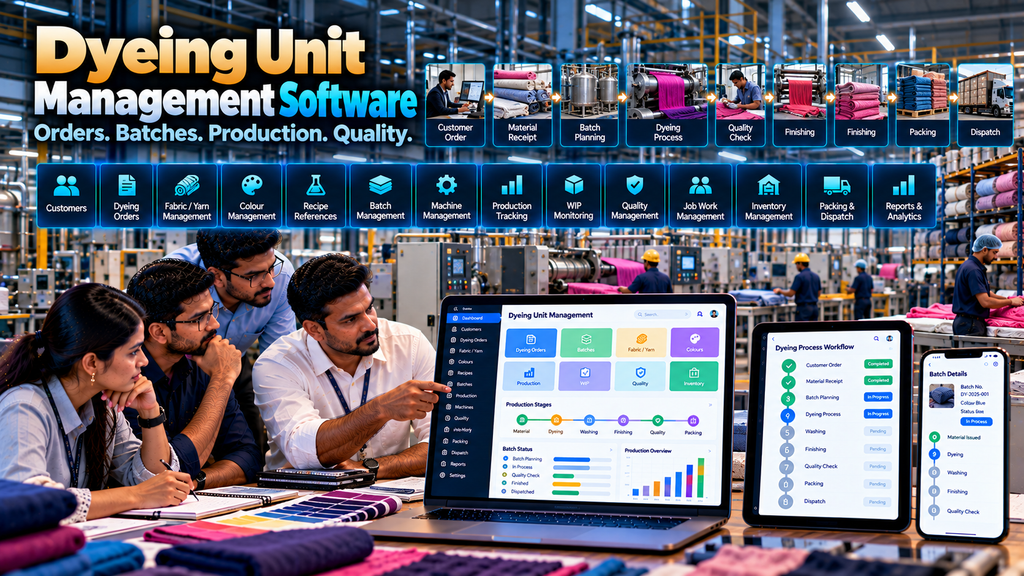
Textile dyeing and processing units manage a chain of activities that can involve customer requirements, incoming materials, colour references, batch planning, production, job work, work-in-progress, quality checks, finishing, packing and dispatch.
When these activities are managed through separate spreadsheets, notebooks, paper records, messaging conversations and disconnected applications, maintaining consistent production information can become difficult.
Dyeing unit management software development in Erode can help textile processing businesses organize these workflows through a custom digital system designed around their actual operating process.
The purpose of dyeing management software is not simply to digitize registers. A useful system should connect the information required by sales, stores, planning, production, quality, job-work, warehouse and management teams while maintaining appropriate user permissions and audit records.
This guide explains the important modules, workflows, integrations and implementation considerations involved in developing custom software for textile dyeing and processing units.
At Greap Technologies, we develop custom manufacturing and textile business software for companies in Erode and nearby areas.
What Is Dyeing Unit Management Software?
Dyeing unit management software is a business and production application designed to organize selected workflows within a textile dyeing or processing operation.
Depending on requirements, the system can include:
- Customer management
- Dyeing order management
- Material receipt
- Fabric or yarn references
- Colour references
- Recipe or approved process references
- Batch planning
- Production orders
- Machine allocation
- Material requirements
- Stores management
- Production-stage tracking
- Work-in-progress tracking
- Job-work management
- Quality workflows
- Reprocessing or rework workflows
- Finishing
- Packing
- Finished-goods management
- Dispatch
- Dashboards and reports
- ERP and accounting integrations
The correct modules depend on the type of textile processing performed by the unit.
Dyeing Software vs Textile ERP
Dyeing management software can operate as a specialized production application or as a module within a broader textile ERP.
| Textile ERP | Dyeing Unit Software |
|---|---|
| Broad textile business management | Dyeing and processing-focused workflows |
| Sales, purchase, inventory and finance integrations | Orders, batches, processing, WIP and quality |
| Can cover several textile divisions | Can focus on one dyeing or processing operation |
| Enterprise-wide reporting | Detailed dyeing-production information |
For a broader architecture, read Textile ERP Software Development in Erode: Features and Benefits.
Typical Dyeing Unit Workflow
A simplified workflow can look like:
Customer Requirement → Material Receipt → Dyeing Order → Batch Planning → Production → Quality → Finishing → Packing → Dispatch
Some units may perform additional processes or follow a different sequence. The software should therefore be based on the actual production workflow rather than a generic template.
1. Dyeing Business Process Mapping
Software development should begin by studying the current process.
Important areas to understand include:
- How customer requirements are received
- How incoming materials are recorded
- How colour requirements are referenced
- How batches are planned
- How production orders are created
- How materials are issued
- How machines or production resources are allocated
- How WIP is recorded
- How quality checks are handled
- How rework is handled
- How finished goods are packed
- How dispatch is managed
- Which existing systems need integration
2. Customer Management
Customer records can connect enquiries, processing requirements, orders, production and dispatch information.
Only information necessary for legitimate business operations should be maintained.
3. Customer Requirement Management
A dyeing or processing requirement can include relevant commercial and production information supplied or approved by the customer.
The system should distinguish customer-provided requirements from internally approved production information where necessary.
4. Dyeing Order Management
Once a requirement is confirmed, the business can create an internal dyeing or processing order.
A dyeing order can potentially reference:
- Customer
- Material
- Quantity
- Colour reference
- Required process
- Required completion date
- Relevant customer reference
- Internal order number
- Current status
5. Internal Order Numbering
A structured numbering system can help identify orders consistently across production, quality and dispatch workflows.
6. Material Receipt Management
For job-processing businesses, customer material may arrive before production begins.
The receipt workflow can record the relevant customer, order, material, quantity and other required references.
7. Customer-Owned Material
If the dyeing unit processes material owned by a customer, the software should distinguish that material appropriately from company-owned inventory.
This distinction should remain clear through production and dispatch.
8. Company-Owned Material
If the business purchases and processes its own textile materials, those inventory workflows may connect with purchase and warehouse modules.
Read Purchase Order Management Software Development in Erode.
9. Material Identification
Incoming material should use the identification structure required by the business.
This might include an internal material code, customer reference, lot or batch reference, or other approved identifiers.
10. Lot and Batch References
Where traceability requires lot or batch information, those references can remain connected to relevant transactions.
The required traceability depth should be determined during process analysis.
11. Colour Reference Management
Colour requirements can be maintained using the reference structure used by the business and customer.
The software should avoid creating arbitrary colour information that has not been approved by the relevant production or quality teams.
12. Colour Master
Where the business uses recurring approved colour references, an appropriate master can help standardize naming and identification.
13. Customer Colour References
Where required, customer-specific colour references can be associated with internal records without replacing the customer’s original reference.
14. Recipe or Process Reference Management
Where a dyeing unit uses approved recipes, formulations or processing instructions, software can store or reference the approved production information required by authorized personnel.
Such information should be maintained under appropriate access controls and operational approval processes.
15. Recipe Version Control
If approved process information changes over time, version control can help preserve which approved version was associated with a particular production batch.
16. Restricted Recipe Access
Production recipes and process parameters can represent commercially sensitive or operationally important information.
Access should therefore be limited according to user roles and business requirements.
17. Batch Planning
Production requirements can be organized into batches according to the dyeing unit’s approved planning process.
A simplified flow can be:
Dyeing Order → Material → Quantity → Batch Planning → Production Batch
18. Batch Creation
Authorized users can create production batches connected to relevant customer and order information.
19. Batch Numbering
Each production batch can receive a structured identifier so its progress can be referenced across production, quality and finishing workflows.
20. Multiple Batches for One Order
A single customer order may be processed through multiple batches.
The software should support this relationship rather than assuming one order always equals one batch.
21. Multiple Orders and Production Planning
Production planning may need to consider several active customer requirements.
Software can present relevant planning information, while final production decisions remain with authorized operational users.
22. Production Order Management
A production order can provide an approved internal reference for processing a defined batch or requirement.
23. Production Status
Production statuses should match the unit’s actual workflow.
Depending on the business, statuses may represent planning, active processing, quality review, finishing, packing or completion.
24. Machine Management
Where useful, dyeing machinery or other production resources can be maintained within the software.
Machine records should contain only information relevant to production planning, maintenance or operational tracking.
25. Machine Allocation
Authorized production planners can associate a production batch with an appropriate machine or resource according to the unit’s operational process.
The software should support the planner rather than automatically making production decisions without sufficient operational context.
26. Machine Availability
Where the business maintains machine status information, planners can use recorded availability as one input when organizing production.
27. Production Capacity Information
Capacity-related information can be represented according to the manufacturer’s defined operating rules.
Actual usable capacity may depend on product, process, maintenance and other operating conditions, so simplistic assumptions should be avoided.
28. Production Scheduling
The system can help organize planned production sequences based on approved orders, material readiness and other relevant information.
Scheduling should remain flexible enough for authorized planners to respond to operational changes.
29. Material Requirement Management
A production batch may require approved supporting materials according to the process defined by the business.
The software can connect these requirements with stores and inventory workflows.
30. Stores Management
Relevant production materials can be managed through structured inventory transactions.
Inventory ownership and units should be clearly defined.
31. Material Issue to Production
Materials issued to an approved production batch can be recorded against the appropriate batch or production-order reference.
32. Material Return
Where unused material is returned to stores, the return should be recorded through an appropriate inventory transaction rather than directly changing stock balances.
33. Inventory Adjustments
Stock adjustments should be controlled through authorized workflows with appropriate reasons and audit information.
34. Purchase Integration
If required materials are unavailable, an approved requirement can connect to the purchasing process.
A simplified flow can be:
Production Requirement → Material Check → Shortage Review → Purchase Request → Purchase Order → Receipt → Stores
35. Production Stage Tracking
Dyeing and processing may involve multiple internal stages.
The software can represent the stages required by the specific unit.
A generalized example might be:
Batch Planning → Processing → Quality → Finishing → Packing
The actual process should be configured from the company’s workflow.
36. Work-in-Progress Tracking
Work-in-progress information can help production teams understand which recorded batches have started but have not yet reached the defined completed stage.
Read Production Tracking Software for Manufacturing Companies in Erode.
37. Stage-Wise WIP
Where useful, active quantities can be associated with defined production stages.
The company should clearly define what constitutes WIP at each point in its process.
38. Batch Movement
When a batch moves from one defined production stage to another, the system can record the transition.
39. Partial Batch Completion
The software should support partial completion where operationally required rather than assuming an entire production quantity always completes simultaneously.
40. Production Tracking Dashboard
Authorized users can view active batches and their recorded production status from a centralized dashboard.
41. Delay and Exception Visibility
The system can highlight batches that meet predefined operational conditions requiring review.
Exceptions should be based on transparent business rules rather than unsupported assumptions about causes or employee performance.
42. Job Work Management
A dyeing or textile processing business may send selected work to an external processor.
Software can support an approved job-work workflow such as:
Batch / Material → Job Work Issue → External Processing → Receipt → Quality Review → Next Stage
43. Job Worker Master
Approved external processing partners can be maintained within a controlled job-worker master.
44. Job Work Issue
Material or semi-processed goods sent outside can be associated with an approved job-work transaction.
45. Job Work Receipt
Returned quantities can be recorded against the corresponding job-work reference.
46. Partial Job Work Receipt
Where externally processed material returns in multiple deliveries, the system can maintain received and outstanding quantities.
47. Pending Job Work
Authorized users can review open job-work references and recorded pending quantities.
48. Quality Management
Quality workflows can be integrated at the stages defined by the dyeing unit.
Inspection criteria, acceptance rules and technical decisions should be defined by appropriately qualified production and quality personnel.
49. Incoming Material Quality
If incoming materials require verification, the receipt workflow can connect to the company’s approved quality process.
50. In-Process Quality
Where the company performs quality checks during processing, authorized users can record relevant approved results against the production batch.
51. Final Quality Inspection
Before finished material moves to packing or dispatch, the business can require an appropriate final quality workflow.
52. Quality Hold
A batch requiring additional review can be placed into an appropriate hold status so it is not unintentionally treated as completed stock.
53. Rework and Reprocessing
Where an authorized quality or production decision requires further processing, the batch can enter a controlled rework or reprocessing workflow.
54. Rework Traceability
Where required, the system can retain the relevant original batch and subsequent rework references.
55. Avoid Automatic Quality Decisions
Software can organize quality information, but technical acceptance decisions should follow the dyeing unit’s approved quality procedures and qualified human review.
56. Finishing Management
After the primary processing stages, material may move through relevant finishing operations.
The system can represent the finishing stages used by the specific business.
57. Finishing Status
Authorized users can record when relevant finishing work begins and reaches the defined completed state.
58. Packing Management
Approved finished material can move into a packing workflow based on the company’s operating process.
59. Finished Goods Management
The software should clearly define the point at which processed material becomes approved finished goods.
60. Finished Goods Warehouse
Completed material can move into the appropriate warehouse or dispatch-ready location.
Read Warehouse Management Software Development in Erode.
61. Customer Order Allocation
Finished quantities can remain associated with the appropriate customer requirement or order.
62. Dispatch Management
A connected workflow might look like:
Customer Material / Order → Production → Quality → Finishing → Packing → Dispatch
63. Partial Dispatch
If processed goods are returned or delivered to the customer in multiple shipments, the software can maintain partial dispatches and remaining quantities.
64. Dispatch Documentation
Relevant approved documents can be associated with dispatch transactions according to the company’s accounting and compliance processes.
65. Transport Integration
Where transport management is required, dispatch information can potentially connect with a dedicated logistics system.
Read Transport and Logistics Management Software Development in Erode.
66. Batch Traceability
Where required, a production batch can maintain references connecting customer, incoming material, production, quality, finishing and dispatch information.
The exact level of traceability should reflect operational and business requirements.
67. Customer-Wise Production History
Authorized users can review recorded processing history associated with a particular customer.
68. Order-Wise Production History
Production information can be viewed against the relevant dyeing or customer order.
69. Batch-Wise Production History
Batch history can bring together recorded information from planning, production, quality and completion workflows.
70. Production Reports
Production reports can organize recorded information by batch, customer, order, status, period or other useful dimensions.
71. Batch Status Report
A batch status report can show active production batches and their recorded workflow stages.
72. WIP Report
A WIP report can organize active quantities according to the company’s defined production stages.
73. Customer Order Status Report
Authorized users can review recorded progress for active customer requirements.
74. Job Work Report
Job-work reports can show recorded issues, receipts and outstanding quantities.
75. Material Consumption Information
Where the company records planned and actual material usage, the software can organize that information for authorized operational review.
The interpretation of consumption differences should consider production context rather than automatically assigning a cause.
76. Inventory Report
Stores users can review recorded inventory according to relevant material and location dimensions.
77. Finished Goods Report
Authorized users can review completed material that has reached the company’s defined finished-goods stage.
78. Dispatch Report
Dispatch information can be organized by customer, order, date or other required dimensions.
79. Management Dashboard
A management dashboard can summarize selected operational information such as:
- Open orders
- Planned batches
- Active batches
- Recorded WIP
- Quality holds
- Pending job work
- Completed production
- Pending dispatches
The dashboard should prioritize information that supports actual decisions.
80. Role-Based Access Control
Different users can receive permissions according to their responsibilities.
Possible roles can include:
- Sales user
- Stores user
- Production planner
- Production supervisor
- Quality user
- Job-work coordinator
- Packing user
- Dispatch user
- Management user
- Administrator
81. Server-Side Authorization
Permissions should be enforced by the application backend rather than relying only on hidden buttons or frontend restrictions.
82. Audit Trails
Important transactions and controlled changes can retain appropriate audit information.
83. Commercial and Production Data Security
Dyeing software can contain customer, production, pricing and process information that may be commercially sensitive.
Access should follow legitimate business responsibilities.
84. Responsive Dyeing Management Software
A responsive web application can allow selected workflows to be used from desktops, tablets and smartphones.
85. Shop-Floor Interfaces
Production users may benefit from focused interfaces containing only the actions and information required for their tasks.
Complex administrative screens should not automatically be reproduced on every shop-floor device.
86. Barcode or QR Workflows
Barcode or QR identifiers can potentially support material, batch, WIP, packing or warehouse workflows where scanning provides an operational benefit.
87. Multi-Unit Dyeing Operations
Companies operating multiple processing units can require unit-specific production, inventory, users and reporting.
The architecture should define how data is shared between units.
88. Multiple Stores or Warehouses
Custom software can maintain multiple inventory locations where the business requires location-level stock control.
89. Textile ERP Integration
Dyeing software can be connected to broader textile ERP workflows.
A possible architecture can be:
Sales / Customer Order → Textile ERP → Dyeing Module → Quality → Warehouse → Dispatch
90. Sales Order Integration
Where dyeing production begins from an internal sales order, relevant approved information can flow into the production workflow.
Read Sales Order Management Software for Manufacturing Businesses in Erode.
91. Purchase Management Integration
Material requirements can connect with purchase workflows where appropriate.
The broader operational flow can be:
Production Requirement → Purchase → Material Receipt → Stores → Dyeing Production
92. Warehouse Integration
Stores, production and finished-goods locations can exchange inventory information through clearly defined transactions.
93. Accounting Integration
If the company already uses an accounting system, dyeing software does not necessarily need to duplicate the entire financial application.
Relevant information can potentially be integrated when supported by the external system.
94. Define the Source of Truth
When several applications are connected, each important data category should have a clearly defined authoritative source.
| Information | Possible Authoritative System |
|---|---|
| Customers | ERP / CRM |
| Orders | ERP / Sales System |
| Materials | ERP / Inventory System |
| Dyeing Batches | Dyeing Management System |
| Production Status | Dyeing Management System |
| Inventory | ERP / Warehouse System |
| Financial Records | Accounting / Financial System |
The final architecture should be defined according to the business’s existing systems.
95. API Integration
Integration with ERP, accounting, CRM or other software depends on available APIs or other supported integration methods, documentation, authentication, permissions and technical architecture.
Integration feasibility should be verified during requirement analysis.
96. Integration Error Handling
Connected applications should account for situations where data cannot be synchronized successfully.
Appropriate logging, retry mechanisms and authorized review workflows can be designed where required.
97. Data Migration
Existing customer, material, order and production information may currently be stored in spreadsheets or older software.
Migration should identify which information is useful and appropriate to move into the new system.
98. Master Data Cleaning
Before migration, review records for:
- Duplicate customers
- Duplicate materials
- Inconsistent material names
- Duplicate colour references
- Incorrect units
- Inactive records
- Obsolete master data
- Inconsistent location names
99. Backup and Recovery
The company should understand how application data is backed up, how restoration is handled and who is responsible for recovery procedures.
100. Software Performance and Scalability
A dyeing management platform may accumulate large volumes of production and inventory transactions.
Technical architecture should consider expected users, batches, records, reports, locations and integrations.
101. Benefits of Dyeing Unit Management Software
When correctly designed and implemented, potential operational benefits can include:
- Centralized customer and order information
- Structured material-receipt records
- Organized batch planning
- Production-stage visibility based on recorded data
- Stage-wise WIP information
- Structured job-work records
- Connected quality workflows
- Finished-goods and dispatch visibility
- Role-specific dashboards
- Reduced duplicate entry where integrations are available
Actual results depend on workflow design, data quality, implementation and user adoption.
102. Dyeing Software vs Spreadsheet Management
| Spreadsheet / Manual Process | Custom Dyeing Software |
|---|---|
| Order information may exist in different files | Relevant orders can be maintained centrally |
| Batch status may require manual consolidation | Recorded batch stages can be presented centrally |
| WIP may be maintained separately | Defined production stages can connect to WIP |
| Job-work records may be disconnected | Job work can connect with production references |
| Reports may require repeated preparation | Defined reports can use structured transaction data |
103. Custom Dyeing Software vs Ready-Made Textile ERP
A ready-made textile ERP can be suitable when its workflows closely match the dyeing unit and the necessary configuration and integrations are available.
Custom development can be considered when the company has specialized production, batch, job-work, quality, reporting or integration requirements.
The appropriate option depends on the business rather than one platform being universally better.
104. Start With a Dyeing Software MVP
A focused first version might include:
Customer → Order → Material Receipt → Batch → Production Status → Quality → Finished Goods → Dispatch
Advanced inventory, job work, planning, accounting integration and other modules can be introduced in later phases if required.
105. Phased Implementation
A possible implementation sequence can be:
Phase 1: Customers + Orders + Material Receipt + Batch Management
Phase 2: Production + WIP + Quality + Finishing
Phase 3: Job Work + Inventory + Packing + Dispatch
Phase 4: ERP + Accounting + Advanced Reporting + Additional Integrations
The actual sequence should follow the company’s priorities.
106. Dyeing Unit Management Software Development Cost in Erode
There is no universal fixed price for custom dyeing management software.
Development cost can depend on:
- Number of modules
- Number of users
- Production workflow complexity
- Batch-management requirements
- Inventory requirements
- Job-work workflows
- Quality workflows
- Number of units or locations
- Reports and dashboards
- ERP or accounting integrations
- Data migration
- Security requirements
- Training
- Maintenance and support
107. Development Timeline
The timeline depends on project scope, production complexity, integrations, migration, testing and user-acceptance requirements.
A workflow and requirement study should be completed before providing a reliable project schedule.
108. Dyeing Management Software Development Process
A structured development process can follow:
Business Study → Dyeing Workflow Mapping → Requirements → Architecture → UI/UX → Development → Integration → Data Migration → Testing → UAT → Training → Deployment → Support
109. User Acceptance Testing
Actual business users should test representative workflows before full deployment.
Useful UAT scenarios can include:
- Customer order creation
- Material receipt
- Batch creation
- Multiple batches against an order
- Material issue
- Production-stage updates
- Partial completion
- Job-work issue and receipt
- Quality hold
- Rework workflow
- Finishing
- Packing
- Partial dispatch
- User permissions
- Reports
- Integrations
110. Training and Support
Training should be role-specific so sales, stores, production, quality, job-work, dispatch and management users understand the workflows relevant to them.
After deployment, support can include bug fixes, security updates, backup monitoring, performance improvements, integration maintenance, workflow changes and future feature enhancements.
Questions to Ask Before Developing Dyeing Unit Software
- What types of textile materials do we process?
- Do we process customer-owned or company-owned material?
- How are incoming materials identified?
- Do we need lot-level traceability?
- How are colour references maintained?
- How are approved process or recipe references managed?
- Do we require version control?
- How are production batches created?
- Can one order have multiple batches?
- How are machines allocated?
- How is production scheduled?
- How are materials issued to production?
- How do we define WIP?
- Which processes are performed internally?
- Which processes are outsourced?
- How is job work managed?
- Where are quality checks performed?
- How is rework handled?
- When does processed material become finished goods?
- How is packing handled?
- How is dispatch handled?
- Which ERP or accounting systems already exist?
- Which reports are actually required?
Dyeing Unit Software Checklist
| Area | Requirement to Define |
|---|---|
| Customers | Customer and processing requirements |
| Orders | Dyeing / processing order workflow |
| Materials | Ownership, identification and receipt |
| Colour | Approved colour references |
| Process | Authorized recipe / process references |
| Batches | Batch creation and numbering |
| Production | Stages, machines and status |
| WIP | Stage-wise work in progress |
| Job Work | Issue, external processing and receipt |
| Quality | Inspection, hold and rework workflows |
| Finished Goods | Completion and warehouse handoff |
| Dispatch | Full and partial dispatch |
| Security | Roles, permissions and audit records |
| Integration | ERP, accounting and other systems |
| Implementation | Migration, UAT, training and support |
Common Dyeing Software Development Mistakes
- Starting development without mapping the actual dyeing process
- Assuming every processing unit follows the same workflow
- Mixing customer-owned and company-owned materials
- Ignoring multiple batches against one order
- Using inconsistent colour or material references
- Ignoring WIP
- Ignoring partial completion
- Ignoring external job work
- Ignoring quality-hold and rework workflows
- Allowing uncontrolled inventory adjustments
- Giving unnecessary users access to sensitive process information
- Using simplistic production numbers to automatically judge workers
- Duplicating ERP or accounting information unnecessarily
- Assuming every external application supports integration
- Creating reports without clear operational purposes
- Migrating poor-quality legacy data without cleaning it
- Trying to implement every possible module in the first release
- Ignoring user training and ongoing support
Dyeing Unit Management Software in Erode and Nearby Areas
Greap Technologies develops custom textile and manufacturing software for businesses in Erode and nearby areas including Perundurai, Chennimalai, Bhavani, Anthiyur, Gobichettipalayam, Sathyamangalam, Modakkurichi, Kavindapadi, Kodumudi, Nambiyur and surrounding locations.
The software should be tailored to the dyeing or textile processing unit’s actual workflows rather than simply repeating generic ERP modules.
Why Consider Greap Technologies for Dyeing Unit Management Software?
Greap Technologies develops custom software around business and production workflows.
Depending on requirements, a dyeing management solution can include:
- Customer management
- Dyeing orders
- Material receipt
- Lot references
- Colour references
- Approved process references
- Batch planning
- Production orders
- Machine management
- Material requirements
- Inventory
- Production tracking
- WIP
- Job work
- Quality workflows
- Rework
- Finishing
- Packing
- Finished goods
- Dispatch
- Role-based access
- Dashboards and reports
- ERP integrations
- Accounting integrations
- Data migration
- Responsive interfaces
- Maintenance and support
Explore Greap Technologies for custom textile and manufacturing software development.
Final Checklist Before Starting Dyeing Management Software Development
- Map the complete customer-to-dispatch workflow
- Define material ownership
- Define material and lot identification
- Standardize colour references
- Define process-reference access and ownership
- Map batch planning
- Define machine and production workflows
- Define WIP
- Map stores and material issue
- Identify job-work processes
- Define quality and rework workflows
- Map finishing and packing
- Define finished-goods handoff
- Map dispatch
- Define roles and permissions
- Identify required reports
- Identify ERP and accounting integrations
- Clean legacy data before migration
- Plan UAT with actual users
- Plan training and post-launch support
Conclusion
Dyeing unit management software development in Erode can help textile processing businesses organize the information connecting customers, materials, batches, production, quality, job work, finishing and dispatch.
A connected workflow can look like:
Customer Requirement → Material Receipt → Dyeing Order → Batch Planning → Production → Quality → Finishing → Packing → Finished Goods → Dispatch
The system should reflect the actual dyeing unit rather than forcing every business into a generic manufacturing workflow.
A job-processing unit handling customer-owned materials may need a different architecture from a vertically integrated textile manufacturer that purchases its own raw materials and connects dyeing with other production stages.
For businesses operating multiple textile processes, dyeing management can form part of a broader Textile ERP or Manufacturing ERP system.
Looking for Dyeing Unit Management Software Development in Erode?
If your dyeing or textile processing unit currently manages customer orders, batches, production, WIP, job work, quality and dispatch through spreadsheets or disconnected systems, Greap Technologies can study your workflow and plan custom dyeing management software around your requirements.
Discuss Your Dyeing Unit Software Requirements on WhatsApp
Frequently Asked Questions
1. What is dyeing unit management software?
Dyeing unit management software is a business application for organizing selected textile processing workflows such as customer orders, material receipts, batches, production, WIP, job work, quality, finishing and dispatch.
2. Can dyeing software manage production batches?
Yes. Custom software can maintain batch numbers, associated orders, materials, quantities, production stages and relevant status information according to the unit’s workflow.
3. Can one customer order have multiple dyeing batches?
Yes. The system can support multiple production batches against a single customer requirement when the production process requires it.
4. Can dyeing software track WIP?
Yes. Active quantities can be associated with defined production stages so authorized users can review recorded work-in-progress information.
5. Can the software manage dyeing job work?
Yes. Custom software can support approved job-work issues, external processing, partial or full receipts and subsequent quality or production workflows.
6. Can dyeing software manage quality and rework?
Yes. The software can organize quality checks, hold statuses and approved rework workflows. Technical quality decisions should remain under the company’s qualified production and quality processes.
7. Can dyeing software manage customer-owned materials?
Yes. Customer-owned material can be identified separately from company-owned inventory and associated with the relevant customer and processing order.
8. Can dyeing software integrate with textile ERP?
Yes, where the relevant systems provide suitable supported integration methods. Dyeing batches, production, inventory and other information can potentially connect with a broader textile ERP architecture.
9. Can dyeing management software work on mobile devices?
Yes. A responsive web application can provide selected production, inventory and management workflows on supported smartphones and tablets.
10. What are the benefits of custom dyeing management software?
A properly designed system can help centralize orders, organize batch records, provide visibility into recorded production stages and WIP, connect job-work and quality workflows, and support structured operational reporting. Actual outcomes depend on the business process, implementation, data quality and adoption.
11. How much does dyeing unit management software cost in Erode?
Cost depends on modules, users, batch workflows, production complexity, inventory, job work, quality, reports, integrations, data migration, security, training and support. Requirements should be studied before estimating a custom project.
12. Does Greap Technologies develop dyeing management software in Erode?
Yes. Greap Technologies develops custom textile and manufacturing software for businesses in Erode and nearby areas based on their production and integration requirements.


