
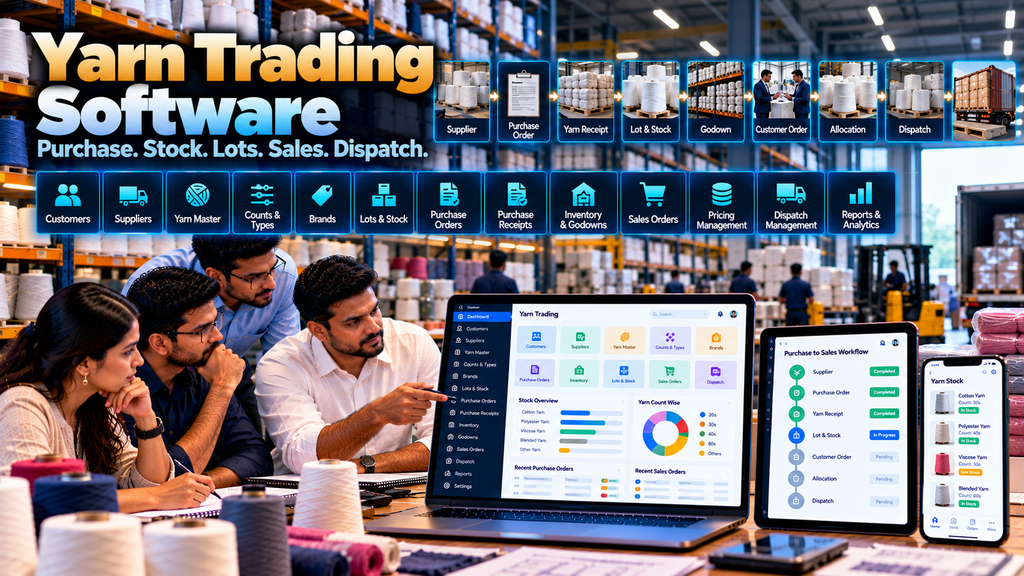
Yarn trading businesses manage a continuous flow of information between suppliers, stock, customers, sales teams, warehouses or godowns and dispatch operations.
Depending on the business model, a yarn trader may handle multiple yarn types, counts, brands, suppliers, lots, packages, godowns, customer-specific pricing, purchase orders, sales orders and delivery requirements.
When purchase information, stock, customer orders and dispatch records are maintained separately through spreadsheets, notebooks, messaging conversations and different software systems, keeping information consistent can become difficult.
Yarn trading software development for textile businesses in Erode can help organize these workflows through a centralized system designed around the company’s actual trading process.
A custom yarn trading platform can potentially connect supplier management, yarn masters, purchasing, receipts, lot tracking, inventory, godown management, quotations, customer orders, stock allocation, dispatch and management reports.
Unlike garment production or textile manufacturing software, yarn trading software should primarily focus on the purchase-to-stock-to-sale cycle unless the business also performs manufacturing or processing.
This guide explains the important modules, workflows, integrations and implementation considerations for developing custom yarn trading software.
At Greap Technologies, we develop custom business and textile software for companies in Erode and nearby areas.
What Is Yarn Trading Software?
Yarn trading software is a business-management application designed to organize the commercial and inventory workflows involved in buying and selling yarn.
Depending on requirements, the system can include:
- Customer management
- Supplier management
- Yarn master
- Yarn count management
- Yarn type and category management
- Brand or mill references where required
- Purchase enquiries
- Purchase orders
- Purchase receipts
- Lot tracking
- Inventory management
- Godown management
- Stock transfers
- Customer enquiries
- Quotations
- Sales orders
- Pricing workflows
- Stock allocation
- Dispatch management
- Accounting integration
- Dashboards and reports
The exact modules should be selected according to how the yarn business operates.
Yarn Trading Software vs Textile ERP
A broader textile ERP may cover manufacturing, production, job work, quality and finished goods. Yarn trading software can focus specifically on yarn purchasing, inventory and sales operations.
| Textile ERP | Yarn Trading Software |
|---|---|
| Can cover textile manufacturing | Focuses on yarn trading operations |
| Production planning and tracking | Purchase, stock and sales workflows |
| Job-work workflows | Supplier and customer workflows |
| Production-stage inventory | Yarn lot and godown inventory |
| Manufacturing-focused modules | Trading-focused modules |
If the business also performs textile manufacturing, the yarn trading modules can potentially form part of a broader Textile ERP Software Development in Erode architecture.
Typical Yarn Trading Workflow
A simplified purchase-to-sale workflow might look like:
Supplier → Purchase Requirement → Purchase Order → Yarn Receipt → Lot & Inventory → Godown → Customer Enquiry → Quotation → Sales Order → Stock Allocation → Dispatch
The actual workflow should be mapped from the business before development.
1. Yarn Business Process Study
Custom software development should begin by understanding the yarn trader’s existing process.
Important questions include:
- What types of yarn are traded?
- How is yarn identified?
- How are suppliers managed?
- How are purchases created?
- How are lots recorded?
- How is stock maintained?
- Are multiple godowns used?
- How are customer enquiries handled?
- How is pricing decided?
- How are sales orders created?
- How is stock allocated?
- How is dispatch handled?
- Which accounting or ERP systems already exist?
2. Yarn Master Management
A structured yarn master can provide consistent product references across purchase, inventory and sales workflows.
Depending on the business, a yarn record may include relevant attributes such as:
- Yarn code
- Yarn name
- Category
- Count
- Type
- Approved unit of measurement
- Brand or mill reference where required
- Status
Only information genuinely required by the trading process should be added.
3. Yarn Count Management
Yarn count can be an important commercial and inventory attribute.
The system can maintain the count terminology used by the business so purchase, stock and sales teams reference yarn consistently.
4. Yarn Type Management
Different yarn categories or types can be maintained according to the company’s actual product range.
The software should use terminology approved by the business rather than creating unnecessary generic classifications.
5. Yarn Brand or Mill References
Where the business identifies yarn by manufacturer, mill or commercial brand, those references can be associated with the appropriate yarn records.
The exact structure depends on how the trader purchases and sells yarn.
6. Unit of Measurement Management
Units should be defined consistently across purchase, inventory and sales transactions.
If the business uses multiple units or conversions, the conversion logic should be clearly documented and tested.
7. Supplier Management
Supplier records can connect purchasing activities with the companies supplying yarn.
Relevant information may include:
- Supplier name
- Contact information
- Approved commercial references
- Purchase history
- Open purchase orders
- Relevant documents
Access to commercially sensitive supplier information should be controlled.
8. Supplier-Wise Yarn Mapping
Where useful, the system can associate particular yarn products or categories with relevant suppliers.
This should support purchasing decisions rather than automatically declaring one supplier better than another based on simplistic metrics.
9. Purchase Requirement Management
A yarn purchase can begin because of low available stock, a customer requirement or another approved business decision.
A simplified workflow can be:
Stock / Customer Requirement → Purchase Requirement → Review → Purchase Order
10. Purchase Order Management
Approved yarn purchases can be recorded through structured purchase orders.
A purchase order may contain:
- Supplier
- Yarn
- Count or relevant specification
- Quantity
- Approved price
- Delivery requirement
- Commercial terms
- Order status
Read Purchase Order Management Software Development in Erode.
11. Purchase Order Approval
If company policy requires purchase approval, the software can route purchase orders through an appropriate authorization workflow.
Approval levels should remain proportional to the actual business requirement.
12. Open Purchase Orders
Authorized users can view purchase orders that have not yet been fully received or closed.
This can help purchasing teams distinguish ordered stock from physically available stock.
13. Partial Purchase Receipt
A supplier may deliver an order in multiple quantities.
The system should support partial receipts where this occurs rather than automatically marking the entire purchase order as received.
14. Yarn Receipt Management
When yarn arrives, authorized users can record the receipt against the appropriate supplier and purchase reference.
The receiving process can capture only the information required by the business.
15. Lot Tracking
Where yarn lots are important to the business, each receipt can retain the relevant lot reference.
A simplified flow can be:
Supplier → Purchase Order → Receipt → Yarn Lot → Inventory
16. Supplier Lot Reference
Where suppliers provide a lot reference that is operationally important, the software can preserve that information with the relevant stock.
17. Internal Lot Reference
A business may also use its own internal reference structure.
If both supplier and internal references are required, the relationship between them should be clearly maintained.
18. Lot-Wise Inventory
Inventory can be organized by lot where this level of distinction is required.
This can help users identify which recorded quantities belong to particular lot references.
19. Yarn Inventory Management
Inventory is one of the central modules of a yarn trading system.
Depending on requirements, users may need to view stock by:
- Yarn
- Count
- Type
- Brand or mill reference
- Lot
- Godown
- Other approved attributes
20. Available Stock vs Physical Stock
It can be useful to distinguish physically recorded inventory from quantities already allocated or otherwise unavailable for new orders.
The exact calculation should be clearly defined before development.
21. Reserved Stock
When stock is allocated to an approved customer order, the software can represent the quantity as reserved according to the company’s fulfilment rules.
22. Avoid Double Allocation
A centralized allocation workflow can help reduce situations where the same recorded available quantity is assigned to multiple customer orders.
The exact controls depend on how orders and inventory are maintained.
23. Godown Management
Yarn traders operating one or more godowns may need location-specific inventory.
A godown structure can help identify where recorded yarn stock is stored.
24. Multiple Godowns
Custom software can support multiple godowns or warehouse locations where required.
Each inventory transaction should maintain the relevant location information.
25. Godown-Wise Stock
Authorized users can view recorded stock by godown rather than relying only on a company-wide total.
26. Stock Transfer Between Godowns
Approved stock movements between locations can be recorded through a transfer workflow.
A simplified process can be:
Source Godown → Transfer → Receiving Godown
27. Transfer Status
Where required, the system can distinguish stock being transferred from stock already available at the receiving location.
28. Stock Adjustment
Inventory adjustments should be controlled through authorized workflows rather than allowing users to modify quantities without an appropriate transaction record.
29. Inventory Audit Trail
Important inventory changes can maintain audit information showing the relevant transaction, user and time information.
30. Customer Management
Customer records can connect enquiries, quotations, orders and dispatch history.
Only information required for legitimate business operations should be maintained.
31. Customer Enquiry Management
A yarn customer may enquire about a particular yarn, count, quantity, availability or commercial requirement before placing an order.
A structured workflow can be:
Customer Enquiry → Requirement → Availability Review → Quotation → Follow-Up → Order
32. CRM Integration
Businesses with larger sales teams may connect yarn enquiries with a CRM system.
For example:
Enquiry → CRM → Follow-Up → Quotation → Sales Order
Read WhatsApp CRM and Lead Follow-Up Software for Businesses in Erode.
33. Quotation Management
Before an order is confirmed, sales teams can create structured quotations based on approved commercial information.
Read Quotation and Invoice Management Software Development in Erode.
34. Quotation Revision
If the customer requirement or approved commercial terms change, a revised quotation can retain appropriate version or status information.
35. Yarn Pricing Management
Yarn pricing can change according to business and market conditions.
The software should therefore support the company’s approved pricing process rather than assuming that one permanent price applies to every transaction.
36. Current Selling Price
If the company maintains a current reference price, the software can present it to authorized users.
The system should clearly distinguish a reference price from a final approved transaction price where necessary.
37. Customer-Specific Pricing
Some businesses may maintain approved commercial arrangements for particular customers.
Where this is part of the company’s process, customer-specific pricing rules can be represented in the software.
38. Price Override Approval
If a salesperson needs to use a price outside the approved rule, the system can require authorization according to company policy.
This can be preferable to allowing unrestricted manual price changes.
39. Sales Order Management
Once the customer confirms a requirement, the quotation or enquiry can potentially be converted into a sales order.
A sales order may contain:
- Customer
- Yarn
- Count or specification
- Quantity
- Approved price
- Required date
- Commercial references
- Order status
Read Sales Order Management Software for Manufacturing Businesses in Erode.
40. Customer Purchase Order Reference
For B2B yarn transactions, the customer’s purchase-order reference can be associated with the internal sales order where required.
41. Sales Order Validation
Before an order moves forward, the system can validate required information such as customer, yarn, quantity and approved commercial data.
42. Sales Order Approval
Where company policy requires approval for particular orders or commercial exceptions, the workflow can route them to an authorized user.
43. Stock Availability Check
When a customer order is created, the system can compare the requirement with reliable inventory information.
A simplified decision can be:
Sales Order → Stock Available?
Yes → Allocate Stock → Dispatch
No → Purchase / Alternative Business Decision
44. Stock Allocation
Available yarn can be allocated against an approved sales order according to the company’s fulfilment process.
45. Lot Allocation
Where lot-level inventory is maintained, authorized users can allocate relevant lots to customer orders according to approved operational rules.
46. Partial Order Fulfilment
The system can support partial fulfilment where only part of the customer requirement is dispatched initially.
47. Pending Sales Orders
Authorized users can review open quantities that remain to be fulfilled.
48. Sales Order Status
Useful order statuses can be designed around the actual process.
Examples might include:
- Draft
- Pending Approval
- Approved
- Partially Allocated
- Allocated
- Partially Dispatched
- Dispatched
- Closed
- Cancelled
Status names should match the company’s operational terminology.
49. Dispatch Management
Once stock is approved for fulfilment, the order can move into dispatch.
A simplified workflow can be:
Sales Order → Stock Allocation → Dispatch Preparation → Dispatch → Order Status
50. Partial Dispatch
Where a customer order is delivered in multiple shipments, each dispatch can be recorded while the remaining order quantity stays open.
51. Dispatch Documentation
The software can associate relevant approved business documents with dispatch records where required.
Tax, statutory and accounting documents should follow the company’s approved financial and compliance processes.
52. Transport Information
Where required, relevant transport references can be associated with the dispatch workflow.
Businesses with more extensive transport operations can consider integration with dedicated logistics software.
Read Transport and Logistics Management Software Development in Erode.
53. Sales Return Workflow
If the business accepts authorized sales returns, those transactions should follow a defined process rather than simply increasing inventory manually.
Returned yarn may require verification before becoming available stock again.
54. Purchase Return Workflow
Where purchased material is returned to a supplier, the software can maintain the relevant purchase, inventory and return references.
55. Accounting Software Integration
Yarn trading software does not necessarily need to replace an established accounting application.
Where supported integration is available, operational information can potentially be exchanged with the financial system.
56. Avoid Rebuilding Accounting Without a Requirement
If an existing accounting platform already manages financial records effectively, duplicating the complete accounting system inside custom yarn software may create unnecessary complexity.
Define which system owns each type of financial information.
57. Customer Credit Information
If authorized sales users require relevant customer account or credit information, this can potentially be obtained from the approved financial system.
Credit decisions should follow the company’s finance policies rather than arbitrary automated scoring.
58. Payment Status Integration
Where technically supported and operationally required, payment status can be synchronized from the authoritative accounting or financial system.
59. Outstanding Information
Authorized users may be given access to relevant customer outstanding information where this supports legitimate sales or collection workflows.
Financial access should be role-controlled.
60. Yarn Trading Dashboard
A dashboard should prioritize actionable information rather than decorative numbers.
Depending on the user’s role, relevant information might include:
- Open purchase orders
- Pending receipts
- Recorded stock
- Allocated stock
- Open customer orders
- Pending dispatches
- Selected inventory exceptions
61. Purchase Report
Purchase information can be organized by supplier, yarn, period, purchase order or other relevant dimensions.
62. Supplier-Wise Purchase Report
Authorized users can review recorded purchases associated with individual suppliers.
63. Yarn-Wise Purchase Report
Purchases can also be reviewed by yarn product or relevant yarn classification.
64. Sales Report
Sales-order information can be organized by customer, yarn, status, date or other relevant business dimensions.
65. Customer-Wise Sales Report
Customer-level reports can provide structured historical transaction information.
Historical sales alone should not automatically be treated as a prediction of future demand.
66. Yarn-Wise Sales Report
Authorized users can review recorded sales quantities by yarn product or relevant classification.
67. Stock Report
Inventory reports can organize recorded stock by relevant dimensions such as yarn, lot and location.
68. Godown-Wise Stock Report
Businesses with multiple locations can review inventory by godown.
69. Lot-Wise Stock Report
Where lot-level tracking is used, reports can show recorded inventory associated with each lot reference.
70. Stock Movement Report
A stock movement report can help authorized users review relevant receipts, transfers, allocations, dispatches and approved adjustments.
71. Open Sales Order Report
This report can show customer orders that still contain quantities requiring fulfilment.
72. Open Purchase Order Report
Purchase teams can review orders with quantities that have not yet been fully received.
73. Order Ageing
Open orders can be grouped by elapsed time where useful.
Ageing should provide operational context rather than automatically labeling an order, customer or employee as problematic.
74. Avoid Unnecessary Reports
Reports should be created because users need them for specific decisions or workflows.
More reports do not automatically make trading software more useful.
75. Role-Based Access Control
Different teams can receive different levels of access.
Possible roles include:
- Sales user
- Purchase user
- Godown user
- Dispatch user
- Accounts-related user
- Manager
- Administrator
76. Authentication and Authorization
Users should authenticate securely, while server-side authorization should determine which information and actions they are permitted to access.
77. Commercial Information Security
Supplier prices, customer prices and other commercial information may be sensitive.
Permissions should reflect the company’s responsibilities and confidentiality requirements.
78. Audit Trails
Important transactions and controlled changes can maintain appropriate audit information.
79. Document Attachments
Where required, relevant documents can be attached to suppliers, purchase orders, customers, sales orders or other records.
File type, size, permissions and storage security should be considered during development.
80. Responsive Web Application
Many yarn trading businesses may be able to use a responsive web application across desktops, tablets and smartphones.
A separate native mobile app should be developed only when mobile-specific requirements justify it.
81. Mobile Sales Access
Sales teams may need quick access to selected customer, yarn, stock, quotation or order information while away from the office.
Mobile screens should focus on useful sales tasks rather than reproducing every desktop administration screen.
82. Godown Mobile Workflows
Selected receiving, transfer or dispatch workflows can potentially be optimized for mobile or scanning devices where the physical process benefits from them.
83. Barcode or QR Integration
Barcode or QR workflows can be considered for relevant yarn packages, lots or warehouse transactions.
The physical identification and scanning process should be studied before implementation.
84. Multi-Branch Yarn Trading Software
Businesses operating more than one branch or location may require branch-specific orders, stock, users and permissions.
The software architecture should clearly define which information is shared and which information is location-specific.
85. Multi-Godown Architecture
Inventory can be maintained by location while management users receive appropriate consolidated visibility.
86. B2B Customer Portal
Some yarn traders may benefit from providing approved customers with a portal for selected product information, enquiries, quotations, orders or account-related information.
The exact information exposed should be controlled carefully.
87. B2B Ecommerce Integration
Where the business accepts online B2B orders, ecommerce can potentially connect with the trading system.
A possible workflow can be:
B2B Website → Customer Order / RFQ → Yarn Trading System → Inventory → Dispatch
Read B2B Ecommerce Website Development for Wholesalers and Manufacturers in Erode.
88. Define the Source of Truth
When yarn trading software connects with accounting, CRM, ecommerce or other systems, each important data category should have one defined authoritative source.
| Information | Possible Authoritative System |
|---|---|
| Customers | Trading System / CRM |
| Suppliers | Trading System / ERP |
| Yarn Master | Trading System / ERP |
| Purchase Orders | Trading System / ERP |
| Inventory | Trading System / Warehouse System |
| Sales Orders | Trading System / ERP |
| Financial Records | Accounting / Financial System |
The actual architecture should reflect the company’s existing systems.
89. API and Third-Party Integrations
Integration feasibility depends on the external application’s APIs or other supported methods, authentication, permissions, documentation and technical architecture.
Integration capability should be verified rather than assumed.
90. Data Migration
Existing yarn, customer, supplier and stock information may currently be maintained in spreadsheets or older applications.
Only required, reviewed data should be moved into the new system.
91. Master Data Cleaning
Before migration, businesses should review data for issues such as:
- Duplicate yarn products
- Inconsistent yarn names
- Duplicate customers
- Duplicate suppliers
- Incorrect units
- Inactive products
- Obsolete customer records
- Inconsistent godown names
92. Opening Stock Migration
If opening inventory is migrated, the company should verify the quantities and relevant lot or location information before the new system becomes authoritative.
93. Security and Backups
Yarn trading software can contain commercially sensitive customer, supplier, pricing and inventory information.
Security planning can include authentication, authorization, protected integrations, backups, software updates and recovery procedures.
94. Software Performance
Trading software can accumulate large numbers of orders and inventory transactions over time.
Database structure, indexing, pagination, reporting architecture and other technical decisions should account for expected usage.
95. Scalability
A custom platform may need to accommodate future growth in:
- Customers
- Suppliers
- Yarn products
- Lots
- Orders
- Users
- Branches
- Godowns
- Integrations
96. Benefits of Yarn Trading Software
When the software is correctly implemented and maintained, potential operational benefits can include:
- Centralized yarn master information
- Structured supplier and customer records
- Connected purchase and receipt workflows
- Lot-wise inventory visibility where required
- Godown-wise stock information
- Structured quotations and sales orders
- Better visibility into recorded allocations
- Connected order and dispatch information
- Reduced duplicate entry where systems are integrated
- Role-specific dashboards and reports
The actual results depend on workflow design, source data, implementation and user adoption.
97. Yarn Trading Software vs Spreadsheet Management
| Spreadsheet-Based Process | Custom Yarn Trading Software |
|---|---|
| Stock may be maintained across multiple files | Inventory can be maintained through structured transactions |
| Purchase and sales information may be separate | Related workflows can be connected |
| Lot history may require manual searching | Lot references can be associated with transactions |
| Godown stock may require manual consolidation | Location-wise stock can be presented from recorded data |
| Reports may require repeated preparation | Defined reports can be generated from structured records |
98. Custom Yarn Trading Software vs Ready-Made Software
Ready-made software can be appropriate when its product, inventory, purchase and sales workflows already match the business.
Custom development can be considered when the yarn trader has specific lot, pricing, godown, sales, approval or integration requirements that are not well supported by existing software.
Neither approach is automatically better for every company.
99. Start With an MVP
A focused first version can sometimes be more practical than attempting to implement every possible feature immediately.
A yarn trading MVP might include:
Yarn Master → Suppliers → Purchase → Inventory → Customers → Sales Orders → Dispatch
Advanced pricing, CRM, customer portals and additional integrations can be introduced later if required.
100. Phased Yarn Trading Software Implementation
A possible phased implementation could be:
Phase 1: Yarn Master + Suppliers + Purchase + Inventory
Phase 2: Customers + Quotations + Sales Orders + Dispatch
Phase 3: Lot Tracking + Multi-Godown + Reports + Approval Workflows
Phase 4: Accounting + CRM + Ecommerce + Additional Integrations
The actual sequence should follow business priorities.
101. Yarn Trading Software Development Cost in Erode
There is no universal fixed price for custom yarn trading software.
Development cost can depend on:
- Number of modules
- Number of users
- Yarn master complexity
- Lot tracking requirements
- Number of godowns
- Purchase workflows
- Sales workflows
- Pricing requirements
- Approval workflows
- Accounting integration
- CRM integration
- Reports
- Data migration
- Security requirements
- Training
- Maintenance and support
102. Why Software Development Quotations Differ
A basic yarn stock application is very different from a multi-branch trading platform connecting purchases, lots, godowns, sales orders, dispatch, accounting and CRM.
Businesses should compare scope, architecture, migration, integrations, testing, training and support rather than only the quoted amount.
103. Development Timeline
The project timeline depends on scope, workflow complexity, integrations, migration and user-acceptance requirements.
A proper requirement study should be completed before committing to a reliable custom development schedule.
104. Yarn Trading Software Development Process
A structured development process can follow:
Business Study → Trading Workflow Mapping → Requirements → Data Architecture → UI/UX → Development → Integration → Migration → Testing → UAT → Training → Deployment → Support
105. User Acceptance Testing
Sales, purchase, godown and management users should test representative business scenarios before full deployment.
Important scenarios can include:
- Purchase order to receipt
- Partial purchase receipt
- Lot creation
- Godown inventory
- Stock transfer
- Quotation to sales order
- Stock allocation
- Partial dispatch
- Sales return
- Purchase return
- Permissions
- Reports
- Integrations
106. User Training
Training should be based on user roles.
A godown user may need inventory and dispatch training, while sales users may focus on customers, quotations, availability and orders.
107. Maintenance and Support
After deployment, ongoing software work can include:
- Bug fixes
- Security updates
- Backup monitoring
- Performance improvements
- Workflow changes
- Report modifications
- Integration maintenance
- Feature enhancements
Questions to Ask Before Developing Yarn Trading Software
- What types of yarn do we trade?
- Which yarn attributes are important to our business?
- Do we need supplier or mill references?
- Do we track lots?
- What units of measurement do we use?
- How do we create purchase requirements?
- How are purchase orders approved?
- Do suppliers make partial deliveries?
- How is yarn received?
- How is inventory currently maintained?
- How many godowns do we operate?
- How do we transfer stock between godowns?
- How are customer enquiries managed?
- How is yarn pricing maintained?
- Do customers have specific commercial arrangements?
- How are sales orders created?
- How is stock allocated?
- Do we allow partial dispatch?
- How are sales and purchase returns handled?
- Which accounting software do we use?
- Do we need CRM integration?
- Do we need a customer portal or B2B ecommerce integration?
- Which reports are actually required?
- What historical data must be migrated?
Yarn Trading Software Checklist
| Area | Requirement to Define |
|---|---|
| Yarn Master | Count, type, unit and required attributes |
| Suppliers | Supplier records and purchasing workflow |
| Purchase | Requirements, orders and receipts |
| Lots | Supplier and internal lot references if required |
| Inventory | Stock ownership and availability logic |
| Godowns | Locations and transfers |
| Customers | Customer and enquiry management |
| Pricing | Approved price rules and exceptions |
| Sales | Quotation and order workflows |
| Allocation | Stock and lot allocation rules |
| Dispatch | Full and partial fulfilment |
| Accounting | Financial source of truth and integration |
| Security | Roles, permissions and audit trails |
| Implementation | Migration, testing, training and support |
Common Yarn Trading Software Development Mistakes
- Starting development without mapping the purchase-to-sale process
- Creating an unnecessarily complicated yarn master
- Using inconsistent yarn names and units
- Ignoring lot tracking where it is operationally required
- Mixing ordered stock with physically available stock
- Ignoring reserved or allocated quantities
- Maintaining conflicting inventory in multiple systems
- Ignoring partial purchase receipts
- Ignoring partial sales dispatches
- Allowing unrestricted price changes
- Allowing uncontrolled stock adjustments
- Ignoring multiple godowns
- Duplicating accounting functionality unnecessarily
- Assuming third-party integrations are always available
- Creating excessive reports without defined use cases
- Migrating poor-quality spreadsheet data without cleaning it
- Implementing too many modules at once
- Ignoring user training and maintenance
Yarn Trading Software Development in Erode and Nearby Areas
Textile businesses in and around Erode may operate across yarn trading, textile distribution, manufacturing, processing and related supply-chain activities.
Greap Technologies develops custom business software for companies in Erode and nearby areas including Perundurai, Bhavani, Chennimalai, Anthiyur, Gobichettipalayam, Sathyamangalam, Modakkurichi, Kavindapadi, Kodumudi, Nambiyur and surrounding locations.
Location references should reflect genuine service coverage rather than creating large numbers of near-duplicate pages for every town.
Why Consider Greap Technologies for Yarn Trading Software Development?
Greap Technologies develops custom software around the actual operational workflow of a business.
Depending on requirements, a yarn trading solution can include:
- Yarn master
- Count and category management
- Supplier management
- Purchase orders
- Purchase receipts
- Lot tracking
- Yarn inventory
- Multiple godowns
- Stock transfers
- Customer management
- CRM workflows
- Quotations
- Sales orders
- Pricing workflows
- Stock allocation
- Dispatch
- Returns
- Dashboards
- Reports
- Role-based access
- Approval workflows
- Accounting integration
- CRM integration
- B2B ecommerce integration
- Data migration
- Responsive interfaces
- Maintenance and support
The final software scope should be determined after studying how the yarn business currently manages purchasing, inventory, sales and dispatch.
Explore Greap Technologies for custom business and textile software development.
Final Checklist Before Starting Yarn Trading Software Development
- Map the complete supplier-to-customer workflow
- Define the yarn master structure
- Standardize counts, types and units
- Define supplier workflows
- Map purchase orders and receipts
- Define lot tracking requirements
- Define inventory ownership
- Map godowns and stock transfers
- Define customer and enquiry workflows
- Define pricing rules
- Map quotation and sales-order processes
- Define stock-allocation logic
- Map dispatch and return workflows
- Identify accounting integration requirements
- Identify CRM or ecommerce requirements
- Define user roles and permissions
- Identify required reports
- Clean legacy data before migration
- Plan UAT with actual users
- Plan training and post-launch support
Conclusion
Yarn trading software development in Erode can help textile trading businesses organize the information connecting suppliers, purchases, yarn lots, inventory, godowns, customers, sales orders and dispatch.
A connected yarn trading workflow can look like:
Supplier → Purchase Order → Yarn Receipt → Lot → Inventory → Godown → Customer Enquiry → Quotation → Sales Order → Stock Allocation → Dispatch
The system should be built around the trader’s actual operation. A business with a single godown and straightforward purchase-and-sales process may need a relatively focused application, while a multi-branch yarn distributor may require lot tracking, customer-specific pricing, multiple godowns, approvals and accounting or CRM integrations.
Yarn trading software should also remain distinct from garment production software. Trading businesses primarily need strong purchase, inventory, pricing, sales and dispatch workflows, while manufacturers may additionally require BOM, production planning, WIP, job work and quality modules.
For textile businesses that combine trading and manufacturing, yarn trading functionality can be integrated into a broader Textile ERP or Manufacturing ERP architecture.
Looking for Yarn Trading Software Development in Erode?
If your yarn business currently manages suppliers, purchases, lots, godown stock, customer orders and dispatch through spreadsheets or disconnected systems, Greap Technologies can study your workflow and plan custom yarn trading software around your requirements.
Discuss Your Yarn Trading Software Requirements on WhatsApp
Frequently Asked Questions
1. What is yarn trading software?
Yarn trading software is a business application for managing selected workflows such as yarn products, suppliers, purchases, receipts, lots, inventory, godowns, customers, sales orders and dispatch.
2. Can yarn trading software manage different yarn counts?
Yes. Custom software can maintain yarn counts and other relevant product attributes according to the terminology used by the business.
3. Can the software track yarn lots?
Yes. Where lot-level tracking is required, purchase receipts and inventory transactions can retain supplier or internal lot references.
4. Can yarn trading software manage multiple godowns?
Yes. The system can maintain location-specific inventory and approved stock transfers between godowns.
5. Can the software show available and allocated yarn stock?
Yes. When inventory and sales-order workflows are properly connected, the system can distinguish recorded stock from quantities allocated according to the company’s defined rules.
6. Can yarn trading software manage customer-specific prices?
Yes. Approved customer-specific commercial rules can be supported where required, along with authorization workflows for pricing exceptions.
7. Can yarn trading software manage purchase and sales orders?
Yes. Custom software can connect supplier purchase orders, purchase receipts, customer quotations, sales orders, stock allocation and dispatch workflows.
8. Can yarn trading software integrate with accounting software?
Potentially. Integration depends on the accounting system’s supported APIs or other integration methods, documentation, permissions and the data that needs to be exchanged.
9. Can the software support partial receipts and partial dispatches?
Yes. A custom workflow can maintain open quantities when supplier receipts or customer dispatches occur in multiple stages.
10. What are the benefits of custom yarn trading software?
A well-designed system can help centralize yarn, supplier and customer records; organize purchase and sales workflows; provide visibility into recorded lot and godown inventory; manage stock allocations; and generate role-specific operational reports. Actual results depend on implementation, data quality and user adoption.
11. How much does yarn trading software development cost in Erode?
Cost depends on modules, users, lot tracking, godowns, pricing workflows, reports, accounting or CRM integrations, migration, security, training and support. A requirement study is needed before estimating a custom project.
12. Does Greap Technologies develop yarn trading software in Erode?
Yes. Greap Technologies develops custom business and textile software for companies in Erode and nearby areas based on their purchasing, inventory, sales and integration requirements.


