
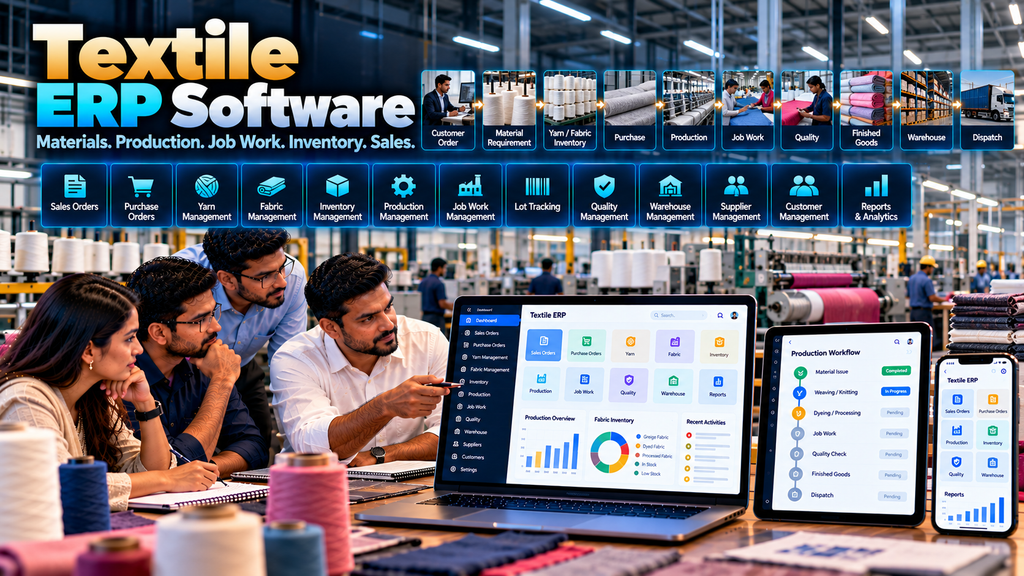
Textile manufacturing involves much more than purchasing material, producing goods and selling finished products.
Depending on the business, operations may involve yarn, fabric, accessories, multiple units of measurement, production stages, outside job work, lots or batches, quality checks, warehouses, customer orders and dispatch.
When sales, purchasing, stores, production, job work and warehouse teams maintain information separately through spreadsheets, paper records and disconnected software, maintaining one consistent operational view can become difficult.
Textile ERP software development in Erode can help textile businesses connect selected workflows through a centralized software platform designed around their actual manufacturing and trading processes.
A custom textile ERP can potentially connect customer enquiries, quotations, sales orders, material requirements, purchasing, inventory, production, job work, quality, finished goods, warehouse operations, dispatch and management reporting.
But every textile company operates differently. A yarn business, fabric manufacturer, processing unit, garment manufacturer and vertically integrated textile company may require very different workflows.
Therefore, textile ERP development should begin by understanding the business process rather than installing an unnecessarily large list of generic modules.
This guide explains important textile ERP features, workflows, integrations, benefits, implementation considerations and the factors businesses should evaluate before developing a custom ERP system.
At Greap Technologies, we develop custom manufacturing and business software for companies in Erode and nearby areas.
What Is Textile ERP Software?
Textile ERP software is a business-management platform designed to connect selected operational processes within textile manufacturing, processing, trading or related businesses.
Depending on requirements, textile ERP modules can include:
- Customer management
- CRM and enquiries
- Quotation management
- Sales orders
- Supplier management
- Purchase requests
- Purchase orders
- Yarn and material inventory
- Fabric inventory
- Accessories inventory
- Production planning
- Production orders
- Production tracking
- Lot or batch tracking
- Job work management
- Quality workflows
- Finished-goods inventory
- Warehouse management
- Dispatch workflows
- Reports and dashboards
The exact modules should reflect the textile company’s actual business model.
Why Textile Companies May Need Industry-Specific ERP
A generic business system may handle customers, purchases and invoices but may not represent important textile-specific operational details.
Textile businesses can require information relating to:
- Yarn
- Fabric
- Colours
- Counts
- Lots or batches
- Rolls
- Production stages
- Job work
- Quality attributes
- Multiple units of measurement
These requirements vary significantly between textile businesses, so they should be confirmed during requirement analysis rather than assumed.
A Typical Textile ERP Workflow
A simplified textile manufacturing workflow might look like:
Customer Requirement → Quotation → Sales Order → Material Requirement → Purchase / Inventory → Production → Job Work → Quality → Finished Goods → Warehouse → Dispatch
For another company, some of these stages may not exist, while additional processes may be required.
Textile ERP vs General Manufacturing ERP
| General Manufacturing ERP | Textile ERP |
|---|---|
| Generic product and material structures | Can support textile-specific material attributes |
| Standard production workflows | Can reflect textile production stages |
| General inventory | Can organize yarn, fabric, rolls and other textile inventory |
| General subcontracting | Can support textile job-work workflows |
| Generic quality workflow | Can capture relevant textile quality information |
A textile ERP can still be built on the same architectural principles as broader Manufacturing ERP Software Development in Erode, but its data structures and workflows should reflect textile operations.
1. Textile Business Process Study
The first stage of ERP development should be understanding what the company actually does.
For example:
- Does it manufacture yarn?
- Does it manufacture fabric?
- Does it process fabric?
- Does it manufacture garments?
- Does it outsource selected production stages?
- Does it trade materials or finished products?
- Does it operate multiple factories or warehouses?
These answers can substantially change the ERP architecture.
2. Textile Product Master
A structured product master can provide consistent references across sales, inventory, production and warehouse operations.
Depending on the business, products may contain attributes such as:
- Product code
- Product name
- Category
- Colour
- Size or dimension
- Unit of measurement
- Other relevant specifications
Only operationally necessary attributes should be added.
3. Yarn Master
Businesses working with yarn may require a dedicated material structure.
Relevant fields can depend on the company’s terminology and processes and should be defined with production and stores teams.
4. Fabric Master
Fabric manufacturers, processors and traders may need standardized fabric records.
A fabric master can connect purchasing, production, inventory, sales and warehouse processes where appropriate.
5. Colour Management
Colour can be an important product or material attribute for some textile businesses.
ERP software can maintain standardized colour references where they are operationally useful.
6. Unit of Measurement Management
Textile businesses may handle different units depending on materials and products.
The ERP should clearly define which units are used for each record and how any required conversions are controlled.
7. Customer Management
Customer records can connect enquiries, quotations, sales orders and dispatch workflows.
Relevant customer information should be available only to authorized roles.
8. CRM for Textile Businesses
For companies managing enquiries before receiving orders, a CRM workflow can help organize sales follow-up.
A flow might be:
Enquiry → Requirement → Follow-Up → Sample / Discussion → Quotation → Sales Order
The actual process depends on the company.
Read WhatsApp CRM and Lead Follow-Up Software for Businesses in Erode.
9. Quotation Management
Textile businesses can use quotation workflows to record approved commercial offers before customer orders are confirmed.
Quotation structures should support the actual product, quantity and pricing process used by the company.
Read Quotation and Invoice Management Software Development in Erode.
10. Sales Order Management
Once an order is confirmed, a sales order can become an important operational reference.
A textile sales order may include:
- Customer
- Product
- Variant or relevant specification
- Quantity
- Approved price
- Delivery requirement
- Commercial references
- Order status
Read Sales Order Management Software for Manufacturing Businesses in Erode.
11. Sales Order to Production
For make-to-order textile manufacturing, confirmed customer demand can contribute to production requirements.
A connected workflow can be:
Sales Order → Material Requirement → Production Order → Production → Quality → Finished Goods
12. Supplier Management
ERP software can maintain approved suppliers used for yarn, fabric, chemicals, accessories, packaging materials or other relevant purchases.
The actual supplier categories depend on the business.
13. Purchase Request Management
Stores, production or another authorized department may raise purchase requirements according to company policy.
A structured workflow helps maintain a relationship between the requirement and subsequent procurement activity.
14. Purchase Order Management
Approved requirements can move through supplier selection and purchase-order workflows.
A typical process might be:
Material Requirement → Purchase Request → Approval → Supplier → Purchase Order → Receipt
Read Purchase Order Management Software Development in Erode.
15. Raw Material Inventory
Textile ERP can maintain or integrate inventory information for raw materials required by production.
Material classifications should match the company’s actual stores and manufacturing process.
16. Yarn Inventory
Where yarn is an important material, ERP software can organize yarn inventory using the attributes genuinely required by the business.
The system should avoid creating unnecessary fields simply because they are common in other textile companies.
17. Fabric Inventory
Fabric inventory can require more detailed handling than a simple product quantity.
Depending on operations, businesses may need to identify fabric by relevant product, lot, roll, colour, location or other approved attributes.
18. Fabric Roll Tracking
Companies that manage individual fabric rolls may require each roll to have an appropriate identifier.
Roll-level tracking can potentially support receiving, storage, production, quality and dispatch workflows.
19. Lot and Batch Tracking
Where lot or batch references are important, the ERP can associate relevant material and production transactions with those references.
The required level of traceability should be established during process mapping.
20. Warehouse Location Tracking
Businesses with structured warehouse locations may need to identify where relevant material or finished goods are stored.
Location structures should reflect the physical warehouse.
21. Multi-Warehouse Inventory
Textile companies operating multiple stores or warehouses can maintain location-specific inventory where required.
The system should define how stock moves between locations.
22. Stock Transfer
ERP workflows can record approved movement between warehouses, production units or other internal locations.
Transfers should preserve the information required for accurate inventory records.
23. Material Requirement for Production
Production requirements can be compared with available material information.
Where shortages exist, the system can help authorized users identify the requirement and initiate the appropriate procurement workflow.
24. Avoid Automatic Procurement Without Review
A calculated shortage should not necessarily trigger an automatic supplier order.
Existing purchase orders, substitutes, production priorities and commercial decisions may need to be considered first.
25. Production Planning
Textile ERP can support production planning based on approved customer orders, stock requirements or other legitimate planning inputs.
The planning model should match the manufacturer’s actual operating method.
26. Production Orders
A production order can define what needs to be produced and the approved quantity.
It can also provide a reference for downstream production stages.
27. Textile Production Stages
Textile manufacturing can involve several production processes.
The ERP should allow production routes to be configured around the specific business rather than assuming one universal textile workflow.
28. Product-Specific Production Routes
Different textile products may follow different routes.
One product may require only a few internal stages, while another may require additional processing or outside job work.
29. Work Order Management
Production requirements can be divided into work orders where the manufacturing process requires more detailed operational control.
Work orders can carry relevant product, quantity, stage and status information.
30. Production Tracking
Textile ERP can track the progress of active production according to the information captured by the system.
Possible tracking information includes:
- Production order
- Work order
- Current stage
- Planned quantity
- Completed quantity
- Remaining quantity
- WIP
- Material status
- Quality status
Read Production Tracking Software for Manufacturing Companies in Erode.
31. Work-in-Progress Tracking
WIP can represent material or production quantities that have entered manufacturing but have not yet reached the defined finished-goods stage.
How WIP is measured should be defined according to the company’s production and relevant accounting processes.
32. Production Stage Transfers
When work moves between production stages, the ERP can maintain the relevant operational status.
This can provide visibility into where active production currently sits.
33. Internal Production vs Job Work
Not every textile manufacturing stage has to occur inside the company’s own facility.
Selected processes may be outsourced to external job workers.
The ERP should distinguish internal production from external processing where this is part of the business model.
34. Textile Job Work Management
Job-work management can help organize material sent to an external processing partner and the corresponding material or processed goods received back.
A simplified workflow can be:
Material → Job Work Issue → External Process → Job Work Receipt → Quality / Next Stage
35. Job Worker Master
Where outside processing is common, ERP software can maintain approved job-worker records.
These records can connect with relevant job-work transactions.
36. Material Sent for Job Work
The system can record relevant material quantities issued to a job worker according to the company’s approved process.
37. Job Work Receipt
When processed material returns, the receipt can be associated with the relevant job-work reference.
Any required quality workflow can then follow.
38. Partial Job Work Receipt
Where operationally required, the ERP can support partial receipts rather than assuming the complete issued quantity returns at one time.
39. Job Work Status
Authorized users can view the status of active external processing requirements based on recorded information.
40. Quality Management
Quality processes can occur when materials are received, during manufacturing, after job work or before finished goods are approved.
The ERP should support the textile company’s defined quality process rather than inventing generic quality criteria.
41. Incoming Material Quality
Businesses that inspect purchased material can associate relevant quality status with the receiving workflow.
42. In-Process Quality
Quality checks can be attached to selected manufacturing stages where required.
The appropriate checks and acceptance rules should be defined by qualified company personnel.
43. Final Quality Check
Before finished goods become available for warehouse or dispatch, the business may require a final approval workflow.
44. Quality Hold
Material requiring review can be placed into an appropriate status so it is not unintentionally treated as approved stock.
45. Rework Management
Where a defined quantity requires additional processing, the ERP can route it through an approved rework process.
Rework records should provide operational context rather than automatically being used to judge individual employees.
46. Finished Goods Management
After the required production and quality processes are completed, accepted quantities can move into finished-goods inventory.
47. Finished Goods Warehouse
The finished-goods warehouse can maintain relevant product, quantity, location, lot or other information required by the business.
Read Warehouse Management Software Development in Erode.
48. Order Allocation
For customer-specific manufacturing, approved finished goods can potentially be associated with the relevant sales order.
The allocation rules should reflect the company’s fulfilment process.
49. Packing Workflow
Where packing is a defined operational stage, the ERP can record the relevant status before dispatch.
Packing structures should reflect actual business requirements.
50. Dispatch Management
A connected textile ERP workflow can move from approved finished goods into dispatch.
For example:
Sales Order → Finished Goods → Allocation → Packing → Dispatch
51. Transport and Logistics Integration
Companies that manage their own transport workflows can potentially connect dispatch information with logistics software.
Read Transport and Logistics Management Software Development in Erode.
52. Dealer and Distributor Management
Textile manufacturers selling through dealer or distributor networks may require channel-management functionality.
Dealer or distributor orders can potentially connect with the ERP sales workflow.
Read Dealer and Distributor Management Software Development in Erode.
53. Dealer Portal Integration
A manufacturer may provide approved dealers with a separate portal for product information, enquiries, ordering, documents and relevant account information.
The dealer-facing portal can then exchange appropriate information with the ERP.
Read Dealer Portal Development for Manufacturers and Distributors in Erode.
54. B2B Ecommerce Integration
Some textile manufacturers or wholesalers may accept B2B enquiries or orders through an ecommerce platform.
A possible architecture can be:
B2B Website → Customer Order / RFQ → ERP → Inventory / Production → Fulfilment
Read B2B Ecommerce Website Development for Wholesalers and Manufacturers in Erode.
55. Accounting Integration
A textile ERP does not necessarily need to replace established accounting software.
If the company’s accounting platform already meets its financial requirements, appropriate integration may be preferable.
56. Define the Source of Truth
When multiple systems are connected, determine which application is authoritative for each important data type.
| Information | Possible Source |
|---|---|
| Customers | ERP / CRM |
| Suppliers | ERP / Procurement |
| Products | ERP |
| Materials | ERP |
| Sales Orders | ERP / Sales System |
| Purchase Orders | ERP / Procurement System |
| Inventory | ERP / Warehouse System |
| Production Progress | ERP / Production System |
| Financial Records | Accounting / Financial System |
The actual architecture should be decided according to the company’s existing systems.
57. Role-Based Access Control
Textile ERP users should receive access according to legitimate responsibilities.
Possible roles can include:
- Sales user
- Purchase user
- Stores user
- Production user
- Production manager
- Job-work coordinator
- Quality user
- Warehouse user
- Management user
- Administrator
58. Approval Workflows
Selected transactions can require approval according to company policy.
These might include:
- Purchase requests
- Purchase orders
- Selected sales exceptions
- Inventory adjustments
- Other controlled transactions
Approval workflows should remain proportional to the actual business requirement.
59. Audit Trails
Important ERP transactions can maintain appropriate audit information.
This can be useful for reviewing changes to orders, approvals, inventory, production or administrative records.
60. Textile ERP Dashboards
Dashboards should be role-specific.
A production manager, stores user and sales manager should not necessarily see the same information.
61. Management Dashboard
Management may require a consolidated view of selected operational information such as:
- Sales-order status
- Purchase-order status
- Material availability
- Production status
- Active job work
- Finished-goods status
- Selected operational exceptions
62. Textile Inventory Reports
Reports can organize inventory by relevant dimensions such as:
- Material
- Product
- Warehouse
- Lot or batch
- Roll where applicable
- Other approved attributes
63. Production Reports
Production reporting can provide structured information about production orders, work orders, stages, quantities and WIP.
64. Job Work Reports
Where external processing is significant, reports can help authorized users review material sent, material received and active job-work references.
65. Sales Reports
Sales reports can organize orders by relevant dimensions such as customer, product, status and date.
66. Purchase Reports
Procurement reports can provide structured information about suppliers, purchase orders, materials and receiving status.
67. Avoid Unnecessary Reports
ERP projects can easily accumulate dozens of reports that are rarely used.
Each report should answer a defined operational or management question.
68. Mobile-Friendly Textile ERP
Selected ERP workflows can be designed for desktop, tablet and mobile devices.
Mobile interfaces should focus on tasks that genuinely benefit from portable access rather than shrinking every desktop ERP screen onto a phone.
69. Barcode and QR Integration
Barcode or QR identifiers can support relevant inventory, production, job-work or warehouse workflows.
The physical process should be studied before selecting hardware or identifier formats.
70. Multi-Unit Textile ERP
Textile companies operating several factories, processing units or warehouses may require location-specific records and permissions.
Inter-unit movements and shared master data should be planned carefully.
71. ERP Data Migration
Existing information may be spread across spreadsheets and older applications.
Migration should identify which historical records are genuinely required.
72. Textile Master Data Cleaning
Before migration, review important information for:
- Duplicate products
- Duplicate materials
- Inconsistent naming
- Duplicate customer records
- Duplicate suppliers
- Incorrect units
- Inactive records
- Obsolete product codes
73. Textile ERP Security
ERP systems can contain commercially sensitive information about customers, suppliers, prices, products, materials and production.
Security planning should include authentication, authorization, server-side access controls, secure integrations, backups and software maintenance.
74. Backup and Recovery
Businesses should understand what ERP information is backed up, how frequently backups occur, how long they are retained and how restoration works.
75. Textile ERP Scalability
The ERP architecture may need to support future growth in:
- Users
- Products
- Materials
- Customers
- Suppliers
- Sales orders
- Purchase orders
- Production orders
- Job workers
- Warehouses
- Production units
76. Textile ERP Integrations
Depending on the project, the ERP may need to connect with accounting software, CRM, ecommerce systems, dealer portals, warehouse software, logistics systems or other internal applications.
Integration feasibility depends on APIs or other supported methods, permissions, documentation and system architecture.
77. Custom Textile ERP vs Ready-Made ERP
Neither custom nor ready-made ERP is automatically the right choice for every textile company.
| Custom Textile ERP | Ready-Made ERP |
|---|---|
| Can be designed around specific workflows | Provides predefined functionality |
| Modules can focus on business requirements | May provide broad functionality immediately |
| Custom integrations may be developed | Integration depends on platform capabilities |
| Requires development and maintenance planning | May involve licensing, configuration and vendor considerations |
A ready-made textile ERP may be suitable when its workflows already fit the company. Custom development can be considered when important operational processes or integrations require tailored functionality.
78. Benefits of Textile ERP Software
When correctly designed and adopted, a textile ERP can help create a more structured information flow between departments.
Potential operational benefits can include:
- Centralized business records
- Reduced duplicate data entry where modules are connected
- Better visibility into approved orders and their recorded status
- Structured purchasing workflows
- Organized material and product inventory
- Production-stage visibility
- Job-work tracking
- Quality workflow visibility
- Connected warehouse and dispatch information
- Role-specific reporting
The actual benefit depends on implementation quality, data quality, user adoption and how well the system matches the business process.
79. ERP Does Not Automatically Fix Business Processes
Software cannot compensate for unclear responsibilities, inaccurate master data or undefined workflows on its own.
ERP implementation works best when the company also defines how information should be created, reviewed and maintained.
80. Start With an ERP MVP
For some textile businesses, a focused first release may be more manageable than implementing every possible module at once.
For example:
Sales → Purchase → Inventory → Production → Job Work → Finished Goods
Quality, advanced reporting, portals and additional integrations can be introduced later where required.
81. Phased Textile ERP Implementation
A possible phased structure could be:
Phase 1: Master Data + Sales + Purchase + Inventory
Phase 2: Production + Production Tracking + Job Work
Phase 3: Quality + Finished Goods + Warehouse + Dispatch
Phase 4: Additional integrations, portals and advanced reports
The correct implementation sequence should follow business priorities.
82. Textile ERP Software Development Cost in Erode
There is no universal fixed price for custom textile ERP development.
Development cost can depend on:
- Number of modules
- Number of users
- Textile business model
- Product and material complexity
- Inventory requirements
- Production workflows
- Job-work requirements
- Quality workflows
- Warehouse requirements
- Multi-unit operations
- Reports
- Third-party integrations
- Data migration
- Security requirements
- Training
- Maintenance and support
83. Why Textile ERP Quotations Differ
A basic textile inventory and order-management system is very different from a multi-unit ERP covering purchasing, production, job work, quality, warehouse, dispatch and external integrations.
Businesses should compare scope, implementation, migration, integrations, testing, training and support rather than price alone.
84. Textile ERP Development Timeline
The development timeline can depend on project scope, workflow complexity, integrations, data migration, testing and user acceptance requirements.
A detailed requirement study should come before a reliable project timeline.
85. Textile ERP Development Process
A structured development process can follow:
Business Study → Textile Workflow Mapping → Requirements → Architecture → Module Planning → UI/UX → Development → Integration → Migration → Testing → UAT → Training → Deployment → Support
86. Textile Workflow Mapping
Relevant departments should help document how information moves through the company.
This can involve:
- Sales
- Purchase
- Stores
- Production
- Job work
- Quality
- Warehouse
- Dispatch
- Management
87. UI/UX for Textile ERP
ERP screens should be designed around user tasks.
A stores user should not need to navigate through unrelated sales or management screens simply to record an approved inventory transaction.
88. Textile ERP Testing
Testing should cover end-to-end workflows such as:
- Quotation to sales order
- Sales order to production requirement
- Material shortage to purchase
- Purchase order to material receipt
- Material issue to production
- Production-stage progression
- Job-work issue and receipt
- Quality workflows
- Finished-goods receipt
- Warehouse to dispatch
- User permissions
- Reports
- Integrations
89. User Acceptance Testing
Actual users from relevant departments should test representative workflows before full deployment.
This helps determine whether the ERP reflects real business operations rather than only technical assumptions.
90. Textile ERP Training
Training should be role-specific.
Production, stores, sales and management users may each require different workflows and levels of system access.
91. Textile ERP Maintenance
After deployment, ongoing work may include:
- Bug fixes
- Security updates
- Backup monitoring
- Performance improvements
- Integration maintenance
- Workflow changes
- Report changes
- Feature enhancements
How to Choose a Textile ERP Development Company in Erode
A development partner should be able to understand the relationship between sales, procurement, inventory, production, job work, quality, warehouse and existing business software.
Evaluate whether the company can handle:
- Business-process analysis
- Manufacturing workflow mapping
- Textile-specific data structures
- Production workflows
- Job-work workflows
- Inventory architecture
- Role-based access
- Third-party integrations
- Data migration
- Testing and UAT
- Training
- Ongoing maintenance
Read Software Development Company in Erode: Services, Cost and How to Choose.
Questions to Ask Before Developing Textile ERP Software
- What type of textile business do we operate?
- Which products and materials do we manage?
- Which attributes actually need to be recorded?
- Which units of measurement are required?
- How are customer orders created?
- How are purchase requirements generated?
- Where is inventory currently maintained?
- What production stages do our products follow?
- Do different products follow different routes?
- Which processes are outsourced as job work?
- How is material sent to and received from job workers?
- How do we define WIP?
- Where do quality checks occur?
- Do we require lot, batch or roll-level tracking?
- How are finished goods stored?
- How does dispatch work?
- Which existing systems should remain?
- Which integrations are required?
- What historical data must be migrated?
- Which modules should be implemented first?
Textile ERP Software Checklist
| Area | What to Define |
|---|---|
| Master Data | Products, materials, customers and suppliers |
| Sales | Enquiry, quotation and sales-order workflow |
| Purchase | Requirements, approvals and purchase orders |
| Inventory | Materials, products, locations and units |
| Production | Orders, stages, routes and WIP |
| Job Work | Issue, external processing and receipt |
| Quality | Inspection and approval workflows |
| Finished Goods | Completion and warehouse handoff |
| Dispatch | Allocation, packing and dispatch |
| Integrations | Accounting, CRM, ecommerce and other systems |
| Security | Roles, permissions and audit controls |
| Implementation | Migration, UAT, training and support |
Common Textile ERP Development Mistakes
- Using a generic manufacturing workflow without studying textile operations
- Adding unnecessary textile attributes
- Creating duplicate product and material masters
- Ignoring multiple units of measurement
- Ignoring lot, batch or roll requirements where they genuinely matter
- Ignoring job-work workflows
- Ignoring partial job-work receipts
- Ignoring WIP
- Maintaining conflicting inventory records
- Assuming every product follows the same production route
- Ignoring quality workflows
- Building too many reports without clear use cases
- Assuming every external application can be integrated
- Migrating poor-quality legacy data without cleaning it
- Implementing too many modules simultaneously
- Ignoring user training and post-launch support
Textile ERP Software Development in Erode and Nearby Areas
Erode and its surrounding region includes businesses involved in textile manufacturing, processing, trading and related supply-chain activities.
Greap Technologies develops custom business software for companies in Erode and nearby areas including Perundurai, Bhavani, Gobichettipalayam, Sathyamangalam, Anthiyur, Chennimalai, Modakkurichi, Kavindapadi, Kodumudi, Nambiyur and surrounding locations.
Local SEO references should reflect genuine service coverage. The same content should not simply be duplicated into dozens of town pages with only the location name changed.
Why Consider Greap Technologies for Textile ERP Development?
Greap Technologies develops custom software around business processes rather than forcing every manufacturer into the same predefined workflow.
Depending on project requirements, textile ERP development can include:
- Customer and CRM management
- Quotation management
- Sales orders
- Supplier management
- Purchase orders
- Textile material masters
- Yarn and fabric inventory
- Lot, batch or roll tracking where required
- Production planning
- Production orders
- Work orders
- Production tracking
- WIP tracking
- Job-work management
- Quality workflows
- Finished-goods management
- Warehouse management
- Dispatch workflows
- Dealer and distributor workflows
- Role-based access
- Approval workflows
- Dashboards and reports
- Third-party integrations
- Data migration
- Responsive interfaces
- Maintenance and support
The final ERP scope should be determined after studying the textile company’s products, materials, manufacturing stages, job-work processes and existing software environment.
Explore Greap Technologies and our Website Development Services, Ecommerce Development Services and SEO Services.
Final Checklist Before Starting Textile ERP Development
- Define the textile business model
- Map the complete order-to-dispatch process
- Identify product and material masters
- Define required textile attributes
- Define units of measurement
- Map purchase workflows
- Define inventory ownership
- Map production routes
- Define WIP
- Map internal and outsourced production
- Define job-work issue and receipt workflows
- Define lot, batch or roll tracking where required
- Define quality processes
- Define finished-goods workflows
- Map warehouse and dispatch operations
- Identify existing applications
- Define required integrations
- Define roles and permissions
- Clean legacy data before migration
- Plan realistic UAT and training
- Plan post-launch maintenance
Conclusion
Textile ERP software development in Erode can help manufacturers, processors and other textile businesses connect important operational information across sales, procurement, inventory, production, job work, quality, warehouse and dispatch.
A connected textile workflow might look like:
Customer → Quotation → Sales Order → Material Requirement → Purchase / Inventory → Production → Job Work → Quality → Finished Goods → Warehouse → Dispatch
The important part is not the number of modules inside the ERP. It is whether those modules accurately represent how the textile company operates and whether information can move between departments without creating conflicting records.
A textile business that performs significant outside processing may need strong job-work functionality. Another company may care more about fabric inventory and roll tracking. A vertically integrated manufacturer may require a broader production and multi-unit architecture.
Understanding these differences before development helps create an ERP that is tailored to the actual operation rather than a generic software feature list.
Looking for Textile ERP Software Development in Erode?
If your textile business currently manages customer orders, purchases, inventory, production, job work and warehouse operations through spreadsheets or disconnected software, Greap Technologies can study your workflow and plan a custom textile ERP system around your requirements.
Discuss Your Textile ERP Requirements on WhatsApp
Frequently Asked Questions
1. What is textile ERP software?
Textile ERP software connects selected processes such as customer orders, purchasing, textile inventory, production, job work, quality, warehouse operations and reporting through a structured business system.
2. Can textile ERP manage yarn and fabric inventory?
Yes. A custom ERP can organize yarn, fabric and other relevant materials using the attributes and units required by the textile business.
3. Can textile ERP track fabric rolls?
Yes. Roll-level identification can be developed where the business requires individual roll tracking through inventory, production, quality or dispatch workflows.
4. Can textile ERP manage job work?
Yes. Custom ERP can support material issued to job workers, external processing references, partial or complete receipts and relevant status tracking according to the company’s workflow.
5. Can textile ERP track production stages?
Yes. Products can follow defined production routes containing the stages relevant to their manufacturing process.
6. Can textile ERP track WIP?
Yes. The ERP can maintain appropriate work-in-progress information when the company clearly defines how WIP should be recorded within its production process.
7. Can textile ERP connect purchase, inventory and production?
Yes. Material requirements can be compared with reliable inventory information, and shortages can contribute to an approved procurement workflow.
8. Can textile ERP integrate with accounting software?
Potentially. Integration depends on the accounting platform’s supported APIs or other integration methods, permissions, documentation and the information that needs to be exchanged.
9. Can textile ERP support multiple factories or warehouses?
Yes. Custom ERP can support multi-unit and multi-warehouse operations when location structures, stock ownership, workflows and user permissions are properly defined.
10. What are the benefits of textile ERP software?
A well-designed ERP can help centralize important business records, reduce duplicate entry between connected modules, structure purchasing and inventory workflows, improve visibility into recorded production and job-work status, and provide role-specific operational reporting. Actual results depend on implementation, data quality and user adoption.
11. How much does textile ERP software development cost in Erode?
Cost depends on modules, users, inventory complexity, production workflows, job work, quality processes, warehouses, integrations, migration, security, training and support. Requirements should be studied before estimating a custom textile ERP project.
12. Does Greap Technologies develop textile ERP software in Erode?
Yes. Greap Technologies develops custom business and manufacturing software for companies in Erode and nearby areas based on their operational processes and integration requirements.


