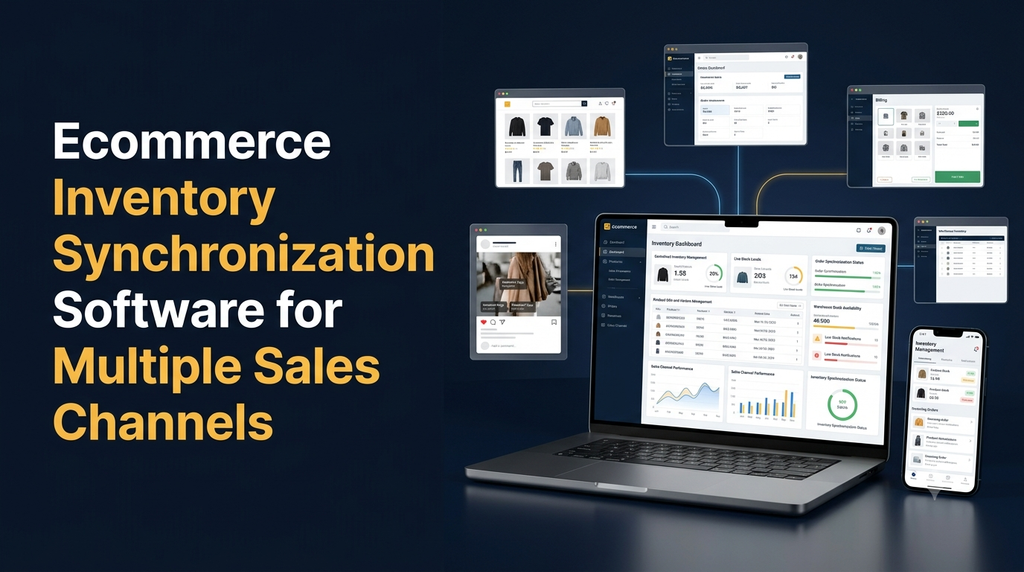
Ecommerce Inventory Synchronization Software for Multiple Sales Channels
Selling products through an ecommerce website, online marketplaces, social commerce platforms and physical stores creates a major inventory management challenge. When every channel maintains separate stock records, businesses may face overselling, incorrect stock availability, delayed order processing and manual data entry. Ecommerce inventory synchronization software connects multiple sales channels to a centralized inventory system, helping businesses maintain more consistent stock information and manage orders efficiently.
Modern ecommerce businesses often sell the same product through several platforms. A customer may purchase an item from the company’s website while another customer orders the same SKU through a marketplace. If inventory is not updated across channels, both customers may be allowed to purchase the last available unit.
This is why multi-channel inventory synchronization has become an important requirement for growing ecommerce businesses, wholesalers, distributors and retailers.
In this guide, we explain how ecommerce inventory synchronization software works, its essential features, integration requirements, architecture, development process and estimated development costs in India.
What Is Ecommerce Inventory Synchronization Software?
Ecommerce inventory synchronization software is a centralized application that manages product stock information across multiple sales channels. When an order is received or inventory changes, the system updates the relevant stock records and communicates the latest available quantity to connected channels.
Depending on the integration and business workflow, the software can connect:
- Business-owned ecommerce websites.
- Online marketplaces.
- Social commerce storefronts.
- Physical retail stores and POS systems.
- Warehouse management applications.
- ERP and accounting software.
- Wholesale and dealer ordering portals.
Why Do Businesses Need Multi-Channel Inventory Synchronization?
Managing inventory separately for every sales channel becomes increasingly difficult as product listings and order volumes grow.
1. Prevent Overselling
Keep channel stock information consistent to reduce the risk of accepting orders for unavailable products.
2. Reduce Manual Work
Automate routine stock updates instead of manually editing inventory on every connected platform.
3. Centralized Management
Manage product quantities, SKUs and stock movements through one administration interface.
4. Faster Order Processing
Bring orders from different channels into a centralized workflow for processing and fulfilment.
5. Better Stock Visibility
Understand available, reserved, damaged and incoming stock across warehouses.
6. Business Scalability
Connect additional sales channels and warehouses as business requirements grow.
How Does Inventory Synchronization Work?
A multi-channel inventory system usually maintains a centralized inventory database and connects it to external sales platforms through APIs or supported integration methods.
Step 1: Centralized Product Management
The business creates products in the central system with details such as SKU, product name, barcode, variant, price and warehouse stock.
Step 2: Connect Sales Channels
The application connects supported ecommerce websites, marketplaces and POS systems. Each integration is configured using the platform’s permitted API and authentication process.
Step 3: Map Products and SKUs
The system matches products between the central inventory and each connected channel. Product identifiers, variants and channel-specific listing IDs must be mapped correctly.
Step 4: Receive Orders and Stock Updates
When an order is created or stock changes, the connected channel sends an event or the application retrieves the updated information through scheduled API synchronization.
Step 5: Calculate Available Inventory
The application updates the inventory ledger and calculates the quantity available for sale based on reserved stock, fulfilled orders, returns and warehouse rules.
Step 6: Synchronize Other Channels
The updated quantity is sent to connected sales channels. The system records the synchronization result and retries failed updates according to its error-handling rules.
Essential Features of Ecommerce Inventory Synchronization Software
1. Centralized Inventory Dashboard
A centralized dashboard gives administrators a consolidated view of stock across connected sales channels and warehouses.
- Total product quantity.
- Available and reserved stock.
- Low-stock products.
- Out-of-stock items.
- Channel-wise stock availability.
- Recent inventory movements.
2. Multi-Channel Integration
The system should connect the sales channels used by the business. Integration possibilities depend on the APIs, account permissions and technical capabilities of each platform.
Common integration categories include:
- Custom ecommerce websites.
- Marketplace seller accounts.
- Retail POS applications.
- Social commerce platforms.
- ERP and accounting systems.
3. Real-Time or Near-Real-Time Stock Updates
Inventory updates should be processed as quickly as the connected platform allows. Webhooks can notify the application when supported events occur, while scheduled synchronization can be used as a fallback or reconciliation mechanism.
4. SKU and Product Variant Management
A product may have several sizes, colours, models or packaging options. Each variant should have a clear stock identifier to prevent inventory mismatches.
The system should support:
- Unique SKU management.
- Product barcode mapping.
- Size and colour variations.
- Channel-specific product identifiers.
- Variant-level inventory tracking.
5. Centralized Order Management
Orders from different connected channels can be collected in one interface. Administrators can review order details, payment status, fulfilment progress and inventory impact.
6. Warehouse Management
Businesses operating multiple warehouses need to know where stock is available and which location should fulfil an order.
- Multiple warehouse support.
- Warehouse-wise stock quantities.
- Stock transfers between locations.
- Warehouse-specific allocation rules.
- Goods received and dispatched records.
7. Low-Stock Alerts
Administrators can configure minimum stock levels for products and receive alerts when available inventory reaches a defined threshold.
8. Returns and Cancellation Management
Returned and cancelled orders must update inventory according to the business’s inspection and restocking policies. A returned product should not automatically become available for sale if it is damaged or awaiting inspection.
9. Inventory Reports and Analytics
Reports help business owners understand stock movements, product demand and channel performance.
- Current stock report.
- Channel-wise sales report.
- Stock movement history.
- Low-stock report.
- Dead-stock and slow-moving product report.
- Purchase and replenishment report.
10. User Roles and Permissions
Different employees may need different levels of access. Role-based access control can help restrict sensitive inventory operations.
- Super Admin.
- Inventory Manager.
- Warehouse Manager.
- Order Processing Staff.
- Sales Manager.
- Accounts Staff.
Supported Ecommerce Sales Channel Integrations
A custom inventory synchronization solution can connect different types of sales channels depending on the business’s requirements and available integration methods.
Own Ecommerce Website
Connect the company’s online store to the central inventory system and synchronize product availability and orders.
Online Marketplaces
Integrate supported marketplace seller accounts to manage product listings, orders and inventory updates.
Social Commerce
Connect eligible social selling platforms and supported commerce integrations.
Retail POS Systems
Connect physical store billing systems so in-store sales can be reflected in centralized stock records.
Warehouse Systems
Connect warehouse applications to track goods received, picked, packed, transferred and dispatched.
ERP and Accounting
Connect business systems to exchange relevant product, purchase, stock and order information.
Integration note: Actual platform support depends on official API availability, developer permissions, marketplace policies, account eligibility and API rate limits. Each integration should be assessed before development.
Important Inventory Synchronization Challenges
Synchronizing inventory across several systems involves more than sending the same stock quantity to every platform. The application must handle concurrent orders, delayed events, failed API requests and differences in how platforms represent product information.
1. Simultaneous Orders
Two customers may attempt to purchase the last available unit through different channels at almost the same time. The central system should use reliable inventory reservation and transaction handling to reduce overselling.
2. API Failures and Rate Limits
External platforms may temporarily reject requests, become unavailable or limit the number of API calls. The application should record failed updates and retry them with appropriate backoff and monitoring.
3. SKU Mapping Errors
A product may have different identifiers on different platforms. Incorrect mapping can cause the wrong product’s inventory to be updated.
4. Delayed Synchronization
A platform may process inventory updates after a delay. The central system should track the last successful update and identify channels with outdated stock information.
5. Returns and Exchanges
Returned products may need inspection before being added back to available stock. The system should support separate statuses for returned, damaged, quarantined and sellable inventory.
6. Warehouse Allocation
When an order is received, the software must identify the appropriate warehouse based on stock availability, delivery location and business fulfilment rules.
Inventory Synchronization Software Architecture
A custom multi-channel inventory platform generally includes a central application, inventory database, integration services and background processing components.
- Sales channels: Ecommerce websites, marketplaces, POS systems and other connected applications.
- Integration layer: API connections, authentication, webhooks and platform-specific adapters.
- Synchronization engine: Processes inventory events, order updates and stock changes.
- Inventory service: Maintains product quantities, reservations, warehouse stock and inventory transactions.
- Database: Stores products, SKUs, orders, stock movements, channel mappings and synchronization logs.
- Admin dashboard: Provides reports, configuration, monitoring and user management.
Technology Stack Options
| Application Layer | Possible Technologies |
|---|---|
| Frontend | React, Next.js, Vue.js |
| Backend | Laravel, Node.js, Python |
| Database | MySQL, PostgreSQL |
| Background Processing | Redis queues, message brokers and scheduled jobs |
| API Integration | REST APIs, webhooks and platform-specific SDKs |
| Infrastructure | AWS, Azure, Google Cloud or suitable managed hosting |
Technology selection should consider expected order volume, integration complexity, hosting budget, development experience and future scalability.
Inventory Synchronization Workflow Example
Consider a business selling the same product through its website, a marketplace and a physical retail store.
| Event | Inventory System Action |
|---|---|
| Initial available stock: 100 units | Central inventory records 100 available units. |
| Website order: 5 units | System reserves 5 units and updates available stock. |
| Marketplace order: 3 units | System processes the order and reserves 3 additional units. |
| Retail POS sale: 2 units | POS integration records the sale and updates central inventory. |
| Remaining available stock | 90 units, assuming all orders are accepted and no other stock movements occur. |
The system then communicates the latest available quantity to the connected channels. The actual implementation should also account for pending orders, safety stock, warehouse allocation and platform-specific inventory rules.
How to Develop Custom Ecommerce Inventory Synchronization Software
Businesses with complex workflows may benefit from custom software rather than trying to manage every inventory requirement through disconnected applications.
- Requirement analysis: Identify sales channels, warehouses, product types, order workflows and business rules.
- Integration planning: Review official APIs, authentication methods, rate limits and available events for each channel.
- UI/UX design: Design the inventory dashboard, product management screens, order interface and reports.
- Database design: Plan product, SKU, inventory ledger, warehouse, order and channel mapping structures.
- Backend development: Build inventory services, order processing, synchronization jobs and API integrations.
- Frontend development: Develop the admin dashboard and relevant mobile or warehouse interfaces.
- Testing: Test simultaneous orders, API failures, stock changes, returns and synchronization recovery.
- Deployment: Deploy the application with suitable monitoring, backups and access controls.
- Ongoing improvement: Monitor actual performance and add integrations or features as required.
How Much Does Ecommerce Inventory Synchronization Software Cost in India?
Custom development costs depend on the number of sales channels, warehouse requirements, product catalogue size, integration complexity and business workflows.
Illustrative Custom Development Cost
| Software Type | Illustrative Development Budget | Typical Scope |
|---|---|---|
| Basic Inventory System | ₹40,000 – ₹80,000 | Central inventory, product management and limited integrations. |
| Multi-Channel Inventory System | ₹80,000 – ₹2,00,000 | Multiple sales channels, stock updates, order management and reports. |
| Advanced Inventory Platform | ₹2,00,000 – ₹5,00,000+ | Multiple warehouses, complex workflows, advanced integrations and analytics. |
| Enterprise Platform | Custom quotation | High-volume operations, ERP integration and specialized infrastructure. |
Note: These are illustrative planning estimates, not fixed market rates or a Greap Technologies quotation. The actual cost may vary based on API access, platform approval requirements, integration complexity, hosting, testing and maintenance.
Factors Affecting Development Cost
- Number and type of connected sales channels.
- Number of products, SKUs and variants.
- Number of warehouses and physical stores.
- Real-time versus scheduled synchronization requirements.
- Order management and fulfilment complexity.
- ERP, accounting and POS integrations.
- Reporting and analytics requirements.
- Security, hosting and maintenance requirements.
Who Needs Multi-Channel Inventory Management Software?
Inventory synchronization can benefit businesses that sell products through more than one sales channel.
- Retail businesses: Companies operating physical shops and online stores.
- Wholesale distributors: Businesses supplying products to dealers, retailers and online customers.
- Fashion and textile businesses: Companies managing multiple sizes, colours and product variants.
- Electronics sellers: Businesses tracking product models, serial numbers and stock availability.
- Manufacturers: Companies managing finished goods across distributors and ecommerce platforms.
- Consumer goods businesses: Brands selling through multiple marketplaces and direct-to-consumer channels.
- Growing ecommerce startups: Businesses expanding from one online store to multiple sales channels.
How to Choose the Right Inventory Synchronization Software
Before selecting an existing solution or developing custom software, evaluate your actual inventory workflow.
- Does the system support your required sales channels?
- Can it manage product variants and unique SKUs?
- Does it support your warehouse structure?
- How does it handle simultaneous orders?
- Can you view failed or pending synchronization tasks?
- Does it provide order and inventory reports?
- Can it connect with your existing ERP or accounting software?
- Are API limitations and third-party subscription charges understood?
- Can the system scale as your catalogue and order volume grow?
- Is ongoing technical support available?
Why Choose Greap Technologies for Ecommerce Software Development?
Greap Technologies provides website development, software development and digital growth solutions for businesses. We understand that ecommerce businesses may need more than a standard online store when managing multiple channels, warehouses and complex inventory workflows.
Depending on your business requirements, a custom software project can include:
- Custom ecommerce inventory management systems.
- Multi-channel stock synchronization solutions.
- Centralized order management dashboards.
- Warehouse and stock tracking applications.
- Marketplace and third-party API integrations.
- POS, ERP and business software integrations.
- Custom admin panels and business reports.
- Ongoing software maintenance and improvements.
Whether you operate a growing online store, a wholesale business or a multi-location retail company, the right inventory system should match your actual business processes.
Planning a Multi-Channel Inventory Management System?
Discuss your ecommerce inventory requirements with Greap Technologies. Explore a custom solution for stock synchronization, order management and business operations.
Visit Greap Technologies Discuss on WhatsAppPhone: +91 70923 30168
Frequently Asked Questions
1. What is ecommerce inventory synchronization software?
It is software that manages product stock centrally and synchronizes inventory information across connected ecommerce websites, marketplaces, POS systems and other sales channels.
2. How does multi-channel inventory synchronization work?
The software connects sales channels to a central inventory database. When orders or stock changes occur, it processes the updates and sends revised availability information to connected platforms through supported integrations.
3. Can inventory software connect multiple ecommerce websites?
Yes. A custom inventory application can connect multiple ecommerce websites through suitable APIs or other supported integration methods. Each connection must be configured according to the platform’s technical requirements.
4. Does inventory synchronization happen in real time?
It can operate in real time or near real time where the connected platforms support suitable APIs and event notifications. Other platforms may require scheduled synchronization, and processing delays can occur.
5. How does inventory synchronization prevent overselling?
A centralized system can reserve stock when an order is accepted, process concurrent inventory changes safely and update the available quantity across channels. Safety stock and synchronization monitoring can provide additional protection.
6. Can the software manage multiple warehouses?
Yes. Custom inventory software can track stock by warehouse, manage transfers, allocate orders to suitable locations and display warehouse-wise availability.
7. Can it integrate with POS and ERP software?
Yes, provided the existing POS or ERP system offers a suitable API, integration method or data exchange capability. The integration scope depends on the systems involved.
8. How much does custom inventory synchronization software cost in India?
Development costs vary depending on the number of channels, warehouses, product variants, integrations and business workflows. A basic solution may cost less than an advanced enterprise inventory platform. A detailed requirement assessment is needed for accurate pricing.
9. Can inventory software manage product returns and cancellations?
Yes. It can process cancellations and returns through configurable workflows. Returned products can be classified as sellable, damaged or awaiting inspection before their stock status is updated.
10. Should a business choose ready-made or custom inventory software?
Ready-made software may suit businesses with standard workflows and supported integrations. Custom software may be more suitable when a business requires specialized warehouse processes, ERP connections, custom reports or unique inventory rules.
Conclusion
Ecommerce inventory synchronization software helps businesses manage stock across multiple sales channels through a centralized system. By connecting ecommerce websites, marketplaces, retail stores and warehouses, businesses can improve stock visibility, reduce manual updates and manage orders more consistently.
A well-designed system should include reliable inventory tracking, SKU management, order synchronization, warehouse support, API monitoring, reporting and proper handling of failed updates. The right solution depends on the business’s sales channels, inventory processes and future growth plans.
If your business needs custom ecommerce inventory management software or multi-channel synchronization, connect with Greap Technologies to discuss your requirements.