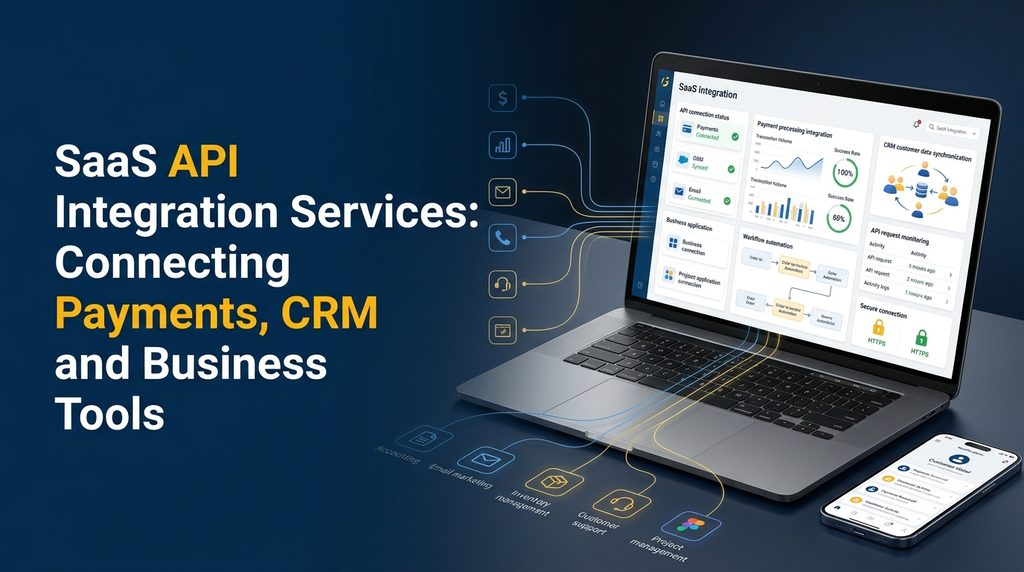
Modern businesses use multiple software applications to manage payments, customer relationships, sales, accounting, inventory and daily operations. However, when these systems operate independently, employees often need to enter the same information into different applications. This creates unnecessary work, data inconsistencies and delays.
SaaS API integration services help businesses connect different software platforms so they can exchange information and work together. By integrating payment gateways, CRM platforms, accounting applications and other business tools, companies can build a more connected software environment.
Whether you are developing a new SaaS product or improving an existing business application, API integration can make your software more useful, flexible and scalable. This guide explains how SaaS API integration works, which systems businesses can connect, important security considerations and what to consider when planning an integration project in India.
What Is SaaS API Integration?
An API, or Application Programming Interface, is a defined way for one software application to communicate with another. An API specifies how applications can request information, submit data and perform supported operations.
SaaS API integration is the process of connecting a Software as a Service application with other software platforms using their APIs. Instead of treating every application as a separate system, integration allows them to exchange relevant information according to configured rules and permissions.
For example, consider an online subscription management platform:
- A customer purchases a subscription through the application.
- The application sends a payment request to an integrated payment gateway.
- The payment provider returns a transaction result.
- The SaaS application updates the subscription status after verifying the result.
- The CRM receives the relevant customer and subscription information.
- An email service sends a confirmation message to the customer.
Each application performs its own role, while the integration layer coordinates the exchange of information.
Why Do Businesses Need SaaS API Integration Services?
Businesses rarely depend on a single software application. A growing company might use one platform for customer management, another for payments, a separate accounting application and additional tools for communication or inventory.
Without proper integration, employees may need to transfer information manually. This can become difficult as the number of customers, transactions and business processes increases.
Reduce Manual Data Entry
Send authorised information between connected applications instead of repeatedly entering the same details.
Improve Data Consistency
Reduce conflicting records by establishing clear rules for how customer, order and payment information is updated.
Connect Business Workflows
Trigger follow-up activities when events such as payments, orders or customer registrations occur.
Support Business Growth
Add supported integrations as the business adopts additional tools and expands its software requirements.
Improve Customer Experience
Help teams access relevant information across connected systems and respond to customers more efficiently.
Support Better Reporting
Bring selected information from different platforms into a consolidated reporting environment.
Types of SaaS API Integrations
The integration requirements depend on the SaaS product, its users and the business processes it needs to support. The following are common integration categories.
1. Payment Gateway Integration
Payment gateway integration allows a SaaS application to accept and manage online payments through an external payment provider.
Common use cases include:
- One-time payments for products or services.
- Subscription payments and recurring billing.
- Payment status updates and transaction records.
- Refund and cancellation workflows.
- Payment failure notifications.
- Invoice and receipt generation workflows.
A subscription-based SaaS product may use payment integration to collect recurring fees and update subscription access according to verified payment events.
Examples of payment providers available to Indian businesses include Razorpay, Cashfree and other providers that offer suitable APIs. Availability, supported payment methods and commercial terms should be checked with the provider before implementation.
2. CRM API Integration
Customer Relationship Management systems help businesses manage leads, customer records, sales activities and follow-up communication. CRM API integration connects these records with a SaaS application.
Possible CRM integration workflows include:
- Creating a CRM contact when a customer registers.
- Sending lead information from a website enquiry form.
- Updating customer details after an authorised profile change.
- Sharing order or subscription status with the sales team.
- Recording customer support activities.
- Synchronising selected customer information between systems.
Depending on the provider and API permissions, a SaaS application may integrate with platforms such as Zoho CRM, HubSpot or Salesforce.
3. Accounting Software Integration
Accounting integration connects sales, invoice and payment information with financial management software. It can reduce repeated data entry and help accounting teams maintain more consistent records.
Common integration requirements include:
- Creating or synchronising customer records.
- Sending invoice information to accounting software.
- Recording payment and refund details.
- Sharing tax-related transaction information.
- Synchronising selected sales and expense records.
The integration should follow the accounting application’s supported data formats and the business’s accounting procedures. Automated synchronisation does not replace professional accounting review.
4. Email and SMS API Integration
Communication integrations allow SaaS applications to send transactional messages and notifications through external services.
Examples include:
- Account registration confirmation.
- Password reset messages.
- Payment and subscription notifications.
- Appointment reminders.
- Order status updates.
- Service and support notifications.
Depending on the business requirement, developers may integrate email delivery services, SMS providers or approved WhatsApp Business Platform solutions.
5. Inventory and ERP Integration
Inventory and Enterprise Resource Planning integration connects a SaaS application with systems responsible for products, stock, purchasing, orders and business operations.
For example, an ecommerce SaaS application may:
- Retrieve product information from an inventory system.
- Check stock availability before order confirmation.
- Send confirmed orders to an ERP platform.
- Receive fulfilment or dispatch updates.
- Synchronise selected inventory changes.
Businesses in manufacturing, textile trading, wholesale distribution and retail may benefit from connecting their operational software with customer-facing applications.
6. Cloud Storage and Document API Integration
Some SaaS applications need to store or retrieve documents using external cloud services. Document integration can support file uploads, report storage, invoice sharing and controlled document access.
Access permissions, file ownership, retention policies and sharing controls should be planned carefully when implementing this type of integration.
How SaaS API Integration Works
An API integration usually involves an application requesting an authorised operation from another service. The receiving service validates the request, processes it and returns a response.
A simplified integration workflow looks like this:
Step 1: A User or System Starts an Action
An action may be initiated by a customer, an employee, an administrator or an automated background process. For example, a customer may submit a payment request or an employee may create a new customer record.
Step 2: The SaaS Backend Validates the Request
The backend checks the request, validates the user’s permissions and prepares the required information. Sensitive credentials should remain on the server side rather than being exposed in frontend code.
Step 3: The Application Communicates with the External API
The backend sends a request to the external service using the API’s supported endpoint, authentication method and data format. Many modern APIs use HTTPS and JSON, although the exact specification depends on the provider.
Step 4: The External Service Returns a Response
The external platform processes the request and returns a response. The response may contain requested data, an operation status or an error message.
Step 5: The SaaS Application Processes the Result
The application validates the response and updates its own records according to the integration rules. Important operations should be designed to handle duplicate requests, delayed responses and temporary service failures safely.
Important Features of a SaaS API Integration System
A reliable integration should do more than simply connect two endpoints. It should provide the controls needed to maintain data quality, troubleshoot failures and support future changes.
Centralised Integration Management
An administrative interface can help authorised users view configured integrations, connection status, enabled services and relevant settings. Access to sensitive configuration should be restricted.
Secure Authentication
Integrations may use API keys, OAuth 2.0, signed requests or other authentication methods supported by the external provider. The correct method should be selected based on the provider’s documentation and security requirements.
Webhook Support
A webhook allows an external service to send an event notification to a configured endpoint in the SaaS application. This can be useful for receiving payment updates, subscription changes, order notifications and other supported events.
Data Mapping and Transformation
Different applications may use different field names, formats and data structures. A mapping layer translates the required information between systems while preserving the intended meaning.
Error Handling and Retry Management
External APIs may become temporarily unavailable or return errors. Integration software should record failures, apply suitable retry rules and provide a way for authorised administrators to investigate unresolved operations.
Integration Logs and Monitoring
Logs help developers investigate failed requests, response errors, synchronisation delays and unexpected behaviour. Logs should avoid storing passwords, secret keys, full payment credentials or unnecessary personal information.
Rate Limit Management
API providers may restrict how many requests an application can make within a specific period. Integration logic should respect these limits and use appropriate queueing, caching or backoff strategies.
Common API Integration Architecture Approaches
The right architecture depends on the number of integrations, expected traffic, data volume and business requirements.
1. Direct API Integration
In a direct integration, the SaaS application communicates with an external service through its API. This approach can be suitable when only a small number of services need to be connected.
2. Middleware-Based Integration
Middleware acts as an intermediate layer between the SaaS application and external services. It can handle authentication, data transformation, routing, logging and integration-specific business rules.
3. Event-Driven Integration
In an event-driven architecture, applications react to events such as customer registration, payment confirmation or order creation. Event queues and background workers can help process tasks without requiring every operation to happen during a user’s request.
4. Integration Platform Approach
Some businesses use an integration platform to connect several applications through prebuilt connectors and workflow configurations. This can reduce custom development for supported use cases, although complex requirements may still need custom code.
| Approach | Suitable Use Case | Key Consideration |
|---|---|---|
| Direct API | A small number of integrations | Each connection needs its own maintenance. |
| Middleware | Multiple services and shared integration rules | Requires additional architecture and monitoring. |
| Event-driven | Background processing and event notifications | Requires reliable event handling and recovery. |
| Integration platform | Connecting supported third-party applications | Connector availability and platform limitations matter. |
API Integration in Multi-Tenant SaaS Applications
Multi-tenant SaaS platforms serve multiple businesses through a shared application environment. Each business may need to connect its own CRM, payment provider, accounting platform or other external service.
This introduces additional requirements because integration settings and credentials must be associated with the correct tenant.
Important design considerations include:
- Store integration configurations with the correct tenant identity.
- Apply tenant-level access controls to integration settings.
- Prevent one tenant from accessing another tenant’s credentials or records.
- Support separate connection status and error reporting for each tenant.
- Apply appropriate usage limits and API quotas.
- Provide secure credential updates and revocation options.
- Keep tenant-specific webhook events properly associated with their source.
A well-designed multi-tenant integration architecture makes it easier to add new customers without mixing their business data or connection settings.
Security Best Practices for SaaS API Integration
API integration creates communication between systems, so security needs to be considered from the beginning of development.
Use HTTPS
Use encrypted HTTPS connections for API communication. Avoid transmitting credentials or sensitive business information through unencrypted connections.
Protect API Credentials
Store API keys, client secrets and access tokens in secure server-side configuration or an appropriate secrets-management system. Avoid placing secret credentials in public repositories, browser code or application logs.
Apply Least-Privilege Access
Grant an integration only the permissions required for its intended functions. Review access scopes and remove unused permissions.
Validate Webhook Requests
Verify webhook signatures or use the provider’s documented verification mechanism. Do not trust an incoming notification merely because it reaches the application’s endpoint.
Prevent Duplicate Processing
Use idempotency controls where supported. This helps prevent duplicate payments, repeated order creation or multiple processing of the same event when a request is retried.
Monitor and Audit Integration Activity
Maintain useful operational logs, access records and alerts. Establish a process for investigating unexpected API activity and rotating credentials when necessary.
Review Third-Party Provider Requirements
Every provider has its own authentication rules, API limits, data handling requirements and service terms. Review the official documentation before building the integration.
Popular Technologies Used for SaaS API Integration
Developers select technologies according to the existing SaaS platform, required integrations, hosting environment and expected scale.
| Technology | Typical Role |
|---|---|
| Laravel / PHP | Backend API development and integration workflows. |
| Node.js | API services, asynchronous operations and event handling. |
| Python | Backend integrations, automation and data processing. |
| React / Next.js | Frontend dashboards and integration management interfaces. |
| MySQL / PostgreSQL | Application data, integration settings and transaction references. |
| Redis / Queue Systems | Background jobs, caching and asynchronous processing. |
| REST APIs / Webhooks | Communication and event exchange between applications. |
A project does not need every technology listed above. The development team should choose a suitable stack based on the actual application requirements.
Common Challenges in SaaS API Integration
Different Data Formats
External platforms may represent dates, addresses, customer identifiers and transaction details differently. Developers need a clear data mapping strategy to avoid incorrect or incomplete information.
API Version Changes
Providers may introduce new API versions, deprecate old endpoints or change supported fields. Integration maintenance should include monitoring provider announcements and testing required updates.
Temporary Service Failures
An external platform may be unavailable or respond slowly. Timeouts, retry policies, queues and failure monitoring help applications handle these situations more safely.
Duplicate Webhook Events
Some providers may deliver the same event more than once. The application should identify previously processed events and avoid repeating operations that must happen only once.
Data Synchronisation Conflicts
When two applications can update the same record, developers must define which system is authoritative for each field and how conflicting updates will be handled.
Provider Limitations
Not every external platform offers the same API capabilities. Some features may require higher subscription plans, special permissions or approval from the provider. Confirm these requirements before finalising the project scope.
Our SaaS API Integration Development Process
A structured development process helps ensure that integrations match business workflows and remain maintainable.
- Requirement analysis: Identify the SaaS application, external platforms, data to be exchanged and expected business workflows.
- API documentation review: Review endpoints, authentication, request limits, webhooks and provider restrictions.
- Integration architecture: Select a suitable direct, middleware-based or event-driven approach.
- Backend development: Implement API communication, data mapping, authentication and business rules.
- Frontend configuration: Build the required settings, connection status and management screens.
- Testing: Test successful requests, invalid credentials, duplicate events, timeouts, failed responses and recovery workflows.
- Deployment: Configure production credentials, secure endpoints, monitoring and environment settings.
- Maintenance: Monitor provider changes, investigate errors and update integrations when required.
SaaS API Integration Development Cost in India
API integration cost depends on the external service, documentation quality, authentication requirements, number of workflows and complexity of the existing SaaS application.
A basic connection to one well-documented API may require considerably less work than a multi-tenant integration system involving several providers, background processing, webhooks and advanced monitoring.
| Integration Scope | Illustrative Development Range |
|---|---|
| Basic single API integration | ₹8,000 – ₹20,000 |
| Payment gateway integration with verification workflow | ₹12,000 – ₹30,000 |
| CRM integration with selected data synchronisation | ₹15,000 – ₹40,000 |
| Multiple API integrations with a shared management interface | ₹30,000 – ₹80,000+ |
| Advanced multi-tenant integration module | ₹50,000 – ₹1,50,000+ |
These figures are illustrative planning estimates, not fixed market prices or a formal quotation. Actual pricing may be lower or higher depending on the existing codebase, API provider, required features, testing, security requirements and deployment scope. Third-party subscription charges, transaction fees, hosting and provider usage charges may be separate.
Factors That Affect API Integration Cost
- Number of external platforms to connect.
- Availability and quality of provider API documentation.
- OAuth, token management and other authentication requirements.
- Number of data fields and synchronisation workflows.
- Webhook implementation and event processing requirements.
- Multi-tenant support and tenant-level configuration.
- Dashboard, reporting and monitoring requirements.
- Security testing, deployment and ongoing maintenance.
Who Needs Custom SaaS API Integration?
API integration can benefit businesses that depend on multiple applications or want to extend the capabilities of their existing software.
- SaaS startups: Connect essential third-party services without building every capability from scratch.
- Ecommerce businesses: Connect payments, inventory, shipping and customer management systems.
- Manufacturing companies: Connect ERP, stock, order management and customer portals.
- Service businesses: Connect appointment booking, CRM, billing and communication tools.
- Subscription businesses: Connect recurring payments, customer records and subscription notifications.
- Wholesale distributors: Connect dealer portals, product catalogues, orders and inventory systems.
- Growing enterprises: Integrate existing applications into more coordinated workflows.
How to Choose a SaaS API Integration Development Company
Choosing the right development partner is important because API integration affects data exchange, business operations and application reliability.
Before selecting a development company, consider the following:
- Experience in backend API development.
- Understanding of payment and CRM integration workflows.
- Knowledge of authentication and secure credential management.
- Ability to implement webhooks and background processing.
- Clear testing and error-handling practices.
- Experience with multi-tenant SaaS architecture when required.
- Documentation and post-deployment maintenance support.
- Transparent project scope, pricing and delivery expectations.
Ask the development team to explain how they will handle failed requests, duplicate events, provider downtime, credential updates and future API version changes. These details are often more important than simply demonstrating a successful API connection.
Build Connected Business Software with Greap Technologies
Greap Technologies provides website development, custom software development and digital growth solutions for businesses. We help businesses plan and develop software applications based on their operational requirements.
If your SaaS product or business application needs to connect payment gateways, CRM platforms, accounting tools, communication services or other external systems, a properly planned integration can make your software environment more connected and manageable.
Our software development services can include:
- Custom SaaS application development.
- REST API development and third-party API integration.
- Payment gateway integration.
- CRM and business software integration.
- Webhook and workflow automation development.
- Multi-tenant SaaS architecture.
- Business dashboards and administration panels.
- Ongoing software maintenance and improvements.
Need API Integration for Your SaaS Application?
Discuss your software requirements with Greap Technologies. Let’s plan an integration solution that connects your business applications and supports your workflows.
Discuss Your Project on WhatsApp Visit Greap TechnologiesPhone: +91 70923 30168
Frequently Asked Questions
1. What is SaaS API integration?
SaaS API integration connects a cloud-based software application with other platforms through their APIs. It enables authorised data exchange and communication between systems such as payment gateways, CRMs, accounting tools and inventory applications.
2. Which business tools can be integrated with a SaaS application?
Depending on API availability, a SaaS application can integrate with payment gateways, CRM platforms, accounting software, email services, SMS providers, inventory systems, ERP applications, cloud storage services and other business tools.
3. Can a SaaS application connect with multiple payment gateways?
Yes. A SaaS application can support multiple payment providers when their APIs and commercial terms allow it. The application needs suitable provider configuration, payment status verification, transaction mapping and error handling.
4. What is the difference between an API and a webhook?
An API generally allows one application to request information or perform an operation on another system. A webhook allows a service to send an event notification to another application when a specified event occurs.
5. Is API integration secure?
API integration can be implemented securely using HTTPS, appropriate authentication, least-privilege permissions, protected credentials, request validation, webhook verification, logging and regular security reviews. Security also depends on the external provider and how the integration is maintained.
6. Can API integration support multi-tenant SaaS applications?
Yes. A multi-tenant SaaS platform can maintain separate integration configurations for individual businesses. Tenant-level permissions, credential isolation, data separation and usage controls are important parts of the design.
7. How long does SaaS API integration development take?
A simple integration may take a few working days, while integrations involving multiple systems, complex synchronisation, webhooks and multi-tenant requirements may take several weeks. The timeline depends on the scope and the external provider’s API capabilities.
8. What is the cost of SaaS API integration in India?
Cost depends on the number of integrations, provider documentation, authentication, data workflows and testing requirements. A basic integration may be relatively inexpensive, while an advanced multi-tenant integration system requires a larger development budget. A project-specific estimate should be prepared after requirement analysis.
9. Can an existing business application be connected to a CRM?
Yes, provided the CRM and existing application offer suitable integration methods. Developers can connect customer records, enquiries, sales activities and selected business information according to the available API permissions.
10. Does API integration require ongoing maintenance?
Yes. External providers may change API versions, authentication requirements, usage limits or supported features. Monitoring, troubleshooting and periodic compatibility updates help keep integrations working reliably.
Conclusion
SaaS API integration helps businesses connect the software tools they already use and create more coordinated workflows. From payment gateway and CRM integration to accounting, inventory and communication systems, the right integrations can reduce repetitive work and improve how business information moves between applications.
A successful integration requires more than connecting API endpoints. It needs secure authentication, accurate data mapping, reliable event handling, error monitoring and a maintenance plan. Businesses planning a new SaaS product or upgrading an existing application should consider these requirements during the architecture and development stages.
Greap Technologies helps businesses plan and develop custom software solutions, including SaaS applications and API-based integrations. Contact our team to discuss your project requirements.