Modern SaaS applications often serve multiple organisations, departments and user groups. Each user needs access to the information and features required for their responsibilities, without exposing sensitive functions or data unnecessarily. Role-Based Access Control (RBAC) provides a structured way to manage these permissions.
Whether you are developing a CRM, ERP, project management system, healthcare application, business portal or multi-tenant SaaS platform, access control should be part of the application’s architecture from the beginning.
In this guide, we explain role-based access control in SaaS applications, its architecture, user roles, permission management, database design, implementation process, security practices and estimated development costs in India.
What Is Role-Based Access Control (RBAC)?
Role-Based Access Control is an authorisation model that assigns permissions to roles rather than individually assigning every permission to every user.
Users receive one or more roles. Each role contains a defined set of permissions that determine which application resources and actions the user can access.
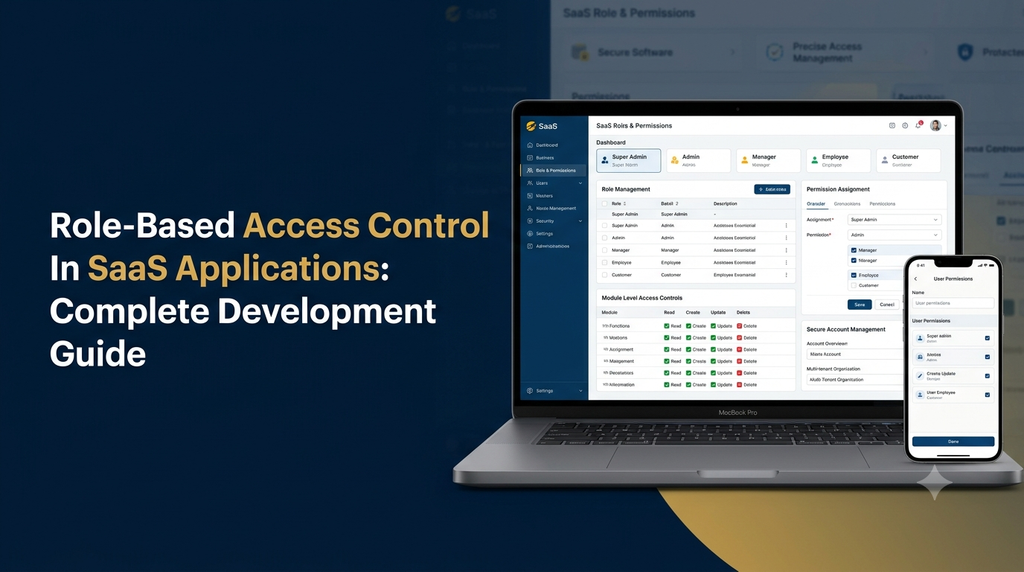
For example, a business management application may have the following roles:
- Super Admin
- Business Admin
- Manager
- Employee
- Customer
The Super Admin may manage the entire platform, while an employee may only view assigned tasks and update permitted records.
Why Is RBAC Important in SaaS Applications?
SaaS applications frequently handle customer records, financial information, business documents, operational data and administrative functions. Giving every user unrestricted access can create unnecessary security and operational risks.
RBAC helps businesses:
- Restrict access to sensitive application modules.
- Separate administrative and employee responsibilities.
- Manage permissions centrally.
- Reduce accidental changes to important records.
- Support different customer and employee access levels.
- Improve accountability through activity tracking.
- Manage access more efficiently as the organisation grows.
- Maintain consistent permission rules across application modules.
How Does Role-Based Access Control Work?
An RBAC system generally connects users, roles and permissions. When a user attempts to perform an action, the application checks whether the user’s assigned role allows that action on the requested resource.
The basic relationship is:
Consider an employee management application:
- An administrator creates an employee account.
- The administrator assigns the employee role.
- The employee role receives permissions to view assigned tasks and update task status.
- The employee signs in to the application.
- The backend checks permissions whenever the employee requests a protected operation.
- Unauthorised actions are rejected.
The permission check must happen on the server side. Hiding a button in the frontend is not sufficient to protect an application feature.
Common User Roles in SaaS Applications
The roles depend on the application type, business model and organisational structure. A multi-tenant SaaS platform may require both platform-level and organisation-level roles.
1. Super Admin
The Super Admin manages the complete SaaS platform and has platform-level responsibilities.
- Manage tenant accounts.
- Configure subscription plans.
- Manage platform settings.
- Monitor application activity.
- Manage platform administrators.
2. Business Admin
The Business Admin manages an individual organisation’s account and its internal users.
- Manage organisation settings.
- Create and update employee accounts.
- Assign organisational roles.
- View business reports.
- Manage permitted business modules.
3. Manager
Managers oversee selected teams, departments or workflows.
- View team information.
- Assign tasks.
- Review selected reports.
- Approve permitted requests.
4. Employee
Employees access the functions required for their assigned work.
- View personal information.
- Access assigned tasks.
- Update permitted records.
- View relevant notifications.
5. Customer
Customers use the application’s customer-facing features.
- View their own account information.
- Access permitted services.
- Submit requests.
- View their own orders or transactions.
6. Custom Roles
Some SaaS products need additional roles such as accountant, sales executive, support agent, HR manager, department head or auditor. A flexible permission system should allow authorised administrators to configure suitable custom roles.
Essential Features of an RBAC System
A production-ready access control module needs more than a simple role dropdown. The following features help create a manageable and secure permission system.
Understanding CRUD Permissions in RBAC
Many business applications use CRUD permissions to manage access to individual resources.
| Permission | Meaning | Example |
|---|---|---|
| View | Read information | View customer records. |
| Create | Add new information | Create a customer account. |
| Update | Modify existing information | Edit customer details. |
| Delete | Remove information | Delete an authorised record. |
Some business workflows need additional permissions beyond CRUD. For example, approving an invoice, exporting financial reports, assigning employees or managing subscriptions should have their own permission identifiers.
Example of a Role and Permission Matrix
A permission matrix helps developers and business owners understand which roles can perform which actions.
| Feature | Super Admin | Business Admin | Manager | Employee |
|---|---|---|---|---|
| Platform Settings | Full Access | No Access | No Access | No Access |
| User Management | Full Access | Organisation Users | Limited | No Access |
| Reports | Platform Reports | Business Reports | Team Reports | Assigned Reports |
| Task Management | Full Access | Full Access | Team Tasks | Assigned Tasks |
| Billing | Platform Billing | Own Subscription | No Access | No Access |
This is an illustrative permission matrix. Actual access should be defined by the application’s business rules, including restrictions on individual records.
RBAC Database Design for SaaS Applications
A well-planned database structure makes role and permission management easier to maintain. A typical RBAC implementation uses separate tables for users, roles, permissions and their relationships.
Common database tables include:
- users: Stores user account information.
- tenants: Stores organisation or customer account information.
- roles: Stores available role definitions.
- permissions: Stores application permission identifiers.
- user_roles: Connects users to their assigned roles.
- role_permissions: Connects roles to permissions.
- audit_logs: Stores important administrative and access-related events.
Example Database Relationships
users
  |
  |---- user_roles
             |
             |---- roles
                       |
                       |---- role_permissions
                                    |
                                    |---- permissions

tenants
  |
  |---- tenant-specific users and resources

audit_logs
  |
  |---- records important access changes
For a multi-tenant application, role assignments and permission queries must respect tenant boundaries. The exact database structure depends on whether roles are global, tenant-specific or a combination of both.
Important Database Design Considerations
- Use stable identifiers for roles and permissions.
- Prevent duplicate role and permission assignments.
- Define suitable foreign key relationships.
- Use tenant identifiers where required.
- Index frequently queried relationships.
- Track important permission changes.
- Use transactions for related administrative updates.
RBAC Implementation Architecture
A reliable RBAC implementation should enforce permissions throughout the application rather than relying on frontend visibility alone.
1. Authentication Layer
Authentication verifies the identity of the user through an appropriate login mechanism. This may include secure passwords, multi-factor authentication or an external identity provider.
2. Role Assignment Layer
The application retrieves the user’s assigned roles and their relevant organisation or tenant context.
3. Permission Evaluation Layer
The authorisation service checks whether the requested action is allowed for the user’s role and the specific resource.
4. Backend API Protection
Protected API endpoints enforce permission checks before reading or modifying sensitive information.
5. Frontend Interface Control
The frontend displays appropriate menus, buttons and pages according to the permissions returned by the backend. This improves usability but does not replace server-side enforcement.
6. Audit and Monitoring Layer
Important role changes, permission updates and administrative operations should be recorded for review and troubleshooting.
RBAC vs ABAC: What Is the Difference?
RBAC and Attribute-Based Access Control (ABAC) are two different approaches to application authorisation.
| Comparison | RBAC | ABAC |
|---|---|---|
| Access Based On | Assigned roles and permissions | Attributes and policy conditions |
| Configuration | Role and permission mapping | Rules involving users, resources and context |
| Best Suited For | Applications with clear job responsibilities | Applications needing fine-grained conditional access |
| Complexity | Generally easier to manage | Can require more complex policy design |
| Example | Managers can approve selected requests | A manager can approve requests only within an assigned department and spending limit |
Many business applications begin with RBAC and introduce selected attribute-based rules when more detailed access decisions become necessary.
Multi-Tenant RBAC: Managing Permissions Across SaaS Customers
Multi-tenant SaaS platforms serve multiple organisations through a common software application. Each organisation may have its own administrators, managers, employees and customers.
A platform therefore needs to distinguish between global platform roles and organisation-specific roles.
Platform-Level Roles
These roles manage the overall SaaS service, including platform administration, tenant onboarding and global configuration.
Tenant-Level Roles
These roles control access within an individual organisation. One tenant’s administrator should not automatically receive access to another tenant’s users or business records.
Tenant-Specific Custom Permissions
Some businesses may require additional roles or permission settings. The application can support tenant-specific configuration while retaining platform-level security rules.
Security Best Practices for RBAC in SaaS Applications
RBAC is an important part of application security, but it must be implemented alongside authentication, secure development practices and data protection controls.
- Principle of least privilege: Give users only the permissions needed for their responsibilities.
- Server-side authorisation: Validate permissions on every protected backend operation.
- Tenant isolation: Enforce organisation boundaries in database queries and application services.
- Secure account management: Use suitable authentication and session management controls.
- Permission change tracking: Record important role and permission updates.
- Regular access reviews: Review accounts and remove unnecessary permissions.
- Protected administrative actions: Apply additional checks to sensitive platform operations.
- Automated security testing: Test access restrictions across roles and tenant boundaries.
- Secure API design: Validate every request instead of trusting frontend data.
- Session and token controls: Ensure permission changes are reflected appropriately in active sessions and tokens.
Common RBAC Development Mistakes
- Creating too many roles without a clear business purpose.
- Giving all administrators unrestricted access by default.
- Checking permissions only in frontend components.
- Using role names as the only security validation mechanism.
- Ignoring tenant-level data separation.
- Allowing users to modify their own permissions without authorisation.
- Failing to track changes to sensitive roles.
- Not testing combinations of roles and permissions.
- Forgetting to revoke access when accounts are deactivated.
- Making permission rules difficult to maintain as the platform grows.
RBAC Development Process
Step 1: Identify User Types
List all users who will interact with the application, including platform administrators, business owners, managers, employees and customers.
Step 2: Define Application Modules
Identify the modules requiring access control, such as users, customers, orders, billing, reports, inventory and settings.
Step 3: Create a Permission Matrix
Define which actions each role can perform. Include special actions such as approval, export, assignment and configuration.
Step 4: Design the Database
Plan user-role relationships, role-permission mappings, tenant associations and audit records.
Step 5: Develop the Authorisation Service
Create reusable backend permission checks and enforce them across protected application operations.
Step 6: Build the Admin Interface
Develop screens for role creation, permission assignment, user-role mapping and access management.
Step 7: Integrate Frontend Permissions
Display only the appropriate navigation items and controls for each user’s permissions while keeping backend enforcement authoritative.
Step 8: Test Access Scenarios
Test permitted and denied operations, custom roles, tenant isolation and sensitive administrative workflows.
Step 9: Deploy and Monitor
Deploy the system with suitable logging, monitoring and access review procedures. Revisit permissions as business requirements change.
Technology Stack for RBAC Development
The technology stack depends on the existing SaaS application and its architecture. RBAC can be implemented using common backend frameworks, database systems and frontend technologies.
| Development Area | Technology Options |
|---|---|
| Frontend | React.js, Next.js, Vue.js |
| Backend | Laravel, Node.js, NestJS, Python |
| Database | PostgreSQL, MySQL |
| Authentication | Secure sessions, OAuth 2.0, OpenID Connect |
| API Security | Backend middleware, policy checks and request validation |
| Hosting | AWS, Google Cloud, Azure or managed infrastructure |
| Monitoring | Application logs, audit records and error monitoring |
RBAC Development Cost in India
The cost of developing an RBAC module depends on the number of roles, permissions, application modules, tenant requirements and administrative workflows.
| Development Scope | Indicative Cost | Typical Features |
|---|---|---|
| Basic RBAC Module | ₹40,000 – ₹80,000 | Predefined roles and basic permission checks. |
| Custom RBAC System | ₹80,000 – ₹1.5 lakh | Custom roles, CRUD permissions and admin management. |
| Advanced RBAC System | ₹1.5 lakh – ₹3 lakh | Fine-grained permissions, audit logs and advanced workflows. |
| Multi-Tenant RBAC | ₹3 lakh and above | Platform and tenant roles, organisation-level permissions and advanced isolation requirements. |
These figures are illustrative development-budget estimates, not fixed quotations. Actual costs depend on the existing application, database structure, integrations, testing scope and security requirements. A complete SaaS application will require a separate overall project estimate.
Why Choose Greap Technologies for SaaS Access Control Development?
Greap Technologies provides website development, custom software development and digital growth solutions for businesses. We can help businesses plan and build SaaS applications with structured user management and permission-based workflows.
Our software development capabilities can include:
- Custom SaaS application development.
- Role-based access control implementation.
- Multi-tenant application development.
- Admin and user management dashboards.
- Custom permission management systems.
- Business workflow and approval applications.
- API integration and backend development.
- Responsive web application development.
Whether you are creating a new SaaS product or upgrading an existing business application, access control should be designed around your users, business processes and data security requirements.
Planning to Develop a SaaS Application with Custom Access Control?
Build a structured application with role management, permission controls and organisation-level access. Discuss your software requirements with Greap Technologies.
Discuss Your Project on WhatsApp Visit Greap TechnologiesCall: +91 70923 30168
Frequently Asked Questions
1. What is RBAC in SaaS applications?
RBAC is an authorisation model that assigns permissions to roles and assigns those roles to users. It helps SaaS applications control access to features, data and business operations.
2. What are the main components of an RBAC system?
The main components are users, roles, permissions and the relationships connecting them. SaaS applications may also require tenant associations, resource-level rules and audit logs.
3. What is the difference between authentication and authorisation?
Authentication verifies who a user is. Authorisation determines what that authenticated user is allowed to access or perform.
4. Can one user have multiple roles?
Yes. An application can assign multiple roles to one user when the business model requires it. The application must define how permissions from those roles are evaluated and handle conflicting rules consistently.
5. What is the difference between RBAC and ABAC?
RBAC grants access according to assigned roles and their permissions. ABAC evaluates attributes such as department, resource ownership, location or other contextual conditions.
6. Is RBAC suitable for multi-tenant SaaS applications?
Yes. RBAC can manage permissions at both platform and tenant levels. It must be combined with reliable tenant isolation and resource-level authorisation.
7. Can administrators create custom roles?
Yes. A custom RBAC module can allow authorised administrators to create roles and assign selected permissions according to organisational requirements.
8. How much does RBAC development cost in India?
A basic custom RBAC module may start around ₹40,000 to ₹80,000 as an indicative budget. Advanced multi-tenant implementations can cost significantly more depending on their requirements.
9. Should RBAC permissions be checked in the frontend or backend?
Authoritative permission checks must happen on the backend for every protected operation. Frontend checks are useful for improving the user interface but cannot independently secure application data.
10. Can RBAC be added to an existing SaaS application?
Yes. RBAC can be added to an existing application after reviewing its authentication system, database structure, APIs and business workflows. The required changes depend on the current architecture.