
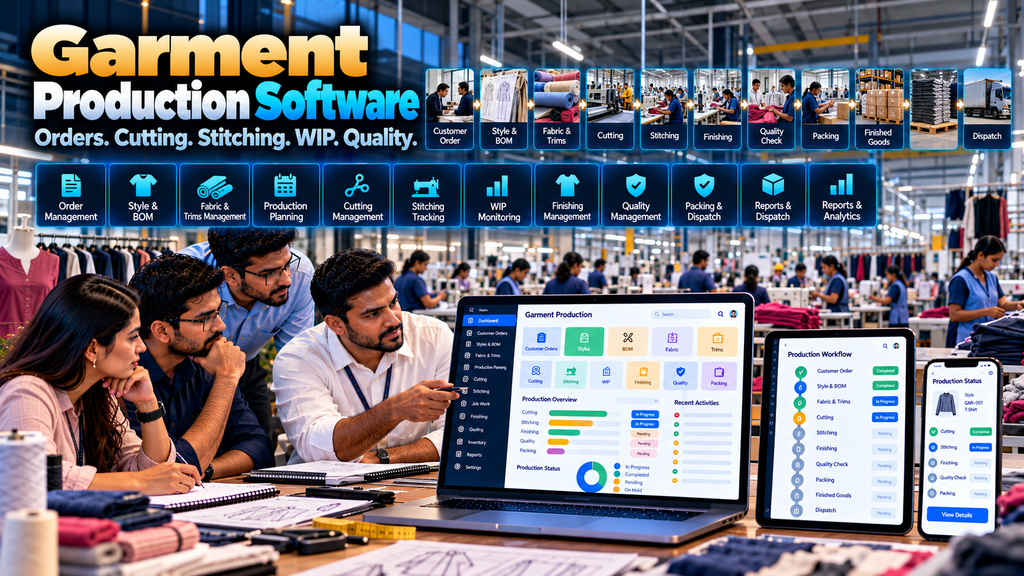
Garment manufacturing involves a series of connected activities that need to move from customer requirements to finished products.
Depending on the manufacturer, this can involve customer orders, garment styles, bills of materials, fabrics, trims, cutting, stitching, outside job work, work-in-progress, finishing, quality inspection, packing, finished-goods storage and dispatch.
When these processes are managed through separate spreadsheets, paper records, messaging conversations and disconnected applications, maintaining a consistent view of production can become difficult.
Garment production management software development in Erode can help apparel manufacturers organize these workflows through a custom digital system designed around their actual production process.
The objective is not simply to create another dashboard. A useful garment production system should connect the information required by sales, planning, stores, cutting, production, job-work, quality, packing and management teams.
This guide explains the important features, production workflows, integrations, implementation considerations and potential benefits of custom garment production management software.
At Greap Technologies, we develop custom manufacturing and business software for companies in Erode and nearby areas.
What Is Garment Production Management Software?
Garment production management software is a system used to organize and track selected workflows involved in manufacturing garments.
Depending on requirements, the software can include:
- Customer management
- Order management
- Style management
- Product and variant management
- Bill of Materials (BOM)
- Fabric requirements
- Trims and accessories
- Material inventory
- Production planning
- Cutting management
- Stitching management
- Production-line workflows
- Job-work management
- Work-in-progress tracking
- Finishing
- Quality workflows
- Packing
- Finished-goods inventory
- Warehouse management
- Dispatch
- Dashboards and reports
The correct feature set depends on the garment manufacturer’s products, production model and existing systems.
How Garment Production Software Fits Into Manufacturing ERP
Garment production software can operate as an independent production application or as a specialized module within a larger manufacturing ERP.
A broader ERP architecture might connect:
CRM → Quotation → Sales Order → Purchase → Inventory → Garment Production → Quality → Warehouse → Dispatch
Read our detailed guide to Manufacturing ERP Software Development in Erode.
Garment Production Software vs Textile ERP
Textile ERP can cover broader textile-industry operations, while garment production software can focus specifically on apparel manufacturing.
| Textile ERP | Garment Production Software |
|---|---|
| Can cover yarn, fabric and textile operations | Focuses on garment manufacturing workflows |
| Broad textile inventory | Fabric, trims and garment production requirements |
| Textile production processes | Cutting, stitching, finishing and packing |
| Textile job work | Garment production job-work workflows |
| Industry-wide ERP scope | Apparel-production-focused scope |
For the broader industry architecture, read Textile ERP Software Development in Erode: Features and Benefits.
1. Garment Production Workflow Mapping
Software development should begin by documenting the actual production process.
A simplified garment workflow might look like:
Customer Order → Style → BOM → Material Requirement → Fabric & Trims → Cutting → Stitching → Finishing → Quality → Packing → Finished Goods → Dispatch
This is only an example. The actual workflow should be mapped from the manufacturer’s operation.
2. Customer Order Management
Production usually begins with a confirmed requirement.
Customer orders can provide important information such as:
- Customer
- Garment or style
- Variants
- Quantities
- Required dates
- Approved commercial references
- Order status
Read Sales Order Management Software for Manufacturing Businesses in Erode.
3. Style Management
Garment manufacturers may organize products using styles or similar internal product references.
A style record can connect relevant information used by production.
Depending on requirements, this might include:
- Style code
- Garment description
- Product category
- Available variants
- BOM reference
- Production route
- Relevant documents
4. Style Variants
A garment style may have multiple variants such as size or colour.
The software should represent variants according to how the manufacturer plans, produces, stores and sells the garments.
5. Size Management
Where garments are produced in several sizes, the system can maintain an approved size structure for each relevant product or style.
Size structures should reflect the manufacturer’s own product requirements rather than assuming one standard applies to every garment.
6. Colour Management
Colour can be maintained as an appropriate style, product or material attribute.
Standardized colour references can help reduce inconsistent naming between sales, stores and production.
7. Order Quantity by Variant
Customer orders may require quantities to be distributed across different sizes, colours or other variants.
The system can maintain this breakdown so relevant production and material-planning workflows have a consistent reference.
8. Bill of Materials for Garments
A Bill of Materials, or BOM, defines the materials associated with producing a garment or style.
Depending on the product, the BOM can include:
- Fabric
- Thread
- Buttons
- Zippers
- Labels
- Tags
- Elastic
- Packaging materials
- Other required trims or accessories
The actual BOM should reflect the approved product specification.
9. BOM by Style
Different styles can have different material requirements.
The ERP or production software can associate the appropriate BOM with each style.
10. BOM by Variant
Where material requirements differ by size, colour or another variant, the data structure should account for those differences.
11. BOM Version Control
Garment specifications can change over time.
Where required, version control can help distinguish an older BOM from the version approved for a particular production requirement.
Changes should be controlled so historical production records do not silently inherit future BOM revisions.
12. Fabric Management
Fabric is a major material category for garment manufacturing.
The software can maintain relevant fabric information required by purchasing, stores and production.
13. Fabric Requirement Planning
Once order quantities and approved BOM information are available, the system can contribute to calculating planned material requirements.
A simplified flow can be:
Customer Order → Style & Quantity → BOM → Planned Fabric Requirement
The calculation logic should be defined with the manufacturer rather than assumed.
14. Fabric Inventory
Available fabric information can be compared with approved production requirements.
If inventory is maintained by another system, integration may be preferable to maintaining a second conflicting stock figure.
15. Fabric Roll Tracking
Businesses that manage fabric at roll level can assign appropriate identifiers to individual rolls.
Roll information can potentially connect receiving, warehouse, cutting and other relevant workflows.
16. Fabric Lot or Batch Tracking
Where lot or batch information matters to the production process, relevant material transactions can retain those references.
The required traceability level should be determined during workflow analysis.
17. Trims and Accessories Management
Garment production can require multiple supporting materials in addition to fabric.
Depending on the garment, these may include:
- Buttons
- Zippers
- Labels
- Tags
- Thread
- Elastic
- Packaging materials
- Other accessories
18. Material Requirement Planning
Production requirements can be compared with reliable inventory information to identify potential material shortages.
A connected process might look like:
Order → BOM → Material Requirement → Available Inventory → Shortage Review → Purchase Requirement
19. Purchase Requirement
Where additional materials are required, authorized users can initiate the company’s procurement process.
Software should support purchasing decisions rather than automatically placing supplier orders without appropriate review.
20. Purchase Order Management
Approved requirements can move into structured purchase-order workflows.
Read Purchase Order Management Software Development in Erode.
21. Material Receipt
Materials received from suppliers can be recorded against relevant purchasing references according to the company’s receiving process.
Where required, receiving can connect to incoming quality workflows.
22. Garment Production Planning
Production planning determines how approved garment requirements will move through manufacturing.
Planning can consider factors such as:
- Customer order
- Style
- Variant quantities
- Material readiness
- Production route
- Available production resources
- Approved production priorities
23. Production Order Management
A production order can act as an approved reference for manufacturing a defined garment, style or quantity.
Production orders can connect planning with downstream shop-floor workflows.
24. Production Route
Garment production commonly moves through several stages.
A simplified route can be:
Material Issue → Cutting → Stitching → Finishing → Quality → Packing
Some products may require additional or different stages.
25. Product-Specific Production Routes
Different garments should not automatically be forced through one identical production route.
The software architecture can support different approved workflows for different product categories or styles where required.
26. Cutting Management
Cutting is an important connection between fabric inventory and garment production.
Software can organize cutting requirements and relevant production information according to the manufacturer’s process.
27. Cutting Plan
A cutting plan can reference the garment requirement, material and relevant quantity breakdown.
The exact planning logic should match the company’s cutting process.
28. Fabric Issue for Cutting
Fabric issued from stores to cutting can be recorded against the relevant approved production reference.
Where roll or lot tracking is required, those references can be preserved.
29. Cut Quantity Recording
Authorized users can record appropriate completed cutting quantities.
The information can then contribute to downstream production visibility.
30. Partial Cutting
The system should not assume the entire production quantity is cut simultaneously.
Where appropriate, partial completion can be recorded while the remaining quantity stays open.
31. Bundle Management
Some garment manufacturers organize cut components into bundles for downstream operations.
Where this reflects the actual process, software can associate bundle identifiers with relevant production references.
32. Bundle Tracking
Bundle-level information can potentially support production-stage visibility where the manufacturer genuinely requires that level of tracking.
The tracking model should not create unnecessary data-entry work if simpler production-level tracking is sufficient.
33. Stitching Management
Stitching workflows can record relevant production quantities and statuses as garment work moves through sewing operations.
34. Sewing Line Management
Manufacturers operating multiple sewing lines may need production orders or work allocated to specific lines.
The software can represent line assignments where this is part of the planning process.
35. Line Allocation
Authorized production planners can assign relevant work to production lines according to the company’s planning process.
The software can record the decision but should not assume that a simplistic algorithm can replace operational planning.
36. Production Line Status
Production managers can view recorded status information for active work assigned to different lines.
Data should represent what has actually been captured by the production process.
37. Work-in-Progress Tracking
Work in progress, or WIP, can represent garment quantities that have entered production but have not yet reached the defined finished-goods stage.
A simplified view might be:
Cutting WIP → Stitching WIP → Finishing WIP → Quality WIP → Packing
The actual definition of WIP should be agreed with production and relevant accounting teams.
38. Production Tracking
Garment production software can provide visibility into active production based on the information recorded by authorized users or integrated systems.
Possible information includes:
- Production order
- Style
- Variant
- Planned quantity
- Current production stage
- Completed quantity
- Remaining quantity
- WIP
- Material status
- Quality status
Read Production Tracking Software for Manufacturing Companies in Erode.
39. Partial Production Completion
Production should not automatically be treated as either completely open or completely finished.
Partial completion can be important when different quantities progress through manufacturing at different times.
40. Production Stage Transfers
When work moves from one production stage to another, the system can record the relevant operational transition.
This can help create a structured view of current WIP.
41. Internal and External Production
Not every garment manufacturer performs every process internally.
Selected operations may be outsourced to job workers or other production partners.
The software should distinguish internal manufacturing from external processing where relevant.
42. Garment Job Work Management
Job-work functionality can manage approved material or semi-finished goods sent outside the company for processing.
A simplified workflow can be:
Production Requirement → Job Work Issue → External Processing → Partial / Full Receipt → Quality → Next Stage
43. Job Worker Master
The software can maintain approved job-worker records used in production workflows.
Only necessary business information should be collected.
44. Job Work Issue
Relevant material or garment quantities sent for outside processing can be associated with an approved job-work reference.
45. Job Work Receipt
Processed quantities received from a job worker can be recorded against the corresponding reference.
46. Partial Job Work Receipt
The system can support partial receipts where work returns in multiple quantities rather than all at once.
47. Job Work Pending Status
Authorized users can view outstanding job-work references and recorded pending quantities.
Reports should reflect recorded transactions rather than presenting unsupported assumptions about a job worker’s performance.
48. Printing and Embroidery Workflows
Garment products may require printing, embroidery or other additional processes.
Where relevant, these can be represented as internal or external production stages within the appropriate workflow.
49. Washing and Processing
Some garments require additional processing after stitching.
The ERP can support these steps where they genuinely form part of the manufacturer’s production route.
50. Finishing Management
Finishing can represent the approved operations required before a garment moves into final quality and packing.
The exact activities should be defined according to the manufacturer’s process.
51. Quality Management
Garment quality workflows can occur at several production stages.
Depending on company requirements, these might include:
- Incoming material checks
- In-process checks
- Post-job-work checks
- Final garment inspection
- Packing approval
Inspection criteria and acceptance rules should be defined by the manufacturer’s appropriate quality personnel.
52. Quality Status
The software can maintain relevant statuses such as pending review, approved or requiring further action according to the company’s quality workflow.
53. Quality Hold
Garments or materials requiring review can be placed into an appropriate status so they are not unintentionally treated as approved finished goods.
54. Rework Management
Where a quantity requires additional production work, the software can route it through an approved rework workflow.
Rework information should support production improvement and traceability rather than automatically being used to blame individual workers.
55. Rejection Recording
Where the business needs to record rejected quantities, the software can maintain the relevant production reference, quantity and approved reason classification.
Reason classifications should be designed with production and quality teams.
56. Packing Management
Once garments complete the required quality process, approved quantities can move into packing.
The packing workflow should reflect how the manufacturer actually prepares finished goods.
57. Packing by Size and Colour
Where required, packed quantities can retain relevant variant information such as size and colour.
58. Finished Goods Management
Approved packed garments can enter the defined finished-goods workflow.
The software should clearly define when production quantities become available finished-goods inventory.
59. Finished Goods Warehouse
Finished garments can be stored according to the company’s warehouse structure.
Read Warehouse Management Software Development in Erode.
60. Sales Order Allocation
For customer-specific manufacturing, completed quantities can potentially be allocated against the appropriate customer sales order.
61. Dispatch Management
A connected order-to-dispatch workflow might be:
Customer Order → Production → Quality → Packing → Finished Goods → Allocation → Dispatch
62. Logistics Integration
Manufacturers managing delivery workflows can potentially connect dispatch information with transport or logistics software.
Read Transport and Logistics Management Software Development in Erode.
63. Barcode and QR Workflows
Barcode or QR identifiers can support selected material, bundle, production, packing or warehouse workflows.
The identifier structure and scanning process should be designed around the actual operational requirement.
64. Production Dashboard
A production dashboard can provide authorized managers with a structured view of active manufacturing work.
Relevant information may include:
- Open production orders
- Material readiness
- Cutting status
- Stitching status
- Job-work status
- WIP
- Quality status
- Packing status
- Completed production
65. Style-Wise Production Report
Production information can be organized by garment style to help users review relevant planned and recorded quantities.
66. Order-Wise Production Report
For customer-order-based manufacturing, production information can be viewed against relevant sales or production orders.
67. Stage-Wise WIP Report
A stage-wise report can show recorded quantities currently associated with cutting, stitching, finishing, quality or other defined production stages.
68. Job Work Report
Job-work reports can organize information about material issued, quantities received and active external-processing references.
69. Material Requirement Report
Production requirements can be summarized against relevant material needs according to approved BOM and planning logic.
70. Finished Goods Report
Authorized users can view finished-goods information by relevant product, style, variant, warehouse or other approved dimensions.
71. Avoid Report Overload
A garment production system does not become better simply because it contains hundreds of reports.
Each dashboard or report should answer a specific operational question.
72. Role-Based Access Control
Different teams should receive access according to their responsibilities.
Possible roles can include:
- Sales user
- Production planner
- Stores user
- Cutting user
- Production user
- Production manager
- Job-work coordinator
- Quality user
- Packing user
- Warehouse user
- Management user
- Administrator
73. Approval Workflows
Where company policy requires control, selected transactions can move through approval workflows.
Approval should be added where it serves a real operational purpose rather than creating unnecessary steps.
74. Audit Trails
Important production changes can maintain appropriate audit information.
This can include changes to production status, approved quantities, material movements and administrative records where required.
75. Mobile-Friendly Garment Production Software
Selected workflows can be made accessible through responsive interfaces for tablets and smartphones.
Mobile screens should focus on the tasks users actually need away from a desktop.
76. Shop-Floor-Friendly Interface
Production-floor users may benefit from simplified interfaces with clear actions rather than complex ERP screens containing unrelated fields.
The interface should reflect the user’s role and working environment.
77. Multi-Unit Garment Manufacturing
Companies operating multiple garment units can require location-specific production records, inventory and user permissions.
The architecture should define how information moves between units.
78. Multiple Warehouses
The software can support multiple stores or warehouses when stock locations and movement workflows are clearly defined.
79. Integration With Textile ERP
A garment production application can operate as a specialized module within a broader textile ERP.
For example:
Textile ERP → Sales Order → Garment Production → Finished Goods → Warehouse → Dispatch
80. Integration With CRM
Customer enquiries and commercial follow-up may begin inside a CRM before becoming confirmed orders.
A connected flow could be:
Enquiry → CRM → Quotation → Sales Order → Garment Production
Read WhatsApp CRM and Lead Follow-Up Software for Businesses in Erode.
81. Integration With Accounting Software
Garment production software does not necessarily need to replace existing accounting software.
Where suitable supported integration methods exist, relevant operational information can be exchanged with the financial system.
82. Integration With B2B Ecommerce
Garment manufacturers selling to business customers online may connect ecommerce ordering with relevant ERP or production workflows.
A possible architecture can be:
B2B Ecommerce → Customer Order → ERP → Production / Inventory → Warehouse → Fulfilment
Read B2B Ecommerce Website Development for Wholesalers and Manufacturers in Erode.
83. Define the Source of Truth
If several systems are connected, each important type of data should have a clearly defined authoritative source.
| Data | Possible Authoritative System |
|---|---|
| Customers | ERP / CRM |
| Sales Orders | ERP / Sales System |
| Styles | ERP / Garment Production System |
| BOM | ERP / Production System |
| Fabric & Trims Inventory | ERP / Warehouse System |
| Production Progress | Garment Production System |
| Finished Goods | ERP / Warehouse System |
| Financial Records | Accounting / Financial System |
The actual ownership model should match the company’s architecture.
84. API Integration
Integration with external software depends on the technical capabilities of that system.
Before committing to an integration, review:
- API availability
- Documentation
- Authentication
- Permissions
- Required data
- Synchronization model
- Error handling
- Platform limitations
85. Data Migration
Existing garment production information may be distributed across spreadsheets, desktop applications and older systems.
Migration should identify which data is actually required in the new application.
86. Master Data Cleaning
Before migration, review records for:
- Duplicate customers
- Duplicate styles
- Inconsistent product codes
- Duplicate fabrics
- Duplicate trims
- Incorrect units
- Inactive products
- Obsolete records
87. Garment Production Software Security
Production software can contain commercially sensitive information about customers, products, materials, prices and manufacturing operations.
Security planning can include secure authentication, role-based authorization, server-side access controls, protected integrations, backups and software maintenance.
88. Backup and Recovery
The business should understand how production data is backed up, how frequently backups occur, where they are stored and how restoration is handled.
89. Software Performance
Production systems can accumulate substantial transaction history.
Technical architecture can consider efficient database design, indexing, pagination, background processing, file storage and other appropriate performance measures.
90. Scalability
The application may need to support future increases in:
- Users
- Customers
- Styles
- Products
- Materials
- Production orders
- Production units
- Job workers
- Warehouses
- Integrations
91. Benefits of Garment Production Management Software
When the software accurately reflects business workflows and is properly adopted, potential operational benefits can include:
- Structured garment-production records
- Connected customer-order and production information
- Centralized style and BOM information
- Better visibility into recorded material requirements
- Cutting and stitching status visibility
- Stage-wise WIP information
- Organized job-work records
- Structured quality workflows
- Connected packing and finished-goods information
- Role-specific operational reports
Actual outcomes depend on process design, data quality, implementation and user adoption.
92. Software Does Not Automatically Improve Production
Production software provides tools for recording, organizing and presenting information.
It cannot by itself resolve unclear processes, poor planning, inaccurate data or other operational issues.
Technology should support the manufacturer’s production-management practices rather than replace necessary human judgment.
93. Avoid Using Software to Rank Individual Workers Automatically
Production quantity alone does not necessarily provide a complete picture of an employee’s work.
Product complexity, machine conditions, material availability, production changes, quality requirements and other factors can influence recorded output.
Production software should primarily support workflow visibility and operational decision-making rather than automatically labeling individual workers based on simplistic metrics.
94. Start With a Garment Production MVP
A manufacturer does not necessarily need every possible module in the first release.
A focused first version might cover:
Order → Style → BOM → Material → Cutting → Stitching → WIP → Quality → Finished Goods
Job work, advanced planning, portals and additional integrations can be added in later phases where appropriate.
95. Phased Garment Software Implementation
A possible phased approach could be:
Phase 1: Styles + BOM + Orders + Materials
Phase 2: Cutting + Stitching + Production Tracking + WIP
Phase 3: Job Work + Quality + Packing + Finished Goods
Phase 4: Integrations + Advanced Reporting + Additional Automation
The actual sequence should follow business priorities.
96. Garment Production Management Software Development Cost in Erode
There is no single fixed price for custom garment production software.
Development cost can depend on:
- Number of modules
- Number of users
- Number of production units
- Style and variant complexity
- BOM requirements
- Material-management requirements
- Cutting workflows
- Stitching workflows
- WIP tracking requirements
- Job-work workflows
- Quality requirements
- Packing and warehouse workflows
- Reports
- Integrations
- Data migration
- Security requirements
- Training
- Maintenance and support
97. Why Garment Software Development Quotations Differ
A basic production-tracking application is very different from a multi-unit garment ERP connecting sales orders, BOM, inventory, cutting, stitching, job work, quality, packing, warehouse and accounting integrations.
Compare the actual scope, architecture, implementation, migration, testing, training and support rather than comparing only the final quotation amount.
98. Garment Production Software Development Timeline
Development time can depend on the number of workflows, modules, users, integrations, migration requirements and testing complexity.
A detailed requirement study should come before a reliable project timeline.
99. Development Process
A structured development process can follow:
Business Study → Garment Workflow Mapping → Requirements → Architecture → UI/UX → Development → Integration → Migration → Testing → UAT → Training → Deployment → Support
100. Requirement Study
The development team should understand how sales, planning, stores, cutting, production, job work, quality, packing and warehouse teams currently operate.
101. UI/UX Design
Garment production software should prioritize efficient task completion.
A cutting user, production planner and management user can each have different interfaces based on their responsibilities.
102. Production Software Testing
Testing should cover complete workflows rather than only individual screens.
Representative scenarios can include:
- Customer order to production order
- Style and BOM selection
- Material requirement calculation
- Fabric issue to cutting
- Cutting completion
- Cutting to stitching
- Partial production
- Job-work issue and receipt
- Quality hold and approval
- Packing
- Finished-goods receipt
- Warehouse handoff
- Permissions
- Reports
- Integrations
103. User Acceptance Testing
Actual business users should test representative garment production scenarios before full deployment.
This helps identify workflow issues that purely technical testing may miss.
104. User Training
Training should focus on the tasks each user performs.
Production-floor users, planners, stores teams and management may require different training sessions.
105. Maintenance and Support
After deployment, ongoing software work can include:
- Bug fixes
- Security updates
- Backup monitoring
- Performance improvements
- Integration maintenance
- Workflow changes
- Report updates
- Feature enhancements
Garment Production Software vs Spreadsheet-Based Management
| Spreadsheet-Based Process | Custom Production Software |
|---|---|
| Information can be distributed across multiple files | Relevant records can be maintained in a structured system |
| Production status may require manual consolidation | Recorded stage information can be presented centrally |
| Style and BOM versions can be difficult to coordinate | Approved master records can be controlled |
| Job-work information may be maintained separately | Job-work transactions can connect to production |
| Reports may require repeated preparation | Defined reports can be generated from recorded data |
Custom Garment Software vs Ready-Made Garment ERP
Neither option is universally better.
Ready-made garment ERP can be appropriate when its existing workflows fit the manufacturer and the required configuration and integrations are available.
Custom garment production software can be considered when important production processes, data structures or integrations require tailored functionality.
Questions to Ask Before Developing Garment Production Software
- What types of garments do we manufacture?
- How do we identify styles and variants?
- How are customer quantities distributed by size and colour?
- How are BOMs maintained?
- Do BOMs require version control?
- How are fabric requirements calculated?
- Do we track individual fabric rolls?
- Do we require lot or batch traceability?
- How are trims and accessories managed?
- How are materials issued to production?
- How does cutting work?
- Do we use bundles?
- How is stitching production organized?
- Do we operate multiple sewing lines?
- How do we define WIP?
- Which processes are outsourced?
- How is job work issued and received?
- Where are quality checks performed?
- How are finished garments packed?
- How are finished goods allocated to customer orders?
- Which existing applications should remain?
- Which integrations are required?
Garment Production Software Checklist
| Area | Key Requirement |
|---|---|
| Orders | Customer and production requirements |
| Styles | Products, variants and approved specifications |
| BOM | Fabric, trims and other materials |
| Inventory | Reliable fabric and accessory information |
| Cutting | Material issue and cutting progress |
| Stitching | Production and line workflows |
| WIP | Stage-wise production status |
| Job Work | Issue, processing and receipt |
| Quality | Defined inspection workflows |
| Packing | Approved garment packing process |
| Finished Goods | Warehouse and order allocation |
| Security | Roles, permissions and audit controls |
| Integration | ERP, accounting, CRM and other systems |
| Implementation | Migration, UAT, training and support |
Common Garment Production Software Development Mistakes
- Starting development without mapping the production process
- Assuming every garment follows the same production route
- Ignoring size and colour variants
- Using uncontrolled BOM records
- Maintaining duplicate material masters
- Ignoring partial cutting or production
- Ignoring WIP
- Ignoring outside job work
- Ignoring partial job-work receipts
- Creating duplicate inventory figures
- Ignoring quality-hold workflows
- Using production data to automatically judge individual workers
- Creating too many unnecessary reports
- Assuming every external system provides an API
- Migrating poor-quality data without review
- Implementing too many modules simultaneously
- Ignoring training and post-launch support
Garment Production Management Software in Erode and Nearby Areas
Greap Technologies develops custom manufacturing software for businesses in Erode and nearby areas including Perundurai, Bhavani, Chennimalai, Anthiyur, Gobichettipalayam, Sathyamangalam, Modakkurichi, Kavindapadi, Kodumudi, Nambiyur and surrounding locations.
The software scope should reflect the manufacturer’s real production operation rather than simply adding location keywords or generic ERP modules.
Why Consider Greap Technologies for Garment Production Software?
Greap Technologies develops custom business software around operational workflows and integration requirements.
Depending on the garment manufacturer’s requirements, a production-management solution can include:
- Customer orders
- Style management
- Size and colour variants
- BOM management
- Fabric management
- Trims and accessories
- Material requirements
- Purchase integration
- Inventory
- Production planning
- Production orders
- Cutting
- Stitching
- Production-line workflows
- WIP tracking
- Job-work management
- Quality workflows
- Finishing
- Packing
- Finished goods
- Warehouse integration
- Dispatch
- Role-based access
- Reports and dashboards
- Third-party integrations
- Data migration
- Responsive interfaces
- Maintenance and support
Explore Greap Technologies for custom business and manufacturing software development.
Final Checklist Before Starting Garment Production Software Development
- Map customer order to finished-goods workflow
- Define style and variant structures
- Define BOM ownership
- Map fabric and trim requirements
- Define inventory ownership
- Map cutting workflows
- Define bundle tracking if required
- Map stitching and production lines
- Define WIP clearly
- Identify internal and external production stages
- Map job-work issue and receipt
- Define quality workflows
- Map finishing and packing
- Define finished-goods handoff
- Identify required reports
- Define roles and permissions
- Identify integrations
- Clean legacy data before migration
- Plan UAT with actual production users
- Plan training and post-launch support
Conclusion
Garment production management software development in Erode can help apparel manufacturers organize the information connecting customer orders, styles, materials and shop-floor production.
A complete garment manufacturing workflow might look like:
Customer Order → Style → BOM → Fabric & Trims → Cutting → Stitching → Job Work → Finishing → Quality → Packing → Finished Goods → Warehouse → Dispatch
The most useful system is not necessarily the one containing the largest number of features. It is the one that accurately represents the manufacturer’s production process and gives each authorized team the information required for its work.
For some businesses, garment production software may operate as a specialized application. For others, it can form part of a broader Textile ERP or Manufacturing ERP architecture.
Starting with workflow mapping, clean master data and a focused implementation scope can provide a stronger foundation for future modules and integrations.
Looking for Garment Production Management Software Development in Erode?
If your garment manufacturing company currently manages styles, fabric, cutting, stitching, job work, WIP, quality and packing through spreadsheets or disconnected systems, Greap Technologies can study your workflow and plan custom production-management software around your requirements.
Discuss Your Garment Production Software Requirements on WhatsApp
Frequently Asked Questions
1. What is garment production management software?
Garment production management software organizes selected apparel manufacturing workflows such as orders, styles, BOMs, materials, cutting, stitching, WIP, job work, quality, packing and finished goods.
2. Can garment production software manage styles, sizes and colours?
Yes. A custom system can maintain style records and relevant variants such as sizes and colours according to the manufacturer’s product structure.
3. Can garment software manage BOMs?
Yes. A BOM can associate approved fabric, trims, accessories and other relevant materials with a garment style or production requirement.
4. Can the software calculate fabric and trim requirements?
Custom software can support planned material-requirement calculations when the manufacturer provides clearly defined BOM, quantity and calculation rules.
5. Can garment production software track cutting and stitching?
Yes. Cutting, stitching and other defined production stages can be connected to production orders and relevant completion information.
6. Can garment software track WIP?
Yes. Stage-wise work-in-progress information can be maintained when the company clearly defines how quantities should move between production stages.
7. Can the software manage garment job work?
Yes. It can support job-work issues, external processing references, partial or full receipts and subsequent production or quality workflows.
8. Can garment production software support multiple production units?
Yes. Custom software can support multiple units when location structures, production ownership, inventory movement and user permissions are clearly defined.
9. Can garment software integrate with ERP and accounting systems?
Potentially. Integration depends on whether the external systems provide suitable supported APIs or other integration methods, along with the required permissions and documentation.
10. What are the benefits of garment production management software?
A well-designed system can help centralize production records, connect style and BOM information, organize material requirements, provide visibility into recorded production stages and WIP, manage job-work information and support structured production reporting. Actual outcomes depend on the company’s processes, data quality, implementation and adoption.
11. How much does garment production management software cost in Erode?
Cost depends on modules, users, production units, BOM complexity, cutting and stitching workflows, WIP, job work, quality, integrations, migration, training and ongoing support. Requirements should be studied before estimating a custom project.
12. Does Greap Technologies develop garment production software in Erode?
Yes. Greap Technologies develops custom manufacturing and business software for companies in Erode and nearby areas based on their workflows and integration requirements.


