Google Tag Manager Setup for Website Leads, Calls and WhatsApp Clicks
Your business website may receive visitors from Google Search, social media, advertisements and other online channels. But how can you measure what those visitors do after opening your website?
Some visitors submit enquiry forms. Others tap a phone number, open WhatsApp or request a quotation.
Without proper event tracking, businesses may struggle to understand which website pages and marketing campaigns encourage these actions.
Google Tag Manager (GTM) helps website owners manage measurement tags and configure interaction tracking without manually changing website code for every supported tracking event.
For businesses in Erode and across Tamil Nadu, GTM can support practical measurement of website enquiries, contact-intent actions and other important interactions.
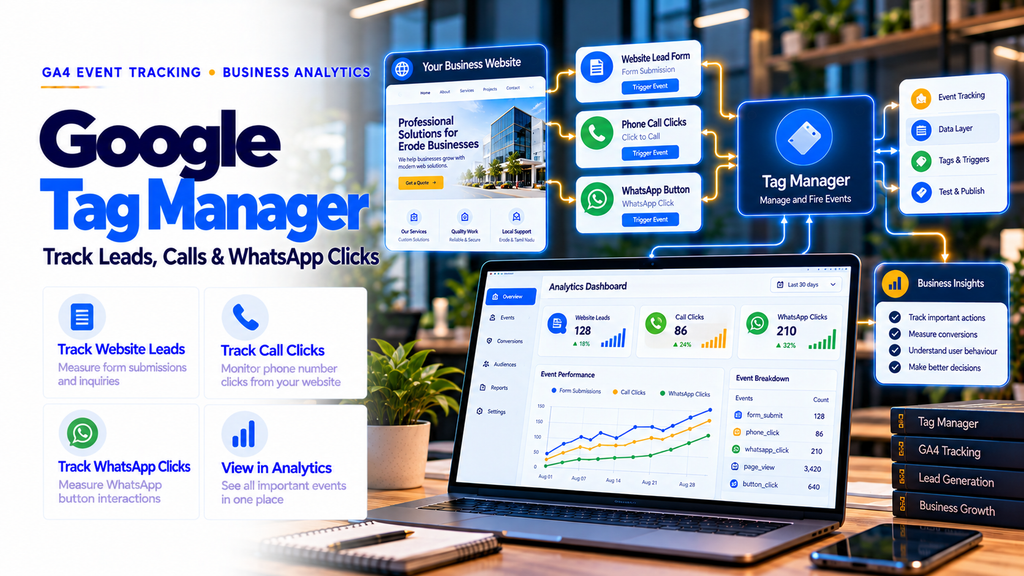
To track website leads, phone clicks and WhatsApp button clicks, install Google Tag Manager, connect the appropriate Google Analytics 4 property, configure link-click and successful form-submission triggers, create corresponding GA4 event tags, test them in GTM Preview and GA4 DebugView, then publish the verified container.
This guide explains GTM setup, triggers, variables, GA4 event tracking, WhatsApp and phone click measurement, lead form tracking, conversion reporting, privacy considerations and common implementation mistakes.
1. What Is Google Tag Manager?
Google Tag Manager is a tag management system that allows website owners to deploy and manage supported tracking tags.
Instead of manually inserting separate tracking scripts for every event, businesses can manage many configurations through a GTM container.
GTM is commonly used alongside Google Analytics 4 and Google Ads.
2. Why Businesses Need Website Event Tracking
Website traffic alone does not explain whether visitors are taking meaningful actions.
Businesses may want to measure:
- Successful enquiry form submissions
- WhatsApp link clicks
- Phone number clicks
- Email link clicks
- Quotation requests
- Appointment requests
- Brochure downloads
- Purchases
Tracking these actions helps businesses evaluate website usability and marketing performance.
3. Google Tag Manager vs Google Analytics 4
| Factor | Google Tag Manager | Google Analytics 4 |
|---|---|---|
| Main Purpose | Deploy and manage tracking tags | Collect and analyze events |
| Event Configuration | Tags, triggers and variables | Event reporting and configuration |
| Reporting | Primarily testing and tag management | Analytics reports and explorations |
| Typical Use | Send website interaction data | Understand measured interactions |
GTM and GA4 are complementary tools rather than direct replacements for each other.
4. Is Google Tag Manager Free?
The standard Google Tag Manager service is available without a subscription fee.
Professional setup, custom development, testing and reporting may involve separate service costs.
5. Requirements Before GTM Setup
- A Google account
- Access to the business website
- Permission to edit website templates or tracking configuration
- A GA4 property and web data stream
- A list of important business actions
- Appropriate privacy and consent arrangements
Use a business-controlled account and retain appropriate administrative access.
6. How to Create a Google Tag Manager Account
- Visit Google Tag Manager.
- Sign in with an appropriate Google account.
- Create a new account.
- Enter the business or organization name.
- Select the country.
- Create a container for the website.
- Select Web as the target platform.
- Complete the available setup process.
7. What Is a GTM Container ID?
Each GTM web container has an identifier similar to:
GTM-XXXXXXX
The container ID identifies the tag management configuration associated with your website.
Use the actual ID provided in your GTM account.
8. How to Install GTM on a Website
- Open your GTM web container.
- Locate the installation instructions.
- Copy the provided container snippets.
- Place the snippets in the website locations specified by Google.
- Save and deploy the website changes.
- Open GTM Preview to verify installation.
For a standard web installation, Google provides code for the page head and a noscript fallback for the body.
Follow the current official installation instructions for your platform.
9. GTM Setup for WordPress Websites
WordPress websites may support GTM installation through compatible plugins or direct template integration.
Review whether the website already uses another tag management or GA4 installation method.
Avoid inserting the same GTM container multiple times.
10. GTM Setup for Shopify Websites
Shopify implementations should use supported tracking and customer event integration methods.
Checkout tracking capabilities depend on Shopify’s current platform requirements and available integrations.
Do not assume that adding a generic script to a theme automatically measures checkout and purchase activity.
11. GTM Setup for Laravel and Next.js Websites
Custom websites can install GTM through shared layouts or supported framework integrations.
For applications with client-side navigation, test page view behavior carefully.
Single-page application navigation and dynamic components may require additional event handling.
12. Understanding Tags, Triggers and Variables
Three concepts form the foundation of GTM configuration.
- Tags: Define what measurement or marketing code should run.
- Triggers: Define when a tag should run.
- Variables: Provide information used by tags and triggers.
For example, a click trigger can detect a WhatsApp link interaction and activate a GA4 event tag.
13. What Is a GTM Tag?
A tag is a configuration that runs supported measurement or marketing code.
Examples include:
- Google tag
- GA4 event tag
- Google Ads conversion tracking tag
- Supported third-party measurement tags
Tags should be configured according to the requirements of the connected service.
14. What Is a GTM Trigger?
A trigger defines the conditions under which a tag fires.
Common trigger types include:
- Page View
- Initialization
- Click – Just Links
- Click – All Elements
- Form Submission
- Custom Event
Choose triggers that match the actual website behavior.
15. What Are GTM Variables?
Variables provide values used by tags and triggers.
Common built-in variables include:
- Click URL
- Click Text
- Click Classes
- Click ID
- Page URL
- Page Path
Enable the required built-in variables before configuring click-based tracking.
16. Connect Google Analytics 4 with GTM
- Open your GTM container.
- Create a Google tag.
- Enter the appropriate Google tag ID or GA4 measurement ID.
- Configure the tag’s firing conditions.
- Use Preview to test the installation.
- Verify events in GA4.
- Publish the tested container.
Check for existing GA4 tags to prevent duplicate measurement.
17. What Is GA4 Event Tracking?
GA4 uses events to measure activities on websites and apps.
Events may be automatically collected, collected through enhanced measurement or implemented through custom configurations.
Examples include:
page_view
click
form_submit
generate_lead
purchase
18. What Are GA4 Key Events?
Key events are events designated as important to a business.
Examples include successful lead submissions, confirmed bookings and purchases.
WhatsApp and phone link clicks may also be marked as key events when the business considers them meaningful contact-intent actions.
However, these clicks should not be confused with confirmed enquiries or sales.
19. Tracking WhatsApp Button Clicks
Many businesses use WhatsApp buttons for customer enquiries.
Common WhatsApp link patterns include:
https://wa.me/
https://api.whatsapp.com/
GTM can detect clicks on these links when they are implemented as standard clickable anchors.
20. Step-by-Step WhatsApp Click Tracking
- Open GTM.
- Enable the Click URL built-in variable.
- Create a new trigger.
- Select Click – Just Links.
- Choose Some Link Clicks.
- Configure conditions matching your actual WhatsApp link URLs.
- Create a GA4 Event tag.
- Set the event name to
whatsapp_click. - Associate the WhatsApp click trigger.
- Test using GTM Preview.
- Verify the event in GA4 DebugView.
- Publish the container after successful testing.
21. Example WhatsApp Click Trigger Conditions
A website using standard WhatsApp links may use conditions such as:
Click URL contains wa.me/

OR

Click URL contains api.whatsapp.com/
These conditions must be configured correctly in GTM using its available trigger rules.
Use Preview to confirm that only intended WhatsApp interactions activate the tag.
22. Recommended WhatsApp Event Parameters
Useful non-personal event information may include:
- Page location
- Button placement
- Contact method
Example custom parameter:
contact_method = whatsapp
Do not send phone numbers, prefilled private messages or other personal information through event parameters.
23. Does a WhatsApp Click Count as a Lead?
A WhatsApp click indicates that a visitor interacted with a link intended to open WhatsApp.
It does not prove that the visitor sent a message.
For reliable reporting, distinguish:
- WhatsApp link clicks
- Actual messages received
- Qualified enquiries
- Confirmed sales
Downstream lead confirmation requires appropriate business systems or processes.
24. Tracking Phone Number Clicks
Phone link tracking helps businesses understand how often visitors interact with clickable telephone numbers.
Standard phone links begin with:
tel:
For example:
tel:+917092330168
GTM can detect these link interactions when correctly configured.
25. Step-by-Step Phone Click Tracking
- Open GTM.
- Enable Click URL.
- Create a Click – Just Links trigger.
- Select Some Link Clicks.
- Set the condition to Click URL starts with
tel:. - Create a GA4 Event tag.
- Use an event name such as
phone_click. - Connect the trigger to the event tag.
- Test on mobile and desktop.
- Verify the event in GA4.
- Publish the container.
26. Phone Clicks vs Actual Phone Calls
A phone link click is not proof that a call connected.
Some visitors may cancel before calling.
Confirmed call measurement may require a suitable call tracking platform, telephone integration or business call records.
27. Tracking Email Link Clicks
Businesses may also measure clicks on email links.
Standard email links begin with:
mailto:
A custom GA4 event might be:
email_click
Do not treat an email link click as confirmation that an email was sent.
28. Tracking Contact Form Submissions
Contact forms are common lead-generation tools for service businesses.
However, simply measuring clicks on a Submit button can produce misleading results.
Visitors may click Submit even when the form contains errors.
For reliable lead tracking, measure successful submissions.
29. Why Form Submission Triggers Sometimes Fail
Some modern forms submit data asynchronously using JavaScript.
These forms may not behave like traditional HTML form submissions.
Common issues include:
- AJAX form submission
- JavaScript validation
- Dynamic form components
- Multiple forms on one page
- Third-party embedded forms
Use a tracking method that reflects the actual form’s success behavior.
30. Recommended Lead Form Tracking Methods
Depending on the website, reliable methods may include:
- Confirmed thank-you page
- Application-generated success event
- Validated data layer event
- Supported form integration
Use the method that most accurately represents a successful enquiry.
31. What Is the Data Layer?
The data layer is a JavaScript-based structure used to pass information and events to Google Tag Manager.
Developers can use data layer events to notify GTM when important website actions occur.
For example, an application can signal that a contact form was successfully submitted.
32. Example Successful Lead Data Layer Event
After the website confirms successful form submission, an application can send a data layer event:
window.dataLayer = window.dataLayer || [];

window.dataLayer.push({
  event: "lead_form_success",
  form_type: "contact"
});
This example should run only after the website confirms success.
Do not include customer names, phone numbers, email addresses or private form content.
33. Configure a Custom Event Trigger
- Open GTM.
- Create a new trigger.
- Select Custom Event.
- Enter the event name
lead_form_success. - Save the trigger.
- Create a GA4 Event tag.
- Use the recommended event name
generate_lead. - Associate the custom event trigger.
- Test the full form submission process.
34. Why Use generate_lead?
Google Analytics provides recommended event names for common business interactions.
generate_lead is an appropriate recommended event for successful lead generation actions.
Using documented event names can improve consistency across implementations.
35. Tracking Quotation Request Forms
B2B websites may use quotation request forms rather than standard contact forms.
Track successful quotation submissions separately when useful.
For example, the business may use the recommended generate_lead event with a non-personal parameter indicating the form type.
36. Tracking Appointment Booking Forms
Appointment-based businesses may track successful booking requests.
Distinguish between:
- Booking form opened
- Booking request submitted
- Appointment confirmed
Choose the event that best represents the intended business outcome.
37. Tracking Multiple Forms on One Website
A website may contain:
- Contact form
- Quotation form
- Demo request form
- Appointment form
- Newsletter signup
Use consistent event naming and suitable non-personal parameters to distinguish different form types.
38. Recommended GTM Event Naming Plan
| Website Action | Suggested GA4 Event | Measurement Meaning |
|---|---|---|
| WhatsApp button click | whatsapp_click | Contact intent |
| Phone link click | phone_click | Contact intent |
| Email link click | email_click | Contact intent |
| Successful lead form | generate_lead | Lead submission |
| Completed purchase | purchase | Transaction |
| File download | file_download | Content interaction |
Custom event names should follow Google’s naming requirements.
39. What Is GTM Preview Mode?
Preview mode allows website owners to test GTM configurations before publishing changes.
It helps identify:
- Which triggers activated
- Which tags fired
- Which tags did not fire
- Available variable values
- Potential configuration problems
40. How to Test WhatsApp Click Tracking
- Open GTM Preview.
- Connect to the website.
- Click the website’s WhatsApp button.
- Review the click event in the debugging interface.
- Confirm that the intended GA4 event tag fired.
- Check that unrelated links do not trigger the same tag.
41. How to Test Phone Click Tracking
- Open GTM Preview.
- Activate the phone link.
- Review the detected Click URL.
- Confirm that the phone click event fires.
- Check that the event is not duplicated.
Testing should include the devices and browsers relevant to the business.
42. How to Test Lead Form Tracking
Test both successful and unsuccessful form attempts.
- Submit an incomplete form.
- Confirm that validation errors do not create a lead event.
- Submit a valid test enquiry.
- Confirm the website reports success.
- Verify that exactly one intended lead event fires.
- Review GA4 DebugView.
Remove test enquiries from business reporting systems when appropriate and permitted.
43. What Is GA4 DebugView?
GA4 DebugView helps developers and marketers inspect events sent in debug mode.
It is useful for checking event names, event parameters and measurement behavior during implementation.
Use it alongside GTM Preview rather than relying only on standard reports.
44. How to Publish GTM Changes
- Complete configuration.
- Test the required events.
- Check for duplicate tracking.
- Review consent behavior.
- Select Submit in GTM.
- Provide a descriptive version name.
- Publish the container.
- Recheck important events on the live website.
45. Common Reasons Events Do Not Fire
- Incorrect trigger conditions
- Required variables not enabled
- Dynamic button implementation
- Incorrect event names
- Missing GTM container
- Unpublished changes
- Consent restrictions
- Third-party form limitations
Use GTM Preview and browser debugging tools to investigate.
46. Why Duplicate GA4 Events Happen
Duplicate events may occur when:
- GA4 is installed directly and through GTM without coordination.
- Multiple event tags use overlapping triggers.
- Enhanced measurement and custom tags collect the same action.
- Form success callbacks run multiple times.
- Website components are initialized repeatedly.
Audit the entire measurement implementation before making changes.
47. Tracking WhatsApp Buttons in Floating Widgets
Some websites use floating WhatsApp widgets instead of standard anchor links.
These widgets may use JavaScript click handlers, embedded frames or third-party scripts.
Standard link-click triggers may not detect every interaction.
Use a supported widget event, suitable element-click trigger or application-generated data layer event where appropriate.
48. Tracking Clicks on Mobile Websites
Mobile visitors may use sticky call buttons, floating WhatsApp icons and compact contact menus.
Test these elements separately because their implementation may differ from desktop buttons.
Ensure event tracking remains accurate across responsive layouts.
49. GA4 Key Event Configuration
After verifying that events are collected correctly, identify which events should be treated as key events.
For many lead-generation businesses, successful generate_lead events are more meaningful than ordinary contact button clicks.
Use clear event definitions to prevent misleading reports.
50. Google Ads Conversion Tracking with GTM
Businesses running Google Ads may configure supported conversion tracking through GTM.
Google Ads conversion actions and GA4 key events are related but not identical.
Review account linking, attribution settings and conversion action configuration before using conversion data for advertising decisions.
51. Conversion Linker and Google Ads
Google’s Conversion Linker tag can support appropriate Google Ads click information handling.
Follow Google’s current setup guidance for the chosen tag implementation.
Review consent settings and test the configuration before publishing.
52. GTM and Google Consent Mode
Consent Mode allows supported Google tags to adjust behavior according to consent signals.
Businesses should implement appropriate consent management based on applicable requirements.
Consent Mode does not replace a valid consent mechanism or guarantee legal compliance.
53. Protect Customer Privacy
Do not send personally identifiable or sensitive customer information to GA4 through event parameters.
Avoid collecting:
- Customer names
- Email addresses
- Phone numbers
- Private WhatsApp messages
- Contact form message contents
- Patient information
Also review page URLs and query parameters for accidental personal information exposure.
54. GTM for Textile Businesses in Erode
Textile manufacturers and traders can use GTM to measure:
- Wholesale enquiry submissions
- Quotation requests
- WhatsApp contact clicks
- Phone link clicks
- Catalog downloads
These events can help evaluate the website’s role in B2B enquiry generation.
55. GTM for Manufacturing Companies
Manufacturing businesses can track important interactions on product and capability pages.
Useful actions include RFQ submissions, brochure downloads, consultation requests and contact-intent clicks.
Use CRM records or business systems to evaluate actual lead quality.
56. GTM for Ecommerce Websites
Ecommerce websites may use GTM for supported GA4 ecommerce event collection.
Relevant events include:
- view_item
- add_to_cart
- begin_checkout
- purchase
Validate purchase events against real order records and prevent duplicate transactions.
57. GTM for Healthcare Websites
Healthcare websites may measure general contact actions and appointment requests.
Implement privacy protections and avoid transmitting patient information or sensitive health details through analytics events.
Use confirmed success events rather than counting every appointment button click as a completed booking.
58. GTM for Local Service Businesses
Local businesses often rely on direct calls, WhatsApp enquiries and contact forms.
GTM can help measure these interactions on service pages.
Businesses serving Erode, Perundurai, Bhavani, Anthiyur, Gobichettipalayam, Sathyamangalam, Chennimalai and nearby towns can use these measurements to evaluate online enquiry activity.
59. How to Measure SEO Leads with GTM and GA4
A practical measurement workflow is:
- Track relevant organic website traffic.
- Identify important landing pages.
- Measure successful lead submissions.
- Measure contact-intent clicks separately.
- Review which pages generate meaningful actions.
- Compare results with confirmed business enquiries.
GA4 can measure website interactions, while lead qualification often requires CRM or business records.
60. Example Monthly Lead Tracking Report
| Metric | Meaning |
|---|---|
| Website Sessions | Measured website sessions |
| WhatsApp Clicks | Interactions with WhatsApp links |
| Phone Clicks | Interactions with telephone links |
| Form Leads | Successfully submitted lead forms |
| Qualified Leads | Enquiries verified by business processes |
| Confirmed Sales | Actual sales recorded by the business |
Keep the definitions consistent across reporting periods.
61. Common GTM Tracking Mistakes
- Installing multiple GTM containers unintentionally
- Creating overlapping GA4 tags
- Tracking every Submit click as a lead
- Using incorrect WhatsApp link conditions
- Failing to test mobile buttons
- Ignoring AJAX form behavior
- Publishing without Preview testing
- Sending personal information in event parameters
- Ignoring consent requirements
- Counting contact clicks as confirmed customers
62. Google Tag Manager Setup Checklist
- Create a business-controlled GTM account.
- Create the correct web container.
- Install GTM according to Google’s instructions.
- Verify the container with Preview.
- Configure the Google tag.
- Confirm GA4 measurement.
- Enable relevant click variables.
- Configure WhatsApp click tracking.
- Configure phone link click tracking.
- Configure email link tracking if required.
- Configure successful form tracking.
- Use recommended GA4 event names where appropriate.
- Check duplicate events.
- Review consent behavior.
- Test desktop and mobile interactions.
- Verify events in GA4 DebugView.
- Mark important events as key events.
- Publish a documented GTM version.
- Monitor events after website changes.
63. How Much Does Google Tag Manager Setup Cost?
The standard GTM platform is free, but professional implementation costs depend on the website and tracking requirements.
Cost factors may include:
- Website platform
- Number of tracked actions
- Custom form development
- Data layer implementation
- Google Ads conversion tracking
- Consent management
- Cross-domain tracking
- Testing and reporting
Businesses should request a clear tracking specification and implementation scope.
64. How to Choose a GTM Setup Service Provider
Before choosing a provider, ask:
- Will our business own the GTM and GA4 accounts?
- Which website actions will be measured?
- How will successful forms be distinguished from failed submissions?
- Will WhatsApp and phone clicks be reported separately?
- Will the setup be tested on mobile devices?
- Will privacy requirements be considered?
- Will event documentation be provided?
65. Google Tag Manager Setup Services in Erode
Businesses in Erode and across Tamil Nadu may need help implementing GTM, GA4 events, lead tracking and analytics reporting.
Potential work includes:
- GTM account and container setup
- Google Analytics 4 integration
- WhatsApp click tracking
- Phone click tracking
- Lead form tracking
- Google Ads conversion configuration
- Custom data layer events
- Event testing and troubleshooting
- Reporting configuration
66. How Greap Technologies Can Help
Greap Technologies provides website development, SEO, software solutions and digital marketing services.
Businesses interested in tracking website leads can discuss Google Tag Manager, GA4 event tracking, contact form measurement and analytics reporting requirements with Greap Technologies.
Implementation scope should be confirmed according to the website platform and business objectives.
Visit Greap Technologies to explore website and digital growth services.
Conclusion
Google Tag Manager setup for website leads, calls and WhatsApp clicks helps businesses measure important website interactions.
A reliable implementation should distinguish contact-intent clicks from successful enquiries and confirmed sales.
By combining GTM with GA4, proper event configuration, testing and business lead verification, companies can gain a clearer understanding of their website’s contribution to marketing performance.
GTM Installation → GA4 Configuration → Click Triggers → Successful Lead Events → Testing → Key Event Reporting → Business Lead Verification.
Need Google Tag Manager and Lead Tracking Setup?
Discuss website lead tracking, WhatsApp click measurement, phone click tracking and GA4 implementation with Greap Technologies.
Discuss GTM SetupWebsite: www.greap.in
Phone: +91 70923 30168
Frequently Asked Questions About Google Tag Manager
1. What is Google Tag Manager?
Google Tag Manager is a system for deploying and managing supported website tracking tags.
2. Is Google Tag Manager free?
The standard GTM service is available without a subscription fee.
3. Can GTM track WhatsApp clicks?
Yes. GTM can measure interactions with WhatsApp links or supported button events when correctly configured.
4. Can GTM track phone calls?
GTM can measure clicks on phone links. Confirmed connected calls require additional suitable measurement methods.
5. How do I track contact form submissions?
Use a reliable success signal, such as a confirmed thank-you page or application-generated event, to send a lead event to GA4.
6. What is the difference between GTM and GA4?
GTM manages tracking tags, while GA4 collects and reports analytics events.
7. What is a GA4 key event?
A key event is an event designated as important to a business, such as a successful enquiry submission.
8. What is a data layer event?
A data layer event allows a website or application to communicate a meaningful interaction to GTM.
9. Can GTM work with WordPress?
Yes. GTM can be integrated with WordPress through supported methods.
10. Can GTM track ecommerce purchases?
Yes. With correct ecommerce implementation, GTM can help send purchase events to GA4.
11. Does a WhatsApp click mean a confirmed lead?
No. It indicates interaction with a WhatsApp link, not confirmation that a message was sent or a customer was acquired.
12. Can Greap Technologies help with GTM setup in Erode?
Greap Technologies can discuss GTM installation, GA4 integration and website lead tracking requirements based on an agreed project scope.