
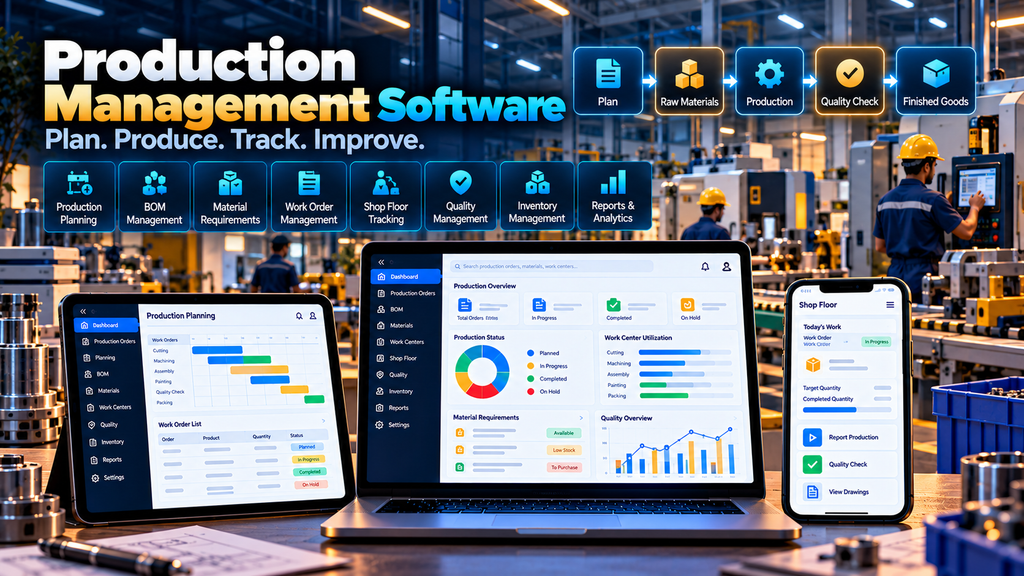
Production Management Software for Manufacturing Companies in Erode can help manufacturers organize production planning, bills of materials, raw-material requirements, work orders, shop-floor activities, work-in-progress, quality checks, wastage, finished goods and manufacturing reports through a centralized digital system.
Manufacturing involves much more than recording how many products were completed.
A customer order or internal requirement creates demand.
Production needs to be planned.
Raw materials need to be available.
Machines, work centres and employees may need to be assigned.
Production then moves through one or more manufacturing stages.
Supervisors need visibility into quantities produced, work still in progress, rejected quantities, material consumption and finished goods.
When these processes are managed through spreadsheets, paper registers, separate inventory systems and verbal updates, getting a clear picture of production can become difficult.
A properly designed Production Management System can connect these manufacturing activities around the company’s actual production workflow.
At Greap Technologies, we develop custom business software, manufacturing applications, management platforms and digital systems for companies in Erode and nearby areas.
What Is Production Management Software?
Production management software is a digital system used to plan, manage and monitor manufacturing activities.
Depending on the manufacturing process, the software can include:
- Product master
- Raw-material master
- Bill of Materials (BOM)
- Production planning
- Production orders
- Work orders
- Material requirements
- Material issue and consumption
- Work centres
- Production stages
- Work-in-progress tracking
- Production entry
- Quality checks
- Rejection records
- Rework workflows
- Scrap and wastage records
- Finished-goods entry
- Batch or lot tracking where required
- Production dashboards
- Manufacturing reports
- Warehouse integration
- ERP integration
The system should be configured around the manufacturer’s real production process rather than forcing every factory into the same workflow.
Who Can Use Production Management Software in Erode?
Custom production software can be considered by manufacturers operating different types of production environments.
Depending on requirements, this may include:
- Engineering companies
- Textile manufacturers
- Garment manufacturers
- Food manufacturers
- Machinery manufacturers
- Fabrication companies
- Component manufacturers
- Building-material manufacturers
- Packaging manufacturers
- Consumer-product manufacturers
- Industrial-product companies
- Multi-unit manufacturing businesses
Discrete manufacturing, batch manufacturing and process-oriented production can require substantially different software designs.
Production Management Software vs Manufacturing ERP
| Production Management Software | Manufacturing ERP |
|---|---|
| Focuses primarily on production operations | Connects multiple business functions |
| Production planning | Sales and purchasing |
| BOM and work orders | Inventory and warehouse |
| Shop-floor activities | Finance and accounting |
| Production tracking | Broader enterprise workflows |
| Quality and manufacturing reports | Cross-department reporting |
A production system can operate independently or form part of a broader ERP architecture depending on the business.
1. Map the Existing Manufacturing Process
Before development begins, the production process should be documented clearly.
A simplified manufacturing workflow may look like:
Demand → Production Plan → Material Requirement → Production Order → Material Issue → Production → Quality Check → Finished Goods
However, real manufacturing processes may contain several additional stages.
Important questions include:
- What triggers production?
- Is production make-to-stock or make-to-order?
- How are BOMs maintained?
- How are raw-material requirements calculated?
- How are materials issued?
- How many production stages exist?
- How is work-in-progress recorded?
- How is production output entered?
- How are rejects and rework handled?
- How are finished goods received into inventory?
2. Product Master
A product master can maintain information about goods manufactured by the company.
Depending on requirements, this can include:
- Product code
- Product name
- Category
- Unit of measure
- Specification
- Production method
- Relevant BOM
- Configured status
3. Raw Material Master
Raw materials used during production can be maintained separately.
Relevant information can include:
- Material code
- Material name
- Category
- Unit
- Specification
- Storage information where relevant
Material information should ideally connect with the inventory or warehouse system to avoid maintaining conflicting stock records.
4. Bill of Materials Management
A Bill of Materials (BOM) defines the components or materials required to manufacture a product according to the company’s approved production specification.
A BOM can contain:
- Finished product
- Raw materials
- Components
- Required quantities
- Units
- Other manufacturing-defined information
5. Multi-Level BOM
Some products are manufactured using subassemblies that are themselves produced from other components.
A multi-level BOM can represent a structure such as:
Finished Product → Subassembly → Components → Raw Materials
The complexity of the BOM structure should reflect the real manufacturing process.
6. BOM Version Management
Product designs and material requirements can change over time.
Instead of silently overwriting a previous BOM, the system can maintain controlled versions.
A BOM version can record:
- Version identifier
- Effective date
- Components
- Quantities
- Approval information
- Status
7. BOM Approval Workflow
Manufacturers with controlled product specifications may require BOM changes to be approved.
A workflow can be:
Draft BOM → Technical Review → Approval → Active BOM
The approval process should match the manufacturer’s quality and engineering controls.
8. Production Planning
Production planning determines what should be produced, in what quantity and during which period.
A production plan may be created from:
- Customer orders
- Sales forecasts
- Reorder requirements
- Minimum stock requirements
- Manual planning decisions
The planning method should follow the manufacturer’s actual operating model.
9. Make-to-Order Production
Some manufacturers begin production only after receiving a confirmed customer order.
A possible workflow can be:
Customer Order → Production Requirement → Production Order → Manufacturing → Finished Goods → Dispatch
This can be useful for customized or order-specific manufacturing.
10. Make-to-Stock Production
Other manufacturers produce goods for inventory before specific customer orders are received.
Production planning may therefore use inventory levels, demand information and management decisions.
11. Production Order Management
A production order authorizes or schedules the manufacture of a particular quantity of a product.
A production order can include:
- Production order number
- Product
- Planned quantity
- Relevant BOM
- Planned dates
- Priority
- Production location
- Status
12. Production Order Status
Production orders can move through configured statuses such as:
Draft → Planned → Released → In Production → Quality Review → Completed / Closed
The exact statuses should match the manufacturer’s process.
13. Work Order Management
A production order may be divided into one or more work orders when manufacturing involves separate activities.
Work orders can be assigned to relevant:
- Production stages
- Work centres
- Machines
- Teams
- Production periods
14. Work Centre Management
A work centre can represent a machine, production line, workstation, department or group of resources used during manufacturing.
Relevant information can include:
- Work-centre code
- Name
- Production stage
- Available status
- Other planning information
15. Production Routing
Manufacturers with multiple processing stages may define the sequence through which a product moves.
For example:
Cutting → Processing → Assembly → Inspection → Packing
The actual routing depends entirely on the product and manufacturing method.
16. Material Requirement Planning
Once production quantity and BOM information are known, the system can calculate the material requirement according to configured data.
A simplified calculation concept is:
Production Quantity × BOM Requirement = Gross Material Requirement
Actual planning may also need to consider available inventory, reserved stock, open purchase orders, scrap assumptions and other business rules.
17. Material Availability Check
Before releasing production, authorized users may need to check whether required materials are available.
Inventory information can be retrieved from the organization’s inventory, warehouse or ERP system.
The interface should clearly identify whether stock information is real-time or periodically synchronized.
18. Material Shortage Identification
The system can identify potential shortages based on configured production requirements and available inventory information.
This information can support purchasing or production-planning decisions.
It should not automatically be treated as a purchase instruction unless that workflow has been specifically designed.
19. Purchase Requirement Integration
If materials are unavailable, the production system can potentially generate or communicate a material requirement to purchasing.
A broader workflow can be:
Production Plan → Material Requirement → Shortage → Purchase Requirement → Material Receipt → Production
20. Material Reservation
Manufacturers may want to reserve available inventory for specific production orders.
This can help distinguish stock that is physically available from stock already committed to production.
21. Material Issue to Production
When production begins, materials can be issued from the warehouse or stores to the relevant production order.
An issue record can include:
- Production order
- Material
- Quantity
- Warehouse or store
- Batch or lot where relevant
- Date
- Authorized user
22. Actual Material Consumption
Actual consumption may differ from planned BOM quantities.
Where required, the system can record the material quantity actually consumed during production.
This can support production analysis and inventory accuracy.
23. Material Return
Unused materials may need to be returned from production to stores.
A controlled material-return workflow can update the relevant production and inventory records.
24. Shop Floor Management
The shop floor is where planned production becomes actual manufacturing activity.
A shop-floor interface can help supervisors and authorized employees record:
- Production order
- Work order
- Production stage
- Quantity started
- Quantity completed
- Rejected quantity
- Work-in-progress status
- Relevant production notes
25. Shop Floor Dashboard
A shop-floor dashboard should prioritize current production work rather than excessive management analytics.
It can show:
- Active work orders
- Pending operations
- Current production stage
- Planned quantity
- Completed quantity
- Pending quantity
- Quality status
26. Production Entry
Authorized users can record production output against a work order or production order.
A production entry can contain:
- Product
- Production order
- Date
- Produced quantity
- Accepted quantity
- Rejected quantity
- Relevant batch information
27. Work-in-Progress Tracking
Work-in-progress, commonly called WIP, represents production that has started but has not yet become completed finished goods.
A WIP view can help authorized users understand:
- Orders currently in production
- Current manufacturing stage
- Quantity completed
- Quantity still pending
- Production waiting for quality review
28. Stage-Wise Production Tracking
Manufacturers with multiple production operations may need to track quantities at each stage.
For example:
Raw Material → Stage 1 → Stage 2 → Stage 3 → Quality → Finished Goods
This can make production status more visible than a simple started/completed model.
29. Production Handover Between Stages
Where required, the system can record when work moves from one production stage or department to another.
This can help identify the current responsibility for a production batch or work order.
30. Batch and Lot Tracking
Some manufacturing processes require raw materials or finished products to be tracked by batch or lot.
The software can maintain batch relationships where required by the business.
The exact traceability design depends on the product, manufacturing process and applicable quality requirements.
31. Serial Number Tracking
Manufacturers producing individually identifiable items may require serial-number tracking.
A serial number can potentially connect a finished item with relevant production information.
This should be implemented only where individual-item traceability is genuinely required.
32. Quality Check Management
Quality checks can be incorporated at relevant production stages.
A quality workflow can include:
- Production order
- Product
- Inspection stage
- Configured parameters
- Result
- Accepted quantity
- Rejected quantity
- Authorized inspector
33. In-Process Quality Checks
Quality inspection does not always happen only after production is complete.
Manufacturers can configure checks during relevant production stages when their process requires them.
34. Final Quality Inspection
Finished production may require a final inspection before goods are transferred into available finished-goods inventory.
A workflow can be:
Production Completed → Quality Inspection → Accepted / Rejected / Rework → Finished Goods
35. Rejection Management
Rejected production quantities can be recorded separately from accepted output.
Depending on the process, rejection records may include:
- Production order
- Product
- Quantity
- Production stage
- Configured reason
- Disposition
36. Rework Management
Not every rejected item necessarily becomes scrap.
Where the production process permits rework, rejected output can enter a controlled rework workflow.
For example:
Quality Rejection → Rework Order → Reprocessing → Quality Recheck → Accepted / Rejected
37. Scrap and Wastage Management
Manufacturing processes may generate scrap or material wastage.
Where useful, the system can record:
- Material or product
- Quantity
- Production order
- Stage
- Configured reason
- Disposition
Wastage reporting should use verified production data and should not automatically be interpreted as employee performance.
38. Finished Goods Entry
After production and required quality checks are complete, accepted quantities can be transferred into finished-goods inventory.
A possible workflow can be:
Production Completion → Quality Approval → Finished Goods Receipt → Warehouse
39. Warehouse Integration
Production and warehouse systems often need to exchange information.
For example:
Warehouse Raw Materials → Production → Finished Goods → Warehouse
A warehouse integration can help maintain the movement of materials and finished products between storage and production.
Read more about Warehouse Management Software Development in Erode.
40. Inventory Integration
Production software should have a clearly defined relationship with inventory.
Relevant transactions can include:
- Material reservation
- Material issue
- Material return
- Material consumption
- Scrap
- Finished-goods receipt
The architecture should define which system is the authoritative source for stock balances.
41. Production Scheduling
Production scheduling can help determine when work orders should be performed.
Scheduling may consider:
- Required completion dates
- Work-centre availability
- Material availability
- Production sequence
- Priority
- Configured capacity information
Complex scheduling requires accurate data and should not be presented as automatically optimal unless the system genuinely supports such optimization.
42. Machine Management
Manufacturers may maintain a master list of relevant production machines.
Depending on requirements, information can include:
- Machine ID
- Machine name
- Work centre
- Operational status
- Relevant capacity information
43. Machine Maintenance Integration
Where machine maintenance is managed digitally, production planning can potentially consider planned machine downtime.
A connected workflow can help prevent production from being scheduled against equipment that is already marked unavailable.
44. Production Downtime Recording
Where operationally useful, authorized users can record production downtime according to configured categories.
Downtime information can help management investigate interruptions, but the data should be interpreted with production context rather than automatically attributing fault to individual employees.
45. Production Shift Management
Factories operating multiple shifts may need production records associated with the relevant shift.
This can help organize production activity by:
- Date
- Shift
- Production line
- Work centre
- Production order
46. Employee and Production Integration
Production systems can potentially connect with employee-management software where the business needs role or shift information.
Production output should not automatically be used as the sole measure of employee performance or payroll entitlement.
For attendance and payroll workflows, see Employee Attendance and Payroll Software Development in Erode.
47. Production Supervisor Dashboard
Supervisors can receive a dashboard focused on current manufacturing activity.
Depending on requirements, it can include:
- Today’s production orders
- Active work orders
- Material shortages
- Work-in-progress
- Pending quality checks
- Rejected or rework quantities
- Completed production
48. Management Production Dashboard
Management may require a higher-level view of manufacturing operations.
The dashboard can summarize verified information such as:
- Planned production
- Recorded production
- Open production orders
- Work-in-progress
- Quality status
- Material requirements
- Production by product
Dashboards should clearly state their reporting period and data definitions.
49. Production Planning Reports
Planning reports can provide authorized users with information about scheduled manufacturing requirements.
Filters can include:
- Period
- Product
- Production order
- Work centre
- Status
50. Production Output Reports
Output reports can show recorded manufacturing quantities by relevant dimensions such as:
- Product
- Date
- Shift
- Production order
- Work centre
51. Material Consumption Reports
Manufacturers can compare planned material requirements with recorded material consumption where the necessary data is available.
This can support investigation of material variance without automatically assuming that every difference represents avoidable waste.
52. WIP Reports
Work-in-progress reports can show production that has not yet reached the completed finished-goods stage.
This can help managers identify where open production orders currently sit within the manufacturing process.
53. Rejection and Rework Reports
Quality teams can review rejection and rework records by:
- Product
- Production order
- Stage
- Configured reason
- Date range
The purpose should be process visibility and investigation rather than unsupported conclusions about cause.
54. Production Traceability
Where required, a production system can create relationships between:
Raw Material → Production Order → Manufacturing Stages → Quality → Finished Product
The required depth of traceability depends on the manufacturing process and applicable business or regulatory requirements.
55. Sales Order Integration
Make-to-order manufacturers may want confirmed sales orders to generate production requirements.
A possible workflow can be:
Quotation → Customer Approval → Sales Order → Production Requirement → Manufacturing → Dispatch
For the commercial side of this workflow, see Quotation and Invoice Management Software Development in Erode.
56. Dealer and Distributor Integration
Manufacturers selling through dealer networks may connect demand from their distribution system with production planning.
A broader workflow can look like:
Dealer Orders → Sales Orders → Production Planning → Manufacturing → Warehouse → Dispatch
Explore Dealer and Distributor Management Software Development in Erode.
57. B2B Ecommerce Integration
Manufacturers accepting digital B2B orders may need confirmed demand to connect with inventory or production workflows.
This does not mean every ecommerce order should automatically trigger manufacturing.
The business should define rules for stock availability, order approval and production planning.
Learn more about B2B Ecommerce Website Development for Wholesalers and Manufacturers in Erode.
58. Transport and Logistics Integration
After finished goods are produced and made available for dispatch, relevant order information can move into transport workflows.
An end-to-end process can be:
Sales Order → Production → Finished Goods → Warehouse → Dispatch → Transport → Delivery
Read about Transport and Logistics Management Software Development in Erode.
59. ERP Integration
A production management system can potentially integrate with an existing ERP.
Depending on architecture, information may move between:
- Sales
- Purchasing
- Inventory
- Production
- Warehouse
- Accounting
Integration feasibility depends on the ERP’s APIs, database architecture, supported interfaces and permissions.
60. API Integration
APIs can be used to connect production software with supported external systems.
Potential integrations may include:
- ERP
- Inventory software
- Warehouse management
- Sales platforms
- Purchasing systems
- Quality systems
- Other approved manufacturing applications
61. Role-Based Access Control
Different manufacturing users require different levels of system access.
| User | Example Access |
|---|---|
| Production Planner | Production planning and authorized production orders |
| Supervisor | Assigned shop-floor and production workflows |
| Stores User | Authorized material issue and return workflows |
| Quality User | Configured inspection and quality workflows |
| Management | Authorized manufacturing reports |
| Administrator | Configured system administration |
62. Audit Trail
Important manufacturing transactions should be traceable where appropriate.
An audit trail can record changes involving:
- BOMs
- Production orders
- Material issues
- Production quantities
- Quality results
- Rework records
- Finished-goods entries
- User permissions
63. Production Data Security
Manufacturing software can contain confidential information about products, materials, processes, quantities and customers.
Security planning can include:
- Secure authentication
- Role-based authorization
- Secure communications
- Session controls
- Input validation
- Audit logging
- Secure APIs
- Backup procedures
- Software updates
64. Backup and Recovery
Backup planning should cover relevant:
- Product masters
- BOMs
- Production orders
- Work orders
- Material transactions
- Production entries
- Quality records
- Application configuration
Recovery procedures should also be documented and tested.
65. Data Migration
Manufacturers moving from spreadsheets or existing software may need to migrate data such as:
- Products
- Materials
- BOMs
- Work centres
- Open production orders
- Relevant inventory information
- Selected historical data
Existing information should be validated before migration.
66. Mobile and Tablet Shop-Floor Interface
Shop-floor users may not always work at desktop computers.
A responsive interface can provide selected production functions on tablets or appropriate mobile devices.
Common actions should remain simple, such as:
Open Work Order → Enter Quantity → Record Quality / Status → Save
67. Barcode and QR Code Workflows
Where appropriate, barcode or QR-code workflows can help users identify materials, production orders, batches or finished goods.
The identifier should connect to verified system records rather than encoding unnecessary confidential information directly into the code.
68. Testing Production Software Before Launch
Manufacturing software should be tested using realistic production scenarios before company-wide rollout.
Testing can include:
- BOM calculations
- Production planning
- Material requirements
- Production orders
- Material issues
- Production entries
- WIP
- Quality checks
- Rework
- Finished-goods receipt
- Permissions
- Integrations
- Reports
Production planners, supervisors, stores teams and quality users should participate in user acceptance testing where relevant.
Production Management Software Modules
| Module | Purpose |
|---|---|
| Product Master | Maintain manufactured-product information |
| Material Master | Maintain production materials and components |
| BOM | Define material requirements for products |
| Production Planning | Plan manufacturing requirements |
| Production Orders | Authorize and manage production |
| Work Orders | Manage individual manufacturing operations |
| Materials | Manage issue, consumption and returns |
| Shop Floor | Record manufacturing activity |
| WIP | Track unfinished production |
| Quality | Manage configured production inspections |
| Rework & Scrap | Record production exceptions |
| Finished Goods | Transfer accepted production into inventory |
| Reports | Provide authorized manufacturing information |
| Integrations | Connect supported ERP, inventory and warehouse systems |
Production Management Software vs Warehouse Management Software
Production management software focuses on converting materials into manufactured goods.
Warehouse management software focuses on receiving, storing, picking, packing and dispatching inventory.
For manufacturers, the systems can work together:
Warehouse → Raw Materials → Production → Finished Goods → Warehouse → Dispatch
Keeping production and warehouse responsibilities clearly defined can reduce duplicate stock records.
Production Management Software vs Inventory Software
Inventory software answers questions about stock quantities and movements.
Production software answers questions about how materials are transformed into finished goods.
Manufacturers often need both capabilities connected through controlled transactions.
Production Software vs ERP
A production management platform can focus deeply on manufacturing operations.
An ERP generally connects broader organizational processes such as sales, purchasing, inventory, manufacturing and finance.
A company with an existing ERP may therefore need a specialized production module or integration rather than an entirely separate replacement platform.
Custom Production Software vs Ready-Made Manufacturing Software
Ready-made manufacturing software can be suitable when its workflows already match the company’s production process.
Custom development can be considered when the manufacturer requires:
- Unique production stages
- Custom BOM structures
- Special material workflows
- Industry-specific quality checks
- Custom work orders
- Special approval processes
- Existing ERP integration
- Custom shop-floor interfaces
- Specialized reports
Neither option is automatically better for every manufacturer.
How Much Does Production Management Software Cost in Erode?
There is no single development price because manufacturing requirements vary significantly.
Project scope can depend on:
- Number of products
- BOM complexity
- Production stages
- Number of factories or units
- Work centres
- Material workflows
- Quality requirements
- Batch or serial tracking
- Shop-floor interfaces
- Warehouse integration
- ERP integration
- Data migration
- Reports
- Security requirements
A basic production-order system has a very different scope from a multi-unit manufacturing platform with multi-level BOMs, shop-floor tracking, quality workflows, warehouse integration and ERP connectivity.
How Long Does Production Management Software Development Take?
The timeline depends on the complexity of the manufacturing workflow.
Factors can include:
- Requirement analysis
- Production-process mapping
- BOM design
- UI/UX design
- Number of modules
- Shop-floor requirements
- External integrations
- Data migration
- Testing
- User acceptance
A realistic implementation timeline should be prepared after the production workflow is documented.
Should Production Software Be Developed in Phases?
For larger manufacturing systems, phased development can make implementation easier to validate.
A possible sequence is:
- Products, materials and BOM
- Production planning
- Production and work orders
- Material issue and consumption
- Shop-floor production entry
- WIP tracking
- Quality, rejection and rework
- Finished-goods integration
- Dashboards and reports
- ERP, warehouse and other integrations
The actual rollout sequence should follow business priorities and technical dependencies.
Production Management Software for SMEs in Erode
Small and medium-sized manufacturers may not require a large enterprise manufacturing platform from the beginning.
A focused system can start with:
- Products
- Materials
- BOMs
- Production orders
- Material consumption
- Production entry
- Finished goods
- Basic production reports
Additional modules can be introduced when there is a clear operational requirement.
Production Management Software for Multi-Unit Manufacturers
Manufacturers operating multiple factories or production units may require separation by location while still providing authorized centralized visibility.
The software can potentially support:
- Factory-specific production orders
- Factory warehouses
- Work centres
- Production teams
- Location-level reporting
- Central management reports
Production Management Software in Erode and Nearby Areas
Greap Technologies can develop custom production and manufacturing management systems for businesses in Erode, Perundurai, Bhavani, Gobichettipalayam, Sathyamangalam, Anthiyur, Chennimalai, Modakkurichi, Kavindapadi, Nambiyur, Kodumudi and nearby areas.
Each project should be designed around the manufacturer’s actual production process rather than creating the same workflow for every company.
Why Choose Greap Technologies for Production Management Software in Erode?
Greap Technologies provides custom software development, business applications and digital solutions for companies in Erode and nearby areas.
Depending on project requirements, production software can include:
- Product management
- Raw-material management
- BOM management
- Production planning
- Production orders
- Work orders
- Material requirements
- Material issue and consumption
- Shop-floor management
- WIP tracking
- Production stages
- Batch or lot tracking
- Quality workflows
- Rejection management
- Rework management
- Scrap and wastage records
- Finished-goods workflows
- Dashboards
- Manufacturing reports
- Role-based access
- Warehouse integration
- Inventory integration
- ERP integration
- Data migration
- Ongoing technical support
The objective is to understand how materials currently move through the factory and then develop software around the production stages that genuinely need better planning, traceability and operational visibility.
Explore Greap Technologies, Website Development Services, Ecommerce Development Services, SEO Services in Erode and Digital Marketing Services.
Conclusion
Production management software can help manufacturing companies connect planning, materials, shop-floor activities, quality and finished-goods workflows through a structured digital platform.
A practical manufacturing system should follow the real production flow:
Demand → Production Plan → Materials → Production Order → Shop Floor → Quality → Finished Goods → Warehouse
Depending on requirements, this workflow can then connect with:
- Sales orders
- Purchasing
- Inventory
- Warehouse management
- Dealer management
- B2B ecommerce
- Transport and logistics
- ERP
- Accounting systems
The software should make production information easier to manage without promising unrealistic productivity improvements or forcing manufacturers into processes that do not match their operations.
Need Production Management Software in Erode?
If your manufacturing company currently manages BOMs, production plans, work orders, material usage and shop-floor records through spreadsheets, paper registers or disconnected applications, a custom production platform may help centralize the workflow.
Greap Technologies develops custom production software, manufacturing-management systems, warehouse platforms and business applications for companies in Erode and nearby areas.
Discuss Your Production Management Software Project on WhatsApp
Frequently Asked Questions
1. What is production management software?
Production management software is a digital system used to manage manufacturing workflows such as BOMs, production planning, work orders, materials, shop-floor activities, quality checks, work-in-progress and finished goods.
2. Can production software manage Bills of Materials?
Yes. A custom system can maintain single-level or multi-level BOMs, material quantities and controlled BOM versions according to manufacturing requirements.
3. Can the software calculate raw-material requirements?
Yes. Material requirements can be calculated using production quantities, BOM data and configured planning rules. More advanced planning may also consider available and committed inventory.
4. Can production software track work-in-progress?
Yes. Work-in-progress can be tracked by production order, work order, stage, product or other manufacturing dimensions configured for the system.
5. Can it manage quality checks and rejected production?
Yes. Quality inspections, accepted quantities, rejected quantities and rework workflows can be included according to the manufacturer’s quality process.
6. Can production software manage multiple production stages?
Yes. Products can move through configured production routes and stages, with relevant quantities and statuses recorded at each step.
7. Can production software integrate with warehouse management software?
Potentially. Material issues, returns and finished-goods receipts can connect with a warehouse platform when suitable integration methods are available.
8. Can it integrate with an existing ERP?
Potentially. Integration depends on the ERP’s APIs, supported interfaces, permissions and technical architecture.
9. Can the system support barcode or QR-code workflows?
Yes. Where appropriate, barcode or QR-code workflows can help identify materials, work orders, batches and finished goods.
10. Is custom production software better than ready-made manufacturing software?
Not always. Ready-made software can be suitable when its workflows already match the manufacturer. Custom development can be considered when production stages, BOM structures, integrations or reporting requirements are sufficiently specialized.
11. How much does production management software development cost in Erode?
Development cost depends on BOM complexity, production stages, work centres, shop-floor workflows, quality requirements, integrations, reports, migration and overall project scope.
12. Does Greap Technologies develop production management software in Erode?
Yes. Greap Technologies develops custom production, manufacturing, warehouse and business-management software for companies in Erode and nearby areas.


