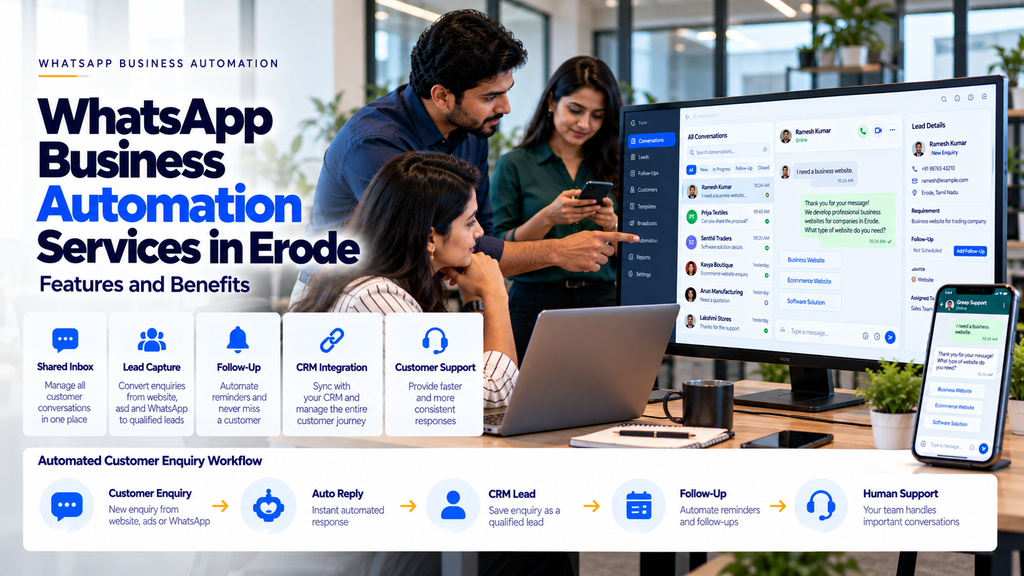
WhatsApp Business Automation Services in Erode: Features and Benefits
WhatsApp has become an important communication channel for many businesses. Customers use messaging to ask about products, request quotations, check order updates, book appointments and contact support teams.
However, managing a growing number of conversations manually can become difficult.
Employees may need to reply to repeated questions, record customer information, assign enquiries, remember follow-up dates and update business software.
When these activities are handled through disconnected processes, businesses may experience delays, inconsistent communication and unnecessary administrative work.
This is where WhatsApp Business automation services in Erode can help.
WhatsApp automation can connect approved messaging workflows with customer support systems, CRM software, enquiry forms and other business applications.
For businesses in Erode and across Tamil Nadu, suitable automation may help organize customer conversations, support timely responses and reduce repetitive manual tasks.
However, WhatsApp automation must be implemented using authorized platform capabilities and must respect customer consent, messaging rules, privacy and security requirements.
In this guide, we explain the features, benefits, use cases, integration options, implementation process and cost factors involved in WhatsApp Business automation.
What Is WhatsApp Business Automation?
WhatsApp Business automation refers to using approved software tools, integrations and predefined workflows to support business communication through WhatsApp.
Depending on the solution, automation may help businesses:
- Send appropriate enquiry acknowledgements
- Organize incoming customer messages
- Assign conversations to employees
- Create CRM leads
- Schedule follow-up tasks
- Send approved notifications
- Route common support questions
- Track conversation status
More advanced systems may use AI to help interpret messages, categorize enquiries or suggest responses.
Not every WhatsApp automation workflow requires artificial intelligence.
WhatsApp Business App vs WhatsApp Business Platform
Businesses should understand the difference between the WhatsApp Business app and the WhatsApp Business Platform.
| WhatsApp Business App | WhatsApp Business Platform |
|---|---|
| Designed for business messaging through an app | Designed for integration with business software and messaging workflows |
| Provides selected built-in business tools | Supports API-based integration through approved access methods |
| Suitable for many smaller communication needs | Useful for more complex messaging and system integration requirements |
| Automation capabilities are limited to supported app features | Can support approved templates, webhooks and application workflows |
| Typically managed through the app interface | Can connect with CRM, helpdesk and other business systems |
The appropriate option depends on business requirements, eligibility, messaging volume and supported platform capabilities.
Why Businesses in Erode Consider WhatsApp Automation
Businesses may receive customer enquiries through their websites, advertisements, product catalogues, social media pages and existing customer relationships.
Managing these conversations manually can create operational challenges.
Common examples include:
- Repeated questions about services
- Enquiries arriving outside working hours
- Difficulty assigning conversations
- Customer details stored in separate spreadsheets
- Missed internal follow-up tasks
- Manual order status communication
- Limited visibility into pending customer requests
Automation can help address selected challenges when the workflow is clearly defined and the integration is implemented correctly.
1. Automated Customer Enquiry Acknowledgements
Businesses may want customers to know that an enquiry has been received.
Depending on the messaging context and applicable platform rules, an automated acknowledgement can provide basic information or explain the next step.
For example:
Customer: I would like details about your website development service.
Business: Thank you for contacting us. Please share your website requirement so our team can assist you.
The message should accurately represent the business’s response process.
2. Shared WhatsApp Team Inbox
A shared team inbox can help multiple authorized employees manage business conversations.
Potential features include:
- Conversation assignment
- Agent access permissions
- Conversation status
- Internal notes
- Customer history
- Team workload visibility
The exact functionality depends on the connected inbox software and WhatsApp integration.
3. WhatsApp Lead Capture Automation
WhatsApp enquiries can sometimes be connected to a CRM or lead management system.
A possible workflow is:
Customer Message → Lead Record → Sales Assignment → Follow-Up Task
Depending on permissions and integration capabilities, the system may record:
- Customer contact details
- Enquiry category
- Requested service
- Assigned salesperson
- Follow-up status
Only collect and retain customer information needed for legitimate business purposes.
4. WhatsApp CRM Integration
CRM integration can help businesses organize customer communication alongside sales activities.
Possible capabilities include:
- Creating leads from enquiries
- Connecting messages to customer records
- Assigning leads to sales teams
- Recording activity history
- Scheduling internal follow-ups
- Updating lead stages
Integration requirements depend on the CRM platform, available APIs and data access permissions.
5. Automated Sales Follow-Up Workflows
Sales teams often need to follow up after a quotation, product enquiry or initial discussion.
Automation can help staff remember these activities.
For example:
New Lead → Requirement Discussion → Quotation Sent → Follow-Up Reminder → Lead Status Update
Some customer-facing follow-up messages may be sent automatically when permitted by applicable messaging rules and customer preferences.
Businesses should avoid excessive or unwanted messages.
6. WhatsApp Chatbot Integration
Chatbots can help businesses handle selected routine questions.
Possible chatbot functions include:
- Service information
- Product categories
- Business hours
- Contact information
- Enquiry collection
- Support request routing
A chatbot may be rule-based, AI-assisted or a combination of both.
Important questions should be answered using verified business information.
7. AI-Powered WhatsApp Chatbots
AI-powered chatbots may interpret customer messages written in different ways.
For example, a customer may ask:
- Do you create ecommerce websites?
- Can you build an online shopping website?
- I want to sell products online. What should I do?
An appropriately configured AI chatbot may identify that these questions concern ecommerce website development.
However, AI-generated responses can be inaccurate. Businesses should use verified knowledge sources, monitoring and human escalation.
8. WhatsApp Appointment Reminders
Appointment-based businesses may use approved messaging workflows for confirmations and reminders.
Potential applications include:
- Appointment acknowledgement
- Scheduled reminders
- Rescheduling information
- Administrative follow-ups
Messages should be based on confirmed appointment data and sent in accordance with platform requirements and customer preferences.
9. WhatsApp Order Notifications
Ecommerce and order-based businesses may use WhatsApp to communicate approved transactional updates.
Examples include:
- Order confirmation
- Processing status
- Dispatch notification
- Delivery updates
- Support information
Order-specific messages should use accurate information from connected systems.
10. WhatsApp Quotation Workflows
Quotation-based businesses may use WhatsApp as part of their customer communication process.
A suitable workflow may include:
Customer Enquiry → Requirement Collection → Quotation Preparation → Staff Approval → Customer Communication
Quotation amounts, terms and commitments should be verified before being communicated.
11. WhatsApp Payment Reminders
Businesses may need to remind customers about outstanding payments.
Approved notification workflows can support appropriate reminders when the business has a valid reason and permission to contact the customer.
Payment information should come from verified accounting records.
Businesses should not send inaccurate payment demands or expose sensitive financial information.
12. WhatsApp Customer Support Automation
Customer support teams may receive repeated questions about products, services and existing orders.
Automation can help:
- Categorize support requests
- Provide approved routine information
- Create support tickets
- Assign tickets to staff
- Track pending requests
- Escalate complex conversations
Customers should have a practical way to reach human support when necessary.
13. WhatsApp Integration With Business Websites
Businesses can provide a WhatsApp contact link on their websites.
For example:
Website Visitor → WhatsApp Conversation → Business Response
More advanced integrations may connect enquiries with CRM or customer support systems.
A basic click-to-chat link does not automatically provide full WhatsApp Business Platform automation.
14. WhatsApp Integration With Ecommerce Stores
Ecommerce businesses may consider integrations for:
- Customer enquiries
- Order notifications
- Delivery updates
- Customer support
- Returns enquiries
- Approved cart recovery communication
Cart recovery and promotional messages must follow applicable consent and messaging requirements.
15. WhatsApp Automation for Manufacturers
Manufacturers may receive enquiries from dealers, distributors and business buyers.
Automation opportunities may include:
- Product enquiry routing
- Catalogue request handling
- Quotation follow-up tasks
- Order status notifications
- Dispatch communication
Technical specifications, pricing and stock information should be based on approved business data.
16. WhatsApp Automation for Textile Businesses in Erode
Textile businesses may manage enquiries relating to yarn, fabric, garment production, wholesale orders and dispatch schedules.
Potential applications include:
- Wholesale enquiry capture
- Product catalogue requests
- Sales team assignment
- Quotation follow-up reminders
- Order status communication
- Dispatch notifications
The workflow should match the business’s actual operational process.
17. WhatsApp Automation for Wholesale and Distribution
Wholesale businesses may communicate regularly with dealers, retailers and distributors.
Suitable workflows can support:
- Order enquiry management
- Dealer communication
- Order confirmations
- Dispatch updates
- Approved payment reminders
- Support request tracking
18. WhatsApp Automation for Clinics
Clinics may use authorized messaging workflows for administrative communication.
Examples include:
- Appointment confirmations
- Appointment reminders
- Administrative enquiries
- Contact and location information
Healthcare information requires careful privacy controls. Sensitive medical details should not be exposed through insecure workflows.
19. WhatsApp Automation for Real Estate Businesses
Real estate businesses may use messaging to coordinate enquiries and site visit requests.
Potential applications include:
- Property enquiry collection
- Agent assignment
- Site visit scheduling
- Customer follow-up tasks
- Enquiry status tracking
Property pricing and availability should be verified before communication.
20. WhatsApp Automation for Educational Institutions
Educational institutions may use messaging for approved administrative communications.
Examples include:
- Admission enquiry responses
- Application status information
- Appointment scheduling
- Administrative notifications
Student information and contact permissions require appropriate safeguards.
21. WhatsApp Automation for Service Businesses
Service companies may use WhatsApp to manage quotation requests, service appointments and customer support.
Possible workflows include:
- Service enquiry acknowledgement
- Requirement collection
- Staff assignment
- Quotation status tracking
- Service scheduling
- Support follow-ups
22. WhatsApp Message Templates
The WhatsApp Business Platform uses message templates for certain business-initiated communications.
Templates may be subject to review and approval, and messaging categories can affect applicable charges and requirements.
Businesses should use the correct template category and follow current platform policies.
Templates should accurately represent the purpose of the message.
23. Understanding the Customer Service Window
WhatsApp Business Platform messaging rules distinguish between customer-initiated service conversations and certain business-initiated messages.
A customer message generally opens a 24-hour customer service window, during which supported free-form responses may be sent.
Outside that window, businesses generally need an approved message template to initiate or resume communication.
Specific platform rules, exceptions and pricing can change, so businesses should verify current requirements before implementation.
24. WhatsApp Automation and Customer Consent
Customer permission is an important part of responsible business messaging.
Businesses should:
- Obtain appropriate opt-in permission
- Explain the types of messages customers may receive
- Respect opt-out requests
- Avoid unsolicited promotional messages
- Maintain appropriate consent records
- Follow platform messaging policies
Having a customer’s phone number does not automatically mean the business has permission to send promotional messages.
25. WhatsApp Automation vs Bulk Messaging
Business automation and unsolicited bulk messaging are not the same thing.
Responsible automation focuses on relevant customer communication, approved notifications and legitimate workflows.
Businesses should avoid unofficial tools that promise unrestricted messaging or bypass platform restrictions.
Such tools may create compliance, reliability and account access risks.
26. WhatsApp Automation With CRM Software
A CRM integration can help businesses connect conversations with customer records and sales activities.
Example:
WhatsApp Enquiry → CRM Lead → Assigned Salesperson → Follow-Up Task → Lead Status
Potential benefits include better record organization and improved visibility into pending sales activities.
Actual results depend on integration quality and staff adoption.
27. WhatsApp Automation With ERP Software
Some businesses may want WhatsApp notifications connected to ERP or order management systems.
Possible workflows include:
- Approved order status notifications
- Dispatch updates
- Purchase order communication
- Customer service routing
ERP integration should use authorized APIs and verified business data.
28. WhatsApp Automation With Appointment Software
Appointment systems may trigger suitable notifications when a booking is confirmed, changed or cancelled.
A typical workflow is:
Booking Confirmed → Approved Notification → Reminder → Appointment Status Update
The automation should not invent appointment availability or confirmation status.
29. Benefits of WhatsApp Business Automation
Reduced Repetitive Work
Routine acknowledgements, routing and reminders can require less manual effort.
Better Conversation Organization
Shared inboxes and CRM integration can help teams track customer requests.
Improved Follow-Up Visibility
Automated tasks can help staff identify pending activities.
More Consistent Communication
Approved templates and defined workflows can support consistent information.
Support for Business Reporting
Connected systems may help summarize recorded customer communication activities.
These are potential operational benefits, not guaranteed performance outcomes.
30. Limitations of WhatsApp Automation
Automation systems also have limitations.
Possible challenges include:
- Platform messaging restrictions
- Template approval requirements
- API and service provider charges
- Integration complexity
- Customer consent management
- Data privacy requirements
- Incorrect chatbot responses
- Workflow failures
- Staff training requirements
Businesses should evaluate these factors before implementation.
31. WhatsApp Automation Security
WhatsApp automation systems may process customer contact details, messages, orders and business information.
Security planning should include:
- Secure API credentials
- Role-based access controls
- Authorized integrations
- Appropriate data retention
- Audit logs
- Secure CRM connections
- Vendor security reviews
- Compliance with applicable privacy requirements
Businesses should avoid exposing sensitive information to unauthorized users or integrations.
32. WhatsApp Automation Implementation Process
- Requirement Analysis: Identify customer communication goals.
- Workflow Planning: Map enquiries, notifications and follow-up processes.
- Platform Assessment: Confirm the appropriate WhatsApp Business solution.
- Integration Design: Plan CRM, website or software connections.
- Template Preparation: Prepare suitable messages and obtain required approvals.
- Development: Configure the approved automation workflows.
- Testing: Verify messages, permissions, exceptions and system responses.
- Deployment: Introduce the system to the business team.
- Monitoring: Review performance, errors and changing requirements.
33. How to Measure WhatsApp Automation Performance
Businesses should define meaningful performance indicators.
Examples include:
- Number of incoming enquiries
- Enquiry assignment time
- Customer response time
- Follow-up completion rate
- Support resolution time
- Workflow error rate
- Qualified leads recorded in CRM
- Customer opt-out rate
Message volume alone does not prove that automation is improving business outcomes.
34. How Much Does WhatsApp Business Automation Cost in Erode?
The total cost depends on the chosen platform, messaging requirements and integration scope.
Potential cost components include:
- Initial configuration
- WhatsApp Business Platform charges
- Service provider fees where applicable
- Message template usage
- CRM integration
- Chatbot development
- Custom workflow development
- Hosting
- Maintenance and support
Platform charges and pricing models can change.
Businesses should review current official pricing and request a quotation that separates one-time development costs from recurring usage charges.
35. How to Choose a WhatsApp Automation Company in Erode
Before choosing an automation provider, consider:
- Understanding of business requirements
- Use of authorized platform integrations
- CRM and software integration capabilities
- Customer consent management
- Security practices
- Message template handling
- Testing and monitoring procedures
- Maintenance and support arrangements
- Transparent recurring cost information
A suitable provider should explain both the capabilities and limitations of the proposed solution.
36. WhatsApp Business Automation Across Erode District
Businesses serving customers in Erode and nearby locations may explore WhatsApp automation based on their operational needs.
Relevant areas include:
- Erode
- Perundurai
- Bhavani
- Anthiyur
- Gobichettipalayam
- Sathyamangalam
- Chennimalai
- Modakkurichi
- Kodumudi
- Nambiyur
- Kavindapadi
- Ammapettai
- Arachalur
- Sivagiri
- Punjai Puliampatti
- Thalavadi
Automation requirements depend on the business model, customer communication process and available software systems.
37. Common WhatsApp Automation Mistakes
- Using unauthorized bulk messaging tools
- Sending promotional messages without appropriate permission
- Ignoring template requirements
- Automating inaccurate business information
- Failing to provide human support
- Connecting CRM systems without access controls
- Ignoring recurring messaging costs
- Sending excessive follow-up messages
- Failing to test message delivery and workflow errors
- Assuming automation guarantees sales
- Ignoring customer opt-out requests
- Failing to train employees
38. WhatsApp Business Automation Checklist
- Define communication goals.
- Identify suitable automation workflows.
- Choose an authorized integration method.
- Review customer consent requirements.
- Plan message templates.
- Identify CRM or software integrations.
- Define staff roles and permissions.
- Prepare accurate business information.
- Configure human escalation.
- Review data privacy.
- Test customer journeys.
- Monitor errors and message delivery.
- Track recurring costs.
- Train employees.
- Review workflow performance regularly.
39. How Greap Technologies Can Help
Greap Technologies can help businesses assess WhatsApp automation requirements as part of software development, CRM integration and business automation projects.
Depending on the agreed scope and available platform integrations, work may include:
- WhatsApp automation requirements analysis
- Business workflow planning
- Website-to-WhatsApp integration
- WhatsApp Business Platform integration
- CRM lead capture
- Customer enquiry routing
- Sales follow-up workflows
- Chatbot integration
- Appointment notification workflows
- Order status notifications
- Custom software integration
- Testing and maintenance
Explore Greap Technologies for business software development, website development and automation solutions.
Conclusion
WhatsApp Business automation services in Erode can help businesses organize customer communication and reduce selected repetitive activities.
Useful applications include enquiry acknowledgements, shared team inboxes, CRM integration, lead follow-up tasks, chatbots, appointment reminders and order notifications.
However, successful implementation requires more than connecting a messaging tool.
Businesses must understand their workflows, use authorized platform capabilities, protect customer information, respect messaging permissions and monitor system performance.
A practical implementation process is:
Identify Communication Needs → Plan Workflows → Choose Approved Integration → Configure → Test → Train → Monitor
For businesses in Erode and across Tamil Nadu, a well-planned WhatsApp automation system can become a useful part of customer communication and business process management.
Need WhatsApp Automation for Your Business?
Greap Technologies can help you discuss WhatsApp integration, customer enquiry management, CRM workflows and suitable automation requirements.
Frequently Asked Questions
1. What is WhatsApp Business automation?
WhatsApp Business automation uses approved software and integrations to support customer messaging workflows, enquiry handling, notifications and business system connections.
2. Can WhatsApp automatically reply to customer enquiries?
Selected automated replies are possible through supported WhatsApp Business features and authorized platform integrations.
3. Can WhatsApp connect to CRM software?
Yes, integration may be possible when the CRM and messaging platform support the required APIs or approved connection methods.
4. Can businesses automate WhatsApp follow-ups?
Businesses can automate internal follow-up tasks and certain permitted customer messages, subject to messaging rules and customer preferences.
5. Is WhatsApp Business automation free?
Costs depend on the chosen solution. Advanced platform integrations may involve development, provider, messaging and maintenance charges.
6. Can WhatsApp automation be used for ecommerce?
Yes. Approved workflows may support customer enquiries, order notifications, delivery updates and customer support.
7. Can AI chatbots work with WhatsApp?
AI chatbots may be integrated through authorized WhatsApp Business Platform solutions with suitable security and response controls.
8. Can businesses send unlimited automated WhatsApp messages?
No. Businesses must comply with applicable platform messaging rules, quality requirements, permissions and limits.
9. Is customer consent required for WhatsApp automation?
Appropriate customer permission is important, particularly for business-initiated and promotional communications. Businesses must follow applicable platform and legal requirements.
10. Is WhatsApp automation secure?
Security depends on authorized integrations, access controls, data handling, vendor practices and ongoing maintenance.
11. How much does WhatsApp automation cost in Erode?
Cost depends on the messaging platform, integrations, chatbot features, development scope, message usage and support requirements.
12. Does Greap Technologies provide WhatsApp automation services in Erode?
Greap Technologies can help assess WhatsApp automation requirements and implement suitable business workflows according to the agreed scope and available authorized integrations.