Business Process Automation Software Development in Erode
Many businesses depend on a series of daily activities to manage sales, customer enquiries, purchases, inventory, production, billing, and internal approvals.
These activities are important, but handling every step manually can create unnecessary administrative work.
For example, a customer enquiry may arrive through a website or messaging channel. An employee records the enquiry, sends it to the sales team, prepares a quotation, requests approval, follows up with the customer, and updates a spreadsheet.
When these steps are handled through disconnected systems, businesses may experience delays, repeated data entry, missing information, and limited visibility into ongoing work.
This is where business process automation software development in Erode can help.
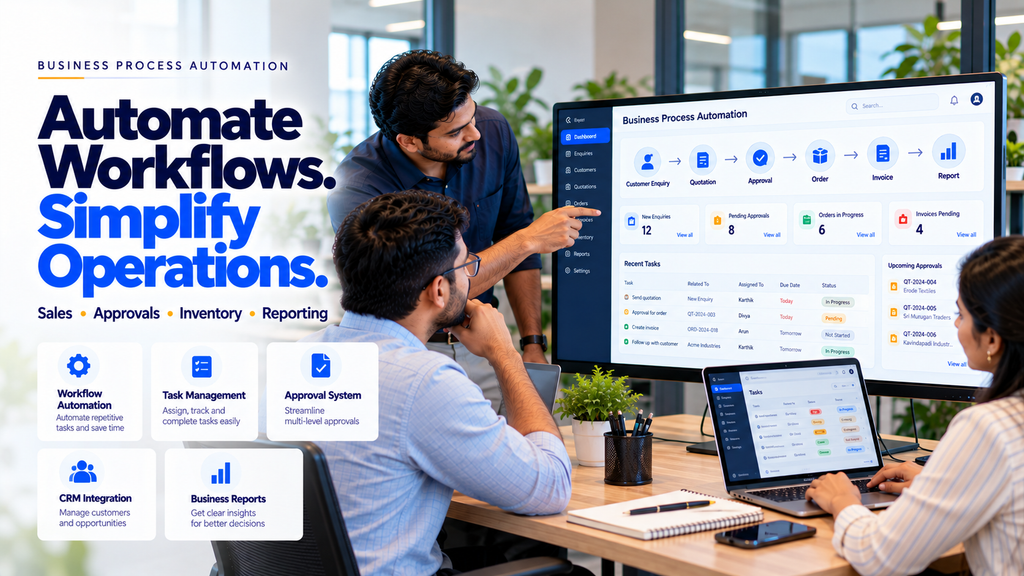
Business process automation, commonly called BPA, uses software to coordinate repetitive tasks, business rules, approvals, notifications, and information transfers.
For manufacturers, textile businesses, wholesalers, retailers, and service companies in Erode and across Tamil Nadu, suitable automation can help improve workflow consistency and reduce avoidable manual activities.
However, successful automation requires understanding the business process before developing the software.
In this guide, we explain what business process automation software is, how it works, which workflows can be automated, what features to consider, and how businesses can plan a custom automation project.
What Is Business Process Automation Software?
Business process automation software is an application that helps execute, coordinate, and track defined business workflows using software rules and integrations.
Instead of relying entirely on employees to remember each step, the system can trigger suitable actions when specified conditions are met.
Examples include:
- Creating a CRM lead after a website enquiry
- Assigning a quotation request to a salesperson
- Sending an internal approval notification
- Updating order status after approval
- Creating an invoice draft from an approved order
- Generating a scheduled business report
- Notifying staff when stock reaches a defined threshold
Automation should follow verified business rules and provide appropriate human review for important decisions.
How Does Business Process Automation Work?
A business automation workflow usually begins with a trigger.
A trigger is an event that starts a defined process.
Examples include:
- A customer submits a website form
- A new order is created
- An employee requests approval
- A payment status changes
- Inventory reaches a threshold
- A scheduled reporting time is reached
The system then follows configured rules and performs the appropriate actions.
A simple example is:
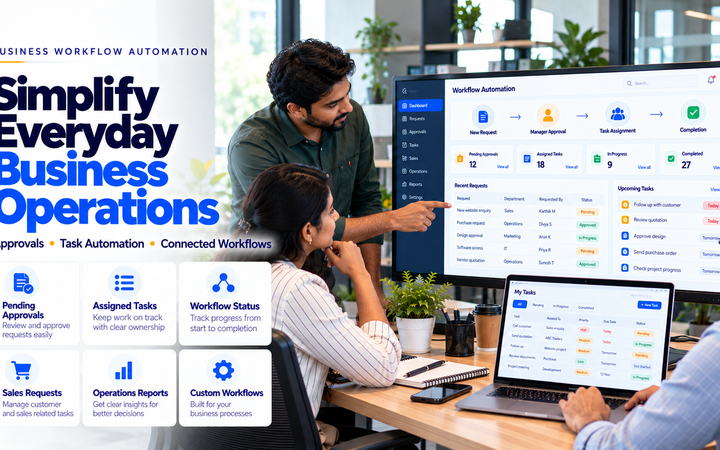
Customer Enquiry → CRM Lead → Sales Assignment → Follow-Up Task → Status Update
The workflow may also include conditions, approvals, error handling, and notifications.
Business Process Automation vs Manual Workflows
| Manual Workflow | Automated Workflow |
|---|---|
| Employees repeatedly enter customer information | Connected systems transfer approved information |
| Managers assign tasks manually | Defined rules can assign tasks |
| Staff remember follow-up dates | The system creates reminders |
| Approvals are tracked through messages | Approval requests are recorded in a workflow |
| Reports are prepared manually | Reports can be generated from recorded data |
Automation does not remove the need for employees. It can help staff focus on activities requiring judgment, customer communication, and operational decisions.
Why Businesses in Erode Consider Process Automation
Businesses in Erode operate across manufacturing, textiles, wholesale distribution, retail, logistics, professional services, and other sectors.
Many companies use a combination of spreadsheets, paper documents, messaging apps, accounting software, and custom applications.
When these systems are not connected, employees may need to repeat the same activities across different tools.
Common operational challenges include:
- Repeated manual data entry
- Delayed approvals
- Missed follow-up tasks
- Unclear order status
- Disconnected department information
- Time-consuming reporting
- Difficulty identifying pending work
- Inconsistent workflow execution
Custom automation software can help address selected challenges when the underlying process is clearly defined.
1. Sales Enquiry Automation
Sales enquiries may arrive through websites, phone calls, email, or approved messaging channels.
Automation can help organize these enquiries.
Possible features include:
- Lead capture
- Enquiry categorization
- Salesperson assignment
- Follow-up reminders
- Lead status tracking
- Sales reporting
Example:
Website Enquiry → Lead Record → Assigned Salesperson → Follow-Up Task
2. CRM Workflow Automation
Customer relationship management software helps businesses organize customer interactions and sales activities.
CRM automation may support:
- Lead creation
- Customer record updates
- Sales pipeline tracking
- Follow-up scheduling
- Task assignment
- Activity reporting
Businesses should define clear rules for handling duplicate records and protecting customer information.
3. Quotation Management Automation
Quotation preparation may involve customer details, product information, pricing, approval, and communication.
A quotation workflow can help organize these steps.
Example:
Quotation Request → Draft Preparation → Manager Approval → Customer Communication → Follow-Up
Potential features include:
- Quotation templates
- Approved product catalogues
- Version tracking
- Approval workflows
- Quotation status
- Follow-up reminders
Prices, discounts, taxes, and contractual terms should be validated using approved business rules.
4. Sales Order Automation
Sales order workflows may involve order entry, approval, stock verification, processing, and dispatch.
Automation can help coordinate these stages.
Example:
Sales Order → Validation → Approval → Processing → Dispatch → Completion
Businesses can configure notifications and status tracking according to their operational requirements.
5. Purchase Order Automation
Purchase order workflows may involve multiple departments and approval levels.
A suitable system can support:
- Purchase requests
- Supplier records
- Approval routing
- Purchase order generation
- Goods receipt tracking
- Purchase reporting
Financial approval limits should remain controlled by authorized employees.
6. Approval Workflow Software
Approval workflows are useful when business activities require authorization before proceeding.
Examples include:
- Purchase approvals
- Quotation discount approvals
- Expense approvals
- Leave approvals
- Order approvals
- Document approvals
Features may include:
- Role-based approval levels
- Pending approval lists
- Notifications
- Approval history
- Rejection reasons
- Audit logs
7. Invoice and Billing Automation
Billing workflows may involve creating invoices, recording payments, and updating financial information.
Automation can help with:
- Invoice draft generation
- Customer information retrieval
- Invoice numbering
- Payment status updates
- Approved reminders
- Accounting integration
Financial calculations and statutory invoice requirements should be verified before finalization.
8. Inventory Management Automation
Inventory automation helps businesses coordinate stock information with operational transactions.
Potential features include:
- Stock movement tracking
- Low-stock notifications
- Reorder alerts
- Stock transfer workflows
- Inventory reporting
- Order-to-stock integration
Accurate inventory automation depends on reliable transaction records and appropriate staff procedures.
9. Production Workflow Automation
Manufacturing companies may use software to track production activities.
Potential workflows include:
- Production order creation
- Job assignment
- Material requirement tracking
- Production stage updates
- Quality checkpoints
- Dispatch coordination
Automation should support operational visibility without bypassing required quality or safety procedures.
10. Manufacturing Process Automation Software
Manufacturing businesses may need systems connecting sales orders, inventory, production, quality, and dispatch.
Example:
Customer Order → Material Check → Production Planning → Manufacturing → Quality Review → Dispatch
Each stage can have defined responsibilities and approval requirements.
Read Manufacturing ERP Software Development in Erode.
11. Business Process Automation for Textile Companies
Textile businesses may manage yarn, fabric, job work, production orders, stock, and dispatch across different teams.
Possible automation features include:
- Order entry
- Production stage tracking
- Material movement records
- Job-work coordination
- Inventory updates
- Dispatch notifications
- Operational reports
The software should reflect the company’s actual production and business processes.
12. Automation for Wholesale and Distribution
Wholesale businesses may need to coordinate dealer orders, stock, dispatch, quotations, and customer communication.
Automation opportunities include:
- Dealer order capture
- Order approval
- Inventory checks
- Dispatch tracking
- Customer notifications
- Payment follow-up tasks
13. Automation for Retail Businesses
Retail businesses may use process automation to organize stock, sales, purchases, and reporting.
Potential features include:
- Low-stock alerts
- Purchase request workflows
- Inventory synchronization
- Sales reporting
- Supplier communication tasks
14. Automation for Ecommerce Businesses
Ecommerce stores may automate selected activities across order management and customer support.
Examples include:
- Order confirmation workflows
- Inventory updates
- Shipping status synchronization
- Support ticket creation
- Returns request routing
- Order reporting
Customer-facing notifications should use accurate information from connected systems.
15. Automation for Logistics Businesses
Transport and logistics businesses may need software for shipment coordination and operational tracking.
Potential workflows include:
- Shipment request creation
- Task assignment
- Dispatch status updates
- Document processing
- Delivery status recording
- Operational reporting
16. Automation for Service Businesses
Service companies may manage enquiries, appointments, quotations, tasks, and customer follow-ups.
Possible automation features include:
- Service enquiry capture
- Appointment scheduling
- Task assignment
- Quotation workflows
- Completion notifications
- Customer follow-up tasks
17. Employee Task Management Automation
Task management software can help businesses assign responsibilities and monitor progress.
Features may include:
- Task creation
- Employee assignment
- Due dates
- Status tracking
- Notifications
- Completion history
18. Employee Leave and Approval Automation
HR workflows may include leave requests, approvals, attendance corrections, and administrative tasks.
Automation can help route requests to authorized staff and maintain appropriate records.
Employee information should be protected using suitable privacy and access controls.
19. Document Approval Automation
Businesses may need approval workflows for quotations, purchase requests, contracts, and internal documents.
Possible features include:
- Document upload
- Version tracking
- Reviewer assignment
- Approval status
- Audit history
- Access permissions
20. Automated Business Notifications
Notifications can help employees identify activities requiring attention.
Examples include:
- New lead assigned
- Quotation awaiting approval
- Order ready for processing
- Low stock detected
- Task deadline approaching
- Report generated
Notifications should be relevant and not overwhelm employees with unnecessary alerts.
21. Automated Business Reporting
Reporting automation can help businesses summarize recorded activities.
Examples include:
- Daily sales reports
- Pending quotation reports
- Purchase order reports
- Inventory reports
- Production status reports
- Employee task reports
Reports are only as reliable as the underlying business data.
22. Integration With Existing Business Software
Businesses may already use accounting systems, CRM platforms, ERP applications, or ecommerce software.
Custom automation can sometimes connect these applications through supported APIs, webhooks, or approved integration methods.
Example:
Website → CRM → Quotation → Sales Order → Invoice → Reporting
Integration feasibility should be assessed before development.
23. ERP Workflow Automation
ERP systems may already manage important business activities.
Automation can help coordinate workflows between ERP modules or external applications.
Potential examples include:
- Order-to-invoice workflows
- Purchase approval routing
- Inventory notifications
- Production status updates
- Reporting workflows
24. CRM and Sales Automation
CRM automation helps sales teams organize customer information and follow-up activities.
Example:
Lead Received → Assigned → Contacted → Quotation Sent → Follow-Up → Outcome
The workflow should be flexible enough to reflect real customer interactions.
25. WhatsApp Business Automation Integration
Businesses may want approved WhatsApp messaging workflows connected to business software.
Potential uses include:
- Customer enquiry routing
- Approved order notifications
- Appointment reminders
- CRM lead creation
- Customer support workflows
Messaging must follow applicable platform policies and customer consent requirements.
Read WhatsApp Business Automation Services in Erode.
26. Does Business Process Automation Require AI?
No.
Many business workflows can be automated using predefined rules and conventional software development.
AI may be useful when a task involves interpreting unstructured information, such as customer messages or documents.
For predictable calculations, approvals, and record updates, rule-based automation may be more reliable.
27. AI-Assisted Business Process Automation
AI can support selected workflow activities.
Examples include:
- Customer enquiry classification
- Document data extraction
- Conversation summaries
- Knowledge base search
- Reporting assistance
AI outputs should be validated before important business actions are completed.
28. Custom Automation vs Ready-Made Software
| Ready-Made Software | Custom Automation Software |
|---|---|
| Uses predefined features | Can match specific business workflows |
| May offer faster setup | May require more development time |
| Customization depends on the platform | Can support specialized business rules |
| Often subscription-based | May involve development and maintenance costs |
| Integrations depend on available connectors | Can be designed around supported APIs |
Businesses should compare functionality, implementation time, total cost, security, and long-term support.
29. Essential Features of Business Process Automation Software
Depending on the requirements, useful features may include:
- Workflow designer
- Task assignment
- Role-based approvals
- Notification engine
- Status tracking
- Document management
- Integration APIs
- Audit logs
- Reporting dashboard
- User permissions
- Error handling
- Mobile-responsive interface
30. Security Requirements for Business Automation
Automation systems may process customer information, employee records, financial data, and operational documents.
Important safeguards include:
- Secure authentication
- Role-based access control
- Appropriate encryption
- Input validation
- Audit logs
- Secure API credentials
- Backup and recovery
- Data retention policies
- Regular security updates
31. How to Identify Processes Suitable for Automation
Before developing software, businesses should review their existing workflows.
Ask:
- Which tasks are repeated frequently?
- Which steps require manual data entry?
- Where do delays occur?
- Which approvals are required?
- Which systems contain the necessary data?
- What happens when a task fails?
- Which activities require human judgment?
- How will success be measured?
These questions help identify realistic automation opportunities.
32. Business Process Automation Development Process
- Requirement Analysis: Understand business goals and existing processes.
- Workflow Mapping: Document tasks, approvals, and responsibilities.
- Feasibility Assessment: Review systems, data, and integration requirements.
- Solution Design: Plan workflows, user roles, and interfaces.
- Development: Build the application and automation rules.
- Integration: Connect approved business systems.
- Testing: Verify normal scenarios, exceptions, and failures.
- Deployment: Introduce the software to users.
- Training: Explain workflow operation and responsibilities.
- Maintenance: Monitor and improve the system.
33. How to Measure Automation Success
Businesses should define measurable indicators before implementation.
Examples include:
- Manual processing time
- Task completion time
- Approval turnaround time
- Workflow error rate
- Follow-up completion rate
- Report preparation time
- Employee adoption
- Operational cost per process
Compare performance against a documented baseline rather than assuming automation automatically delivers savings.
34. Benefits of Business Process Automation Software
Reduced Repetitive Work
Routine tasks can require less manual effort.
Improved Workflow Visibility
Managers can review pending tasks and recorded statuses.
More Consistent Processes
Defined rules help teams follow the same workflow.
Better Approval Tracking
Approval requests and decisions can be recorded.
Improved Data Organization
Connected systems can reduce repeated entry of the same information.
Support for Reporting
Structured data can make operational reports easier to prepare.
Actual benefits depend on the workflow, implementation quality, and staff usage.
35. Limitations of Business Process Automation
Automation systems can also introduce challenges.
Potential limitations include:
- Incorrect business rules
- Unreliable source data
- Integration failures
- Unexpected workflow exceptions
- Employee training requirements
- Maintenance costs
- Security risks
- Changes to business processes
Automation should include suitable monitoring, error handling, and manual fallback procedures.
36. How Much Does Business Process Automation Software Cost in Erode?
Development cost depends on the complexity of the business workflow.
Important factors include:
- Number of workflows
- User roles and permissions
- Approval levels
- Custom dashboards
- Existing software integrations
- Data migration
- Notification requirements
- Security controls
- Testing and deployment
- Maintenance and support
A simple approval workflow and a complete multi-department automation platform will require different budgets.
Businesses should request a detailed quotation based on actual requirements.
37. How Long Does Automation Software Development Take?
The timeline depends on workflow complexity, integration requirements, data readiness, and testing.
A small automation project may require less development effort than a system connecting sales, purchases, inventory, production, and accounting.
Businesses should confirm scope, milestones, and acceptance criteria before development begins.
38. How to Choose a Business Process Automation Company in Erode
Before choosing a development partner, evaluate:
- Understanding of your business process
- Custom software development capabilities
- Workflow design approach
- Integration experience
- Security practices
- Testing procedures
- Documentation and training
- Maintenance arrangements
- Transparent development costs
A suitable provider should recommend automation based on operational needs rather than unnecessary features.
39. Business Process Automation Across Erode District
Businesses operating in Erode and surrounding locations may explore automation according to their industry and workflows.
Relevant areas include:
- Erode
- Perundurai
- Bhavani
- Anthiyur
- Gobichettipalayam
- Sathyamangalam
- Chennimalai
- Modakkurichi
- Kodumudi
- Nambiyur
- Kavindapadi
- Ammapettai
- Arachalur
- Sivagiri
- Punjai Puliampatti
- Thalavadi
Automation requirements should be based on actual business operations rather than location alone.
40. Common Business Automation Mistakes
- Automating a poorly understood process
- Ignoring employee feedback
- Using inaccurate source data
- Skipping approval controls
- Connecting systems without verifying APIs
- Failing to handle errors
- Ignoring security requirements
- Creating too many unnecessary notifications
- Failing to train staff
- Assuming automation guarantees cost savings
- Launching without realistic testing
- Failing to review workflows after deployment
41. Business Process Automation Checklist
- Define the business problem.
- Map the existing process.
- Identify repetitive tasks.
- Define approval requirements.
- Review existing software.
- Identify integration options.
- Define user roles.
- Plan security controls.
- Design the workflow.
- Test normal and exceptional scenarios.
- Configure monitoring.
- Train employees.
- Measure actual results.
- Review and improve the system.
42. How Greap Technologies Can Help
Greap Technologies can help businesses discuss custom workflow automation requirements as part of software development and business system integration projects.
Depending on the agreed scope, solutions may include:
- Business process analysis
- Workflow automation planning
- Custom business software development
- CRM workflow integration
- Quotation and approval systems
- Sales order management
- Purchase order management
- Inventory workflow automation
- Production tracking integration
- Employee task management
- Business reporting dashboards
- API integrations
- Security planning
- Testing and maintenance
Explore Greap Technologies for custom software development, business automation, and digital solutions.
Conclusion
Business process automation software development in Erode can help companies organize repetitive workflows and reduce selected manual activities.
Suitable applications include sales enquiries, CRM management, quotations, approvals, purchase orders, inventory, production tracking, invoicing, and reporting.
However, successful automation depends on clear business requirements, accurate data, appropriate software architecture, secure integrations, realistic testing, and employee training.
A practical approach is:
Understand Process → Identify Repetitive Tasks → Design Workflow → Develop Software → Test → Deploy → Measure
For businesses in Erode and across Tamil Nadu, starting with one clearly defined workflow can be a practical way to evaluate automation before expanding to a larger business management system.
Want to Automate Your Business Workflows?
Greap Technologies can help you discuss your current business processes and explore suitable custom automation software solutions.
Frequently Asked Questions
1. What is business process automation software?
Business process automation software coordinates repetitive business tasks, approvals, notifications, and information transfers using predefined workflows.
2. Which business processes can be automated?
Examples include lead assignment, CRM updates, quotation approvals, sales orders, purchase orders, inventory notifications, and reporting.
3. Does business process automation require AI?
No. Many workflows can be automated using conventional software rules. AI may help with tasks involving unstructured information.
4. Can automation software connect to existing ERP systems?
Integration may be possible when the ERP platform provides suitable APIs or approved integration methods.
5. Can automation software manage approvals?
Yes. Custom systems can support role-based approvals, notifications, status tracking, and audit records.
6. Is business automation suitable for small businesses?
Small businesses may benefit from automating clearly defined repetitive tasks when the expected value justifies implementation and maintenance costs.
7. Can automation software support manufacturing?
Yes. Software may help track production orders, inventory movements, approvals, and operational reporting.
8. Can business automation integrate with WhatsApp?
Selected workflows may integrate with authorized WhatsApp Business Platform services, subject to platform policies and technical requirements.
9. Is business process automation secure?
Security depends on authentication, access controls, data handling, integrations, testing, and maintenance.
10. How much does business process automation software cost in Erode?
Cost depends on the number of workflows, integrations, user roles, security requirements, and development complexity.
11. How long does automation software development take?
The timeline depends on the project scope, existing systems, integration requirements, testing, and deployment needs.
12. Does Greap Technologies develop business process automation software in Erode?
Greap Technologies can help assess workflow automation requirements and develop suitable custom software solutions according to the agreed project scope.