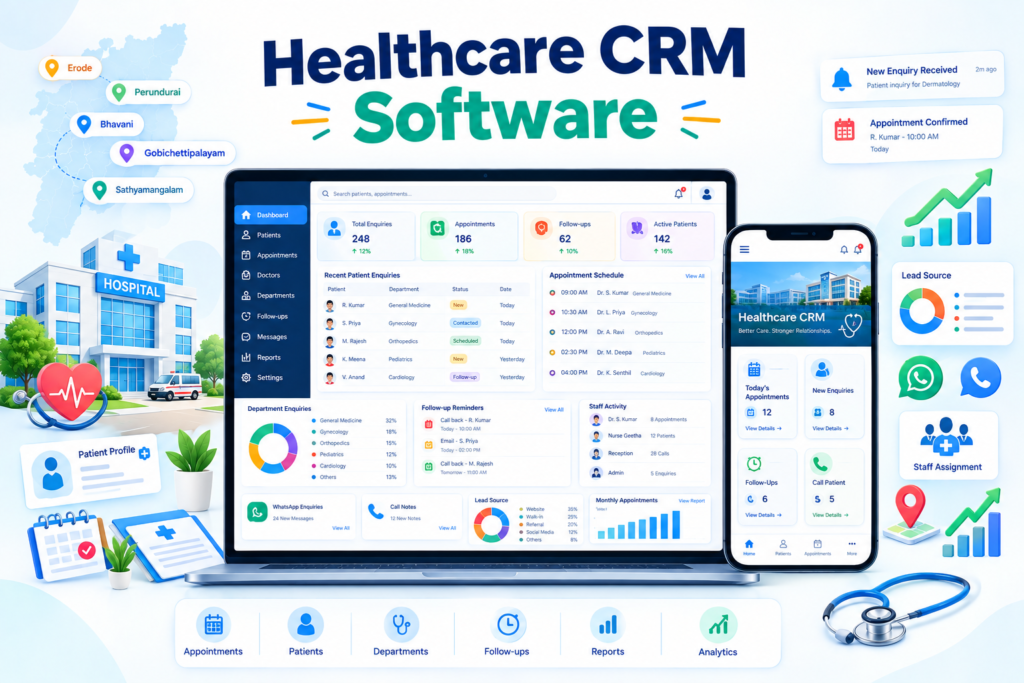
CRM software for hospitals and clinics in Erode helps hospitals, dental clinics, eye hospitals, skin clinics, fertility centres, diagnostic centres, physiotherapy clinics and other healthcare businesses manage patient enquiries, appointment requests, follow-ups and communication in one organized system.
Healthcare businesses receive enquiries through phone calls, WhatsApp, websites, Google Business Profile, digital advertising, referrals, social media and walk-ins. When these enquiries are managed manually, appointment requests and callbacks can easily be delayed or missed.
A professional healthcare CRM can help receptionists, telecallers, coordinators, marketing teams and management track enquiries, schedule follow-ups, update appointment status, assign responsibilities and understand which marketing sources are generating useful enquiries.
At Greap Technologies, we provide CRM software for hospitals and clinics in Erode, helping healthcare businesses improve enquiry handling, appointment coordination, team accountability and communication workflows.
Quick Answer: What Is CRM Software for Hospitals and Clinics?
Healthcare CRM software is primarily an enquiry, appointment and communication management system. It helps healthcare businesses organize prospective patient enquiries, appointment requests, follow-up activities, enquiry sources and staff responsibilities.
A hospital or clinic CRM can include:
- Patient enquiry management
- Appointment request tracking
- Follow-up reminders
- Doctor-wise enquiry routing
- Department-wise enquiry tracking
- Staff assignment
- Call notes
- WhatsApp communication support
- Lead-source tracking
- Appointment status tracking
- Reception dashboard
- Telecaller panel
- Role-based permissions
- Reports and analytics
- Website enquiry integration
- Landing-page integration
- Import and export tools
- Mobile-responsive access
The CRM should be designed around the healthcare business’s actual enquiry and appointment workflow rather than forcing every hospital or clinic into the same process.
Hospital and Clinic CRM Software in Erode: Service Overview
| Detail | Information |
|---|---|
| Service | CRM Software for Hospitals and Clinics |
| Company | Greap Technologies |
| Location | Erode, Tamil Nadu |
| Main Audience | Hospitals, clinics, diagnostic centres, speciality centres and healthcare businesses |
| Main Goal | Manage enquiries, appointment requests, follow-ups and staff communication |
| Core Features | Enquiry management, appointments, reminders, staff assignment, source tracking and reports |
| Best For | Dental, eye care, dermatology, fertility, physiotherapy, diagnostics and speciality healthcare |
| Service Area | Erode District and nearby areas |
Why Hospitals and Clinics in Erode Need CRM Software
Hospitals and clinics may receive dozens or hundreds of enquiries across different communication channels. Without a centralized system, staff may struggle to know what happened with each enquiry.
A CRM can help answer questions such as:
- Who contacted the hospital or clinic?
- Which treatment, service or department did they ask about?
- Which doctor were they interested in?
- When do they want an appointment?
- Has somebody called them back?
- Is the appointment confirmed?
- Was the visit completed?
- Is another follow-up required?
- Which staff member handled the enquiry?
- Which marketing source generated the enquiry?
- How many enquiries became confirmed appointments?
A healthcare CRM brings these operational details into one controlled system.
What Types of Healthcare Businesses Need CRM Software?
1. Multi-Speciality Hospitals
Hospitals can manage enquiries across multiple departments and route appointment requests to the appropriate team or doctor.
2. Dental Clinics
Dental clinics can manage consultation enquiries, treatment enquiries, appointment requests, review visits and follow-up reminders.
3. Eye Hospitals and Eye Clinics
Eye-care businesses can track enquiries related to consultations, eye examinations, procedures, surgery consultations and follow-up visits.
4. Skin and Hair Clinics
Dermatology and aesthetic clinics can manage consultation requests, package enquiries, treatment follow-ups and repeat appointment reminders.
5. Fertility Centres
Fertility centres can use carefully controlled CRM workflows for initial enquiries, consultation requests and appointment coordination.
Because this type of information can be particularly sensitive, access permissions and data handling should be planned carefully.
6. Physiotherapy Clinics
Physiotherapy centres can track new enquiries, session bookings, package enquiries and scheduled follow-ups.
7. Diagnostic Centres
Diagnostic businesses can manage:
- Test enquiries
- Appointment requests
- Package enquiries
- Home sample collection requests
- Report collection communication
8. Maternity and Women’s Clinics
Women’s healthcare clinics can manage appointment requests, consultation enquiries and scheduled follow-ups with appropriate privacy controls.
9. ENT, Orthopaedic and Other Speciality Clinics
Speciality clinics can use doctor-wise appointment tracking, enquiry classification and review-visit reminders.
10. Ayurveda and Wellness Clinics
Wellness businesses can manage consultation requests, therapy bookings, programme enquiries and repeat visits.
Benefits of CRM Software for Hospitals and Clinics
1. Better Patient Enquiry Management
CRM software can centralize enquiry details such as:
- Name
- Phone number
- Enquiry source
- Service requested
- Preferred department
- Preferred doctor
- Appointment preference
- Status
- Assigned staff
- Next follow-up
- Operational notes
Only information that is genuinely required for enquiry and appointment management should be collected.
2. Reduce Missed Follow-Ups
The CRM can create organized lists for:
- Today’s callbacks
- Overdue follow-ups
- Upcoming appointments
- Appointment confirmation calls
- Review-visit reminders
- Pending patient callbacks
- Staff-wise tasks
This can improve operational consistency, although actual appointment outcomes depend on factors such as patient need, doctor availability, service quality and response time.
3. Better Appointment Tracking
An enquiry can move through defined stages such as:
New Enquiry → Callback Pending → Appointment Requested → Appointment Confirmed → Visited → Follow-Up Required → Review Scheduled → Closed
This helps the reception and management team understand where each enquiry currently stands.
4. Better Staff Coordination
Different healthcare employees may handle different parts of the enquiry journey.
CRM software can support:
- Receptionist login
- Telecaller login
- Coordinator login
- Manager login
- Lead assignment
- Task assignment
- Activity tracking
- Role-based access
5. Better Communication History
Authorized staff can maintain operational communication notes such as:
- Appointment preference
- Doctor requested
- Service enquiry
- Callback status
- Next follow-up
- Appointment status
A CRM intended for marketing and appointment management should not automatically become a clinical medical-record system. Diagnosis, prescriptions, treatment notes and other clinical records should only be handled through systems designed and governed for those purposes.
6. Better Marketing Source Tracking
Lead-source tracking can show whether enquiries originated from:
- Website
- Landing page
- Google Ads
- Meta Ads
- Google Business Profile
- Referral
- Direct call
- Walk-in
- Social media
- Offline campaigns
This can help management compare enquiry volume and appointment outcomes by source.
7. Better Management Reports
Reports can include:
- Total enquiries
- Appointment requests
- Confirmed appointments
- Visits completed
- Pending follow-ups
- Department-wise enquiries
- Doctor-wise enquiries
- Source-wise enquiries
- Staff-wise activity
- Appointment conversion trends
Important Features of Hospital and Clinic CRM Software
1. Patient Enquiry Management
The core enquiry module can support:
- Add enquiry
- Edit enquiry
- Assign enquiry
- Source tracking
- Department
- Doctor preference
- Appointment preference
- Status
- Next follow-up
- Notes
- Activity history
2. Appointment Management
The appointment module can include:
- Appointment request
- Confirmed appointment
- Doctor
- Department
- Date
- Time
- Visit status
- Reschedule status
- Cancellation status
- Review appointment
3. Follow-Up Reminder System
The CRM can show:
- Today’s follow-ups
- Upcoming follow-ups
- Overdue follow-ups
- Appointment confirmation tasks
- Review reminders
- Staff-wise pending tasks
4. Department-Wise Enquiry Tracking
Hospitals can categorize enquiries by departments such as:
- Dental
- Eye Care
- Dermatology
- Orthopaedics
- ENT
- Cardiology
- Physiotherapy
- Diagnostics
- General Medicine
Only departments actually available at the healthcare facility should be configured.
5. Doctor-Wise Appointment Tracking
The system can track:
- Doctor
- Speciality
- Appointment date
- Available schedule
- Appointment status
- Completed visit
- Follow-up requirement
6. Appointment Calendar
A calendar view can help staff view:
- Today’s appointments
- Doctor-wise appointments
- Department-wise appointments
- Available time slots
- Rescheduled appointments
- Upcoming review visits
7. WhatsApp Communication Support
Depending on the implementation, CRM workflows can support:
- Click-to-chat
- Appointment confirmation messages
- Location sharing
- General follow-up messages
- Review appointment reminders
Hi, thank you for contacting us. Your appointment request has been received. Our team will contact you with confirmation details.
For automated WhatsApp messaging, hospitals and clinics may need an approved WhatsApp Business Platform setup, suitable templates and separate provider charges.
Sensitive medical information should not be included in automated WhatsApp messages unless the healthcare provider has an appropriate and compliant process for doing so.
8. Call Notes and Activity History
Authorized users can record:
- Call completed
- Patient requested callback
- Appointment requested
- Appointment confirmed
- Next action
- Follow-up date
9. Lead-Source Tracking
Each enquiry can be tagged with a source to support marketing analysis.
10. Staff and Role Management
Roles can include:
- Owner
- Administrator
- Clinic Manager
- Receptionist
- Telecaller
- Doctor Coordinator
- Marketing Team
Each role should only have access to the information required for its work.
11. Dashboard and Reports
The CRM dashboard can show:
- Total enquiries
- Today’s appointments
- Pending callbacks
- Overdue follow-ups
- Confirmed appointments
- Department-wise enquiries
- Doctor-wise appointments
- Source-wise enquiries
- Staff activity
Healthcare CRM Data Privacy and Security Features
Healthcare information can be sensitive, so security and access control should be considered from the beginning of CRM development.
Depending on the scope of the system, useful controls can include:
- Role-based permissions
- Strong authentication
- Secure password storage
- Encrypted website connections
- Audit logs
- User activity logs
- Automatic session timeout
- Restricted data export
- Backup procedures
- Access revocation for former staff
- Minimal data collection
The CRM should collect only the information required for the intended business workflow.
If the system is expected to store clinical records, prescriptions, diagnostic information or detailed treatment history, those requirements should be assessed separately because they go beyond a standard enquiry-management CRM.
Best CRM Structure for Hospitals and Clinics
General Healthcare CRM
- Dashboard
- Enquiries
- Appointments
- Follow-Ups
- Doctors
- Departments
- Staff
- Lead Sources
- Communication
- Reports
- Settings
Hospital CRM
- Dashboard
- Department Enquiries
- Doctor Appointments
- Patient Follow-Ups
- Reception Panel
- Telecaller Panel
- Source Tracking
- Reports
- Administration
Clinic CRM
- Dashboard
- Enquiries
- Appointment Requests
- Follow-Up Reminders
- Doctor Schedule
- WhatsApp Support
- Reports
Diagnostic Centre CRM
- Dashboard
- Test Enquiries
- Appointment Requests
- Home Collection Requests
- Package Enquiries
- Follow-Up Tasks
- Reports
Healthcare CRM vs Hospital Management Software
A healthcare CRM and a Hospital Management System (HMS) serve different primary purposes.
| Feature | Healthcare CRM | Hospital Management System |
|---|---|---|
| Main Purpose | Enquiries, appointments, follow-ups and communication | Broader hospital administration and operations |
| Marketing Lead Tracking | Core focus | Usually not the main focus |
| Appointment Enquiry Funnel | Strong focus | May be available |
| Follow-Up Reminders | Core feature | Depends on system |
| Lead-Source Attribution | Important | Often limited |
| Billing | Not usually the core function | Often important |
| Clinical Records / EMR | Not the main purpose | May be supported |
| Pharmacy / Lab Operations | Not the main purpose | May be supported |
| Best Use | Reception, enquiry, marketing and communication workflows | Broader hospital operations |
A healthcare business may use CRM software alongside an existing HMS when it needs stronger enquiry management, follow-up and marketing attribution.
Healthcare CRM Software Design Style
The CRM should be simple enough for reception and coordination teams to use throughout the day.
| User Type | Primary CRM Need |
|---|---|
| Hospital Owner | Dashboard, reports and enquiry-source visibility |
| Clinic Manager | Appointments, follow-ups and staff activity |
| Receptionist | Fast enquiry entry and appointment updates |
| Telecaller | Callback list, notes and follow-up reminders |
| Doctor Coordinator | Doctor-wise appointment schedule |
| Marketing Team | Source-wise enquiry and appointment tracking |
Useful interface principles include:
- Clean dashboard
- Simple forms
- Quick search
- Easy filters
- One-click status updates
- Visible reminders
- Mobile-responsive layout
- Role-based dashboards
Connecting Healthcare CRM with Websites and Digital Marketing
CRM software for hospitals and clinics in Erode becomes more useful when website and campaign enquiries are routed into a structured follow-up process.
A connected system can include:
- Hospital website
- Clinic website
- Appointment landing pages
- Website enquiry forms
- Google Ads campaigns
- Meta Ads campaigns
- Google Business Profile
- WhatsApp enquiries
- CRM lead capture
- Source tracking
- Appointment follow-up
- Conversion reports
Example workflow:
Google / Ads / Website → Enquiry → CRM → Staff Assignment → Callback → Appointment Confirmed → Visit → Follow-Up
Automated capture from advertising platforms depends on the APIs, permissions and integration methods currently supported by those platforms.
Related Greap services include website development, SEO services and digital marketing services.
Useful Enquiry Sources to Track in Healthcare CRM
- Hospital website
- Clinic website
- Landing pages
- Google Ads
- Meta Ads
- Google Business Profile
- Direct calls
- Referrals
- Walk-ins
- Social media
- Offline campaigns
- Health camp registrations
Consistent source tracking helps management compare enquiry volumes and appointment outcomes across channels.
Admin Panel Features for Hospital and Clinic CRM Software
| Module | Purpose |
|---|---|
| Dashboard | View enquiry and appointment activity |
| Enquiries | Manage patient enquiries |
| Appointments | Track appointment requests and status |
| Follow-Ups | Manage callbacks and reminders |
| Doctors | Manage doctor profiles and availability references |
| Departments | Manage healthcare departments |
| Staff | Manage CRM users |
| Roles & Permissions | Control system access |
| Lead Sources | Manage enquiry-source categories |
| Communication | Track operational communication activity |
| Reports | Analyze enquiries and appointments |
| Settings | Configure workflows and notifications |
Advanced Features for Hospital and Clinic CRM Software
Depending on business requirements, advanced features can include:
- Automatic enquiry assignment
- Appointment calendar
- Doctor-wise scheduling
- Department-wise routing
- Follow-up automation
- WhatsApp integration
- Email notifications
- SMS integration
- Reception panel
- Telecaller panel
- Health camp lead management
- Package enquiry management
- Revisit reminders
- Website integration
- Landing-page integration
- API integrations
- Google Sheet import/export
- Analytics dashboard
- Campaign-wise reports
- Mobile application
Advanced functionality should be added based on real operational needs and should not make everyday CRM usage unnecessarily complicated.
Hospital and Clinic CRM Software Development Process
Step 1: Requirement Analysis
Important questions include:
- What healthcare services do you provide?
- How many departments are there?
- How many doctors need appointment tracking?
- Who handles incoming enquiries?
- What are your enquiry sources?
- Do you need follow-up reminders?
- Do you need WhatsApp support?
- Do you need website integration?
- Do you use an existing HMS?
- What information should each employee be allowed to access?
- What reports does management need?
Step 2: Workflow Planning
A typical workflow can be:
New Enquiry → Callback Pending → Appointment Requested → Confirmed → Visited → Follow-Up → Review Visit → Closed
The workflow should be customized to match the hospital or clinic’s real process.
Step 3: UI/UX Design
Common activities should require as few steps as practical:
- Create enquiry
- Assign enquiry
- Update status
- Schedule appointment
- Add communication note
- Create follow-up
- Search patient enquiry
Step 4: CRM Development
Development can include:
- Enquiries
- Appointments
- Follow-ups
- Doctors
- Departments
- Staff accounts
- Permissions
- Communication tools
- Reports
- Admin dashboard
Step 5: Existing Data Import
Existing operational data can be prepared for migration where appropriate.
Examples include:
- Old enquiry records
- Doctor information
- Departments
- Staff accounts
- Lead sources
- Appointment status categories
Data should be reviewed for duplicates, unnecessary information and access requirements before importing it into a new CRM.
Step 6: Testing and Training
Testing can include:
- Enquiry creation
- Appointment scheduling
- Rescheduling
- Follow-up reminders
- Staff assignment
- Permissions
- Doctor filters
- Department filters
- Reports
- Mobile responsiveness
- Integrations
Staff training is important because CRM reports are only useful when users maintain accurate information consistently.
Step 7: Launch and Improvement
After launch, workflows, reports and automation can be refined according to real staff usage and operational feedback.
Hospital and Clinic CRM Features Checklist
| Feature | Recommendation |
|---|---|
| Admin Dashboard | Required |
| Patient Enquiry Management | Required |
| Appointment Tracking | Required |
| Follow-Up Reminders | Required |
| Doctor Management | Recommended |
| Department Management | Recommended |
| Staff Accounts | Required |
| Role-Based Permissions | Recommended |
| Lead-Source Tracking | Required |
| WhatsApp Support | Recommended |
| Communication Notes | Recommended |
| Appointment Status | Required |
| Reports | Required |
| Mobile Responsive Access | Required |
| Website Enquiry Integration | Recommended |
| Landing-Page Integration | Recommended |
| Import / Export | Recommended |
| Audit Logs | Recommended |
| Mobile App | Based on requirement |
Common Healthcare CRM Mistakes to Avoid
1. Managing Large Enquiry Volumes Only in Notebooks or Spreadsheets
Basic tools may work at low volume but become difficult when multiple employees need assignments, reminders and activity history.
2. No Follow-Up Reminders
Every pending appointment enquiry should have a clear next action where appropriate.
3. No Enquiry-Source Tracking
Without consistent source attribution, marketing reports can become unreliable.
4. No Appointment Status
Teams should be able to distinguish requested, confirmed, visited, cancelled and rescheduled appointments.
5. No Clear Staff Ownership
Every enquiry should have a responsible team member where assignment is required.
6. Collecting Unnecessary Sensitive Information
A marketing or appointment CRM should avoid collecting clinical information that is not required for its purpose.
7. Weak Access Permissions
Not every employee should automatically have access to every record.
8. Complicated Interface
Reception and call-handling workflows should remain fast and practical.
9. No Mobile-Friendly Access
Authorized managers and staff may need secure access outside a desktop environment.
10. No Adoption or Training Process
A CRM cannot improve operations if staff do not consistently update appointment and follow-up information.
Erode District Healthcare CRM Strategy
Greap Technologies supports hospitals and clinics across Erode district, including:
Erode, Perundurai, Bhavani, Anthiyur, Gobichettipalayam, Sathyamangalam, Modakkurichi, Kodumudi, Nambiyur, Chennimalai, Kavindapadi, Ammapettai, Arachalur, Sivagiri, Punjai Puliampatti, Solar, Surampatti, Veerappanchatram, Nasiyanur and nearby areas.
Location-specific SEO pages should only be created where the service is genuinely available and each page can contain useful local information.
Avoid publishing large numbers of near-identical pages that simply replace one location name with another.
How Greap Technologies Helps Hospitals and Clinics
Greap Technologies can develop healthcare CRM systems around the enquiry, appointment and staff workflow of the healthcare business.
Our CRM development services can include:
- Requirement analysis
- Patient enquiry management
- Appointment management
- Follow-up reminders
- Doctor management
- Department management
- Staff management
- Role-based permissions
- WhatsApp support
- Communication history
- Lead-source tracking
- Dashboard development
- Reports
- Website integration
- Landing-page integration
- Data import support
- Security and access planning
- Mobile-responsive CRM
- Testing
- User training
- Maintenance support
Explore related Greap services:
- Custom Software Development
- Website Development Services
- SEO Services
- Digital Marketing Services
- Mobile App Development
Why Choose Greap Technologies?
Healthcare-Focused Workflow Planning
We can structure the CRM around enquiries, callbacks, appointment requests, confirmations, visits and follow-up activities.
Custom CRM Development
The CRM can be designed around the hospital or clinic’s actual workflow instead of forcing the organization into a generic sales process.
Simple Staff Experience
Receptionists, telecallers and managers can have role-specific screens and permissions.
Marketing Source Tracking
Enquiries from websites, landing pages and campaigns can be tagged or integrated where supported.
Security and Access Control
Role-based access and other appropriate security measures can be included based on the sensitivity and scope of the information being managed.
Complete Digital Support
Greap Technologies can also support healthcare websites, landing pages, SEO, digital advertising, mobile applications and other custom software requirements.
Conclusion
CRM software for hospitals and clinics in Erode can help healthcare businesses organize patient enquiries, appointment requests, follow-ups, staff responsibilities and marketing-source information more effectively.
A practical healthcare CRM should include enquiry management, appointment tracking, reminders, doctor and department routing, staff permissions, communication history, lead-source tracking and management reports.
Healthcare CRM should also be designed with appropriate privacy and access controls because healthcare-related information can be sensitive.
Greap Technologies helps hospitals, clinics, diagnostic centres and speciality healthcare businesses in Erode build CRM software based on their actual enquiry and appointment workflows.
Need CRM Software for Your Hospital or Clinic in Erode?
Greap Technologies can help you build a custom healthcare CRM with enquiry management, appointment tracking, follow-up reminders, doctor and department management, WhatsApp support, staff permissions and reports.
Frequently Asked Questions
1. What is CRM software for hospitals and clinics?
Healthcare CRM software is a system for managing patient enquiries, appointment requests, follow-up activities, staff responsibilities, communication history and enquiry sources.
2. Why do hospitals and clinics in Erode need CRM software?
CRM software can help healthcare businesses organize enquiries from multiple sources, reduce missed callbacks, track appointment status and improve staff coordination.
3. What should healthcare CRM software include?
A healthcare CRM can include enquiry management, appointment tracking, follow-up reminders, doctor and department management, staff permissions, WhatsApp support, source tracking and reports.
4. Can CRM software track appointments?
Yes. CRM software can track appointment requests, confirmations, cancellations, rescheduling, completed visits and follow-up appointments.
5. Can healthcare CRM software connect with WhatsApp?
Yes. Depending on the implementation, it can support click-to-chat, appointment-related messages and advanced WhatsApp integrations through suitable providers.
6. Can CRM software track enquiries from Google Ads and Meta Ads?
Yes. Enquiry sources can be recorded, and automated integrations may be possible depending on the current APIs, permissions and connectors available from the advertising platforms.
7. Can Greap Technologies build custom CRM software for hospitals and clinics?
Yes. Greap Technologies can develop custom healthcare CRM software based on enquiry workflow, appointment management, staffing and reporting requirements.
8. Is CRM software useful for small clinics?
Yes. Small clinics can use CRM software for enquiry tracking, appointments, follow-up reminders and communication management without requiring an unnecessarily complex system.
9. Is healthcare CRM the same as hospital management software?
No. CRM primarily focuses on enquiries, appointments, communication and follow-ups, while hospital management software generally covers broader operational functions such as billing, clinical workflows, pharmacy or laboratory management.
10. Can CRM software help improve appointment conversion?
CRM software can improve response consistency, follow-up discipline and appointment visibility. Actual appointment outcomes depend on patient needs, doctor availability, healthcare services, communication quality and other factors.