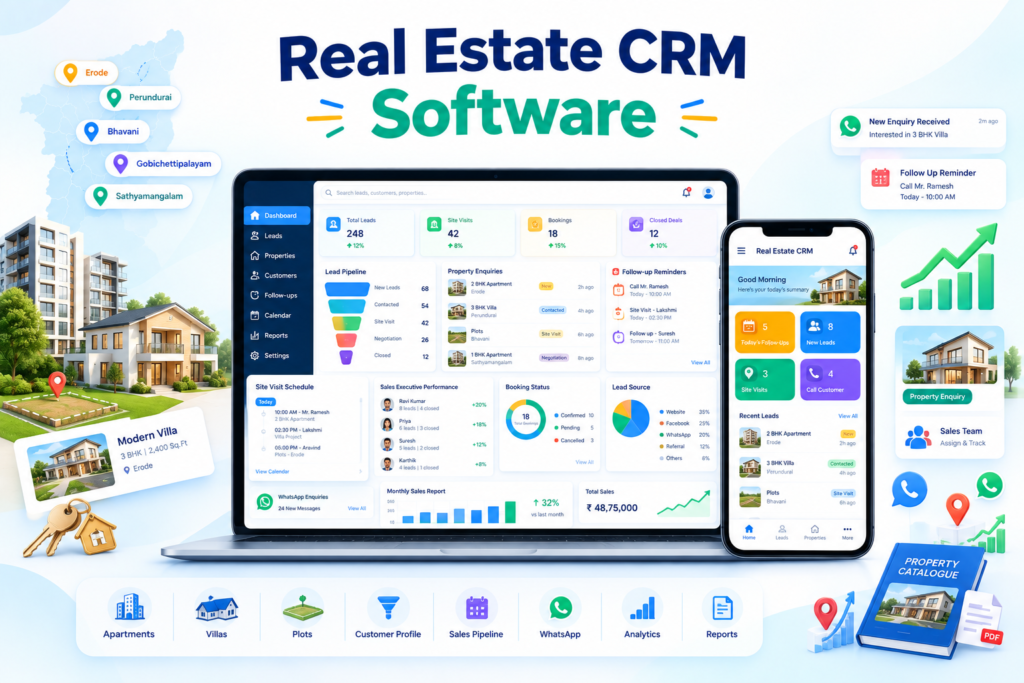
CRM software for real estate businesses in Erode helps builders, real estate agents, property developers, plot promoters, apartment sellers, villa promoters, land brokers and construction companies manage leads, customer follow-ups, site visits and sales activities in one organized system.
Real estate sales rarely happen after a single enquiry. A customer may request details today, compare multiple projects, speak with family members, schedule a site visit after several days and make a booking only after multiple follow-ups.
Without a structured CRM system, valuable leads can be missed because follow-ups are forgotten, customer discussions are not recorded or sales executives do not have clear ownership of each enquiry.
At Greap Technologies, we provide CRM software for real estate businesses in Erode, helping property businesses manage leads, follow-ups, site visits, sales teams and customer communication more effectively.
Quick Answer: What Is Real Estate CRM Software?
Real estate CRM software is a lead and customer management system designed to track property enquiries from the first contact until booking, closure or future follow-up.
A real estate CRM can include:
- Lead management
- Customer management
- Property and project tracking
- Lead-source tracking
- Sales executive assignment
- Follow-up reminders
- Site-visit scheduling
- Sales pipeline
- WhatsApp communication support
- Call notes
- Booking management
- Payment follow-up
- Staff management
- Role-based permissions
- Dashboard and reports
- Website lead integration
- Landing-page lead integration
- Data import/export
- Mobile-responsive access
The exact CRM structure should match how the real estate business actually handles enquiries, site visits, negotiations, bookings and customer follow-ups.
Real Estate CRM Software in Erode: Service Overview
| Detail | Information |
|---|---|
| Service | CRM Software for Real Estate Businesses |
| Company | Greap Technologies |
| Location | Erode, Tamil Nadu |
| Main Audience | Builders, agents, developers, plot promoters, brokers and property sales teams |
| Main Goal | Manage property leads, follow-ups, site visits and sales pipeline |
| Core Features | Lead management, reminders, site visits, staff assignment, pipeline and reports |
| Best For | Plots, apartments, villas, land, commercial properties and construction enquiries |
| Service Area | Erode District and nearby areas |
Why Real Estate Businesses in Erode Need CRM Software
Real estate businesses receive enquiries from multiple sources, including websites, landing pages, advertising campaigns, WhatsApp, direct calls, referrals, property portals and walk-in customers.
Without CRM software, it can become difficult to answer questions such as:
- Who enquired?
- Which property are they interested in?
- What is their budget?
- Which sales executive is handling the lead?
- When is the next follow-up?
- Has the customer visited the site?
- What was discussed previously?
- Is the lead hot, warm or cold?
- Which enquiries are overdue?
- Which leads converted?
- Which marketing source generated the enquiry?
A CRM provides one central system where these details can be recorded, searched and updated.
Which Real Estate Businesses Need CRM Software?
1. Real Estate Agencies
Real estate agencies can use CRM software to manage buyer requirements, seller enquiries, property listings, follow-ups and deal stages.
2. Builders and Property Developers
Builders can track enquiries for apartments, villas, gated communities and commercial projects from initial enquiry to booking.
3. Plot Promoters
Plot promoters can manage:
- Layout enquiries
- Plot availability
- Customer budget
- Site visits
- Plot selection
- Booking stage
- Payment follow-ups
4. Land Brokers
Land brokers can manage buyer and seller leads, location requirements, budget information, property details and negotiation notes.
5. Apartment Sales Teams
Apartment sales teams can track unit interest, project enquiries, site visits, preferred floor or configuration and booking stages.
6. Villa Promoters
Villa projects can use CRM software for premium lead handling, appointment scheduling, requirements and sales follow-ups.
7. Commercial Property Dealers
Commercial property businesses can track enquiries for offices, shops, warehouses, industrial spaces and rental properties.
8. Construction Companies
Construction companies can use CRM software to manage project enquiries, requirement discussions, quotation follow-ups and customer communication.
Benefits of CRM Software for Real Estate Businesses
1. Better Lead Management
Every enquiry can be stored with important customer information.
Lead details can include:
- Customer name
- Phone number
- Lead source
- Property interest
- Budget
- Preferred location
- Property type
- Lead status
- Assigned employee
- Next follow-up date
- Remarks
This makes it easier for the sales team to understand each customer before contacting them.
2. Reduce Missed Follow-Ups
Follow-up discipline is particularly important in property sales because customers may take weeks or months to make decisions.
The CRM can show:
- Today’s follow-ups
- Overdue follow-ups
- Upcoming follow-ups
- Priority leads
- Staff-wise pending calls
- Follow-up history
CRM reminders can reduce the chance of leads being forgotten, but actual sales results still depend on lead quality, salesperson performance, project attractiveness, pricing and other business factors.
3. Manage Site Visits Properly
A dedicated site-visit workflow can include:
- Customer name
- Project or property
- Visit date
- Visit time
- Assigned sales executive
- Visit status
- Customer feedback
- Interested unit or plot
- Next follow-up
This helps management understand which leads are progressing beyond phone enquiries.
4. Track the Complete Sales Pipeline
A real estate pipeline can show each stage clearly.
Example:
New Lead → Contacted → Interested → Site Visit Scheduled → Site Visited → Negotiation → Booking → Payment Follow-Up → Closed Won / Closed Lost
This makes it easier to identify where leads are getting delayed or lost.
5. Improve Sales Team Accountability
CRM software can show:
- Leads assigned
- Calls or follow-ups completed
- Overdue activities
- Site visits handled
- Bookings generated
- Pipeline value
- Lead conversion status
This gives managers better visibility into team activity without depending only on verbal updates.
6. Maintain Customer Communication History
The CRM can maintain records such as:
- Call notes
- Customer requirements
- Budget discussion
- Property preferences
- Objections
- Site visit feedback
- Next action
- Booking discussion
If another employee handles the customer later, they can review the previous history before contacting them.
7. Track Marketing Sources
A real estate CRM can record where each lead originated.
Examples include:
- Website
- Project landing page
- Google Ads
- Meta Ads
- Direct call
- Walk-in
- Referral
- Property portal
- Offline marketing
- Google Business Profile
Source tracking can help management compare lead volume and later evaluate which channels are generating useful opportunities.
Important Features of Real Estate CRM Software
1. Lead Management
The lead-management module is the foundation of the CRM.
It can support:
- Create lead
- Edit lead
- Assign lead
- Lead source
- Status management
- Budget
- Property requirement
- Priority
- Follow-up date
- Notes
- Activity history
2. Property and Project Management
The CRM can organize:
- Projects
- Layouts
- Plots
- Apartments
- Villas
- Commercial properties
- Land listings
Useful information can include:
- Project name
- Location
- Property type
- Size
- Configuration
- Price range
- Availability
- Booking status
3. Customer Requirement Tracking
Customer preference fields can include:
- Preferred location
- Budget
- Plot size
- Apartment configuration
- Villa requirement
- Commercial requirement
- Purchase timeline
- Investment or self-use
4. Follow-Up Reminder System
CRM reminders can display:
- Today’s follow-ups
- Tomorrow’s follow-ups
- Upcoming follow-ups
- Overdue follow-ups
- High-priority leads
- Staff-wise pending activities
5. Site Visit Management
The site-visit module can support:
- Schedule visit
- Assign employee
- Visit date and time
- Project selection
- Visit completion status
- Customer feedback
- Next follow-up
- Outcome tracking
6. Sales Pipeline
CRM software can present leads in a pipeline or Kanban-style view.
Example stages:
- New Enquiry
- Contacted
- Interested
- Follow-Up
- Site Visit Planned
- Site Visited
- Negotiation
- Booking Stage
- Closed Won
- Closed Lost
7. Sales Executive Management
Features can include:
- Staff login
- Lead assignment
- Task list
- Follow-up management
- Site visits
- Activity history
- Performance reports
8. Role-Based Access
Different users may need different levels of access.
For example:
- Owner
- Admin
- Sales Manager
- Sales Executive
- Telecaller
- Marketing Team
- Accounts Team
Role permissions can limit access to the information required for each employee’s work.
9. WhatsApp Communication Support
Depending on the required implementation and available integrations, the CRM can support workflows such as:
- Click-to-chat
- Pre-filled follow-up messages
- Property detail sharing
- Site visit reminders
- Booking-related messages
- Customer-service conversations
Example message:
Hi, thank you for your property enquiry. Our sales team will share the project details and available site-visit options with you.
Advanced WhatsApp automation may require an approved WhatsApp Business Platform provider, suitable templates and separate provider charges depending on the implementation.
10. Communication Notes and Activity Timeline
Every lead can maintain a timeline showing:
- Lead creation
- Assignment
- Calls
- Notes
- Status changes
- Follow-ups
- Site visits
- Booking updates
11. Booking Management
Once a customer decides to proceed, the CRM can record:
- Customer
- Project
- Unit or plot
- Booking date
- Booking amount
- Booking status
- Documents
- Remarks
12. Payment Follow-Up
Where required, the CRM can help track:
- Booking amount
- Payment milestones
- Amount paid
- Pending amount
- Next due date
- Payment remarks
For full accounting and statutory finance workflows, integration with suitable accounting software may be more appropriate than using the CRM as the only financial system.
13. Dashboard and Reports
A management dashboard can show:
- Total leads
- New leads
- Today’s follow-ups
- Overdue follow-ups
- Site visits scheduled
- Site visits completed
- Priority leads
- Bookings
- Lost leads
- Lead-source performance
- Staff performance
- Monthly pipeline
Recommended Real Estate CRM Structure
General Real Estate CRM
- Dashboard
- Leads
- Customers
- Projects
- Properties
- Follow-Ups
- Site Visits
- Sales Pipeline
- Bookings
- Payments
- Staff
- Reports
- Settings
CRM for Builders
- Dashboard
- Projects
- Project Enquiries
- Unit Availability
- Site Visits
- Bookings
- Customer Documents
- Payment Follow-Up
- Sales Reports
CRM for Plot Promoters
- Dashboard
- Layouts
- Plot Inventory
- Leads
- Site Visits
- Plot Selection
- Bookings
- Payment Tracking
- Reports
CRM for Real Estate Agents
- Dashboard
- Buyer Leads
- Seller Leads
- Property Listings
- Requirements
- Follow-Ups
- Site Visits
- Deals
- Reports
Real Estate CRM Software Design Style
Real estate CRM software should prioritize ease of daily use rather than unnecessary visual complexity.
| User Type | CRM Requirement |
|---|---|
| Business Owner | Dashboard, revenue pipeline and source reports |
| Sales Manager | Team activity, pending follow-ups and pipeline |
| Sales Executive | Assigned leads, reminders and site visits |
| Telecaller | Lead list, call notes and next follow-up |
| Marketing Team | Lead-source and campaign reporting |
| Admin / Accounts | Bookings, documentation and payment status |
Useful UI principles include:
- Simple dashboard
- Fast lead search
- Easy filters
- Quick status updates
- Mobile responsiveness
- Visible follow-up reminders
- Minimal data-entry steps
- Role-based dashboards
Connecting Real Estate CRM with Website and Digital Marketing
CRM software for real estate businesses in Erode becomes more useful when leads from websites, landing pages and marketing activities are organized in one sales workflow.
A connected system can include:
- Real estate website
- Project landing pages
- Website enquiry forms
- Advertising lead sources
- WhatsApp enquiries
- CRM lead capture
- Lead-source attribution
- Sales assignment
- Follow-up reminders
- Site visits
- Booking tracking
Example journey:
Ad / Google Search / Website → Enquiry → CRM Lead → Sales Assignment → Follow-Up → Site Visit → Negotiation → Booking
Lead capture from advertising platforms depends on the available API, connector or integration method and should be configured according to the platform’s current technical requirements.
Greap Technologies also provides digital solutions for real estate businesses and digital marketing services.
Useful Lead Sources to Track in Real Estate CRM
- Website forms
- Project landing pages
- Google Ads
- Meta Ads
- Direct calls
- Google Business Profile
- Property portals
- Social media
- Referrals
- Walk-ins
- Offline campaigns
Consistent source tracking allows the business to compare lead quantity, follow-up progress and eventual outcomes across marketing channels.
Real Estate CRM Lead Scoring
Advanced CRM systems can help prioritize leads based on business-defined rules.
Possible indicators include:
- Budget match
- Property requirement match
- Purchase timeline
- Number of follow-ups
- Site visit completed
- Customer response
- Booking readiness
Lead scoring should help sales teams prioritize work; it should not replace human judgment.
Admin Panel Features for Real Estate CRM Software
| Module | Purpose |
|---|---|
| Dashboard | Business and sales overview |
| Leads | Manage property enquiries |
| Customers | Maintain customer profiles |
| Projects | Manage real estate projects |
| Properties | Manage units, plots or listings |
| Follow-Ups | Manage reminders and activities |
| Site Visits | Schedule and track visits |
| Pipeline | Monitor sales stages |
| Bookings | Track booking progress |
| Payments | Record payment follow-up information |
| Staff | Manage users and assignments |
| Roles | Control access permissions |
| Lead Sources | Track marketing sources |
| Reports | Analyze lead and team activity |
| Settings | Configure CRM workflows |
Advanced Features for Real Estate CRM Software
Depending on the business size and workflow, advanced features can include:
- Automatic lead assignment
- Lead scoring
- Priority lead alerts
- Advanced WhatsApp integration
- Email notifications
- SMS integration
- Telecaller panel
- Sales executive mobile dashboard
- Plot or unit availability
- Document upload
- Customer timeline
- Payment milestones
- Task management
- Campaign reports
- Google Sheet import/export
- Website integration
- Landing-page integration
- API integrations
- Mobile application
- Custom analytics
Advanced features should be added when they solve real operational problems rather than simply making the CRM more complicated.
Real Estate CRM Software Development Process
Step 1: Business Requirement Analysis
Important questions include:
- What types of properties do you sell?
- How many projects do you manage?
- How many sales employees use the system?
- Where do leads currently come from?
- How are leads assigned?
- What pipeline stages do you use?
- Do you need site-visit management?
- Do you need plot or unit availability?
- Do you need booking tracking?
- Do you need payment follow-ups?
- Do you need WhatsApp support?
- Do you need mobile access?
Step 2: CRM Workflow Planning
The CRM workflow should match the actual sales process.
Example:
New Lead → Assigned → Contacted → Follow-Up → Site Visit → Negotiation → Booking → Payment Follow-Up → Closed
Step 3: UI/UX Design
CRM design should make common tasks fast:
- Add lead
- Update status
- Add call note
- Create follow-up
- Schedule site visit
- Search customer
Step 4: CRM Development
Development can include:
- Lead management
- Customer management
- Project management
- Property management
- Follow-ups
- Site visits
- Pipeline
- Bookings
- Staff accounts
- Role permissions
- Reports
- Notifications
Step 5: Existing Data Migration
Existing business data can be prepared and imported where technically suitable.
Examples:
- Customer records
- Old leads
- Projects
- Properties
- Staff
- Lead sources
- Lead statuses
Data should be cleaned and reviewed before migration to reduce duplicates and incorrect records.
Step 6: Testing and User Training
Testing should include:
- Lead creation
- Assignments
- Follow-ups
- Site visits
- Status updates
- Roles and permissions
- Reports
- Mobile responsiveness
- Notifications
- Integrations
User training is important because CRM effectiveness depends on consistent daily use by the sales team.
Step 7: Launch and Improvement
After launch, reports, filters, automation and workflows can be refined based on actual usage and sales-team feedback.
Real Estate CRM Software Features Checklist
| Feature | Recommendation |
|---|---|
| Admin Dashboard | Required |
| Lead Management | Required |
| Customer Management | Required |
| Project Management | Required for developers/builders |
| Property / Unit Management | Recommended |
| Lead-Source Tracking | Required |
| Follow-Up Reminders | Required |
| Site Visit Management | Required |
| Sales Pipeline | Required |
| Staff Login | Required |
| Role-Based Access | Recommended |
| WhatsApp Support | Recommended |
| Call Notes | Recommended |
| Booking Management | Recommended |
| Payment Follow-Up | Based on workflow |
| Reports | Required |
| Mobile Responsive Access | Required |
| Website Lead Integration | Recommended |
| Landing Page Integration | Recommended |
| Data Import / Export | Recommended |
| Mobile App | Based on requirement |
Common Real Estate CRM Mistakes to Avoid
1. Managing High Lead Volume Only in Spreadsheets
Spreadsheets can be useful for simple tracking, but large sales teams may struggle with assignments, reminders, activity history and access control.
2. No Follow-Up System
A CRM should clearly show which customer needs to be contacted next.
3. No Lead-Source Tracking
If source information is missing, marketing teams cannot reliably compare campaign quality.
4. No Site-Visit Tracking
Property businesses should know which leads reached the site-visit stage and what happened after the visit.
5. No Clear Lead Ownership
Every lead should have a responsible sales executive or team.
6. Incomplete Customer History
Important discussions and status changes should be recorded consistently.
7. Complicated CRM Interface
If everyday actions require too many steps, sales staff may avoid maintaining the CRM properly.
8. Too Many Unnecessary Fields
Collect only information that helps qualification, follow-up, reporting or sales operations.
9. No Mobile-Friendly Access
Real estate sales teams frequently work away from the office, so responsive access can be valuable.
10. No CRM Adoption Process
Even well-developed CRM software will not provide useful reporting if the team does not consistently update leads and follow-ups.
Erode District Real Estate CRM Strategy
Greap Technologies supports real estate businesses across Erode district, including:
Erode, Perundurai, Bhavani, Anthiyur, Gobichettipalayam, Sathyamangalam, Modakkurichi, Kodumudi, Nambiyur, Chennimalai, Kavindapadi, Ammapettai, Arachalur, Sivagiri, Punjai Puliampatti, Solar, Surampatti, Veerappanchatram, Nasiyanur and nearby areas.
Location-specific SEO pages should only be created when the business genuinely serves that area and when each page provides useful, unique information.
Avoid publishing near-identical pages that only replace one town name with another.
How Greap Technologies Helps Real Estate Businesses
Greap Technologies can develop custom CRM systems around the actual lead and sales process of a property business.
Real estate CRM development services can include:
- CRM requirement planning
- Lead management
- Customer management
- Project management
- Property management
- Plot or unit tracking
- Follow-up reminders
- Site-visit management
- Sales pipeline
- Staff management
- Role-based permissions
- WhatsApp support
- Call notes
- Booking management
- Payment follow-up
- Lead-source tracking
- Website integration
- Landing-page integration
- Reports and dashboards
- Existing data import
- Mobile-responsive design
- Testing and training
- CRM maintenance
Explore related Greap services:
- Custom Software Development
- Real Estate Solutions
- Website Development Services
- Digital Marketing Services
- SEO Services
Why Choose Greap Technologies?
Real Estate-Focused CRM Planning
We can structure CRM workflows around enquiry, follow-up, site visit, negotiation, booking and payment follow-up processes.
Custom CRM Development
The system can be designed around your team’s workflow instead of forcing every real estate business into the same fixed process.
Lead and Follow-Up Focus
Lead assignment, reminders, site visits, activity history and reporting are treated as core CRM functions.
Website and Landing Page Integration
CRM systems can receive enquiries from your digital properties when suitable integration methods are available.
Role-Based Sales Team Management
Owners, managers, telecallers and executives can have different permissions and dashboards.
Complete Digital Support
Greap Technologies can also support real estate websites, landing pages, SEO, Google Ads, Meta Ads and other digital growth requirements.
Conclusion
CRM software for real estate businesses in Erode can help property businesses organize leads, maintain follow-up discipline, schedule site visits, assign enquiries to sales employees and understand the sales pipeline more clearly.
A practical real estate CRM should include lead management, customer requirements, property tracking, follow-up reminders, site-visit scheduling, staff management, communication history, booking tracking and useful reports.
The most effective CRM is not necessarily the one with the largest number of features. It is the system that matches the actual sales workflow and is simple enough for the team to use consistently.
Greap Technologies helps builders, real estate agents, plot promoters and property developers in Erode create CRM software based on their business processes and sales requirements.
Need CRM Software for Your Real Estate Business in Erode?
Greap Technologies can help you build a custom real estate CRM with lead management, follow-up reminders, site-visit tracking, sales pipeline, WhatsApp support, staff management, reports and admin controls.
Frequently Asked Questions
1. What is CRM software for real estate businesses?
Real estate CRM software is a system for managing property enquiries, customer requirements, sales follow-ups, site visits, staff assignments and sales pipeline information.
2. Why do real estate businesses in Erode need CRM software?
CRM software can help real estate businesses organize leads from multiple sources, reduce missed follow-ups, track site visits and improve visibility into sales-team activity.
3. What should real estate CRM software include?
A real estate CRM can include lead management, customer management, project and property tracking, follow-up reminders, site visits, sales pipeline, staff access, communication history and reports.
4. Can CRM software track site visits?
Yes. Site visits can be scheduled and tracked with customer details, project information, assigned staff, visit status, feedback and next follow-up.
5. Can real estate CRM software connect with WhatsApp?
Yes. Depending on the required implementation, CRM software can support click-to-chat, pre-filled messages and advanced WhatsApp integrations through suitable providers.
6. Can CRM software track leads from digital marketing campaigns?
Yes. Lead-source information can be recorded for website enquiries, advertising campaigns, WhatsApp, referrals, property portals and other channels. Automated integrations depend on the available APIs or connectors.
7. Can Greap Technologies build custom real estate CRM software?
Yes. Greap Technologies can develop custom CRM software based on a real estate company’s lead flow, team structure, site-visit process and sales requirements.
8. Is CRM software useful for plot promoters?
Yes. Plot promoters can use CRM software to manage layout enquiries, plot availability, site visits, follow-ups, bookings and payment-related information.
9. Can real estate CRM software work on mobile?
Yes. CRM software can be designed with responsive interfaces so authorized sales users can access leads and activities from mobile devices.
10. Can CRM software help improve real estate sales?
CRM software can improve lead organization, follow-up discipline, team accountability and pipeline visibility. Actual sales results still depend on lead quality, project demand, pricing, sales execution and market conditions.