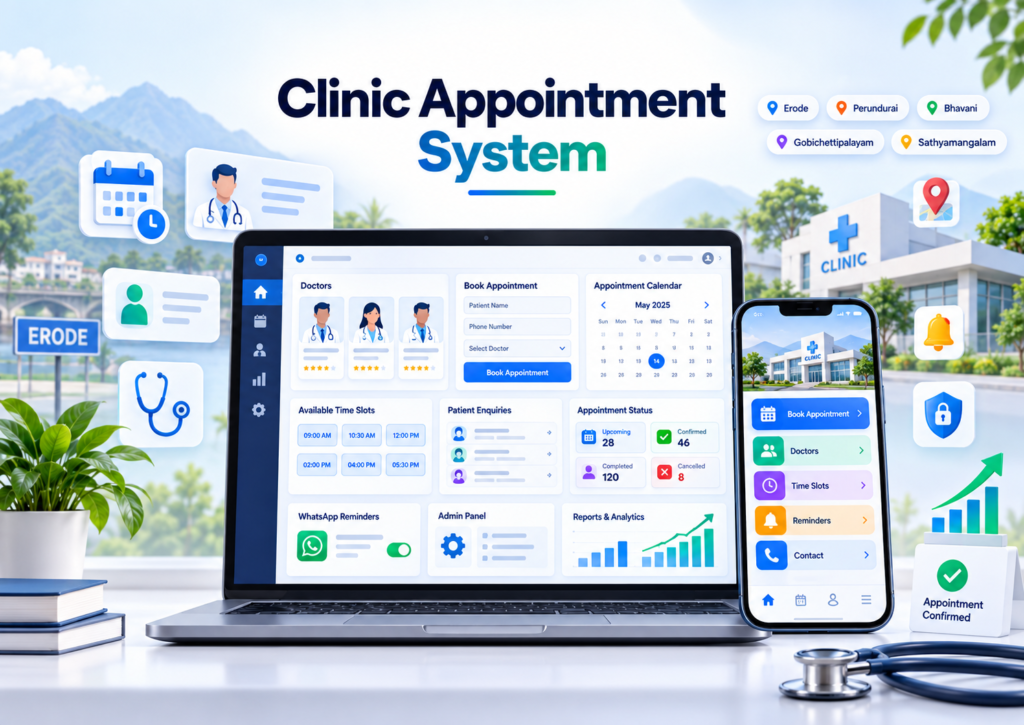
Online appointment system for clinics in Erode helps dental clinics, eye clinics, skin clinics, physiotherapy centres, speciality clinics, diagnostic centres and other healthcare service providers allow patients to request or schedule appointments online.
Many clinics still depend heavily on phone calls, WhatsApp messages and handwritten appointment registers. During busy hours, reception staff may find it difficult to answer every call, check doctor availability, avoid overlapping appointments and send reminders to patients.
A professional clinic appointment system can allow patients to view doctors or services, choose a preferred date and time, submit their details, receive booking updates and contact the clinic easily from mobile or desktop.
At Greap Technologies, we provide online appointment system development for clinics in Erode, helping healthcare businesses build simple, secure, mobile-friendly and practical appointment solutions based on their clinic workflow.
Quick Answer: What Is an Online Appointment System for Clinics?
An online appointment system for clinics is a digital booking platform that helps patients request or schedule appointments with doctors, departments or healthcare services through a website or web application.
A clinic appointment system can include:
- Clinic website or booking page
- Doctor profiles
- Treatment/service pages
- Appointment booking form
- Date selection
- Time-slot selection
- Doctor-wise availability
- Department-wise booking
- Receptionist dashboard
- Appointment status management
- Patient enquiry tracking
- WhatsApp support
- Email/SMS reminders
- Online payment, where required
- Cancellation and rescheduling
- Reports and analytics
The system can be designed for simple appointment requests or for real-time slot confirmation depending on the clinic’s requirements.
Online Appointment System for Clinics in Erode: Service Overview
| Detail | Information |
|---|---|
| Service | Online Appointment System Development for Clinics |
| Company | Greap Technologies |
| Location | Erode, Tamil Nadu |
| Main Audience | Clinics, doctors, speciality centres, dental clinics, eye clinics, physiotherapy centres and diagnostic businesses |
| Main Goal | Help patients request or schedule appointments online |
| Core Features | Doctor schedules, appointment form, slots, admin panel, reminders, patient enquiries and reports |
| Best For | Single-doctor clinics, multi-doctor clinics, speciality clinics and appointment-based healthcare services |
| Service Area | Erode District and nearby areas |
Why Clinics in Erode Need an Online Appointment System
Clinics depend on smooth coordination between patients, receptionists, doctors and management. As patient enquiries increase, manual appointment handling can become difficult.
Without a structured appointment system, clinics may face:
- Missed phone enquiries
- Delayed WhatsApp replies
- Double bookings
- Unclear doctor availability
- Appointment details stored in different places
- Patients forgetting appointment timings
- No structured cancellation process
- No rescheduling workflow
- No source tracking for patient enquiries
- No clear appointment reports
An appointment system can give clinic staff one place to manage booking requests and provide patients with a clearer digital booking experience.
What Types of Clinics Can Use an Online Appointment System?
1. Dental Clinics
Dental clinics can allow patients to request appointments for consultations, cleaning, orthodontic reviews, follow-up visits and other dental services.
2. Eye Clinics
Eye-care businesses can manage consultation appointments, follow-up visits and service-specific schedules.
3. Skin and Dermatology Clinics
Skin clinics can provide appointment requests for consultations and clinic services while clearly displaying doctor availability.
4. Physiotherapy Clinics
Physiotherapy centres can manage initial consultations, treatment sessions and recurring appointment schedules.
5. Multi-Speciality Clinics
Patients can select:
- Department
- Doctor
- Service
- Date
- Available time
6. Diagnostic Centres
Diagnostic businesses can use booking systems for selected appointments or service enquiries based on their operational model.
7. Child Healthcare Clinics
Appointment systems can support parent/contact bookings while ensuring any patient-related information is handled with appropriate privacy controls.
8. Women’s Health Clinics
Appointment scheduling can be structured around doctor availability, consultation duration and clinic timing.
9. Small Single-Doctor Clinics
Even smaller clinics can start with a simple appointment request page and receptionist dashboard rather than implementing a large hospital-management system.
10. Multi-Branch Clinics
Clinics operating in multiple locations can add branch selection, doctor availability and branch-wise reports.
Benefits of an Online Appointment System for Clinics
1. Patients Can Submit Appointment Requests Online
Patients can review clinic information and submit a booking request even when reception staff are busy or the clinic is closed.
2. Better Doctor Schedule Management
The system can maintain doctor availability based on:
- Working days
- Working hours
- Consultation duration
- Break times
- Blocked dates
- Leave dates
- Existing appointments
3. Reduce Double Booking
For real-time booking, the system should perform a final availability check before confirming an appointment.
Example:
Select Doctor → Select Available Slot → Enter Patient Details → Recheck Slot → Confirm Appointment
4. Better Reception Management
Reception staff can view:
- Today’s appointments
- Upcoming appointments
- Pending requests
- Confirmed appointments
- Cancelled appointments
- Rescheduled appointments
5. Better Patient Communication
Patients can receive clear information about whether an appointment is:
- Requested
- Pending confirmation
- Confirmed
- Rescheduled
- Cancelled
- Completed
6. Appointment Reminders
Reminder messages can support patient attendance by sending updates before the appointment where required.
7. Better Reports for Clinic Owners
Reports can help clinic owners understand appointment activity without relying only on manual registers.
Important Features of a Clinic Appointment System
1. Clinic Website or Appointment Landing Page
A clinic booking experience can begin from a professional website containing:
- Clinic information
- Doctors
- Services/treatments
- Appointment CTA
- Location
- Working hours
- FAQs
- Contact options
Explore Website Development Services for complete clinic website requirements.
2. Doctor Profile Management
Doctor profiles can include:
- Doctor name
- Speciality
- Professional qualifications, where accurately provided
- Consultation availability
- Clinic branch
- Booking button
Professional credentials and medical claims should only be published when they are accurate and authorized by the clinic.
3. Treatment and Service Pages
Each major service can have a dedicated page explaining:
- Service name
- General information
- Doctor/speciality involved
- Appointment process
- Clinic location
- Booking CTA
- FAQs
4. Appointment Booking Form
The booking form can collect:
- Patient/customer name
- Phone number
- Email, if required
- Selected service
- Selected doctor
- Preferred date
- Preferred time
- Basic booking note
Only information necessary for arranging the appointment should be collected through a general public booking form.
5. Doctor-Wise Time Slots
Different doctors can have different schedules.
The system can define:
- Available weekdays
- Start and end times
- Consultation duration
- Break periods
- Leave days
- Maximum appointments
6. Department-Wise Booking
Multi-speciality clinics can first ask the patient to select a department and then display suitable doctors.
Example:
Select Department → Select Doctor → Select Date → Select Slot → Enter Details → Submit
7. Appointment Status Management
Useful appointment statuses include:
- New Request
- Pending Confirmation
- Confirmed
- Patient Arrived
- Completed
- Rescheduled
- Cancelled
- No-Show
8. Receptionist Dashboard
The receptionist dashboard can include:
- Today’s appointment list
- Calendar view
- Patient/contact details
- Doctor
- Time
- Status
- Reschedule option
- Cancellation option
- Internal notes
9. Doctor Schedule View
Doctors can have a simple view showing their upcoming appointment schedule without necessarily giving access to unrelated clinic-management information.
10. Booking Confirmation
A confirmation should clearly state whether the appointment is:
- Successfully confirmed, or
- Only submitted and waiting for clinic approval.
A booking request should not be described as a confirmed appointment until the requested slot has actually been reserved.
11. Cancellation and Rescheduling
The system can support:
- Patient cancellation request
- Reception cancellation
- Reschedule request
- Alternative slot selection
- Status history
12. Appointment Reminders
Notifications can be used for:
- Booking received
- Booking confirmation
- Appointment reminder
- Rescheduling
- Cancellation
13. WhatsApp Support
The clinic website can include:
- Click-to-WhatsApp
- Pre-filled appointment enquiry
- Booking-support button
Automated WhatsApp messages generally require appropriate WhatsApp Business Platform access, approved templates and provider-related setup or charges.
14. SMS and Email Notifications
Depending on requirements, clinics can send appointment confirmation and reminder notifications through supported email or SMS providers.
15. Online Payment Integration
Clinics that collect consultation fees before appointment confirmation can connect supported payment gateways.
A payment workflow can be:
Appointment Details → Payment Gateway → Server-Side Payment Verification → Appointment Status Updated
Payment-gateway provider fees, account approval and transaction charges remain separate from website-development charges.
Patient Appointment Journey Example
A simple digital patient journey can be:
Google Search / Google Maps → Clinic Website → Doctor / Service Page → Book Appointment → Choose Date & Time → Submit Details → Clinic Confirmation → Reminder → Clinic Visit
This creates a clearer journey from online discovery to appointment management.
Appointment Request vs Instant Confirmed Booking
| Feature | Appointment Request | Instant Booking |
|---|---|---|
| Patient Chooses Date | Yes | Yes |
| Patient Chooses Time | Preferred time | Available live slot |
| Clinic Approval | Required | Usually not required after successful booking |
| Real-Time Availability | Optional | Required |
| Double-Booking Protection | Handled during confirmation | Required during booking transaction |
| Best For | Small clinics with flexible schedules | Clinics with structured appointment calendars |
Online Appointment System vs Clinic Website
| Feature | Clinic Website | Appointment System |
|---|---|---|
| Main Purpose | Present clinic information | Manage patient appointment workflow |
| Doctor Profiles | Included | Can be connected |
| Service Pages | Included | Can be connected |
| Appointment Form | Basic or advanced | Core feature |
| Doctor Schedule | Usually limited | Core feature |
| Time Slots | Optional | Core feature when real-time booking is needed |
| Admin Panel | Content-focused | Appointment-focused |
| Reports | Website analytics | Appointment reports |
A clinic can use both: the website handles public information and SEO, while the appointment system manages booking operations.
Online Appointment System vs Clinic CRM
| Feature | Appointment System | Clinic CRM |
|---|---|---|
| Main Purpose | Manage appointments | Manage enquiries and follow-ups |
| Doctor Schedule | Strong focus | Usually limited |
| Time Slots | Strong focus | Usually not core |
| Lead Source | Can be captured | Strong focus |
| Follow-Up Reminders | Appointment-related | Enquiry and relationship-focused |
| Patient Enquiries | Can be included | Strong focus |
An appointment system and CRM can work together when the clinic needs both booking management and enquiry follow-up.
Online Appointment System vs Hospital Management Software
| Feature | Online Appointment System | Hospital Management Software |
|---|---|---|
| Main Purpose | Appointment scheduling | Broader healthcare operations |
| Appointment Booking | Strong focus | Included |
| Doctor Schedule | Included | Included |
| Billing | Optional | Usually included |
| Pharmacy | Not main focus | Can be included |
| Lab | Optional or integrated | Can be included |
| Clinical / Medical Records | Not main focus | May be included depending on system scope |
| Reports | Appointment-focused | Broader operational reports |
| Best For | Clinics and appointment-based services | Hospitals and larger healthcare operations |
For many smaller clinics, an appointment system can be a practical starting point when full hospital-management functionality is not required.
Patient Privacy and Security for Clinic Appointment Systems
A clinic appointment system can collect patient contact details and appointment information. Security and privacy should therefore be planned from the beginning.
Depending on the project, controls can include:
- HTTPS
- Secure admin authentication
- Role-based access
- Receptionist-specific permissions
- Doctor-specific access
- Secure password hashing
- Session controls
- Form validation
- Spam protection
- Audit/activity logs
- Database backups
- Restricted data exports
Clinics should avoid collecting unnecessary medical information through a general public booking form.
If the project expands into clinical records, prescriptions, diagnostic information or other sensitive medical data, the application requires additional security, privacy, access-control and compliance planning beyond a basic appointment system.
Online Appointment System for Clinics in Erode: SEO Strategy
The primary focus of this page should remain online appointment system for clinics in Erode.
Primary Keyword
Online appointment system for clinics in Erode
Supporting Search Terms
- Clinic appointment booking system in Erode
- Doctor appointment system in Erode
- Online booking system for clinics
- Appointment scheduling software for clinics
- Clinic booking website in Erode
- Patient appointment management software
- Healthcare appointment system in Erode
- Clinic website development in Erode
- Clinic CRM software in Erode
These terms should be used naturally where relevant rather than repeatedly inserted into every section.
How to Structure This Page for Google and AI Search
Clear structured content can make the page easier for search engines and AI-powered search experiences to interpret.
Useful content elements include:
- A direct quick-answer section
- Clear H2 and H3 headings
- Clinic-specific use cases
- Feature explanations
- Comparison tables
- Patient journey examples
- Local Erode context
- FAQs
- Relevant internal links
- Accurate structured data
No content format can guarantee Google rankings, AI citations or enquiry generation. Visibility depends on many factors including competition, authority, relevance, technical SEO, content quality and external signals.
Important Topic Entities to Cover Naturally
Relevant concepts include:
- Clinic
- Doctor
- Patient
- Appointment
- Time Slot
- Receptionist
- Admin Panel
- Doctor Schedule
- Booking Form
- Appointment Reminder
- Clinic Website
- Patient Enquiry
- Clinic CRM
- Reports
- Erode
These entities should appear only where they genuinely contribute to the topic.
Clinic Appointment System Design Style
A clinic appointment system should be simple and comfortable for both patients and staff.
| User Type | Primary Requirement |
|---|---|
| Patient | Easy doctor/service selection and appointment booking |
| Receptionist | Appointment calendar, patient details and status updates |
| Doctor | Daily schedule and appointment list |
| Clinic Owner | Appointment summary and reports |
| Marketing Team | Enquiry-source and conversion tracking |
| Administrator | Users, schedules, settings and permissions |
Recommended interface principles include:
- Visible Book Appointment CTA
- Simple doctor cards
- Clear date and time selection
- Minimal booking fields
- Mobile-responsive design
- Clear confirmation messages
- Fast-loading pages
- Simple receptionist dashboard
Digital Marketing Integration for Clinic Appointment Systems
Online appointment system for clinics in Erode can work as the conversion destination for different digital marketing channels.
Possible traffic sources include:
- Google Search
- Google Business Profile
- Google Ads
- Meta Ads
- Social media
- Referral links
A useful journey can be:
Search / Ad → Clinic Page → Doctor / Treatment Information → Appointment Booking → Confirmation → Clinic Visit
Explore:
Appointment Conversion Tracking
Clinics can measure website actions such as:
- Appointment page views
- Booking form starts
- Booking form submissions
- Confirmed appointments
- WhatsApp clicks
- Phone clicks
- Payment completion, where applicable
A submitted appointment request should not automatically be counted as a completed patient visit.
Analytics and ad-platform reporting should distinguish between:
Enquiry → Booking Request → Confirmed Appointment → Clinic Visit
Advanced Features for Clinic Appointment Systems
- Doctor-wise time slots
- Department-wise booking
- Multi-branch appointment management
- Recurring appointments
- Follow-up appointment reminders
- Receptionist login
- Doctor login
- Patient/customer portal
- Patient enquiry CRM
- Waitlist management
- No-show tracking
- Cancellation and rescheduling
- Online consultation booking
- Payment gateway integration
- Document upload, when genuinely required
- WhatsApp notifications
- Email notifications
- SMS reminders
- Calendar integration
- Reports and analytics
- Mobile application
Advanced features should be added based on the actual clinic workflow rather than making the booking process unnecessarily complicated.
Online Appointment System Development Process
Step 1: Clinic Requirement Analysis
Important questions include:
- What type of clinic is it?
- How many doctors are available?
- Do doctors have different schedules?
- Do patients select a doctor or department?
- Are appointments instantly confirmed?
- Does the receptionist approve bookings?
- How long is each consultation slot?
- Do you need cancellation or rescheduling?
- Do you need appointment reminders?
- Do you need payment integration?
- Do you need CRM integration?
- What reports does the clinic owner need?
Step 2: Appointment Workflow Planning
Example:
Patient Visits Website → Selects Doctor / Service → Selects Date → Selects Slot → Enters Details → Booking Submitted → Confirmation → Reminder → Consultation
Step 3: Doctor Schedule Planning
Configure:
- Working days
- Working hours
- Consultation duration
- Break times
- Leave dates
- Blocked slots
Step 4: User Role Planning
Define access for:
- Administrator
- Receptionist
- Doctor
- Marketing/report user
- Patient/customer portal user, if applicable
Step 5: UI/UX Design
The appointment booking process should remain simple, especially on mobile phones.
Step 6: Website and Booking System Development
Development can include:
- Clinic website
- Doctor profiles
- Treatment pages
- Appointment form
- Slot engine
- Admin panel
- Notifications
- Reports
Step 7: Content and SEO Setup
SEO setup can include:
- SEO title
- Meta description
- Heading structure
- Internal links
- Image ALT text
- FAQ content
- Relevant schema
- Local clinic information
Step 8: Booking Testing
Test scenarios such as:
- Successful booking
- Slot already booked
- Doctor unavailable
- Booking request pending
- Cancellation
- Rescheduling
- Notification delivery
- Payment success/failure, where applicable
Step 9: Security and Permission Testing
Test that users cannot access information outside their role.
Step 10: Staff Training and Launch
Receptionists and administrators should understand scheduling, appointment statuses, cancellations, rescheduling and reporting before launch.
Clinic Appointment System Features Checklist
| Feature | Recommendation |
|---|---|
| Clinic Website / Booking Page | Required |
| Doctor Profiles | Recommended |
| Treatment / Service Pages | Required |
| Appointment Booking Form | Required |
| Date Selection | Recommended |
| Time-Slot Selection | Recommended |
| Final Slot Availability Check | Required for instant booking |
| Doctor-Wise Schedule | Based on clinic type |
| Department-Wise Booking | Based on requirement |
| Admin Panel | Required |
| Receptionist Access | Recommended |
| Appointment Status | Required |
| Booking Confirmation | Recommended |
| Appointment Reminders | Recommended |
| Cancellation / Rescheduling | Based on requirement |
| WhatsApp CTA | Recommended |
| Email / SMS | Based on requirement |
| Patient Enquiry CRM | Based on requirement |
| Payment Gateway | Based on requirement |
| Reports | Recommended |
| Conversion Tracking | Recommended |
| Mobile Responsive Design | Required |
| SEO Setup | Required |
| Role-Based Access | Recommended |
Common Mistakes Clinics Should Avoid
1. Using Only Phone Calls for Appointments
Online booking can provide another way for patients to submit requests when staff cannot answer immediately.
2. No Clear Book Appointment CTA
The appointment button should be easy to find across important clinic pages.
3. Calling Every Submission a Confirmed Appointment
The system should clearly distinguish between a booking request and a reserved appointment.
4. No Final Slot Validation
Real-time booking systems should verify that a selected slot is still available before confirmation.
5. Collecting Too Much Sensitive Information
A basic booking form should collect only information needed for appointment scheduling.
6. No Doctor Schedule Management
Multi-doctor clinics need accurate availability rules.
7. Poor Mobile Experience
The complete booking process should work comfortably on mobile devices.
8. No Cancellation or Rescheduling Process
Clinics should define what happens when an appointment changes.
9. No Appointment Reporting
Owners should be able to review booking activity and enquiry sources where tracking is enabled.
10. Treating Appointment Software as a Full Medical Records System
An appointment solution should not automatically be treated as an EMR, EHR or complete hospital-management platform unless those capabilities are specifically designed and implemented.
Erode District Clinic Appointment System Service Areas
Greap Technologies supports businesses across:
Erode, Perundurai, Bhavani, Anthiyur, Gobichettipalayam, Sathyamangalam, Modakkurichi, Kodumudi, Nambiyur, Thalavadi, Chennimalai, Kavindapadi, Ammapettai, Arachalur, Sivagiri, Punjai Puliampatti, Solar, Surampatti, Veerappanchatram, Nasiyanur and nearby areas.
Location-specific pages should only be created for areas genuinely served and should contain useful local information rather than repeating identical content with different place names.
Supporting Content Ideas for Clinic Software SEO
- Website Development for Hospitals and Clinics in Erode
- Clinic Appointment Booking Website in Erode
- CRM Software for Hospitals and Clinics in Erode
- Digital Marketing for Clinics in Erode
- SEO Services for Clinics in Erode
- Google Ads for Clinics in Erode
- Patient Enquiry Management Software in Erode
- WhatsApp Booking System for Clinics in Erode
- Doctor Appointment Scheduling Software in Erode
- Clinic Management Software for Small Clinics in Erode
Supporting articles should answer different search intents instead of repeating the same page with slightly different keywords.
How Greap Technologies Helps with Online Appointment System Development
Greap Technologies can develop clinic appointment systems based on doctor schedules, receptionist workflows and patient booking requirements.
Our development services can include:
- Requirement analysis
- Appointment workflow planning
- UI/UX design
- Clinic website development
- Doctor profile development
- Treatment/service pages
- Appointment booking form
- Date and time-slot selection
- Doctor schedule management
- Department-wise booking
- Admin panel
- Receptionist dashboard
- Appointment status management
- Cancellation and rescheduling
- Patient enquiry CRM
- WhatsApp support
- Email/SMS integrations
- Payment gateway integration
- Reports and analytics
- Conversion tracking
- SEO setup
- Mobile-responsive development
- Testing and training
- Maintenance support
Explore related Greap services:
- Website Development Services
- Web Application Development
- Custom Software Development
- API Integration Services
- SEO Services
- Digital Marketing Services
Why Choose Greap Technologies?
Clinic Workflow-Based Development
We can structure the appointment system around doctor availability, receptionist confirmation, booking status and patient communication.
Custom Appointment System Development
The system can be customized for single-doctor, multi-doctor or multi-speciality clinic workflows.
Patient-Friendly Booking Experience
The booking process can be designed to remain clear and simple across mobile and desktop devices.
Role-Based Access
Receptionists, administrators and doctors can receive different levels of access based on their responsibilities.
SEO-Friendly Website Structure
Clinic pages can include local SEO structure, service pages, FAQs, metadata and appropriate structured data.
Complete Digital Support
Greap Technologies also provides clinic websites, CRM systems, custom web applications, mobile applications, SEO and digital marketing services.
Conclusion
Online appointment system for clinics in Erode can help clinics provide patients with a more convenient way to request or schedule doctor appointments while giving reception and management teams better visibility into daily bookings.
A practical clinic appointment system should include clear doctor/service information, date and time selection, appointment status, receptionist controls, confirmation messages, reminders, mobile-friendly design and useful reports.
Clinics with more complex requirements can later add doctor logins, patient portals, CRM functionality, payment integration, multi-branch scheduling and advanced reporting.
Greap Technologies helps clinics in Erode develop custom appointment systems based on their actual doctor schedules, patient journey and administrative workflow.
Need an Online Appointment System for Your Clinic in Erode?
Greap Technologies can help you build a clinic appointment system with doctor profiles, appointment slots, receptionist management, reminders, WhatsApp support, reports, SEO and mobile-responsive design.
Frequently Asked Questions
1. What is an online appointment system for clinics?
An online appointment system is a digital booking platform that allows patients to request or schedule appointments by selecting a doctor, service, date or available time slot.
2. Why do clinics in Erode need an online appointment system?
An appointment system can help clinics organize patient booking requests, doctor schedules, confirmations and reminders while reducing dependence on manual appointment registers.
3. What features should a clinic appointment system include?
A clinic appointment system can include doctor profiles, treatment pages, booking forms, date/time slots, receptionist dashboard, appointment status, reminders, WhatsApp support and reports.
4. Can patients book appointments from mobile phones?
Yes. A responsive appointment system can allow patients to complete the booking process from mobile phones, tablets and desktop devices.
5. Can the system manage doctor-wise time slots?
Yes. Doctor-specific working days, hours, consultation durations, breaks, blocked slots and existing appointments can be used to calculate availability.
6. Can clinics send WhatsApp appointment notifications?
Yes. Click-to-WhatsApp can be added easily, while automated WhatsApp confirmations or reminders may require approved WhatsApp Business Platform access, templates and provider setup.
7. Can Greap Technologies build a custom clinic appointment system?
Yes. Greap Technologies can develop appointment systems based on doctor availability, clinic workflow, receptionist requirements, booking rules and reporting needs.
8. Can the appointment system connect with clinic CRM software?
Yes. Appointment data can be connected with a suitable CRM to manage patient enquiries, follow-ups, lead sources and booking-related workflows.
9. Is an online appointment system suitable for small clinics?
Yes. Small clinics can begin with a simple booking page, doctor schedule and receptionist dashboard without implementing a complete hospital-management platform.
10. Can an online appointment system help generate more patient enquiries?
A clear mobile-friendly booking experience and SEO-optimized clinic pages can support enquiry generation by making appointment actions easier to discover and complete. Actual enquiry volume depends on search visibility, competition, reputation, marketing and other factors.