Website Accessibility Services in Erode: Making Websites Easier to Use
Imagine visiting a business website to find a product, book an appointment or submit an enquiry, but the text is difficult to read, the navigation does not work with a keyboard or the contact form cannot be completed using assistive technology.
These problems can prevent people from using important website features.
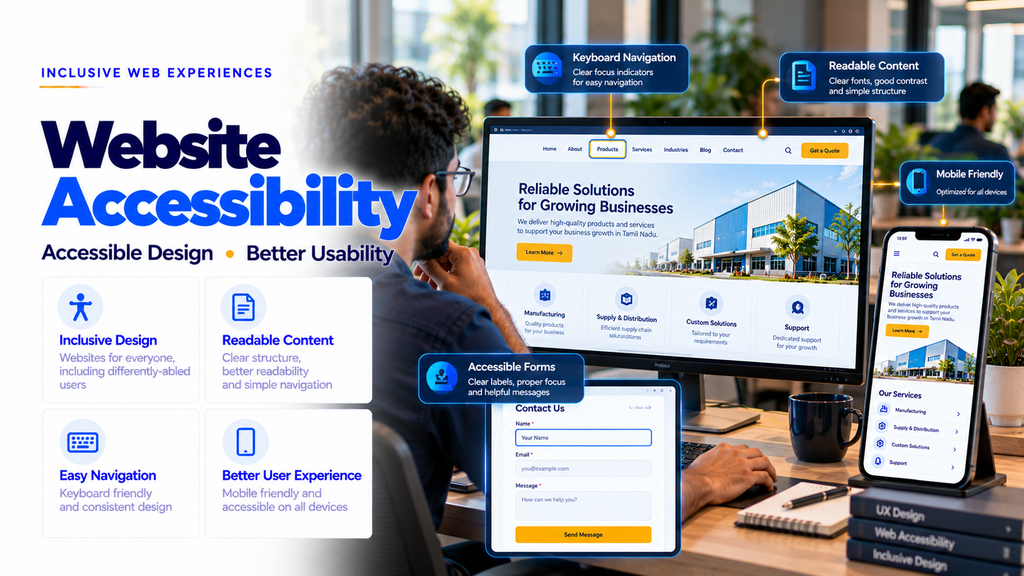
Website accessibility focuses on making digital content and functionality usable by people with different abilities, devices and interaction methods.
Website accessibility services in Erode can help businesses identify accessibility barriers and improve websites through better design, development and testing practices.
Accessibility is relevant to corporate websites, ecommerce stores, educational platforms, healthcare websites, booking systems and custom business applications.
This guide explains accessible website design, WCAG guidelines, accessibility audits, keyboard navigation, screen reader compatibility, accessible forms, mobile usability, testing, costs and practical improvements for businesses across Erode district and Tamil Nadu.
What Is Website Accessibility?
Website accessibility means designing and developing websites so that people with different disabilities and access needs can perceive, understand, navigate and interact with digital content.
Accessibility considerations may include:
- Visual accessibility
- Hearing accessibility
- Motor accessibility
- Cognitive accessibility
- Keyboard navigation
- Assistive technology compatibility
- Readable content
- Accessible forms
Accessibility can also improve usability for people using mobile devices, alternative input methods or challenging viewing conditions.
Why Website Accessibility Matters for Erode Businesses
Businesses in Erode use websites to share information, generate enquiries, sell products and provide online services.
Accessibility barriers can prevent some customers from completing important tasks.
Improving accessibility can help businesses:
- Make content easier to understand
- Improve navigation
- Support assistive technology users
- Reduce unnecessary interaction barriers
- Improve form usability
- Provide more inclusive digital services
Accessibility should be treated as an ongoing part of website quality rather than a one-time visual adjustment.
1. What Are WCAG Guidelines?
The Web Content Accessibility Guidelines, commonly called WCAG, provide internationally recognized recommendations for making web content more accessible.
WCAG covers areas such as text alternatives, keyboard access, color contrast, navigation, forms and compatibility with assistive technologies.
WCAG 2.2 is a published W3C Recommendation and includes additional accessibility success criteria compared with earlier versions.
2. The Four WCAG Accessibility Principles
WCAG is organized around four principles:
- Perceivable: Information and interface components should be presented in ways users can perceive.
- Operable: Users should be able to operate navigation and interface controls.
- Understandable: Information and operation should be understandable.
- Robust: Content should work with suitable browsers and assistive technologies.
These principles are often summarized as POUR.
3. WCAG A, AA and AAA Conformance Levels
WCAG includes three conformance levels: A, AA and AAA.
| Level | Meaning | Consideration |
|---|---|---|
| A | Foundational accessibility criteria | Does not address every accessibility barrier |
| AA | Includes Level A and additional criteria | Common target for accessibility projects |
| AAA | Includes additional advanced criteria | May not be achievable for every type of content |
Businesses should choose an appropriate conformance target based on applicable requirements and project scope.
4. Website Accessibility Audit Services
An accessibility audit is a structured assessment of a website against selected accessibility requirements.
Potential audit activities include:
- Keyboard navigation testing
- Screen reader testing
- Color contrast review
- Form accessibility review
- Heading structure assessment
- Image alternative text review
- Mobile accessibility testing
- Interactive component testing
The audit should document its scope, methodology, findings and limitations.
5. Automated Website Accessibility Testing
Automated testing tools can identify certain accessibility problems.
Examples include:
- Missing alternative text
- Some contrast failures
- Invalid accessibility attributes
- Selected form labeling problems
- Some structural issues
Automated testing cannot detect every accessibility barrier, so manual review remains important.
6. Manual Website Accessibility Testing
Manual testing evaluates how real users may interact with website features.
Potential activities include:
- Keyboard-only navigation
- Screen reader interaction
- Form completion
- Zoom and text resizing
- Mobile interaction
- Content clarity review
Testing with people with disabilities can provide additional insight into real usability barriers.
7. Keyboard Accessibility
Some people navigate websites using keyboards instead of a mouse.
Important keyboard accessibility considerations include:
- Logical focus order
- Visible focus indicators
- Accessible menus
- Operable buttons
- Keyboard-accessible forms
- No unexpected keyboard traps
Essential website functions should not require mouse-only interaction.
8. Visible Keyboard Focus
A visible focus indicator helps users identify which interactive element is currently selected.
Focus indicators should remain clear against surrounding interface colors.
Removing browser focus outlines without providing an accessible replacement can create navigation barriers.
9. Screen Reader Compatibility
Screen readers interpret website content and interface information for users who rely on assistive technology.
Compatibility considerations include:
- Semantic HTML
- Meaningful headings
- Descriptive links
- Accessible form labels
- Correct button names
- Appropriate status announcements
Testing should consider common assistive technologies and supported browsers.
10. Semantic HTML for Accessibility
Semantic HTML helps browsers and assistive technologies understand the purpose of webpage elements.
Examples include:
- Header
- Navigation
- Main content
- Article
- Section
- Footer
- Buttons
- Forms
Using native HTML elements correctly often provides better accessibility than recreating standard controls with generic containers.
11. Accessible Website Heading Structure
Headings organize content into understandable sections.
Important considerations include:
- Descriptive headings
- Logical hierarchy
- Consistent structure
- Headings that match the content
Headings should represent document structure rather than being selected only for visual appearance.
12. Accessible Website Navigation
Navigation should help visitors understand where they are and how to reach important pages.
Potential improvements include:
- Clear menu labels
- Consistent navigation
- Keyboard support
- Visible focus
- Accessible mobile menus
- Skip navigation links
13. Skip Navigation Links
A skip link allows keyboard users to bypass repeated navigation and move directly to the main content.
This can reduce repetitive keyboard navigation across website pages.
Skip links should become visible when focused and move users to the intended content region.
14. Website Color Contrast
Text needs sufficient contrast against its background to remain readable for people with different visual abilities.
For WCAG Level AA, normal text generally requires a contrast ratio of at least 4.5:1, while qualifying large text generally requires at least 3:1.
Some text and interface situations have specific exceptions or different requirements.
15. Accessible Typography
Readable typography helps visitors understand website content.
Important considerations include:
- Legible font choices
- Appropriate text size
- Comfortable line spacing
- Clear paragraph structure
- Text resizing support
- Avoiding unnecessary decorative text
Accessibility depends on the overall reading experience, not one particular font.
16. Text Resizing and Browser Zoom
Visitors may enlarge text or zoom into a webpage to read content comfortably.
Responsive layouts should support text enlargement without unnecessarily hiding content or functionality.
Websites should be tested at different zoom levels and viewport sizes.
17. Accessible Images and ALT Text
Alternative text describes meaningful images for users who cannot see them.
Good alternative text should communicate the image’s relevant purpose in context.
Decorative images should generally use empty alternative text so they do not create unnecessary announcements.
18. Accessible Website Buttons
Buttons should have clear labels and predictable behavior.
Potential improvements include:
- Descriptive button names
- Keyboard operation
- Visible focus indicators
- Appropriate touch target sizes
- Clear disabled states
19. Accessible Links
Links should help users understand their destination or purpose.
Descriptive text is usually more useful than repeated vague labels such as “Click Here”.
Links should also remain distinguishable from surrounding text.
20. Accessible Contact Forms
Contact forms are important for lead generation and customer communication.
Accessibility considerations include:
- Visible field labels
- Clear instructions
- Keyboard operation
- Helpful validation messages
- Accessible error identification
- Logical form structure
21. Accessible Form Validation
When a user makes a form entry error, the website should explain what needs correction.
Useful validation messages should:
- Identify the affected field
- Describe the problem
- Provide helpful correction guidance
- Remain accessible to assistive technology
22. Accessible Error Messages
Error messages should not depend only on color.
For example, displaying a red border without explaining the error may be insufficient.
Clear text messages can help users understand what went wrong.
23. Accessible Website Menus
Dropdown and expandable menus should support appropriate keyboard and assistive technology interaction.
Important considerations include:
- Clear labels
- Keyboard operation
- Focus management
- Expanded state communication
- Predictable behavior
24. Accessible Mobile Navigation
Mobile menus should be usable through touch and compatible assistive technologies.
Potential requirements include:
- Readable menu labels
- Appropriate target sizes
- Accessible menu buttons
- Correct expanded states
- Logical navigation order
25. Accessible Website Tables
Data tables should use appropriate table markup and headings.
Important considerations include:
- Table headers
- Clear relationships between headers and cells
- Readable content
- Responsive presentation
Tables should be used for tabular data rather than unnecessary page layout.
26. Accessible Website Videos
Videos may require captions and other accessibility support depending on their content.
Potential features include:
- Accurate captions
- Accessible playback controls
- Keyboard operation
- Transcripts where useful
- Audio description where required
27. Video Captions and Transcripts
Captions help users access spoken content and relevant audio information.
Transcripts provide a text alternative that can also support people who prefer reading.
Automatically generated captions should be reviewed for accuracy.
28. Accessible Website Animations
Animations should not create unnecessary barriers.
Important considerations include:
- Reduced-motion preferences
- Pause controls where appropriate
- Avoiding distracting movement
- Preventing harmful flashing content
- Maintaining readable content
29. Reduced Motion Support
Some users prefer reduced motion because animations can cause discomfort or interfere with usability.
Websites can respect system-level reduced-motion preferences and reduce unnecessary animation effects.
30. Accessible Modal Dialogs
Modal dialogs require careful keyboard and focus management.
Potential requirements include:
- Accessible dialog labels
- Appropriate initial focus
- Keyboard operation
- Clear close controls
- Restoring focus after closing
31. Accessible Ecommerce Website Development
Ecommerce accessibility affects product browsing, cart management and checkout.
Important areas include:
- Product navigation
- Search and filters
- Product image descriptions
- Variant selection
- Shopping cart
- Checkout forms
- Order confirmation
32. Accessible Ecommerce Checkout
Checkout processes should allow customers to complete purchases without unnecessary accessibility barriers.
Potential improvements include:
- Clear form labels
- Accessible validation
- Logical keyboard order
- Understandable totals
- Clear payment instructions
- Accessible confirmation messages
33. WordPress Website Accessibility
WordPress websites can be developed with accessible themes, content and interactive components.
Potential review areas include:
- Theme accessibility
- Plugin compatibility
- Navigation
- Headings
- Forms
- Media alternatives
Using an accessibility-focused theme does not automatically make all website content and plugins accessible.
34. WooCommerce Website Accessibility
WooCommerce stores may require accessibility reviews covering both WordPress components and ecommerce workflows.
Important areas include:
- Product pages
- Product variations
- Filters
- Cart interactions
- Checkout
- Customer accounts
35. Shopify Website Accessibility
Shopify store accessibility depends on theme implementation, customizations, apps and content.
Potential review areas include:
- Theme navigation
- Product information
- App-generated components
- Forms
- Interactive controls
- Mobile usability
36. Laravel Website Accessibility
Laravel applications may include custom dashboards, forms and administrative interfaces.
Accessibility should be considered during frontend development.
Potential priorities include:
- Semantic templates
- Accessible forms
- Validation messages
- Keyboard navigation
- Interactive components
37. React.js Website Accessibility
React applications may include dynamic content and complex interactive components.
Accessibility considerations include:
- Semantic HTML
- Accessible component patterns
- Focus management
- Keyboard interaction
- Dynamic status announcements
38. Next.js Website Accessibility
Next.js websites can use accessible React components and semantic page structures.
Important considerations include:
- Page titles
- Heading structure
- Navigation
- Focus management
- Forms
- Dynamic content
39. Accessibility for Business Websites
Corporate and service websites should make essential business information easy to access.
Important content includes:
- Services
- Products
- Business location
- Contact information
- Enquiry forms
- Company details
40. Accessibility for Educational Websites
Educational websites may serve students, parents, teachers and administrators.
Potential accessibility priorities include:
- Course information
- Admissions
- Student portals
- Learning materials
- Forms
- Announcements
41. Accessibility for Healthcare Websites
Healthcare websites may provide information about services, appointments and patient guidance.
Important considerations include:
- Readable medical information
- Accessible appointment forms
- Clear navigation
- Accessible contact details
- Mobile usability
42. Accessibility for Manufacturing Websites
Manufacturing websites may include product catalogues, technical documents and enquiry systems.
Potential priorities include:
- Readable specifications
- Accessible product navigation
- Document accessibility
- Clear enquiry forms
- Keyboard-friendly interfaces
43. Accessibility for B2B Portals
B2B portals may include account dashboards, quotation requests and order management.
Accessibility should be considered for:
- Dashboard navigation
- Data tables
- Search and filtering
- Forms
- Notifications
- Account settings
44. Website Accessibility and SEO
Accessibility and SEO have some overlapping best practices, including semantic HTML, descriptive links, useful content and image alternatives.
However, accessibility conformance is not the same as SEO optimization.
Improving accessibility does not guarantee higher search rankings.
45. Website Accessibility and User Experience
Accessibility and user experience are closely related.
Clear navigation, readable content, understandable forms and predictable controls can help many website visitors complete tasks more comfortably.
Accessibility adds specific requirements for people using assistive technologies and alternative interaction methods.
46. Website Accessibility and Conversion Opportunities
Accessibility barriers can prevent visitors from submitting enquiries, booking appointments or completing purchases.
Addressing these barriers may help more visitors use important website functions.
Business results depend on traffic, customer needs and the quality of the overall experience.
47. Website Accessibility Requirements in India
Accessibility obligations can vary depending on the organization, website purpose and applicable laws or standards.
Indian businesses should review relevant legal requirements, including accessibility-related obligations that may apply to their sector.
Government and public-service websites may have additional requirements.
WCAG conformance and legal compliance are related considerations but should not be treated as automatically equivalent.
Organizations needing formal legal or compliance assurance should obtain appropriate professional advice.
48. Website Accessibility Audit Cost in Erode
Accessibility audit costs depend on the website’s size, technology, complexity and assessment scope.
Important factors include:
- Number of page templates
- Website platform
- Interactive components
- Forms
- Ecommerce functionality
- Assistive technology testing
- Reporting requirements
- Remediation work
- Retesting
A basic automated scan and a comprehensive manual accessibility audit have different scopes and should not be considered equivalent.
49. Website Accessibility Budget Planning
| Service Component | Typical Scope | Cost Consideration |
|---|---|---|
| Initial Review | Website structure and key workflows | Website complexity |
| Automated Testing | Tool-based checks | Pages and templates |
| Manual Testing | Keyboard and assistive technology review | Testing coverage |
| Accessibility Report | Findings and recommendations | Reporting depth |
| Remediation | Design and code improvements | Number and severity of issues |
| Retesting | Verification of fixes | Changes made |
50. Website Accessibility Improvement Process
- Requirement Discussion: Understand the website and accessibility goals.
- Scope Definition: Identify pages, templates and user journeys.
- Automated Review: Identify selected technical issues.
- Manual Testing: Evaluate keyboard and assistive technology interaction.
- Findings Report: Document accessibility barriers.
- Prioritization: Identify important improvements.
- Design Changes: Improve relevant interface patterns.
- Code Remediation: Correct implementation issues.
- Retesting: Verify fixes.
- Maintenance Planning: Include accessibility in future updates.
51. Website Accessibility Maintenance
Accessibility should be reviewed when websites are updated.
Ongoing activities may include:
- Testing new pages
- Reviewing new plugins
- Checking forms
- Testing updated navigation
- Reviewing images and alternative text
- Checking new interactive components
- Training content editors
52. Common Website Accessibility Mistakes
- Removing keyboard focus indicators
- Using images without suitable text alternatives
- Creating mouse-only navigation
- Using insufficient text contrast
- Publishing forms without proper labels
- Using unclear error messages
- Ignoring mobile accessibility
- Using headings only for visual styling
- Publishing videos without needed captions
- Ignoring reduced-motion preferences
- Relying only on automated testing
- Assuming an accessibility overlay fixes every problem
53. Website Accessibility Checklist
- Use semantic HTML.
- Provide meaningful page titles.
- Use logical headings.
- Include descriptive links.
- Provide suitable image alternative text.
- Ensure keyboard navigation works.
- Maintain visible focus indicators.
- Check text contrast.
- Support text resizing.
- Test responsive layouts.
- Label form controls.
- Provide understandable error messages.
- Check dropdown menus.
- Test modal dialogs.
- Review dynamic content announcements.
- Provide required captions.
- Respect reduced-motion preferences.
- Check accessible names for buttons.
- Test with assistive technologies.
- Document remaining accessibility issues.
54. Website Accessibility Services Across Erode District
Businesses across Erode district may benefit from accessibility improvements for corporate websites, ecommerce stores, educational websites and custom applications.
Relevant locations include:
- Erode
- Perundurai
- Bhavani
- Anthiyur
- Gobichettipalayam
- Sathyamangalam
- Modakkurichi
- Kodumudi
- Nambiyur
- Chennimalai
- Kavindapadi
- Ammapettai
- Arachalur
- Sivagiri
- Punjai Puliampatti
- Thalavadi
- Solar
- Surampatti
- Veerappanchatram
- Nasiyanur
Businesses in Coimbatore, Tiruppur, Salem, Karur, Namakkal, Chennai, Madurai and Tiruchirappalli may also require accessible website development and testing.
55. How to Choose a Website Accessibility Service Provider
Before selecting a provider, consider:
- Understanding of WCAG
- Manual testing capabilities
- Keyboard accessibility knowledge
- Assistive technology experience
- Responsive design experience
- Clear audit methodology
- Actionable reporting
- Remediation capabilities
- Retesting options
- Ongoing support
Ask whether testing includes important user journeys and whether the report identifies both technical and practical usability barriers.
56. How Greap Technologies Can Help
Greap Technologies can help businesses in Erode and Tamil Nadu discuss website accessibility and usability improvement requirements.
Depending on the agreed project scope, potential services may include:
- Website accessibility review planning
- Accessible website development
- Responsive interface improvements
- Keyboard navigation improvements
- Accessible form development
- Semantic HTML improvements
- WordPress accessibility updates
- WooCommerce accessibility improvements
- Laravel frontend accessibility improvements
- React and Next.js accessibility improvements
- Website usability optimization
- Accessibility remediation support
Formal conformance assessments and specialist assistive technology testing should be clearly scoped with suitably experienced professionals when required.
Explore Greap Technologies for website development, ecommerce solutions, maintenance and digital services.
Conclusion
Website accessibility services in Erode can help businesses make their websites easier to use for people with different abilities and interaction needs.
Accessible websites require thoughtful navigation, readable content, appropriate contrast, keyboard support, accessible forms and compatibility with assistive technologies.
WCAG provides a useful framework, but meaningful accessibility improvement also requires manual testing and ongoing maintenance.
Businesses should prioritize the website functions that matter most to their customers and address accessibility barriers through practical design and development improvements.
Want to Make Your Business Website Easier to Use?
Greap Technologies can help you discuss website accessibility, responsive design, keyboard navigation, form usability and accessibility improvement requirements.
Frequently Asked Questions
1. What is website accessibility?
Website accessibility means designing and developing websites so that people with different disabilities and access needs can use their content and functionality.
2. What are WCAG guidelines?
WCAG is a set of internationally recognized web accessibility guidelines published by the World Wide Web Consortium.
3. How much does a website accessibility audit cost in Erode?
Cost depends on website complexity, page templates, interactive features, testing requirements and remediation scope.
4. Can an existing website be made more accessible?
Yes. Existing websites can often be improved through design changes, code fixes, content updates and testing.
5. Can WordPress websites be improved for accessibility?
Yes. WordPress accessibility improvements may include theme changes, accessible forms, navigation fixes and content updates.
6. Does accessibility improve SEO?
Accessibility and SEO share some good practices, but accessibility improvements do not guarantee higher search rankings.
7. Is automated accessibility testing enough?
No. Automated tools can detect certain issues, but manual testing is needed to assess many accessibility barriers.
8. What is keyboard accessibility?
Keyboard accessibility means users can operate important website functions using a keyboard without requiring a mouse.
9. What is screen reader compatibility?
Screen reader compatibility means website content and controls provide meaningful information through supported assistive technologies.
10. Do ecommerce websites need accessibility improvements?
Ecommerce accessibility is important for product browsing, shopping carts, checkout forms and customer account functions.
11. Does WCAG compliance guarantee legal compliance in India?
No. Legal requirements depend on applicable laws, organizational responsibilities and sector-specific obligations.
12. Does Greap Technologies provide website accessibility services in Erode?
Greap Technologies can assess website accessibility improvement requirements and discuss suitable development, testing and remediation work based on the agreed project scope.