
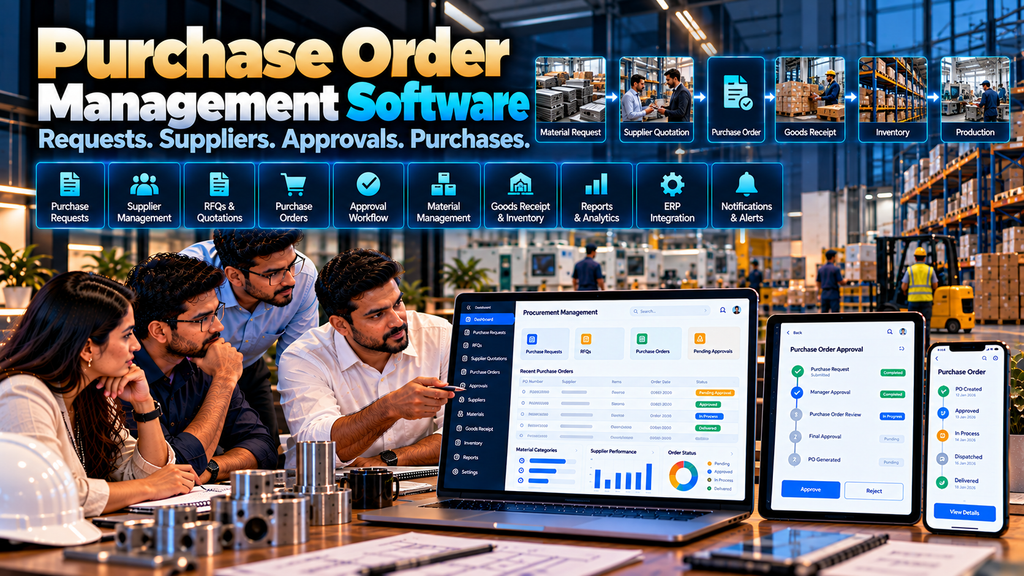
Purchasing is one of the most important operational processes for manufacturers, distributors and other product-based businesses.
Raw materials, components, packaging materials, spare parts, consumables and other business requirements may need to move through multiple steps before a purchase is completed.
When purchase requests, supplier quotations, approvals, purchase orders, delivery information and material receipts are managed through spreadsheets, emails, phone calls and disconnected documents, procurement teams can find it difficult to maintain one clear view of each purchase.
Custom purchase order management software development in Erode can help businesses create a structured workflow for requesting, reviewing, approving, ordering, receiving and tracking purchases.
The software can also connect with inventory, warehouse, production, ERP, accounting and other business systems where appropriate integrations are available.
However, purchase order software should reflect the company’s actual procurement process. A manufacturer purchasing production materials may require different workflows from a business purchasing mainly office supplies or resale products.
This guide explains the important modules, workflows, integrations, security considerations, development process and cost factors businesses should understand before developing a purchase order management system.
At Greap Technologies, we develop custom business and manufacturing software for companies in Erode and nearby areas.
What Is Purchase Order Management Software?
Purchase order management software is a digital system used to organize and manage selected procurement activities from an internal requirement through purchase-order processing and receipt of goods or services.
Depending on the business, it can support:
- Purchase requests
- Supplier records
- RFQ workflows
- Supplier quotations
- Quotation comparison
- Purchase approvals
- Purchase order creation
- PO revisions
- Delivery schedules
- Goods receipt
- Inventory integration
- Purchase returns
- Documents
- Notifications
- Reports
- ERP and accounting integrations
Purchase Management Workflow
A structured procurement workflow may look like:
Requirement → Purchase Request → Approval → RFQ → Supplier Quotation → Comparison → Supplier Selection → Purchase Order → Delivery → Goods Receipt → Inventory
Depending on the organization, invoice verification and payment processes may follow.
Not every company needs every stage. The software should match the actual purchasing policy.
Purchase Order Management vs Sales Order Management
| Purchase Order Management | Sales Order Management |
|---|---|
| Manages what the company buys | Manages what the company sells |
| Works primarily with suppliers | Works primarily with customers, dealers or distributors |
| Starts from procurement requirements | Starts from customer or channel orders |
| Connects purchasing with receiving and inventory | Connects sales with inventory, production and dispatch |
Together, the two workflows can connect both sides of manufacturing operations.
Supplier → Purchase Order → Materials → Production → Finished Goods → Sales Order → Customer
Read Sales Order Management Software for Manufacturing Businesses in Erode.
1. Start With the Existing Procurement Process
Before developing software, map how purchasing currently works.
Identify:
- Who identifies a requirement
- Who creates a purchase request
- Who approves it
- How suppliers are selected
- How quotations are collected
- Who approves pricing
- Who creates the purchase order
- Who receives materials
- Where inventory is updated
- Where supplier invoices are processed
2. Identify Different Purchase Types
A company may purchase several types of items.
Examples can include:
- Raw materials
- Components
- Packaging materials
- Consumables
- Spare parts
- Maintenance items
- Office supplies
- Resale products
- Approved services
Different purchase types may require different workflows.
3. Purchase Request Management
A purchase request records an internal requirement before a supplier order is created.
Depending on requirements, it may contain:
- Requested item
- Quantity
- Required date
- Department
- Requesting user
- Relevant project or production reference
- Business reason where required
4. Purchase Request Approval
Some businesses require internal approval before procurement begins.
A workflow could be:
Request Created → Department Approval → Procurement Review → Approved for Purchase
The number of approval stages should follow company policy.
5. Avoid Unnecessary Approval Layers
Adding approval steps simply because software makes them possible can slow down procurement.
Approval rules should correspond to genuine business controls.
6. Material Requirement From Production
For manufacturing businesses, purchase requirements may originate from production planning or material shortages.
A possible workflow is:
Production Requirement → Material Check → Shortage → Purchase Request
This can reduce repeated manual entry when compatible production and inventory systems are connected.
7. Production Management Integration
Production software may identify material requirements based on approved production plans.
Where appropriate, shortage information can contribute to the procurement workflow.
Read Production Management Software for Manufacturing Companies in Erode.
8. Inventory-Based Purchase Requirements
Some purchases may be triggered when stock reaches an internally defined level.
The system can provide information to authorized users about inventory conditions that may require review.
Automatic purchasing should only be implemented where business rules and controls justify it.
9. Supplier Master Management
A central supplier master can maintain approved supplier information.
Depending on requirements, it may include:
- Supplier code
- Business name
- Contact information
- Address
- Approved product categories
- Payment terms
- Account status
- Relevant business documents
10. Supplier Onboarding
Businesses with formal supplier onboarding can create a structured workflow.
For example:
Supplier Application → Document Review → Internal Approval → Supplier Account Activation
Only information necessary for legitimate procurement processes should be collected.
11. Supplier Status
Supplier accounts can have defined statuses according to company policy.
This can help prevent users from unintentionally creating new purchase orders for suppliers that are not currently authorized for purchasing.
12. Supplier Product Mapping
Some materials may be available from several suppliers.
The system can associate approved suppliers with relevant items or categories where the business maintains this information.
13. Supplier-Specific Product Codes
A supplier may use a different item reference from the manufacturer’s internal product or material code.
Where needed, both references can be maintained to support communication and receiving.
14. Request for Quotation Management
When the business requires competitive quotations, the procurement team can create an RFQ.
An RFQ may contain:
- Required items
- Quantities
- Specifications
- Required delivery date
- Delivery location
- Relevant commercial requirements
15. Multiple Supplier RFQs
The same approved requirement may be shared with multiple eligible suppliers where the procurement policy requires comparison.
The system can maintain a record of which suppliers were included in the process.
16. Supplier Quotation Recording
Supplier quotations can be recorded against the relevant RFQ.
Information may include:
- Supplier
- Quoted item
- Quantity
- Unit price
- Applicable commercial terms
- Delivery information
- Quotation validity
17. Supplier Quotation Comparison
Software can organize comparable quotation information in one place.
| Supplier | Price | Delivery | Terms | Status |
|---|---|---|---|---|
| Supplier A | Quoted value | Quoted schedule | Recorded terms | Under Review |
| Supplier B | Quoted value | Quoted schedule | Recorded terms | Under Review |
Software can organize information for human review, but supplier selection may involve quality, technical suitability, reliability, commercial relationships and other factors beyond the lowest quoted price.
18. Supplier Selection
Authorized procurement users can record the selected supplier according to the company’s purchasing process.
Where required, the decision can move through an approval workflow.
19. Avoid Automatic Supplier Judgments
A single metric such as price or delivery time should not automatically be treated as a complete assessment of supplier suitability.
Supplier decisions can require context and human review.
20. Purchase Order Creation
Once the requirement and supplier are approved, the system can create a purchase order.
A PO may contain:
- Purchase order number
- Supplier
- Items
- Quantities
- Approved prices
- Delivery location
- Required delivery dates
- Approved commercial terms
- Relevant references
21. Unique Purchase Order Number
Every purchase order should have a unique reference that can be used across procurement, receiving and relevant financial workflows.
22. Purchase Order From Approved Quotation
Where a supplier quotation has already been approved, relevant information can potentially flow into the PO.
A digital process can look like:
RFQ → Supplier Quotation → Approval → Purchase Order
This can reduce unnecessary re-entry while still validating current information.
23. Direct Purchase Orders
Not every purchase requires an RFQ process.
Some approved purchases may be made directly from established suppliers according to company policy.
The software should support the procurement routes the business genuinely uses.
24. Purchase Order Approval
Purchase orders may require approval based on defined conditions.
Conditions might include:
- Purchase category
- Commercial value
- Pricing exception
- Non-standard supplier
- Other approved business rules
25. Multi-Level PO Approval
For selected purchases, a company may use multiple approval stages.
For example:
Procurement → Department Head → Authorized Management / Finance → Approved PO
The workflow should match actual authority levels.
26. Purchase Order Status
A purchase order can move through defined statuses such as:
- Draft
- Pending approval
- Approved
- Issued
- Partially received
- Received
- Closed
- Cancelled
Status terminology should match the company’s process.
27. Purchase Order Revision
Changes may sometimes be required after a PO is created.
The system should define:
- Who can revise it
- Which fields can change
- Whether approval is required again
- How previous versions are retained where necessary
28. Purchase Order Cancellation
Authorized users can cancel a purchase order according to company policy.
Important cancellations can retain an appropriate record or reason where required.
29. Purchase Order Documents
Relevant documents can be associated with a purchase order.
Examples may include:
- Purchase request
- RFQ
- Supplier quotation
- Approved purchase order
- Technical specifications
- Relevant correspondence or supporting documents
30. Purchase Order PDF
The system can generate a structured PO document containing approved purchase information.
Document format should reflect the company’s required fields and business identity.
31. Supplier Communication
Approved purchase orders can be communicated to suppliers through the company’s supported business channels.
Where messaging integrations are used, official supported technologies should be preferred.
32. Delivery Schedule Management
Some purchase orders have a single delivery date, while others may involve scheduled deliveries.
The system can maintain the agreed delivery information where relevant.
33. Partial Delivery
A supplier may deliver a purchase order in multiple parts.
The system can track quantities such as:
- Ordered quantity
- Received quantity
- Rejected quantity where applicable
- Remaining quantity
34. Goods Receipt
When materials arrive, an authorized receiving workflow can record what was actually received.
A simplified flow is:
Purchase Order → Supplier Delivery → Goods Receipt → Inventory Update
35. Goods Receipt Note
Where the business uses a GRN process, a goods receipt record can reference:
- Purchase order
- Supplier
- Received items
- Received quantities
- Receipt date
- Relevant receiving information
36. PO vs Received Quantity
The receiving process can compare the ordered quantity with the quantity received.
Differences can be routed for appropriate review according to business rules.
37. Quality Inspection
Manufacturers may require incoming materials to pass a quality process before they become available for production.
A possible workflow is:
Material Received → Inspection → Accepted / Rejected / Held → Inventory Decision
Quality requirements depend on the manufacturer’s process and should be defined by appropriate internal teams.
38. Rejected Materials
If received material is rejected according to the company’s quality process, the system can record the relevant quantity and status.
Further supplier-return or replacement workflows can then follow where required.
39. Purchase Return Management
A structured return workflow may look like:
Rejected / Returnable Material → Return Request → Approval → Supplier Return → Resolution
40. Inventory Integration
Accepted materials can potentially update or contribute to inventory records.
If a separate ERP or warehouse system owns inventory, the purchase system should exchange information with that system instead of maintaining conflicting stock records.
41. Warehouse Management Integration
Material receipt and storage can connect with warehouse operations.
Read Warehouse Management Software Development in Erode.
A connected workflow could be:
Purchase Order → Goods Receipt → Quality Review → Warehouse → Inventory
42. Multiple Warehouses
A business operating multiple warehouses may need to specify the intended receiving location for each purchase order or line item.
The appropriate workflow depends on how the company manages purchasing and stock allocation.
43. Production Material Purchasing
For manufacturers, purchasing can connect closely with production requirements.
A broader workflow may be:
Sales Demand → Production Plan → Material Requirement → Purchase → Material Receipt → Production
44. Avoid Treating Every Shortage as an Automatic Purchase
A stock shortage does not always mean a new PO should be created immediately.
Businesses may need to consider open purchase orders, substitute materials, production schedules, existing reservations and other operational factors.
45. Supplier Invoice Reference
Supplier invoice information can be associated with relevant purchase and receipt records where required.
Accounting and tax treatment should follow the company’s approved financial processes.
46. PO, Receipt and Invoice Matching
Some organizations compare information across:
Purchase Order → Goods Receipt → Supplier Invoice
Software can assist with organizing matching information and highlighting defined differences for authorized review.
47. Do Not Replace Financial Review With Blind Automation
Invoice exceptions, taxes, commercial terms and accounting treatment can require qualified human review.
Software should support the workflow rather than make unsupported financial judgments.
48. Accounting Software Integration
If supplier invoices and payments are maintained in accounting or ERP software, the purchase-order system can potentially exchange relevant information with that system.
Integration depends on available supported methods.
49. ERP Integration
A manufacturer may already maintain important procurement data inside an ERP.
Possible integration areas include:
- Material master
- Supplier master
- Inventory
- Purchase orders
- Goods receipt
- Production requirements
- Invoices
- Financial information
50. Define the Source of Truth
Before integration, identify which system owns each important data type.
| Information | Possible Source |
|---|---|
| Materials / Products | ERP / Product Master |
| Suppliers | ERP / Procurement System |
| Inventory | ERP / Warehouse System |
| Production Requirements | Production / ERP System |
| Purchase Orders | Procurement System / ERP |
| Financial Records | ERP / Accounting System |
The actual architecture depends on existing business systems.
51. API Integration
Where supported APIs are available, systems can exchange approved procurement information.
Integration planning should review:
- API availability
- Authentication
- Permissions
- Data structure
- Rate limits
- Synchronization requirements
- Error handling
52. Integration Error Handling
External systems and network connections can fail.
Important integrations should have suitable validation, logging and retry or exception-handling processes according to the workflow.
53. Purchase Dashboard
A procurement dashboard can provide authorized users with actionable information such as:
- Pending purchase requests
- RFQs awaiting quotations
- POs awaiting approval
- Open purchase orders
- Partially received orders
- Relevant delayed deliveries
54. Purchase Order Tracking
Users can search purchase orders and review their current status.
Useful filters might include:
- PO number
- Supplier
- Material
- Department
- Date range
- Status
55. Open Purchase Order Report
An open-PO report can show purchase orders that have not completed the defined receiving or closure workflow.
56. Purchase History
Authorized users can review historical purchasing information for operational analysis.
History can be searched by supplier, material, category, period or other relevant dimensions.
57. Material Purchase History
Procurement teams may need to review previous purchases for a material.
Historical information provides context but should not automatically be treated as the correct future price or supplier decision.
58. Supplier Purchase History
The system can organize objective historical purchasing records associated with a supplier.
Commercial decisions should still consider relevant current circumstances.
59. Procurement Reports
Reports may organize data by:
- Supplier
- Material
- Category
- Department
- Purchase order
- Period
- Status
Only reports that support actual business decisions should be prioritized.
60. Purchase Price Analysis
Historical purchase data can show recorded prices across selected periods or suppliers.
Price differences may result from quantity, specifications, market conditions, commercial terms and other factors, so they should be interpreted with context.
61. Supplier Delivery Information
The software can report objective information about recorded deliveries where reliable data is available.
This information can support procurement review without automatically turning a single metric into a complete supplier-quality judgment.
62. Role-Based Access
Purchase software may include roles such as:
- Requester
- Department approver
- Procurement user
- Procurement manager
- Warehouse user
- Quality user
- Finance user
- Administrator
Each role should receive only the permissions necessary for its responsibilities.
63. Authentication and Authorization
Authentication identifies the user.
Authorization determines which purchase requests, supplier information, prices, purchase orders and actions that user can access.
64. Audit Trail
Important procurement actions may require an audit record.
Depending on requirements, this can include:
- Purchase request creation
- Approvals
- Supplier selection
- Purchase order creation
- PO revisions
- Cancellations
- Goods receipt
- Other important administrative changes
65. Procurement Data Security
Supplier prices, commercial terms and purchase information can be commercially sensitive.
The system should apply suitable access controls, secure authentication and other appropriate application-security practices.
66. Document Access
Supplier quotations, agreements and other procurement documents should be accessible only to authorized users.
Hiding links in the interface is not a substitute for server-side authorization.
67. Notifications
Notifications can be used for relevant workflow events such as:
- Purchase request awaiting approval
- RFQ requiring action
- PO awaiting approval
- Purchase order issued
- Delivery or receipt status change
Notifications should support action rather than create unnecessary noise.
68. Mobile-Friendly Purchase Management
Managers may need to review purchase requests or approvals from mobile devices.
A responsive web application can support selected workflows on desktop, tablet and mobile screens.
69. Web Application vs Mobile App
A responsive web application may be sufficient for many procurement workflows.
A dedicated mobile app can be considered when the business has specific mobile or offline requirements.
Read Mobile App Development Company in Erode: What Businesses Should Know.
70. Data Migration
Existing supplier and purchasing information may be stored in spreadsheets, legacy systems or ERP applications.
Migration planning should identify what information genuinely needs to be transferred.
71. Clean Supplier Data Before Migration
Review existing records for:
- Duplicate suppliers
- Inactive suppliers
- Inconsistent supplier codes
- Missing information
- Outdated contacts
72. Software Performance
Procurement systems with large supplier, material and purchase histories may require careful database and application design.
Performance considerations can include:
- Database indexing
- Efficient queries
- Pagination
- Search optimization
- Background processing where appropriate
- API performance
73. Scalability
The system may need to support future growth in:
- Suppliers
- Materials
- Users
- Departments
- Warehouses
- Purchase orders
- Integrations
74. Backup and Recovery
The business should define what procurement data is backed up, how frequently backups occur, where they are stored and how restoration works.
75. Start With an MVP Where Appropriate
A first release might focus on:
Purchase Request → Approval → Supplier → Purchase Order → Goods Receipt
RFQ comparison, advanced integrations and additional modules can be introduced based on genuine operational requirements.
76. Purchase Order Management Software Development Cost in Erode
There is no universal fixed price for custom purchase-order software.
Cost can depend on:
- Purchase-request workflow
- Approval levels
- Supplier management
- RFQ requirements
- Quotation comparison
- Purchase-order complexity
- Material master integration
- Inventory integration
- Production integration
- Warehouse and GRN workflows
- ERP integration
- Accounting integration
- Reports
- Data migration
- Security requirements
- Support requirements
77. Why Purchase Software Quotations Differ
A basic PO application may provide supplier records, purchase-order creation and approvals.
A larger procurement platform may include RFQs, quotation comparison, inventory, production, warehouse, receiving, ERP integrations, migration and reporting.
Compare the complete project scope rather than only the quoted price.
78. Development Timeline
Timeline can depend on:
- Number of workflows
- Approval complexity
- Supplier structure
- Material structure
- Integration availability
- Migration requirements
- Testing
- User acceptance
79. Purchase Order Software Development Process
A structured development process can follow:
Business Study → Procurement Workflow Mapping → Requirements → Integration Review → Architecture → UI/UX → Development → Integration → Migration → Testing → UAT → Deployment → Training → Support
80. Procurement Requirement Analysis
Before development, understand:
- Purchase types
- Departments
- Supplier structure
- Material master
- Approval rules
- RFQ process
- PO process
- Receiving process
- Quality process
- Inventory process
- Financial process
- Existing software
81. UI/UX Design
Important interfaces may include:
- Procurement dashboard
- Purchase requests
- Approval queue
- Supplier list
- Supplier profile
- RFQ creation
- Quotation comparison
- Purchase-order creation
- PO details
- Goods receipt
- Reports
82. Testing
Testing should cover representative workflows such as:
- Purchase requests
- Approvals
- Supplier selection
- RFQs
- Quotation recording
- Purchase orders
- PO revisions
- Partial receipts
- Goods receipt
- Permissions
- Reports
- External integrations
83. User Acceptance Testing
Procurement, warehouse, production, finance and other relevant users should test realistic scenarios before full deployment.
84. Training
Training should be provided according to user responsibilities.
A requester may only need to understand purchase requests, while procurement users may need supplier, RFQ and PO workflows.
85. Maintenance and Support
After deployment, custom purchase software may require:
- Bug fixes
- Security updates
- Backup monitoring
- Integration maintenance
- Performance improvements
- Compatibility updates
- Feature enhancements
How to Choose a Purchase Order Management Software Development Company in Erode
A development company should understand how procurement connects with inventory, production, warehouse and finance.
Evaluate whether the development partner can handle:
- Business-process analysis
- Purchase-request workflows
- Supplier management
- RFQ workflows
- Purchase-order approvals
- Inventory integration
- Production integration
- Warehouse integration
- ERP integration
- Role-based access
- Data migration
- Testing
- Maintenance and support
Read Software Development Company in Erode: Services, Cost and How to Choose.
Questions to Ask Before Developing Purchase Order Software
- Who can create purchase requests?
- Which requests need approval?
- Where is material master data maintained?
- Where is supplier master data maintained?
- Do we require RFQs?
- Do we compare multiple supplier quotations?
- Who selects suppliers?
- Who can create purchase orders?
- Which POs require approval?
- Can approved POs be revised?
- How are partial deliveries handled?
- Do materials require quality inspection?
- Where is inventory maintained?
- How are goods receipts recorded?
- Where are supplier invoices processed?
- Do we need ERP integration?
- Do we need production integration?
- Which reports are actually required?
- What historical data should be migrated?
- What support is needed after deployment?
Purchase Order Management Software Checklist
| Area | Requirement |
|---|---|
| Purchase Requests | Requirements and internal approvals |
| Suppliers | Master records and approved status |
| RFQ | Quotation request and comparison workflow |
| Purchase Orders | Creation, approval, revision and tracking |
| Delivery | Expected and partial deliveries |
| Goods Receipt | Received quantities and PO reference |
| Quality | Incoming inspection where required |
| Inventory | Material and warehouse integration |
| ERP | Relevant master and transaction integration |
| Security | Roles, authorization and audit controls |
| Reports | Operational procurement reporting |
| Support | Maintenance and future changes |
Common Purchase Order Software Development Mistakes
- Developing software before mapping procurement workflows
- Creating unnecessary approval levels
- Duplicating supplier or material master data
- Assuming every purchase requires the same process
- Choosing suppliers automatically using only the lowest price
- Ignoring partial deliveries
- Ignoring PO revisions
- Failing to connect goods receipt with the PO
- Updating inventory without considering quality workflows
- Rebuilding ERP or accounting functionality unnecessarily
- Assuming every external system provides an API
- Ignoring authorization for commercial data
- Migrating duplicate supplier records
- Creating reports nobody uses
- Ignoring training and maintenance
Purchase Order Software for Manufacturing Companies in Erode
Manufacturing companies can connect purchasing more closely with material requirements and production.
A broader manufacturing workflow may be:
Sales Order → Production Requirement → Material Requirement → Purchase Request → Purchase Order → Goods Receipt → Inventory → Production
This does not mean every process needs to be built into one application. Existing ERP, production, inventory and warehouse systems can remain responsible for their respective functions where appropriate.
Purchase Order Software for Distributors and Wholesalers
Distributors and wholesalers can use purchase-order software to manage supplier purchasing for products intended for resale.
The workflow may focus more on:
Stock Requirement → Purchase → Supplier → Receipt → Warehouse → Available Inventory
Purchase Order Management Software Development in Erode and Nearby Areas
Greap Technologies develops custom business software for manufacturers, distributors, wholesalers and other companies in Erode and nearby areas including Perundurai, Bhavani, Gobichettipalayam, Sathyamangalam, Anthiyur, Chennimalai, Modakkurichi, Kavindapadi, Kodumudi, Nambiyur and surrounding locations.
Local targeting should reflect genuine service coverage while the software itself should be designed around real procurement requirements.
Why Consider Greap Technologies for Purchase Order Management Software?
Greap Technologies develops custom business software around operational workflows and integration requirements.
Depending on project scope, purchase order software can include:
- Purchase requests
- Approval workflows
- Supplier management
- RFQ management
- Supplier quotation recording
- Quotation comparison
- Purchase-order creation
- PO approvals
- PO revisions
- Delivery tracking
- Partial receipts
- Goods receipt workflows
- Purchase returns
- Inventory integration
- Warehouse integration
- Production integration
- ERP integration
- Accounting-system integration
- Notifications
- Dashboards
- Reports
- Role-based access
- Audit trails
- Data migration
- Responsive web application development
- Maintenance and support
The appropriate modules should be selected after studying how the business currently requests, approves, orders and receives purchases.
Explore Greap Technologies, Website Development Services, Ecommerce Development Services and Digital Marketing Services.
Final Checklist Before Starting Purchase Order Software Development
- Map the procurement workflow
- Identify purchase types
- Define purchase-request rules
- Define approval authority
- Clean supplier master data
- Identify the material-data source
- Define RFQ requirements
- Define supplier quotation workflow
- Define PO creation rules
- Plan PO revision handling
- Define partial delivery workflow
- Define goods receipt
- Define quality inspection where required
- Identify inventory integration
- Identify production integration
- Identify ERP/accounting integration
- Define roles and permissions
- Define essential reports
- Plan UAT and training
- Plan ongoing support
Conclusion
Effective purchase order management software development in Erode should connect procurement requirements with suppliers, approvals, receiving and the systems that manage inventory and production.
A basic procurement workflow may be:
Purchase Request → Approval → Supplier → Purchase Order → Goods Receipt
A more detailed manufacturing workflow can become:
Production Requirement → Material Shortage → Purchase Request → RFQ → Supplier Quotation → Purchase Order → Goods Receipt → Inventory → Production
When ERP and warehouse systems are already in place, the architecture may instead be:
Production / ERP → Procurement Software → Supplier → PO → Warehouse / GRN → ERP
The goal is not to automate every purchasing decision. Supplier selection, commercial negotiation, quality exceptions and unusual procurement situations can still require experienced human review.
The software should make repeatable procurement workflows easier to organize while maintaining appropriate business controls.
Looking for Purchase Order Management Software Development in Erode?
If your company currently manages purchase requests, supplier quotations, approvals and purchase orders across spreadsheets, emails and disconnected systems, Greap Technologies can study your procurement workflow and plan a custom purchase order management solution.
Discuss Your Purchase Order Software on WhatsApp
Frequently Asked Questions
1. What is purchase order management software?
Purchase order management software helps businesses manage selected procurement workflows such as purchase requests, suppliers, quotations, approvals, purchase orders, receiving and reporting.
2. Can purchase order software manage supplier quotations?
Yes. Custom software can record RFQs and supplier quotations and organize comparable information for authorized procurement users.
3. Can purchase orders have approval workflows?
Yes. Approval workflows can be configured according to defined company policies, purchase categories or other approved conditions.
4. Can purchase order software integrate with inventory?
Potentially. Purchase and goods-receipt information can exchange data with inventory systems when compatible integration methods are available.
5. Can it connect purchasing with production?
Yes. For manufacturing businesses, approved production or material requirements can potentially contribute to purchase-request workflows when suitable systems are integrated.
6. Can the software handle partial deliveries?
Yes. Where required, it can track ordered, received and remaining quantities across multiple deliveries.
7. Can it generate a Goods Receipt Note?
Yes. If the business uses a GRN process, custom software can record goods receipts against purchase orders according to the defined receiving workflow.
8. Can purchase software integrate with ERP?
Potentially. ERP integration depends on available APIs or other supported integration methods, permissions, documentation and the required data exchange.
9. Can purchase order software compare suppliers automatically?
Software can organize objective information such as recorded quotations and delivery terms. Supplier selection can involve additional commercial, technical and quality considerations that may require human review.
10. Can purchase order software work on mobile devices?
Yes. A responsive web application can provide selected procurement and approval workflows on supported desktop, tablet and mobile devices.
11. How much does purchase order management software development cost in Erode?
Cost depends on supplier management, RFQs, approvals, PO complexity, receiving workflows, integrations, reporting, data migration, security and support requirements. A requirement study is needed before estimating a custom project.
12. Does Greap Technologies develop purchase order management software in Erode?
Yes. Greap Technologies develops custom business and manufacturing software for companies in Erode and nearby areas based on their operational requirements.


