
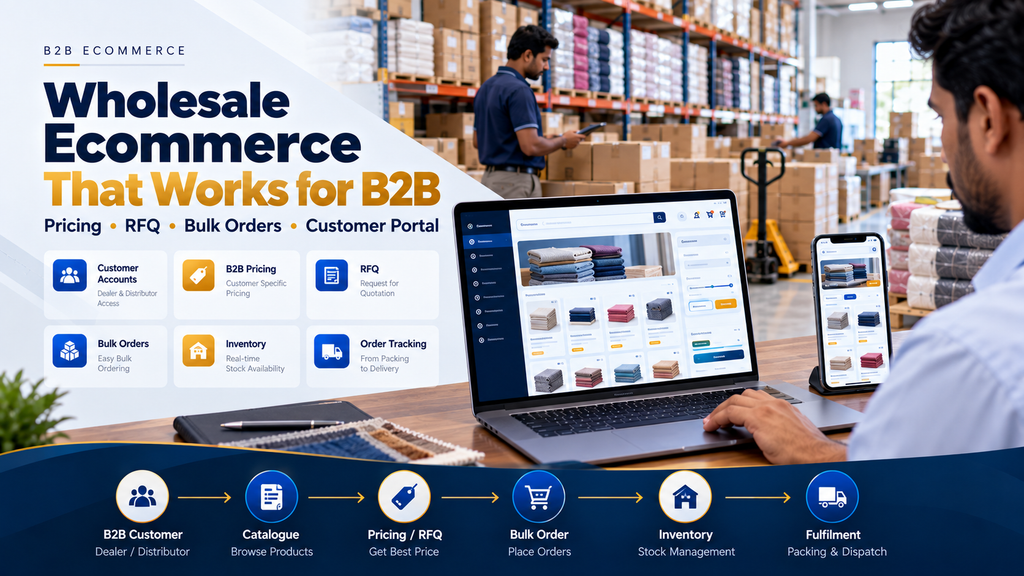
Wholesale ecommerce is different from building a standard online store for individual consumers. Wholesalers often deal with business customers, larger quantities, negotiated prices, quotations, repeat orders, dealer networks, inventory allocation, credit terms and more complex fulfilment workflows.
Because of these differences, successful wholesale ecommerce website development should begin with the B2B sales process rather than simply adding a shopping cart to a product catalogue.
A well-planned wholesale ecommerce platform can help customers discover products, request pricing, place bulk orders, access approved account information and follow their orders while connecting the website with the company’s internal sales, inventory, warehouse and accounting systems.
This guide explains the important B2B ecommerce features wholesale businesses need, which features may be optional and how businesses can plan a platform around their actual sales process.
At Greap Technologies, we develop custom websites, ecommerce platforms and business software for B2B companies, wholesalers, manufacturers and distributors.
What Is a Wholesale Ecommerce Website?
A wholesale ecommerce website is an online sales platform designed primarily for business-to-business transactions.
Instead of focusing only on individual consumers purchasing a small number of products, the platform can support commercial buyers such as:
- Retailers
- Dealers
- Distributors
- Wholesalers
- Resellers
- Manufacturers
- Institutional buyers
- Other business customers
The website can provide product discovery, enquiries, quotations, pricing, bulk ordering and account-specific functionality according to the seller’s business model.
How Is B2B Ecommerce Different From B2C Ecommerce?
B2B and B2C ecommerce can use similar web technologies, but their commercial workflows may be very different.
| B2B / Wholesale Ecommerce | B2C Ecommerce |
|---|---|
| Business customers | Individual consumers |
| Bulk quantities may be common | Smaller quantities are common |
| Account-specific pricing may apply | Public pricing is common |
| RFQs may be required | Direct checkout is common |
| Minimum quantities may apply | Single-item purchases are common |
| Orders may require approval | Orders are usually immediately accepted |
| Payment terms may vary | Immediate payment is common |
| Repeat ordering can be important | Shopping journeys vary widely |
| ERP integration can be important | Standard store integrations may be sufficient |
Typical Wholesale Ecommerce Customer Journey
A B2B customer journey can look like:
Business Customer → Product Catalogue → Login / Registration → Pricing / RFQ → Bulk Order → Approval → Inventory → Fulfilment → Dispatch
However, there is no single workflow that every wholesale company should use.
Some businesses may support direct ordering, while others may require quotations before an order is confirmed.
1. Professional B2B Website Design
The website should make it immediately clear what the business supplies, which markets it serves and how a B2B customer can begin purchasing.
The design should prioritize product discovery and commercial actions rather than unnecessary visual effects.
2. Mobile-Responsive Ecommerce Design
Business customers may browse products, review quotations or submit orders from phones and tablets as well as desktop computers.
Important B2B workflows should therefore remain usable across screen sizes.
3. Structured Wholesale Product Catalogue
A large wholesale catalogue requires clear information architecture.
Products can be organized by relevant categories, subcategories, brands, applications or specifications according to the business.
4. Product Category Pages
Category pages can help customers discover relevant groups of products without searching the entire catalogue.
5. Product Search
Customers who already know what they need should be able to search efficiently using appropriate product names, SKUs or other relevant identifiers.
6. Product Filters
Filters can help customers narrow large catalogues according to meaningful product attributes.
The business should avoid adding filters that provide little purchasing value.
7. Detailed B2B Product Pages
Wholesale customers may need more information than a product image and short description.
Depending on the product, pages can include:
- Product name
- Product code
- Images
- Description
- Specifications
- Available variants
- Unit information
- Packaging information
- Minimum order information
- Availability status
- RFQ or ordering action
8. Product Variants
Products with sizes, models, specifications, materials or other legitimate options should use a clear variant structure.
9. Units of Measure
Wholesale businesses may sell products by piece, box, carton, kilogram, metre, roll or another defined unit.
Units and conversions should be standardized according to the business’s approved rules.
10. Pack and Carton Quantities
If products must be ordered in specific pack or carton configurations, those rules can be represented in the ordering interface.
11. Minimum Order Quantity
Where minimum order quantities genuinely apply, customers should see the requirement clearly before submitting an order.
12. Customer Registration
A wholesale platform can allow businesses to apply for a B2B account.
13. B2B Account Approval
Registration does not necessarily need to provide immediate access to private commercial information.
The business can review account applications before activating B2B privileges.
14. Secure Customer Login
Approved customers can access account-specific products, pricing, orders and other permitted functionality through authenticated access.
15. Customer Roles
The platform can represent relevant customer types such as dealer, distributor, reseller or direct B2B buyer where those distinctions exist in the business.
16. Public vs Private Catalogue
Some wholesalers may want every product publicly visible.
Others may want certain products, categories or commercial information available only to authenticated customers.
17. Public vs Private Pricing
Wholesale businesses do not necessarily need to publish all prices publicly.
Common approaches include:
- Public fixed pricing
- Login-only pricing
- Customer-specific pricing
- RFQ-only pricing
- A hybrid approach
18. Customer-Specific Pricing
Where approved commercial agreements require different prices, the platform can display account-specific pricing after authentication.
19. Customer Price Lists
Different approved price lists can potentially be associated with relevant customer groups or individual accounts.
20. Quantity-Based Pricing
Where the company uses formal volume-based pricing, the ecommerce platform can represent those rules.
21. Pricing Validity
Time-sensitive B2B prices can use appropriate effective or expiry dates where required.
22. Pricing Permissions
Sensitive wholesale prices and discounts should be protected by appropriate permissions.
23. Request for Quotation
An RFQ workflow is useful when pricing cannot reasonably be determined through a fixed public price.
24. Product-Level RFQ
Customers can request a quotation directly from a relevant product page.
25. Multi-Product RFQ
A B2B customer may need quotations for multiple products within the same commercial requirement.
26. RFQ to Quotation Workflow
An integrated process can look like:
Website RFQ → Sales Review → Quotation → Customer Confirmation → Sales Order
Read Quotation and Invoice Management Software Development in Erode.
27. Bulk Ordering
Bulk ordering is one of the central requirements for many wholesale ecommerce platforms.
The interface should make entering larger quantities efficient without making customers repeatedly navigate through unnecessary steps.
28. Quick Order Form
Repeat buyers who already know the required products may benefit from a streamlined quick-order interface.
29. SKU-Based Quick Ordering
Customers familiar with product codes can potentially enter SKUs and quantities directly.
30. Multi-Product Order Entry
A B2B ordering interface can allow customers to enter quantities for multiple products on one screen where this matches their purchasing behaviour.
31. CSV Order Upload
For suitable businesses, customers placing very large repeat orders may benefit from a controlled file-based order-import workflow.
The uploaded data should be validated before becoming a confirmed order.
32. B2B Shopping Cart
A wholesale cart can maintain multiple products, bulk quantities, account pricing and relevant ordering rules.
33. Order Validation
Before submission, the system can validate relevant requirements such as minimum quantities, pack configurations or available ordering options.
34. Purchase Order Number
B2B customers may need to include their internal purchase-order reference with an order.
35. Customer Purchase Order Upload
Where useful, the platform can allow an authorized customer to attach relevant purchase-order documentation.
36. Order Approval Workflow
Some wholesale orders may require internal approval before they become confirmed sales orders.
37. Avoid Unnecessary Approvals
Approval stages should address real commercial risks or requirements rather than adding friction to every transaction.
38. Wholesale Order Management Integration
Once an ecommerce order is confirmed, it can connect with the company’s central order-management workflow.
Read Wholesale Order Management Software Development in Erode.
39. Avoid Manual Order Re-Entry
If the website and order-management system can be appropriately integrated, confirmed orders should not need to be manually typed into multiple applications.
40. Inventory Integration
Wholesale ecommerce can connect with inventory information from the appropriate system.
41. Physical Stock vs Available Stock
Businesses should define physical, reserved and available quantities rather than assuming every physically present product can be sold immediately.
42. Customer-Facing Availability
The business can decide whether customers should see:
- Exact available quantity
- In stock
- Limited availability
- Available on request
- Out of stock
- No inventory information
43. Stock Reservation
Confirmed orders can reserve appropriate inventory where the business uses a reservation process.
44. Preventing Overselling
Inventory availability, reservation and allocation should connect with the authoritative inventory system where practical.
45. Multi-Warehouse Inventory
Businesses operating multiple warehouses may require inventory and fulfilment decisions across locations.
46. Warehouse Management Integration
Approved orders can move into warehouse workflows for allocation, picking and packing.
Read Warehouse Management Software Development in Erode.
47. Picking
Warehouse teams can receive structured picking requirements from confirmed orders.
48. Packing
Picked products can move through the company’s packing process while remaining connected with the originating order.
49. Partial Fulfilment
A wholesale order may not always be fulfilled completely at one time.
50. Partial Dispatch
The system can maintain ordered, dispatched and remaining quantities when one order is supplied through multiple shipments.
51. Dispatch Management
Relevant dispatch information can remain connected with the ecommerce order.
52. Transport and Logistics Integration
Businesses with more complex delivery operations can potentially connect dispatch with logistics workflows.
Read Transport and Logistics Management Software Development in Erode.
53. Customer Order Status
Authenticated customers can access selected order-status information without contacting the sales team for every update.
54. Order History
A B2B account can provide access to relevant historical orders.
55. Reorder Functionality
Customers can potentially use a previous order as the starting point for a new purchase.
Current pricing, product status and availability should still be validated.
56. Saved Product Lists
Repeat customers can potentially maintain lists of frequently purchased products.
57. Dealer Portal
Businesses operating through dealer networks can provide dedicated authenticated functionality.
Read Dealer Portal Development for Manufacturers and Distributors in Erode.
58. Distributor Accounts
Distributors can receive appropriate catalogue, pricing, ordering and order-history functionality according to the company’s channel structure.
59. Distributor Management Integration
Wholesale ecommerce can operate as the external ordering layer of a wider distributor-management system.
Read Distributor Management Software Development in Erode.
60. Customer Self-Service
Useful self-service functionality can reduce unnecessary repetitive communication while still allowing customers to contact the sales team when needed.
61. Account Dashboard
A B2B customer dashboard can provide appropriate access to:
- Account information
- Saved products
- RFQs
- Quotations
- Orders
- Order status
- Order history
- Dispatch information
62. Online Payments
Where immediate payment forms part of the B2B model, the website can integrate an appropriate supported payment provider.
63. Payment Terms
Not every B2B order requires immediate online payment.
Approved business customers may operate under commercial payment arrangements managed through the company’s established financial process.
64. Accounting Integration
Where accounting software manages invoices, payments and outstanding balances, ecommerce should connect with that financial source rather than unnecessarily duplicating financial records.
65. Invoice Access
Where appropriate and supported by the accounting architecture, customers can receive access to relevant approved invoice information.
66. Outstanding Information
Selected financial information can potentially be displayed to authenticated customers where it comes from the appropriate authoritative system.
67. ERP Integration
ERP integration can be important when wholesale ecommerce is only one part of a larger operational workflow.
A connected architecture can look like:
B2B Ecommerce → Sales Order → ERP → Inventory → Warehouse → Dispatch → Accounting
68. What Information Can Ecommerce and ERP Share?
Depending on the systems and business requirements, integration can involve:
- Products
- Customer accounts
- Pricing
- Inventory availability
- Orders
- Order status
- Dispatch information
69. API Integration
ERP, CRM, warehouse and accounting integrations depend on the APIs or other supported integration methods provided by each external system.
70. Integration Failure Handling
The architecture should account for delayed or failed synchronization rather than assuming every system will always exchange data instantly.
71. Source of Truth Architecture
Connected B2B systems should define which application owns each important category of data.
| Information | Possible Authoritative System |
|---|---|
| Public Product Content | Ecommerce / CMS |
| Product Master | ERP |
| B2B Customers | ERP / CRM |
| Pricing | ERP / Pricing System |
| RFQs | Ecommerce / CRM |
| Sales Orders | Order Management / ERP |
| Inventory | ERP / Warehouse |
| Dispatch | ERP / Warehouse |
| Invoices and Payments | Accounting / Financial System |
72. CRM Integration
Website enquiries and prospective B2B accounts can connect with a CRM workflow.
Website Enquiry → CRM → Qualification → RFQ → Quotation → Customer → Order
Read WhatsApp CRM and Lead Follow-Up Software for Businesses in Erode.
73. Sales Representative Accounts
Internal sales users can potentially access appropriate customer, quotation and order functionality according to permissions.
74. Sales-Assisted Ecommerce
B2B ecommerce does not have to remove salespeople from the buying journey.
The website can handle product discovery and routine ordering while sales teams continue supporting complex commercial requirements.
75. Search Engine Optimization
A wholesale ecommerce platform should provide a technically sound foundation for search visibility.
76. Crawlable Category Pages
Important product categories should have useful crawlable pages rather than depending entirely on internal search results.
77. Useful Product Pages
Product pages should contain accurate and useful information for potential buyers rather than thin copied descriptions.
78. Original Product Content
Businesses should provide original information where possible instead of repeating the same supplier description used across many websites.
79. Product Images
Images should clearly and accurately represent the product while being optimized appropriately for web delivery.
80. Internal Linking
Categories, products, services, industry pages and useful informational content should be connected logically.
81. Clean URL Architecture
Important category and product URLs should be descriptive, stable and aligned with the website’s information architecture.
82. Faceted Navigation
Large catalogues may need filters, but uncontrolled combinations of filter URLs can create unnecessary crawlable pages.
83. Canonical Strategy
Canonicalization should be planned for duplicate and near-duplicate ecommerce URLs where appropriate.
84. XML Sitemaps
Important indexable categories, products and content pages should be represented appropriately in XML sitemaps.
85. Ecommerce Website Speed
Large catalogues, scripts and product images can make ecommerce websites unnecessarily heavy if performance is ignored.
86. Image Optimization
Use suitable image dimensions, compression and modern formats where appropriate while preserving the visual information customers need.
87. Lazy Loading
Below-the-fold media can use appropriate lazy-loading techniques to reduce unnecessary initial loading work.
88. Core Web Vitals
Frontend development should aim for responsive interactions, stable layouts and efficient loading.
89. Accessibility
Forms, navigation, product controls, images, tables and account interfaces should be designed with accessibility considerations in mind.
90. Ecommerce Security
A B2B ecommerce platform can contain commercially sensitive customer accounts, pricing and order information.
Security considerations can include:
- HTTPS
- Secure authentication
- Server-side authorization
- Input validation
- Appropriate session management
- Software updates
- Backups
- Recovery planning
- Logging and monitoring
91. Role-Based Access Control
Different internal and external users should receive only the functionality required for their role.
92. Protect Customer-Specific Pricing
Account-specific commercial information should not become publicly accessible because of frontend-only access controls.
93. Audit Trails
Important administrative changes involving products, prices, orders and account permissions can retain appropriate audit information.
94. Ecommerce Analytics
Analytics can help the business understand how customers use the website and where important journeys encounter friction.
95. Useful B2B Ecommerce Measurements
Depending on the sales model, useful measurements can include:
- B2B account applications
- Qualified enquiries
- RFQ submissions
- Product searches
- Product-page engagement
- Order submissions
- Repeat ordering activity
- Important funnel exits
96. Avoid Focusing Only on Website Traffic
Traffic is only one signal. A wholesale website should ultimately support meaningful product discovery, enquiries, customer accounts and commercial ordering workflows.
97. Multi-Language Requirements
Businesses serving customers in multiple language markets can consider multilingual functionality where there is a genuine customer need.
98. Multi-Currency Requirements
Businesses operating across relevant international markets may require carefully planned currency and pricing workflows.
99. Tax and Compliance Requirements
Tax, invoicing and compliance logic should be configured according to the business’s applicable requirements and qualified professional guidance rather than assumptions made during website design.
100. Data Migration
Existing product, customer and pricing information may need to be moved from spreadsheets, ERP systems or older ecommerce platforms.
101. Clean Product Data Before Migration
Review catalogue information for:
- Duplicate products
- Incorrect SKUs
- Inconsistent names
- Incorrect categories
- Missing specifications
- Outdated prices
- Incorrect units
- Poor-quality images
- Inactive products
102. Customer Data Migration
Duplicate, inactive and incomplete customer records should be reviewed before moving them into the new platform.
103. Custom B2B Ecommerce vs Ready-Made Platform
A ready-made ecommerce platform can be suitable when its catalogue, pricing, ordering and integration capabilities closely match the business.
Custom development can be considered where the company has specialized B2B pricing, RFQ, bulk-ordering, dealer, warehouse or integration requirements.
Neither approach is automatically right for every wholesaler.
104. Start With a B2B Ecommerce MVP
Instead of trying to implement every feature at once, an initial version can focus on:
Website → Catalogue → B2B Registration → RFQ / Ordering → Order Management
Advanced pricing, dealer portals, ERP integrations and warehouse automation can be added according to validated requirements.
105. Phased B2B Ecommerce Development
A possible implementation sequence is:
Phase 1: Website + Catalogue + Product Pages + Search + RFQ
Phase 2: B2B Accounts + Pricing + Bulk Ordering + Order History
Phase 3: Inventory + Warehouse + Dispatch + ERP Integration
Phase 4: Dealer Portal + Advanced Automation + Reporting + Optimization
106. Wholesale Ecommerce Website Development Cost
There is no universal fixed cost for a B2B wholesale ecommerce website.
Development cost can depend on:
- Number of products
- Catalogue complexity
- Product variants
- Customer account requirements
- Pricing rules
- RFQ workflows
- Bulk ordering
- Dealer and distributor functionality
- Inventory integration
- Warehouse integration
- ERP integration
- Accounting integration
- Payment requirements
- Data migration
- SEO requirements
- Security
- Training
- Ongoing support
107. Wholesale Ecommerce Development Timeline
The timeline depends on catalogue size, B2B functionality, custom business rules, integrations, migration and testing.
Requirements should be studied before estimating a reliable implementation schedule.
108. Wholesale Ecommerce Development Process
A structured development process can follow:
Business Study → Customer Journey Mapping → Requirements → Information Architecture → UI/UX → Development → Ecommerce Configuration → Integrations → Migration → Testing → UAT → Launch → Monitoring → Support
109. User Acceptance Testing
Representative internal users and realistic B2B customer scenarios should be tested before full launch.
Important scenarios can include:
- Customer registration
- Account approval
- Login
- Product search
- Filtering
- Account pricing
- RFQ
- Bulk ordering
- Minimum quantities
- Pack quantities
- Purchase-order references
- Order approval
- Inventory availability
- Partial fulfilment
- Order history
- Reordering
- Permissions
- Mobile usability
- ERP synchronization
- Failure scenarios
110. Common Wholesale Ecommerce Development Mistakes
- Treating B2B ecommerce exactly like a consumer store
- Building before mapping the wholesale sales process
- Using an unclear product catalogue structure
- Publishing thin product pages
- Ignoring product search and filtering
- Ignoring RFQ workflows
- Ignoring customer-specific pricing
- Forcing every B2B customer through immediate checkout
- Ignoring minimum order quantities
- Making bulk ordering unnecessarily slow
- Using inconsistent units
- Displaying incorrect stock availability
- Ignoring stock reservation
- Ignoring partial dispatch
- Manually re-entering online orders into other systems
- Maintaining duplicate product and pricing sources
- Exposing sensitive B2B information
- Ignoring mobile users
- Ignoring website performance
- Trying to build every possible feature before launch
Which B2B Ecommerce Features Should You Prioritize?
Not every wholesale company needs every feature listed in this guide.
| Business Requirement | Feature to Consider |
|---|---|
| Complex pricing | Account-specific pricing / RFQ |
| Large repeat orders | Quick order / bulk ordering |
| Dealer network | Dealer portal |
| Large catalogue | Search and product filters |
| Multiple warehouses | Inventory and warehouse integration |
| Repeat B2B customers | Order history and reorder |
| Existing ERP | ERP integration |
| Negotiated sales | RFQ and quotation workflow |
| Large quantities | MOQ and quantity rules |
| Complex fulfilment | Partial dispatch and order tracking |
Questions to Ask Before Building a Wholesale Ecommerce Website
- Who are our B2B customers?
- How do they currently place orders?
- How many products do we sell?
- How should products be categorized?
- Which product specifications matter?
- Should pricing be public?
- Do customers have different prices?
- Do we need RFQs?
- Do we need direct online ordering?
- Do minimum order quantities apply?
- Do customers order by SKU?
- Would quick ordering improve repeat purchases?
- Do dealers or distributors need dedicated accounts?
- Should customers see inventory availability?
- Do we operate multiple warehouses?
- How do we manage partial fulfilment?
- Which system owns products and pricing?
- Which ERP, CRM or accounting integrations are needed?
- What data needs migration?
- Which features are essential for the first release?
Wholesale Ecommerce Website Development in Erode
Manufacturers, wholesalers and distributors in Erode can use B2B ecommerce to create a structured digital channel for product discovery, enquiries and commercial ordering.
Greap Technologies develops custom B2B ecommerce websites for businesses in Erode and nearby areas including Perundurai, Bhavani, Chennimalai, Anthiyur, Gobichettipalayam, Sathyamangalam, Modakkurichi, Kavindapadi, Kodumudi, Nambiyur and surrounding locations.
The platform can be planned around the company’s actual products, customer types, pricing, inventory, warehouse and fulfilment workflows.
Why Consider Greap Technologies for Wholesale Ecommerce Development?
Greap Technologies develops ecommerce websites and business software around the way a company actually sells and fulfils orders.
Depending on requirements, a B2B ecommerce project can include:
- Custom ecommerce website design
- Responsive development
- Wholesale product catalogue
- Product search and filters
- B2B customer registration
- Account approval
- Private catalogues
- Customer-specific pricing
- RFQ workflows
- Bulk ordering
- Quick ordering
- Dealer and distributor accounts
- Order history
- Reordering
- Inventory integration
- Warehouse integration
- ERP integration
- Accounting integration
- SEO foundations
- Analytics
- Security
- Maintenance and support
Explore Greap Technologies Ecommerce Development Services or visit Greap Technologies.
Final B2B Ecommerce Feature Checklist
- Responsive website
- Structured product catalogue
- Product search
- Useful filters
- Detailed product pages
- B2B customer registration
- Account approval
- Secure login
- Private catalogue where required
- Customer-specific pricing
- RFQ
- Bulk ordering
- Quick ordering
- Minimum-order rules
- Purchase-order references
- Inventory availability
- Stock reservation
- Multi-warehouse support where required
- Order history
- Reordering
- Partial fulfilment
- Warehouse integration
- Dispatch integration
- ERP integration
- Accounting integration
- SEO foundations
- Analytics
- Security
- Backups
- Testing and support
Conclusion
Wholesale ecommerce website development is most effective when the platform reflects how B2B customers actually research products, request pricing, place bulk orders and receive goods.
A connected wholesale ecommerce workflow can look like:
B2B Customer → Catalogue → Account Pricing / RFQ → Bulk Order → Inventory → Warehouse → Packing → Dispatch
For businesses with existing operational software, ecommerce can become the customer-facing layer while ERP, warehouse, accounting and order-management systems continue managing their respective internal responsibilities.
The goal should not be to add every possible B2B feature. It should be to identify the features that remove friction from the company’s actual customer and fulfilment workflows.
Looking for Wholesale Ecommerce Website Development in Erode?
If your wholesale, manufacturing or distribution business wants to provide B2B customers with a better way to discover products, request quotations and place orders, Greap Technologies can study your existing sales workflow and plan a suitable ecommerce platform.
Discuss Your Wholesale Ecommerce Project on WhatsApp
Frequently Asked Questions
1. What is a wholesale ecommerce website?
A wholesale ecommerce website is an online platform designed for B2B customers to discover products, request pricing and place commercial or bulk orders according to the seller’s business process.
2. What features does a B2B wholesale ecommerce website need?
Common requirements include a structured catalogue, B2B accounts, account-specific pricing, RFQs, bulk ordering, minimum-order rules, inventory integration, order history and ERP integration. The exact feature set depends on the business.
3. Can wholesale customers have different prices?
Yes. Where approved commercial agreements require it, authenticated customers can receive account-specific prices or price lists.
4. Can customers request a quotation instead of purchasing directly?
Yes. RFQ functionality can allow customers to submit product and quantity requirements for sales review before an order is confirmed.
5. Can a B2B website support bulk ordering?
Yes. Bulk ordering can include multi-product order entry, quick-order interfaces, SKU-based ordering and quantity rules depending on requirements.
6. Can dealers and distributors have separate accounts?
Yes. Authorized dealer and distributor accounts can receive appropriate catalogue, pricing, ordering and account functionality.
7. Can wholesale ecommerce integrate with inventory?
Yes. Where supported by the inventory or ERP architecture, ecommerce can receive appropriate stock availability and send confirmed order information into fulfilment workflows.
8. Can a wholesale ecommerce website integrate with ERP?
Yes, where the ERP provides appropriate APIs or other supported integration methods. Products, customers, pricing, inventory, orders and dispatch information can potentially be exchanged according to the integration design.
9. Can B2B customers reorder previous purchases?
Yes. Order history and reorder functionality can simplify repeat purchasing, while current prices, product status and availability should still be validated.
10. Does every wholesale ecommerce website need online payment?
No. Some B2B businesses use immediate online payment, while others operate through quotations, approved payment terms or established financial processes.
11. How much does wholesale ecommerce website development cost?
Cost depends on catalogue size, customer accounts, pricing rules, RFQs, bulk ordering, dealer functionality, integrations, migration, security and other requirements. A requirement study is needed for a meaningful custom estimate.
12. Can Greap Technologies develop a wholesale ecommerce website in Erode?
Yes. Greap Technologies develops custom B2B ecommerce websites and connected business software for wholesalers, manufacturers and distributors in Erode and nearby areas based on their requirements.
Leave a Reply