
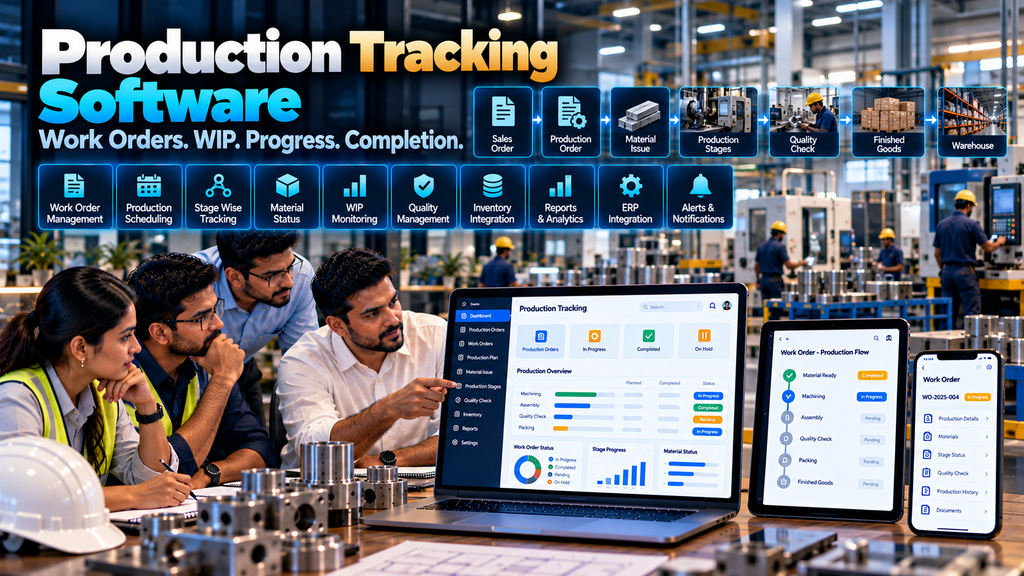
Knowing that a production order has been released is not the same as knowing what is actually happening on the shop floor.
Manufacturing teams may need to understand which work orders have started, which production stages are completed, how much quantity is currently in process, what remains to be produced, whether required materials are available and which orders require operational attention.
When production updates are maintained through paper registers, spreadsheets, phone calls, messaging groups and separate systems, management and operations teams can find it difficult to maintain a consistent view of production status.
Custom production tracking software in Erode can help manufacturing companies create a structured digital system for tracking work orders, production stages, work in progress, quantities, material status, completion and other relevant shop-floor information.
The system can also connect with sales orders, production planning, inventory, purchase orders, warehouse operations, quality processes and ERP software where appropriate integrations are available.
However, production tracking software should not simply collect as much shop-floor data as possible. The system should focus on operational information that genuinely helps production teams understand and manage manufacturing progress.
This guide explains how production tracking software works, the features manufacturers may require, possible integrations, implementation considerations, cost factors and what businesses should evaluate before developing a custom system.
At Greap Technologies, we develop custom manufacturing and business software for companies in Erode and nearby areas.
What Is Production Tracking Software?
Production tracking software is a digital system used to record and view the progress of manufacturing work as it moves through defined production stages.
Depending on the manufacturing process, it may track:
- Production orders
- Work orders
- Products
- Planned quantities
- Production stages
- Work in progress
- Completed quantities
- Remaining quantities
- Material status
- Quality status
- Production dates
- Order status
- Finished goods
- Operational exceptions
The exact information should depend on the manufacturer’s production process.
Production Tracking vs Production Management Software
Production tracking is closely related to production management, but the two terms can represent different scopes.
| Production Management | Production Tracking |
|---|---|
| Can cover broader manufacturing planning and control | Focuses strongly on production progress and status |
| May include planning, work orders, materials and reports | Tracks what stage each work order has reached |
| Can coordinate multiple production processes | Provides operational visibility into active production |
| Broader software scope | Can be a focused module or connected application |
A production tracking module can therefore operate as part of a larger production-management system.
Read Production Management Software for Manufacturing Companies in Erode.
Why Production Tracking Matters
A production plan describes what should happen.
Production tracking helps record what has happened or what is currently happening according to the information captured by the system.
The difference is important.
A planned work order may show 1,000 units scheduled for production. Tracking information may show that some quantity has completed an earlier stage while another quantity remains in process.
That operational visibility can help relevant teams coordinate the next steps.
A Typical Manufacturing Tracking Workflow
A simplified workflow might look like:
Sales Order / Demand → Production Order → Material Availability → Work Order → Production Stage 1 → Stage 2 → Quality → Finished Goods → Warehouse
Production tracking records the relevant progress as the order moves through these stages.
1. Map the Actual Manufacturing Process First
Before developing tracking software, document how products are actually manufactured.
For each product or product family, understand:
- Where production begins
- Which stages are required
- What information moves between stages
- How quantities are recorded
- Where quality checks occur
- When production is considered complete
- How finished goods enter inventory
Software should follow the real process rather than forcing every manufacturer into the same generic workflow.
2. Identify What Actually Needs Tracking
Not every shop-floor event needs to become a software field.
Start with information required for genuine operational decisions.
This may include:
- Work-order status
- Current production stage
- Planned quantity
- Completed quantity
- Remaining quantity
- WIP quantity
- Material availability
- Quality status
- Completion status
3. Production Order Management
A production order can represent an authorized requirement to manufacture a defined product and quantity.
Depending on the business, it may originate from:
- Sales orders
- Forecast or planning requirements
- Inventory replenishment
- Internal production requirements
- Other approved demand sources
4. Production Order Number
Each production order should have a unique reference that allows users and connected systems to identify it throughout the manufacturing workflow.
5. Sales Order to Production Order
For make-to-order manufacturers, a confirmed sales order may contribute directly to the production requirement.
A connected workflow can be:
Customer → Sales Order → Production Order → Manufacturing → Finished Goods → Dispatch
Read Sales Order Management Software for Manufacturing Businesses in Erode.
6. Make-to-Stock Production
Make-to-stock manufacturers may create production orders based on approved planning or inventory requirements rather than a specific customer order.
The tracking system should therefore support the manufacturer’s actual production model.
7. Work Order Tracking
A production order may be divided into one or more work orders depending on the manufacturing process.
A work order can contain information such as:
- Work-order number
- Product
- Quantity
- Production stage or routing
- Planned dates
- Current status
- Relevant production references
8. Work Order Status
Possible statuses might include:
- Planned
- Released
- In progress
- On hold
- Completed
- Cancelled
Status names should correspond to meaningful manufacturing events.
9. Avoid Excessive Statuses
Too many similar statuses can make tracking harder rather than easier.
A status should answer a useful operational question or trigger a legitimate next step.
10. Production Stage Tracking
Manufacturing processes often involve multiple stages.
For example:
Material Preparation → Processing → Assembly → Finishing → Inspection → Packing
The actual stages will differ significantly between industries and products.
11. Product-Specific Production Routes
Not every product follows the same production sequence.
The software may need to support different routes for different products or product families.
12. Stage Sequence
Where production stages must occur in a specific sequence, the system can apply relevant workflow rules.
However, exceptions should be considered where the real manufacturing process permits them.
13. Planned Quantity
The production order should clearly record the approved quantity intended for manufacturing.
This provides the baseline against which relevant progress information can be viewed.
14. Completed Quantity
As production progresses, authorized users or connected systems can record completed quantities at appropriate stages.
15. Remaining Quantity
The system can derive the remaining quantity from appropriate production records where the business process supports that calculation.
16. Work in Progress Tracking
Work in progress, or WIP, represents production that has started but has not yet reached the defined finished-goods stage.
WIP tracking can help teams understand where active production currently sits within the manufacturing workflow.
17. WIP by Production Stage
For multi-stage manufacturing, the system may show quantities currently associated with each stage.
For example:
| Production Stage | Tracking Information |
|---|---|
| Stage 1 | Quantity processed / in process |
| Stage 2 | Quantity processed / in process |
| Quality | Quantity awaiting or under review |
| Finished Goods | Accepted completed quantity |
The fields should reflect the company’s actual production records.
18. Material Availability Tracking
Production cannot always begin simply because a work order exists.
The required materials may need to be available first.
A production tracking system can potentially display relevant material-availability information from an inventory or ERP system.
19. Material Shortage Visibility
If required materials are unavailable, authorized users may need visibility into the shortage.
A broader workflow can be:
Production Requirement → Material Check → Shortage → Purchase Request → Purchase Order → Goods Receipt → Production
20. Purchase Order Integration
Where procurement is connected with production, material shortages can contribute to an approved purchasing workflow.
Read Purchase Order Management Software Development in Erode.
21. Inventory Integration
Material availability should ideally come from the authoritative inventory system.
If inventory is maintained in an ERP or warehouse application, production tracking software can retrieve or exchange relevant information through supported integrations.
22. Do Not Create Conflicting Stock Records
If another system is already responsible for inventory, avoid maintaining an independent stock figure inside production tracking software unless there is a clearly defined synchronization architecture.
23. Material Issue to Production
Some manufacturers need to record materials issued against production or work orders.
This can create a traceable relationship between the approved production requirement and relevant material movement.
24. Material Consumption
Where required, the software can capture approved material-consumption information.
The level of detail should depend on the manufacturing process and existing ERP or inventory architecture.
25. Batch Tracking
Businesses that manufacture or handle products in batches may need to associate production information with defined batch references.
Batch requirements depend on the product, industry and internal operational process.
26. Serial Number Tracking
Some manufactured products require individual serial references.
Where this is a genuine business requirement, production tracking can associate relevant production records with those serial numbers.
27. Production Start Recording
The system can record when a work order or defined production stage is started according to the company’s process.
This can provide operational context when reviewing active production.
28. Production Completion Recording
When a production stage or work order is completed, an authorized user or connected system can update its completion status.
The system should define what qualifies as complete.
29. Planned vs Actual Production Dates
Production software can organize planned dates alongside recorded operational dates.
Differences can help teams investigate production conditions, but a difference should not automatically be interpreted as employee underperformance.
30. Production Delays
A work order may take longer than originally planned for many reasons, including:
- Material availability
- Production changes
- Machine availability
- Quality review
- Customer revisions
- Priority changes
- Other operational conditions
Tracking software can provide relevant facts and status information while production teams determine the actual cause and appropriate response.
31. Avoid Employee Surveillance as the Goal
Production tracking software should be designed primarily to improve process visibility and coordination.
Raw activity counts or isolated timestamps should not automatically be used to judge an individual worker’s performance because manufacturing outcomes can depend on materials, machinery, production complexity, upstream stages and many other factors.
32. Production Hold Management
Authorized users may need to place a work order or production stage on hold for a defined operational reason.
The software can record the status and relevant context according to company policy.
33. Resume Production
When the relevant issue has been addressed, authorized users can move the work back into the appropriate production workflow.
34. Production Priority
Some businesses need to identify production priorities.
Priority rules should be controlled by the company’s planning process rather than automatically inferred from incomplete information.
35. Production Schedule Visibility
Tracking software can display relevant scheduled and active work orders to authorized teams.
This can help production, warehouse and management teams maintain a shared operational view.
36. Shop-Floor Production Dashboard
A shop-floor dashboard should emphasize useful operational information.
Depending on requirements, it might show:
- Released work orders
- Active work orders
- Current stages
- Planned quantities
- Completed quantities
- WIP
- Orders on hold
- Orders awaiting quality review
37. Management Production Dashboard
Management may need a higher-level view than shop-floor users.
Instead of displaying every transaction, it can summarize:
- Open production orders
- Orders by status
- Production progress
- Relevant material shortages
- Orders awaiting completion
- Selected operational exceptions
38. Role-Specific Dashboards
Different departments do not need the same dashboard.
Production, warehouse, quality and management teams can receive views appropriate to their responsibilities.
39. Quality Check Integration
Quality checks may occur during production, after a particular stage or before finished goods are released.
A simplified workflow could be:
Production Stage → Quality Check → Accepted / Rework / Held → Next Stage
The actual quality rules should be defined by the manufacturer’s appropriate technical and quality teams.
40. Rework Tracking
Where the manufacturing process includes rework, the system can record that a defined quantity has entered an approved rework workflow.
The software should avoid treating every rework event as proof of individual worker error without appropriate context.
41. Rejected Quantity
Where relevant, the system can record quantities that do not proceed to the next stage according to the company’s quality process.
The reason structure should reflect legitimate operational requirements.
42. Finished Goods
Once manufacturing and required quality steps are complete, accepted quantities can move into the defined finished-goods workflow.
43. Finished Goods Inventory Integration
Completed production can potentially update or contribute to the authoritative finished-goods inventory system.
The integration should clearly define when a manufactured quantity becomes available stock.
44. Warehouse Integration
Finished goods may move from production into warehouse operations.
A connected workflow can be:
Production Complete → Quality Approval → Finished Goods → Warehouse → Sales Order Allocation / Dispatch
Read Warehouse Management Software Development in Erode.
45. Sales Order Status Integration
For make-to-order manufacturing, production progress may be relevant to the corresponding customer order.
The sales team may need an appropriate status view without requiring access to every internal shop-floor record.
46. Customer-Facing Status
If production status is exposed through a customer or dealer portal, it should usually be translated into appropriate external-facing statuses.
Internal manufacturing details do not necessarily need to be visible to customers.
47. Dealer and Distributor Workflows
Manufacturers selling through dealer or distributor networks may receive demand through channel-ordering systems.
A connected workflow could be:
Dealer / Distributor Order → Sales Order → Production Requirement → Production Tracking → Finished Goods → Dispatch
Read Dealer Portal Development for Manufacturers and Distributors in Erode.
48. ERP Integration
Production tracking software may need to exchange information with an existing ERP.
Potential integration areas include:
- Product master
- Material master
- Sales orders
- Production orders
- Inventory
- Purchase orders
- Warehouse records
- Finished goods
Integration feasibility depends on APIs or other supported integration methods, system permissions, documentation and architecture.
49. Define the Source of Truth
Before connecting multiple applications, determine which system is authoritative for each type of information.
| Information | Possible Source |
|---|---|
| Products | ERP / Product Master |
| Materials | ERP / Material Master |
| Sales Orders | ERP / Sales Order System |
| Production Progress | Production Tracking System |
| Inventory | ERP / Warehouse System |
| Purchase Orders | ERP / Procurement System |
| Finished Goods | ERP / Warehouse System |
The correct architecture depends on the manufacturer’s existing systems.
50. API Integration
Where supported APIs are available, production tracking software can exchange selected information with other business applications.
Integration planning should review:
- Authentication
- Permissions
- Endpoints
- Data formats
- Synchronization frequency
- Error handling
- Rate limits where applicable
51. Real-Time vs Near-Real-Time Production Tracking
The phrase “real-time production tracking” should be used carefully.
Data is only as current as the method used to capture and synchronize it.
A system updated immediately by connected equipment may behave differently from a workflow where an operator records completion manually or data is synchronized periodically from another application.
Businesses should describe the actual update method accurately.
52. Manual Production Updates
For many manufacturers, authorized operators or supervisors can update relevant production information through simple digital interfaces.
This can be suitable where automatic machine integration is unnecessary or unavailable.
53. Barcode-Based Tracking
Where appropriate hardware and operational processes exist, barcode identifiers can support actions such as locating work orders, batches or relevant production records.
The implementation should match the company’s physical workflow.
54. QR Code-Based Tracking
QR codes can similarly provide a convenient identifier for authorized production workflows.
The code itself does not replace access controls or validation in the software.
55. Machine Integration
Some manufacturing environments may have equipment capable of providing production information through supported interfaces.
Machine integration depends heavily on equipment capabilities, protocols, network architecture, vendor documentation and the specific data required.
56. Do Not Assume Every Machine Can Be Connected
Older or specialized machinery may not provide suitable digital interfaces.
Integration feasibility should be assessed before promising automated production data collection.
57. Production Notifications
Notifications can be used for meaningful workflow events such as:
- Work order released
- Material issue requiring review
- Production stage completed
- Work order placed on hold
- Quality action required
- Production completed
Notifications should remain relevant and actionable.
58. Production Reports
Reports can organize production information by dimensions such as:
- Production order
- Work order
- Product
- Production stage
- Date
- Status
- Batch where relevant
59. Open Production Order Report
An open-production report can show work that has not reached the defined completion stage.
This can help teams review outstanding production without relying on separate spreadsheets.
60. Work-in-Progress Report
A WIP report can organize active production quantities by relevant production stage.
The definition of WIP should match the company’s manufacturing and accounting processes where applicable.
61. Production History
Historical production records can help authorized teams investigate previous work orders and understand how specific production jobs progressed.
62. Planned vs Recorded Production
The system can compare approved planned information with recorded production outcomes.
Differences should be used as a starting point for operational analysis rather than as automatic conclusions about the cause.
63. Production Analytics
Useful production analytics should answer defined business questions.
For example:
- Which production orders remain open?
- Which stage currently contains active WIP?
- Which orders are awaiting material?
- Which work orders are awaiting quality action?
- Which production orders have completed?
More charts do not automatically create better production decisions.
64. Avoid Misleading Productivity Metrics
Production volume can vary because of product complexity, batch size, material availability, machine conditions, quality requirements and many other factors.
Software should not automatically convert simplistic output counts into employee-quality or performance scores.
65. Search and Filters
Users should be able to locate production information efficiently.
Useful search and filtering fields may include:
- Production-order number
- Work-order number
- Sales-order reference
- Product
- Batch
- Status
- Production stage
- Date range
66. Role-Based Access Control
Possible production-software roles may include:
- Production operator
- Production supervisor
- Production manager
- Quality user
- Warehouse user
- Planning user
- Management user
- Administrator
Actual roles should reflect business responsibilities.
67. Authentication and Authorization
Authentication verifies who is using the software.
Authorization controls which production records and actions the authenticated user can access.
Both are important for manufacturing applications.
68. Audit Trail
For important production events, the system may maintain appropriate audit information.
This can include:
- Work-order creation
- Status changes
- Quantity updates
- Hold and resume actions
- Quality-status changes
- Important administrative changes
69. Production Data Security
Manufacturing information can include commercially sensitive product, quantity, process and customer information.
Appropriate security controls should be applied to the application, database, integrations and user accounts.
70. Mobile-Friendly Production Tracking
Supervisors and authorized users may need to review or update selected production information using tablets or phones.
A responsive web application can provide appropriate workflows across supported screen sizes.
71. Tablet-Friendly Shop-Floor Interfaces
Tablets can be useful in some production environments because they provide more screen space than phones while remaining portable.
Interfaces should use clear controls and avoid unnecessary data entry.
72. Web Application vs Dedicated Mobile App
A responsive web application may be sufficient for many production tracking requirements.
A dedicated mobile application can be considered when the business requires specific device capabilities, offline workflows or other mobile-specific functionality.
Read Mobile App Development Company in Erode: What Businesses Should Know.
73. Offline Production Tracking
Manufacturing facilities with unreliable connectivity may require selected offline capabilities.
Offline workflows require careful synchronization and conflict handling when connectivity returns.
74. Multi-Plant Manufacturing
Companies operating multiple production locations may require production records to be associated with the relevant plant or facility.
Permissions and reporting can then be structured according to legitimate operational requirements.
75. Multi-Warehouse Operations
Production tracking may also need to identify which warehouse supplies materials and where finished goods are transferred.
This should connect with the authoritative warehouse architecture where possible.
76. Data Migration
Existing production records may be stored in spreadsheets, legacy software or ERP applications.
Before migration, determine which historical data is genuinely needed in the new system.
77. Clean Production Master Data
Before implementation, review important records for issues such as:
- Duplicate product codes
- Inactive products
- Inconsistent stage names
- Outdated routing information
- Missing references
78. Production Tracking Software Performance
A production tracking system may accumulate large volumes of work-order and status information over time.
Development can consider:
- Efficient database structure
- Indexes
- Pagination
- Optimized queries
- Background processing where appropriate
- API performance
- Archival strategies where appropriate
79. Scalability
The architecture may need to support future increases in:
- Products
- Production orders
- Work orders
- Users
- Production stages
- Plants
- Warehouses
- Integrations
80. Backup and Recovery
The business should understand what production data is backed up, how often backups occur, where they are stored and how restoration works.
81. Start With an MVP Where Appropriate
A first version of production tracking software may focus on:
Production Order → Work Order → Stage → Quantity → Status → Completion
Advanced machine integrations, additional analytics and other modules can be introduced later when they have a clear operational purpose.
82. Production Tracking Software Development Cost in Erode
There is no universal fixed price for custom production tracking software.
Development cost can depend on:
- Manufacturing process complexity
- Number of production stages
- Product-routing requirements
- Work-order workflows
- WIP tracking
- Material tracking
- Quality workflows
- Batch or serial tracking
- Barcode or QR requirements
- ERP integration
- Inventory integration
- Purchase integration
- Warehouse integration
- Machine integration
- Reports and dashboards
- Data migration
- Security requirements
- Support requirements
83. Why Development Quotations Differ
A basic work-order tracking application and a multi-stage production system connected with ERP, inventory, procurement and warehouse software have significantly different scopes.
When comparing quotations, review what is actually included.
84. Production Tracking Software Development Timeline
Development timeline can depend on:
- Number of workflows
- Manufacturing complexity
- Integration availability
- Existing data quality
- Hardware integration
- Testing requirements
- User acceptance testing
85. Production Tracking Software Development Process
A structured development process can follow:
Factory Process Study → Requirements → Production Workflow Mapping → Integration Review → Architecture → UI/UX → Development → Integration → Migration → Testing → UAT → Deployment → Training → Support
86. Factory Process Study
Software developers should understand the manufacturing process before designing the application.
Important areas can include:
- Products
- Materials
- Production routes
- Work orders
- Production stages
- Quantity recording
- Quality workflows
- Finished-goods process
- Existing software
87. UI/UX for Shop-Floor Software
Shop-floor interfaces should prioritize speed and clarity.
Depending on the workflow, useful screens can include:
- Production dashboard
- Work-order queue
- Work-order details
- Stage update
- Quantity update
- Material status
- Quality status
- Production history
- Reports
88. Minimize Unnecessary Data Entry
If the same information already exists in an ERP, sales-order or production system, appropriate integration may be better than asking shop-floor users to type it again.
89. Production Tracking Software Testing
Testing should cover realistic scenarios such as:
- Production-order creation
- Work-order release
- Stage progression
- Quantity updates
- Partial completion
- Material shortage
- Production hold
- Quality workflow
- Rework where applicable
- Finished-goods completion
- User permissions
- Reports
- External integrations
90. User Acceptance Testing
Production supervisors, planners, quality users, warehouse users and other relevant teams should test representative workflows before full deployment.
Software that works technically but does not match the real shop-floor process can create unnecessary work.
91. Training
Training should focus on the tasks each role actually performs.
Shop-floor users may only need a small set of production actions, while supervisors and managers may require broader monitoring and reporting functionality.
92. Maintenance and Support
After deployment, production tracking software may require:
- Bug fixes
- Security updates
- Backup monitoring
- Performance improvements
- Integration maintenance
- Compatibility updates
- Workflow changes
- Feature enhancements
How to Choose a Production Tracking Software Development Company in Erode
A development partner should understand both software engineering and the relationship between production, inventory, procurement, warehouse and sales workflows.
Evaluate whether the development company can handle:
- Manufacturing-process analysis
- Work-order workflows
- Multi-stage production
- WIP tracking
- Material integration
- Quality workflows
- ERP integration
- Purchase-order integration
- Warehouse integration
- Role-based access
- Responsive interfaces
- Data migration
- Testing
- Maintenance and support
Read Software Development Company in Erode: Services, Cost and How to Choose.
Questions to Ask Before Developing Production Tracking Software
- What products do we manufacture?
- Which production routes do they follow?
- What is a production order in our process?
- Do we use separate work orders?
- Which production stages need tracking?
- What quantity information needs to be captured?
- How do we define WIP?
- Where is material inventory maintained?
- How are materials issued to production?
- How are material shortages handled?
- Where do quality checks occur?
- Do we need batch tracking?
- Do we need serial-number tracking?
- Do we need barcode or QR workflows?
- Can any existing machines provide usable data?
- Where are finished goods recorded?
- Does production need to connect with sales orders?
- Does it need ERP integration?
- Which users need access?
- What reports support actual operational decisions?
Production Tracking Software Checklist
| Area | What to Define |
|---|---|
| Production Orders | Source, quantity and status |
| Work Orders | Structure and workflow |
| Production Stages | Routes and stage sequence |
| WIP | Definition and quantity tracking |
| Materials | Availability, issue and shortage workflow |
| Quality | Checks, holds and rework where applicable |
| Finished Goods | Completion and inventory handoff |
| Integrations | ERP, sales, purchase and warehouse systems |
| Users | Roles and permissions |
| Reporting | Operationally useful reports |
| Security | Authentication, authorization and audit |
| Support | Maintenance and future changes |
Common Production Tracking Software Mistakes
- Developing software before studying the factory process
- Trying to track every possible shop-floor activity
- Using too many production statuses
- Using the same production route for every product
- Duplicating inventory records across systems
- Ignoring partial production
- Ignoring WIP
- Ignoring quality and rework workflows
- Assuming every machine can be integrated
- Calling periodically updated information real-time
- Creating unnecessary manual data entry
- Using simplistic production counts to judge individual employees
- Ignoring shop-floor usability
- Ignoring data migration quality
- Ignoring maintenance after deployment
Production Tracking Software for Make-to-Order Manufacturers
For make-to-order manufacturing, production can be directly connected with confirmed customer demand.
A workflow may look like:
Customer → Quotation → Sales Order → Production Order → Work Orders → Production Tracking → Finished Goods → Dispatch
Production Tracking Software for Make-to-Stock Manufacturers
For make-to-stock businesses, the production requirement may originate from approved planning or inventory replenishment.
A workflow can be:
Planning / Stock Requirement → Production Order → Production Tracking → Finished Goods → Warehouse
Production Tracking Software for Multi-Stage Manufacturing
Businesses with multiple manufacturing stages can use production tracking to maintain visibility as work moves between defined processes.
For example:
Raw Material → Stage A → Stage B → Stage C → Quality → Finished Goods
The stages should be configured around the actual production route rather than a generic template.
Production Tracking Software Development in Erode and Nearby Areas
Greap Technologies develops custom manufacturing and business software for companies in Erode and nearby areas including Perundurai, Bhavani, Gobichettipalayam, Sathyamangalam, Anthiyur, Chennimalai, Modakkurichi, Kavindapadi, Kodumudi, Nambiyur and surrounding locations.
The production workflow should be designed around the manufacturer’s real products, processes and existing systems rather than adding unnecessary features for keyword or feature count.
Why Consider Greap Technologies for Production Tracking Software?
Greap Technologies develops custom software around business and manufacturing workflows.
Depending on project requirements, production tracking software can include:
- Production orders
- Work orders
- Production-stage tracking
- Planned quantities
- Completed quantities
- Remaining quantities
- WIP tracking
- Material-status visibility
- Production holds
- Quality workflows
- Rework workflows where required
- Batch tracking
- Serial-number tracking
- Barcode or QR workflows
- Finished-goods tracking
- Production dashboards
- Reports
- ERP integration
- Inventory integration
- Purchase-order integration
- Sales-order integration
- Warehouse integration
- Role-based access
- Audit trails
- Responsive interfaces
- Data migration
- Maintenance and support
The appropriate scope should be determined after studying the manufacturer’s existing production process and software environment.
Explore Greap Technologies and our Website Development Services, Ecommerce Development Services and Digital Marketing Services.
Final Checklist Before Starting Production Tracking Software Development
- Map the complete manufacturing process
- Define production-order sources
- Define work-order structure
- Document product-specific production routes
- Define meaningful production statuses
- Define planned, completed and remaining quantities
- Define WIP
- Identify the inventory source
- Define material-issue workflows
- Define shortage handling
- Define quality workflows
- Define rework where applicable
- Determine batch or serial requirements
- Assess barcode or QR requirements
- Assess machine integration realistically
- Define finished-goods workflow
- Identify ERP and other integrations
- Define user roles and permissions
- Plan realistic shop-floor UAT
- Plan ongoing maintenance and support
Conclusion
Effective production tracking software for manufacturing companies in Erode should provide useful visibility into how manufacturing work moves from an approved requirement to finished goods.
For a make-to-order business, the connected process might be:
Sales Order → Production Order → Material → Work Order → Production Stages → Quality → Finished Goods → Warehouse → Dispatch
For a manufacturer facing material shortages, procurement can become part of the same operational picture:
Production Requirement → Material Shortage → Purchase Order → Material Receipt → Production → Finished Goods
The goal is not to create an employee-surveillance system or collect every possible factory data point. The goal is to provide the right operational information to the right users so they can understand production status and coordinate legitimate next steps.
By mapping production routes, WIP, material dependencies, quality processes, finished-goods workflows and existing ERP systems before development begins, manufacturers can build a production tracking system that reflects how their factory actually operates.
Looking for Production Tracking Software Development in Erode?
If your manufacturing company currently tracks work orders, production stages and WIP using paper records, spreadsheets or disconnected systems, Greap Technologies can study your production workflow and plan a custom production tracking solution.
Discuss Your Production Tracking Software on WhatsApp
Frequently Asked Questions
1. What is production tracking software?
Production tracking software helps manufacturers record and view the progress of production orders, work orders, manufacturing stages, quantities, WIP and completion according to their defined production workflow.
2. What is WIP tracking in manufacturing?
Work-in-progress tracking provides visibility into production that has started but has not yet reached the manufacturer’s defined finished-goods stage.
3. Can production tracking software track multiple manufacturing stages?
Yes. Custom software can support product-specific production routes and multiple stages when those stages are clearly defined.
4. Can production tracking software connect with sales orders?
Potentially. For make-to-order businesses, approved sales-order information can contribute to production requirements when suitable systems and integrations are available.
5. Can production tracking software show material shortages?
Yes, when reliable material and inventory information is available from the relevant inventory, ERP or other authoritative system.
6. Can it connect with purchase order software?
Potentially. Material shortages can contribute to approved procurement workflows when the production and purchase systems are appropriately integrated.
7. Can production tracking software use barcodes or QR codes?
Yes. Barcode or QR workflows can be developed where they provide a useful way to identify work orders, batches or other relevant production records.
8. Can production software integrate directly with factory machines?
It depends on the equipment. Machine integration requires suitable interfaces or protocols, network access, documentation and technically accessible data from the machinery or related control systems.
9. Can production tracking software integrate with ERP?
Potentially. Integration depends on available APIs or other supported methods, permissions, documentation and the required information exchange.
10. Can production tracking software work on tablets and mobile devices?
Yes. A responsive web application can provide selected production workflows on supported desktop, tablet and mobile devices.
11. How much does production tracking software development cost in Erode?
Cost depends on production complexity, work-order structure, WIP requirements, quality workflows, integrations, barcode or machine requirements, reports, migration, security and support. The requirements should be studied before estimating a custom project.
12. Does Greap Technologies develop production tracking software in Erode?
Yes. Greap Technologies develops custom manufacturing and business software for companies in Erode and nearby areas based on their production processes and integration requirements.


