
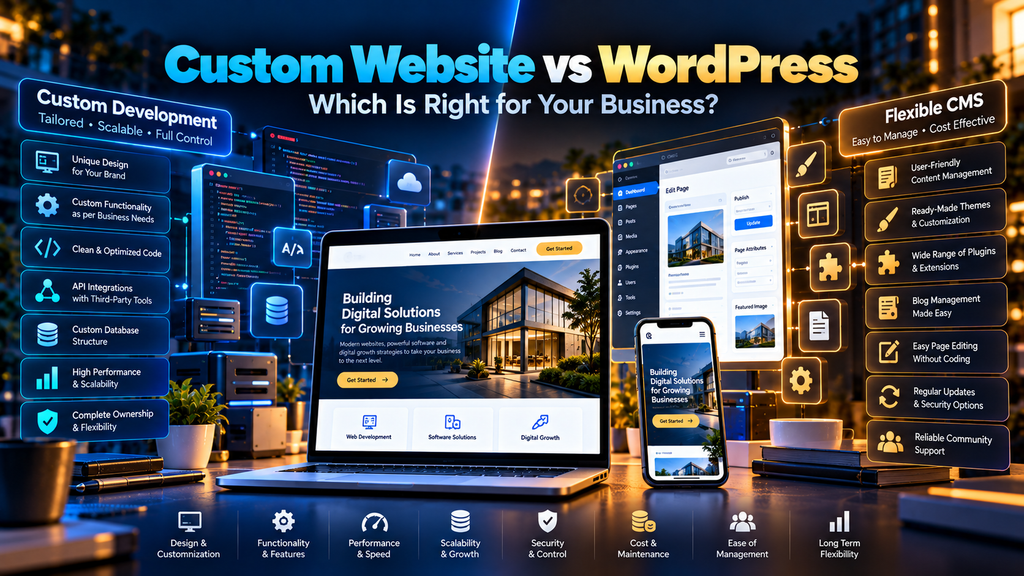
Custom Website vs WordPress: Which Is Better for Your Business? is a common question for companies planning a new website, redesign or digital platform.
Both approaches can produce professional, responsive and search-friendly business websites.
However, they solve website development in different ways.
A WordPress website is built around an established content management system with themes, plugins and an administration interface that can make everyday content management easier.
A custom website is developed around specific project requirements using a selected technology stack, architecture and custom functionality.
Neither approach is automatically the right choice for every business.
The decision should depend on what your website actually needs to do, how frequently your team needs to edit it, what integrations are required, how much customization you need and how the website may evolve over time.
At Greap Technologies, we provide website development services, custom web development, WordPress development, ecommerce development and SEO services in Erode for businesses planning and improving their digital presence.
What Is a Custom Website?
A custom website is developed around the specific requirements of a business instead of relying primarily on a ready-made CMS architecture, theme or page-building system.
Depending on the project, custom development can involve:
- Custom front-end development
- Custom back-end development
- Custom database architecture
- APIs
- Business-system integrations
- Custom dashboards
- Customer portals
- Special workflows
- Custom ecommerce functionality
- Purpose-built administrative tools
The technology stack should be selected according to the project’s requirements.
What Is WordPress?
WordPress is an open-source content management system that businesses can use to create and manage websites.
A WordPress website can use:
- Themes
- Plugins
- Blocks
- Custom templates
- Custom fields
- Custom code
- Content-management tools
WordPress can be used for many types of websites, including company websites, blogs, portfolios, landing-page websites and ecommerce stores using WooCommerce.
Custom Website vs WordPress at a Glance
| Area | Custom Website | WordPress |
|---|---|---|
| Development Approach | Built around project requirements | Built on an established CMS |
| Customization | Extensive architectural control | Extensive customization within WordPress ecosystem |
| Content Management | Must be designed or integrated | Built-in CMS capabilities |
| Plugins | Not dependent on WordPress plugins | Large plugin ecosystem available |
| Development Time | Can require more development for custom features | Existing CMS functionality can reduce development work |
| Maintenance | Depends on custom technology stack | Core, theme and plugins require ongoing maintenance |
| Hosting | Depends on selected architecture | Requires suitable WordPress hosting |
| SEO | Can be implemented directly in architecture | Can support strong SEO when configured properly |
| Business Logic | Can be purpose-built | Can use plugins and custom development |
1. Start with Business Requirements, Not the Platform
The first question should not be:
“Should we use WordPress or custom code?”
Start with:
“What does our website need to do?”
Document requirements such as:
- Number and type of pages
- Content-management needs
- Lead-generation forms
- Customer accounts
- Online payments
- Product catalogues
- Dashboards
- Booking systems
- CRM integrations
- ERP integrations
- APIs
- Multilingual content
- Ecommerce
- Custom workflows
Once these requirements are understood, platform selection becomes much easier.
2. Development Flexibility
Custom Website
Custom development can give the development team control over the architecture, front end, back end and data flow.
This can be valuable when the project has requirements that do not fit neatly into a conventional CMS structure.
WordPress
WordPress is also highly customizable.
Developers can create:
- Custom themes
- Custom plugins
- Custom post types
- Custom fields
- API integrations
- Custom templates
The key difference is that these customizations operate within the WordPress ecosystem.
3. Content Management
This is one of WordPress’s major practical advantages for many business websites.
WordPress already provides an administration environment for managing content.
Business teams can potentially manage:
- Pages
- Blog posts
- Images
- Categories
- Menus
- Other configured content
A custom website can provide equally capable content management, but those tools need to be developed, integrated or provided through another CMS.
If employees frequently update content, the administration experience should be considered during platform selection.
4. Design Freedom
Both approaches can support custom visual design.
A common misconception is that every WordPress website must look like a template.
That is not necessarily true.
A custom WordPress theme can be designed specifically for a business.
Likewise, custom development can provide complete control over interface implementation.
Design quality ultimately depends on:
- UI/UX planning
- Branding
- Typography
- Layout
- Responsive design
- Accessibility
- Development quality
5. Development Time
WordPress can reduce development effort when the project can reuse established CMS functionality.
For example, a standard business website may need:
- Homepage
- About page
- Services
- Blog
- Contact form
- Portfolio
Building every administration feature from scratch may not provide enough business value for such a project.
Custom development can require more initial work when the system itself needs to be purpose-built.
However, timelines depend heavily on project scope and should not be estimated based on the words “WordPress” or “custom” alone.
6. Development Cost
There is no universal rule that WordPress is always cheap or custom development is always expensive.
A heavily customized WordPress website can require significant development.
A focused custom website can sometimes be relatively straightforward.
Cost can depend on:
- Design complexity
- Number of pages
- Content requirements
- Custom functionality
- Integrations
- Administration requirements
- Ecommerce
- Data migration
- SEO requirements
- Testing
Compare the complete project scope rather than only the platform name.
7. Plugins vs Purpose-Built Functionality
WordPress has a large ecosystem of plugins that can add functionality without developing every feature from scratch.
Plugins can support areas such as:
- Forms
- SEO
- Security
- Caching
- Backups
- Ecommerce
- Analytics
This can save development time.
However, installing a plugin for every small requirement can create unnecessary complexity.
Custom development can implement only the functionality required by the project, but that functionality then needs to be developed and maintained appropriately.
8. Website Performance
Neither approach is automatically faster.
A custom website can be extremely efficient when its architecture and code are optimized for the project.
It can also be slow if implemented poorly.
A WordPress website can perform well when:
- Hosting is appropriate
- The theme is optimized
- Plugins are selected carefully
- Images are optimized
- Caching is configured appropriately
- Third-party scripts are controlled
It can also become slow when unnecessary themes, plugins, scripts and oversized media accumulate.
Read our Website Speed Optimization Services in Erode guide for more information.
9. Core Web Vitals
Both custom and WordPress websites should consider user-experience performance metrics such as:
- LCP – loading performance
- INP – interaction responsiveness
- CLS – visual stability
The technology choice alone does not guarantee strong Core Web Vitals.
Images, fonts, scripts, server performance, page architecture and third-party resources can all influence the result.
Read our Core Web Vitals Optimization for Business Websites in Erode guide.
10. Custom Website vs WordPress for SEO
Both approaches can support strong SEO foundations.
WordPress does not automatically rank higher because it is WordPress.
A custom website does not automatically rank higher because it has custom code.
Search performance depends on many areas, including:
- Search intent
- Useful content
- Website structure
- Crawlability
- Indexability
- Internal linking
- Metadata
- Canonical URLs
- Structured data
- Mobile usability
- Website performance
The development platform should make these requirements possible to implement correctly.
11. WordPress SEO Plugins
WordPress SEO plugins can simplify management of areas such as:
- Page titles
- Meta descriptions
- Canonical URLs
- XML sitemaps
- Indexing controls
- Structured data
However, installing an SEO plugin does not automatically optimize the website or guarantee rankings.
Content, architecture, relevance and technical implementation still matter.
12. Custom Website SEO Controls
With a custom website, developers can implement SEO controls directly into the application’s architecture or content-management system.
This can provide precise control over:
- Metadata
- URLs
- Canonicals
- Sitemaps
- Robots directives
- Structured data
- Internal linking systems
However, these features need to be deliberately designed and developed.
A custom website does not receive good technical SEO automatically.
13. Technical SEO
Regardless of the platform, business websites should consider technical areas such as:
- HTTPS
- XML sitemap
- Robots.txt
- Canonical URLs
- Redirects
- 404 errors
- Mobile usability
- Core Web Vitals
- Structured data
- Internal links
Read our Technical SEO Checklist for Business Websites in Erode.
14. Security
Security depends on the entire website architecture and maintenance process.
WordPress
WordPress security management can include:
- Core updates
- Plugin updates
- Theme updates
- User permissions
- Strong authentication practices
- Backups
- Hosting security
- Monitoring
Custom Website
A custom website avoids dependency on WordPress-specific themes and plugins, but custom applications still require secure development and ongoing maintenance.
Security responsibilities can include:
- Framework updates
- Package updates
- Authentication
- Authorization
- Server configuration
- Database security
- Application security
- Backups
- Monitoring
“Custom” does not automatically mean secure, and “WordPress” does not automatically mean insecure.
15. Updates and Maintenance
WordPress Maintenance
WordPress websites commonly require ongoing management of:
- WordPress core
- Plugins
- Themes
- Backups
- Security
- Forms
- Performance
Read our WordPress Maintenance Services in Erode guide.
Custom Website Maintenance
A custom application may require:
- Framework updates
- Dependency updates
- Server maintenance
- Database maintenance
- API maintenance
- Bug fixes
- Security updates
- Performance monitoring
Maintenance requirements depend on the selected technology stack.
16. Scalability
Scalability is another area where oversimplified comparisons can be misleading.
Both WordPress and custom systems can support growing businesses when their architecture is appropriate for the workload.
Consider:
- Expected traffic
- Content volume
- Number of users
- Database activity
- Integrations
- Custom workflows
- Future functionality
For complex applications, custom architecture can be designed around highly specific scaling requirements.
For many content-focused business websites, WordPress can remain a practical solution when properly configured and maintained.
17. Integrations
Modern business websites frequently connect with other systems.
Examples include:
- CRM
- ERP
- Payment systems
- Email marketing
- Analytics
- Customer support platforms
- Booking systems
- Inventory systems
WordPress may already have suitable plugins for common integrations.
Custom development can provide purpose-built integrations where standard options do not meet the business requirements.
18. APIs and Custom Workflows
A custom website can be particularly useful when the website is effectively part of a larger software system.
For example, the project may require:
- Custom API communication
- Complex user permissions
- Internal dashboards
- Customer portals
- Automated business workflows
- Custom database relationships
WordPress can also support APIs and custom development, but highly specialized application requirements should be evaluated carefully before selecting a CMS architecture.
19. Ecommerce
WordPress can support ecommerce using WooCommerce.
This can be suitable for businesses that want to combine WordPress content management with ecommerce functionality.
Read our WooCommerce Website Development for Businesses in Erode guide.
Custom ecommerce development can be considered when the business has highly specialized workflows that do not fit standard ecommerce platforms effectively.
Explore our Ecommerce Development Services.
20. Business Website Editing
Ask who will manage the website after launch.
If a marketing team regularly needs to:
- Create pages
- Publish blogs
- Change images
- Update service content
- Create landing pages
a CMS can be highly valuable.
WordPress provides these capabilities as part of its core approach.
A custom website should include an appropriate CMS or administration system when non-technical users need similar control.
21. Blogging and Content Marketing
WordPress has a strong content-management foundation and can be practical for businesses publishing articles regularly.
A custom website can also support blogging, but the publishing system needs to be developed or integrated.
If SEO blogging is a major part of your marketing strategy, compare the actual editorial workflow your team will use.
22. Ownership and Control
WordPress is open-source software and can provide substantial control over the website and hosting environment.
A custom website can also provide extensive ownership and control, depending on the development agreement, source-code access, hosting setup and third-party services used.
Before beginning any website project, clarify:
- Who owns the domain?
- Who owns the hosting account?
- Who has administrator access?
- Who controls the source code?
- Who controls analytics?
- Who controls Search Console?
- What happens if the development provider changes?
23. Hosting Requirements
WordPress requires a suitable hosting environment.
Hosting quality can affect:
- Performance
- Reliability
- Backups
- Security
- Scalability
Custom websites can use many different hosting architectures depending on their technology stack.
The infrastructure should match the application’s actual requirements.
24. Backups
Both custom and WordPress websites need an appropriate backup and recovery strategy.
Depending on the system, backups can include:
- Website files
- Database
- Uploaded media
- Configuration
- Other important application data
Backup frequency should reflect how often important website data changes.
25. Mobile Responsiveness
Both approaches can deliver excellent responsive websites.
Mobile quality depends on implementation.
Test:
- Navigation
- Headings
- Images
- Forms
- Tables
- Buttons
- Popups
- Interactive functionality
Responsive design should be considered from the beginning rather than patched onto the project at the end.
26. Accessibility
Accessibility is not determined by whether a website uses WordPress or custom code.
Both approaches should consider areas such as:
- Semantic HTML
- Keyboard usability
- Form labels
- Image alternatives where appropriate
- Readable content
- Clear interaction states
The implementation and content-management process matter more than the platform label.
27. Custom Website for Small Businesses
Custom development can make sense for a small business when it has a specific requirement that justifies purpose-built functionality.
Examples might include:
- Custom quoting system
- Customer portal
- Special booking workflow
- Unique integration
- Internal business process
However, custom development should solve a real problem rather than being selected only because “custom” sounds more premium.
28. WordPress for Small Businesses
WordPress can be practical for small businesses that primarily need:
- Professional company website
- Service pages
- Blog
- Portfolio
- Contact forms
- Landing pages
- Content management
Using established CMS functionality can avoid developing unnecessary administration features from scratch.
29. Custom Website for Growing Businesses
A growing company may consider custom development when its website begins functioning more like a software platform than a conventional marketing website.
Examples include:
- Customer dashboards
- Employee portals
- Complex integrations
- Role-based systems
- Automated workflows
- Custom reporting
Architecture should be planned around both current and reasonably expected future requirements.
30. WordPress for Growing Businesses
Growing businesses can continue using WordPress when their requirements fit the platform effectively.
Growth may require improvements to:
- Hosting
- Performance
- Security
- Content architecture
- Development workflow
- Plugin management
Growth alone does not automatically mean a company needs to abandon WordPress.
Custom Website vs WordPress Comparison Checklist
| Requirement | Custom Website Direction | WordPress Direction |
|---|---|---|
| Standard business website | Possible | Strong practical option |
| Regular blogging | CMS needed | Built-in content workflow |
| Highly custom business logic | Purpose-built architecture possible | May require custom plugins/development |
| Non-technical content editing | Admin/CMS should be provided | CMS included |
| Custom API integrations | Purpose-built implementation | Plugins or custom development |
| WooCommerce store | Not applicable as a custom-only approach | Native WordPress ecosystem |
| Minimal plugin dependency | Possible | Requires disciplined plugin selection |
| Unique software-like platform | Can be designed around requirements | Suitability depends on complexity |
| SEO | Can support it | Can support it |
| Responsive design | Can support it | Can support it |
Questions to Ask Before Choosing
- What does the website need to do?
- Who will update website content?
- How often will content change?
- Do we need a blog?
- Do we need ecommerce?
- Do customers need accounts?
- Do we need custom dashboards?
- Which systems need integration?
- How much custom business logic is required?
- What performance requirements exist?
- Who will maintain the website?
- What is the total project budget?
- What functionality might be required later?
Common Website Platform Selection Mistakes
- Choosing technology before defining requirements
- Assuming custom development is automatically better
- Assuming WordPress is suitable for every project
- Assuming WordPress websites must use generic templates
- Installing unnecessary plugins
- Ignoring ongoing maintenance
- Ignoring content-management requirements
- Ignoring performance
- Ignoring technical SEO
- Ignoring integrations
- Ignoring future requirements
- Comparing only initial development price
Is a Custom Website Faster Than WordPress?
Not automatically.
A lightweight custom website can be very fast because developers can control exactly what is loaded.
But poor custom code or inefficient infrastructure can still create performance problems.
A well-optimized WordPress website can also perform strongly when the theme, plugins, hosting, images and scripts are managed properly.
Compare implementation quality rather than platform stereotypes.
Is a Custom Website More Secure Than WordPress?
Not automatically.
Custom applications can contain security vulnerabilities if they are poorly designed or maintained.
WordPress websites can also develop security risk when core software, plugins, themes or access controls are neglected.
Secure development and ongoing maintenance matter for both approaches.
Is WordPress Better for SEO?
WordPress provides convenient tools for managing many SEO elements, but using WordPress does not itself guarantee search visibility.
A custom website can also implement strong SEO controls.
The important question is whether the website supports the technical and content requirements needed for your SEO strategy.
Which Is Cheaper: Custom Website or WordPress?
Cost depends on scope.
WordPress can reduce development effort for websites that can reuse existing CMS functionality.
Custom development may require additional initial engineering when functionality needs to be purpose-built.
However, complex WordPress customization, premium plugins, maintenance and integrations can also increase total cost.
Compare total development and ownership requirements instead of assuming one option is always cheaper.
Which Is Easier to Maintain?
The answer depends on the project.
WordPress has a standardized ecosystem, but it requires ongoing attention to core software, themes and plugins.
A custom website may have fewer CMS-specific components but still requires framework, dependency, server, database and application maintenance.
The most maintainable website is usually one that has been built cleanly, documented properly and supported by a suitable maintenance process.
Custom Website vs WordPress for Erode Businesses
For many Erode businesses, WordPress can be practical when the primary requirement is a professional marketing website with service pages, blogs, portfolios and lead-generation forms.
Custom development becomes worth evaluating when the website requires specialized business logic, complex integrations, dashboards, portals or application-like functionality.
Businesses should make the decision based on requirements rather than assuming that every company in the same industry needs the same technology.
Website Development for Erode and Nearby Areas
Greap Technologies provides website development support for businesses in Erode, Perundurai, Bhavani, Gobichettipalayam, Sathyamangalam, Anthiyur, Chennimalai, Modakkurichi, Kavindapadi, Nambiyur, Kodumudi and nearby areas.
The appropriate technology should be selected according to the business requirements rather than creating a different technical recommendation merely because a business operates in a different nearby town.
Maintenance After Website Development
Regardless of the technology selected, a business website requires ongoing attention.
Maintenance can include:
- Backups
- Security
- Software updates
- Bug fixes
- Performance monitoring
- Form testing
- Content updates
- Technical SEO checks
Read our Website Maintenance Services in Erode guide for the broader maintenance process.
Website AMC for Business Websites
Businesses that depend heavily on their website can also consider an ongoing maintenance agreement.
A website AMC can define areas such as:
- Maintenance scope
- Update responsibilities
- Backup responsibilities
- Technical support
- Bug fixes
- Content updates
- Performance monitoring
Read our Website AMC Services in Erode: Cost, Scope and Benefits guide.
Why Choose Greap Technologies for Website Development in Erode?
Greap Technologies provides website development, ecommerce development, custom software, website maintenance, performance optimization and SEO services for businesses in Erode and nearby areas.
Depending on project requirements, website development can include:
- Requirement analysis
- Website planning
- UI/UX design
- WordPress development
- Custom website development
- Responsive development
- CMS implementation
- Contact and lead forms
- API integrations
- Ecommerce development
- Website performance optimization
- Technical SEO
- Analytics integration
- Ongoing website maintenance
The objective should be to select technology based on what the business actually needs instead of forcing every project into the same development stack.
Explore our Website Development Services, Ecommerce Development, SEO Services in Erode and Digital Marketing Services.
Conclusion
Custom website development and WordPress can both be suitable choices for business websites.
WordPress can be practical when a company needs a flexible content-management system, service pages, blogs, portfolios, landing pages or WooCommerce functionality.
Custom development can be worth evaluating when a website requires specialized workflows, complex integrations, custom dashboards, portals or software-like functionality.
Before choosing, compare:
- Business requirements
- Content management
- Custom functionality
- Integrations
- Performance
- SEO
- Security
- Maintenance
- Scalability
- Development cost
- Long-term ownership
Do not begin with the question, “Which technology sounds better?”
Begin with, “What does our business need this website to accomplish?”
Need Help Choosing Between WordPress and Custom Development?
If you are planning a new business website and are unsure whether WordPress or custom development fits your requirements, start by defining the functionality, content workflow, integrations and long-term requirements.
Greap Technologies provides WordPress development, custom website development, ecommerce development, performance optimization, technical SEO and ongoing website support for businesses in Erode and nearby areas.
Discuss Your Website Project on WhatsApp
Frequently Asked Questions
1. What is the difference between a custom website and WordPress?
A custom website is developed around specific project requirements using a selected technology architecture. WordPress is an established open-source content management system that provides built-in content-management capabilities and can be extended using themes, plugins and custom development.
2. Is a custom website better than WordPress?
Neither approach is universally better. Custom development can suit specialized application requirements, while WordPress can be practical for many content-driven business websites. The appropriate choice depends on the project’s requirements.
3. Is WordPress suitable for a business website?
Yes. WordPress can support company websites, service pages, blogs, portfolios, landing pages and ecommerce through WooCommerce when implemented appropriately.
4. Is a custom website faster than WordPress?
Not automatically. Performance depends on architecture, development quality, hosting, images, scripts, third-party resources and optimization. Either approach can perform well or poorly.
5. Is a custom website more secure than WordPress?
Not automatically. Both custom applications and WordPress websites require secure implementation, appropriate access controls, updates, backups and ongoing maintenance.
6. Is WordPress good for SEO?
WordPress can support strong SEO implementation and provides convenient tools for managing many SEO elements. Search visibility still depends on content, relevance, website architecture, technical SEO, performance and other factors.
7. Can a custom website rank on Google?
Yes. A custom website can implement the technical and content foundations required for search optimization. Using custom code alone does not guarantee rankings.
8. Which costs more: WordPress or custom development?
Cost depends on scope. WordPress can reduce development work by providing existing CMS functionality, while highly customized WordPress projects can still become complex. Custom development costs depend on the amount of functionality that needs to be designed and built.
9. Which option is easier for updating content?
WordPress includes a content-management interface. A custom website can also provide an easy editing experience when an appropriate CMS or custom administration system is included in the project.
10. Can WordPress handle ecommerce?
Yes. WooCommerce can add ecommerce functionality to WordPress for products, cart, checkout, orders and related online-store requirements.
11. When should a business consider custom development?
Custom development is worth evaluating when the project requires specialized workflows, complex integrations, customer portals, dashboards, custom business logic or other functionality that does not fit standard website solutions effectively.
12. Does Greap Technologies provide WordPress and custom website development in Erode?
Yes. Greap Technologies provides WordPress development, custom website development, ecommerce development, performance optimization, technical SEO and ongoing website support for businesses in Erode and nearby areas.


