An ecommerce category page does more than display a grid of products.
For customers, categories help organize a large catalogue and make relevant products easier to discover and compare.
For search engines, well-structured category pages can help explain how products are grouped and can provide useful landing pages for broader commercial searches.
This makes ecommerce category page SEO an important part of a scalable ecommerce search strategy.
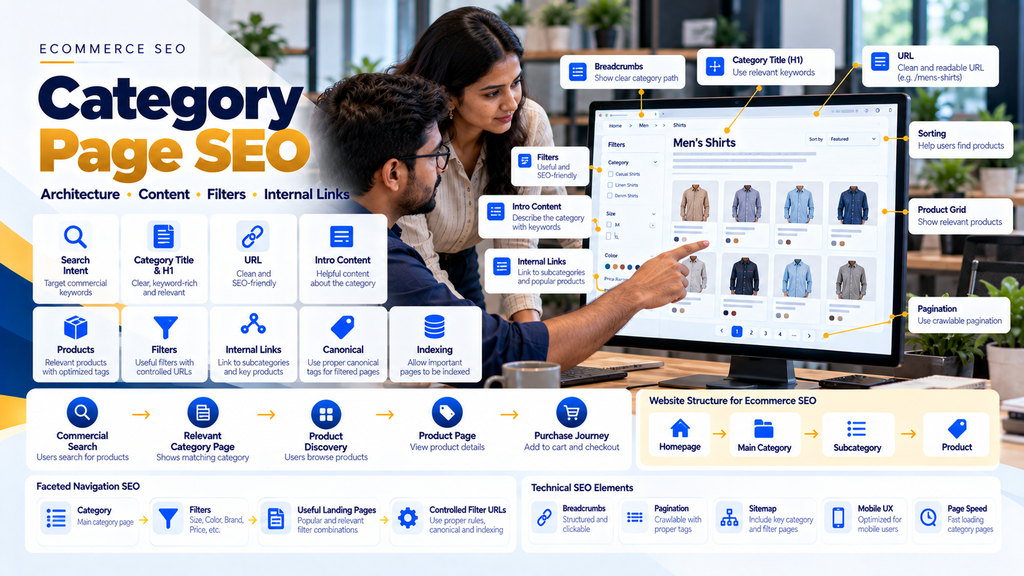
A useful ecommerce structure can look like:
Homepage → Main Category → Subcategory → Product
But simply creating hundreds of categories does not automatically improve SEO.
Each important category should have a clear purpose, useful products, appropriate content, logical internal links and technically sound indexing controls.
This complete guide explains how ecommerce businesses can optimize category and collection pages without creating keyword-stuffed content, unnecessary duplicate pages or uncontrolled filter URLs.
What Is an Ecommerce Category Page?
An ecommerce category page groups products that share a meaningful relationship.
Depending on the platform, it may also be called a:
- Product category
- Collection page
- Product listing page
- PLP
- Department page
- Subcategory page
For example:
Electronics → Laptops → Gaming Laptops → Individual Product
Each level has a different purpose.
What Is Ecommerce Category Page SEO?
Ecommerce category page SEO is the process of improving category and collection pages so customers can browse products effectively while search engines can discover, understand and appropriately evaluate the pages for relevant searches.
It can include:
- Search-intent research
- Keyword mapping
- Category architecture
- Title tags
- H1 headings
- URLs
- Introductory content
- Product listings
- Subcategory links
- Internal linking
- Breadcrumbs
- Faceted navigation
- Pagination
- Canonical URLs
- Indexing controls
- Structured data
- XML sitemaps
- Mobile usability
- Page speed
Category Pages vs Product Pages for SEO
One of the most important ecommerce SEO decisions is choosing the correct page type for each search intent.
| Category Page | Product Page |
|---|---|
| Targets broader product demand | Targets a specific product |
| Shows multiple relevant products | Explains one product |
| Supports browsing and comparison | Supports detailed product evaluation |
| Can target product-type searches | Can target product/model searches |
| Links to many product pages | Usually links back to categories and related products |
Read Ecommerce Product Page SEO: How to Rank Products on Google.
Match Search Intent to the Correct Ecommerce Page
A useful mapping model is:
Informational Search → Guide
Broad Commercial Search → Category
More Specific Product-Type Search → Subcategory
Exact Product / Model Search → Product Page
The objective is not to make every page target every keyword.
Strategy 1: Research Category Keywords
Before creating a category, understand how potential customers describe that group of products.
1. Identify the Main Product Type
Start with the natural term customers use for the products in the category.
2. Review Search Intent
Determine whether people using that search are likely to want multiple products or one specific item.
3. Identify Useful Subcategories
Some broader categories can be divided into meaningful product groups.
4. Consider Relevant Attributes
Material, application, size, product type or other attributes may represent useful category opportunities when they reflect genuine customer demand.
5. Avoid Creating Categories for Every Keyword Variation
Closely related keyword variations do not automatically require separate pages.
Strategy 2: Build a Logical Ecommerce Category Architecture
A strong ecommerce hierarchy helps customers navigate the catalogue and gives search engines useful relationships between pages.
A common architecture is:
Homepage → Category → Subcategory → Product
6. Keep Main Categories Broad but Meaningful
Top-level categories should represent important divisions in the product catalogue.
7. Create Subcategories When They Help Customers
A subcategory should make browsing easier or satisfy a meaningfully different product need.
8. Avoid Excessive Category Depth
Do not create unnecessary hierarchy simply to insert more keywords into URLs and headings.
9. Avoid Categories With No Clear Purpose
A category containing one unrelated product may not provide a useful browsing experience.
10. Plan Architecture Before the Catalogue Becomes Large
Restructuring thousands of indexed product and category URLs later can require substantial migration work.
Strategy 3: Map One Primary Intent to Each Important Category
Important categories should have a clearly understood search and customer purpose.
11. Avoid Multiple Categories Competing for the Same Intent
Creating several nearly identical categories can make the site architecture harder to understand.
12. Merge Redundant Categories Where Appropriate
If two categories serve essentially the same purpose, consider whether one stronger page would provide a better experience.
13. Keep Distinct Categories When Customer Needs Differ
Do not merge genuinely different product groups merely to reduce page count.
Strategy 4: Optimize the Category URL
Category URLs should be stable and understandable.
14. Use Descriptive Slugs
Where the ecommerce platform allows it, use a concise slug that represents the category.
15. Avoid Unnecessary URL Parameters
The primary category URL should not depend on tracking, sorting or session parameters.
16. Keep URLs Stable
Changing an established category URL without a good reason creates additional redirect and migration requirements.
17. Redirect Changed Category URLs
If a category URL must change, redirect the previous URL to the most relevant replacement.
Strategy 5: Write an Effective Category Title Tag
The title element should accurately describe the category.
18. Lead With the Main Category
Make the core product type clear.
19. Add Useful Context Naturally
Brand or business context can be included where it helps identify the page.
20. Avoid Keyword Lists
A title should not become:
Buy Shoes | Shoes Online | Best Shoes | Cheap Shoes | Shoes India
Write for clarity instead of keyword repetition.
21. Keep Category Titles Distinct
Each important category should have a title that accurately differentiates it from other categories.
Strategy 6: Optimize the Category H1
The main category heading should clearly tell customers what group of products they are viewing.
22. Use a Descriptive H1
The heading can usually use the natural category name.
23. Avoid Promotional H1s That Hide the Category
A heading such as “Discover Something Amazing” may sound promotional but does not clearly identify the products.
24. Maintain Logical Heading Structure
Use lower-level headings for supporting sections rather than choosing heading tags only for visual styling.
Strategy 7: Write a Useful Meta Description
The category meta description can summarize the product group for potential search visitors.
25. Explain What Customers Can Browse
Describe the category accurately.
26. Mention Relevant Differentiators
Useful product types, applications or shopping options can be mentioned naturally where appropriate.
27. Avoid Fake Promotions
Do not claim discounts, availability or shipping offers that do not actually apply.
Strategy 8: Add Useful Category Intro Content
A category page does not need a huge article above the product grid.
A short useful introduction can help customers understand the category.
28. Explain the Product Group
Briefly describe what customers will find.
29. Mention Important Differences
If the category contains several types of products, explain the main distinctions where useful.
30. Keep Products Visible
Do not force customers to scroll through a massive SEO essay before they can browse products.
31. Avoid Keyword-Stuffed Introductions
The introduction should read naturally.
How Much Content Should a Category Page Have?
There is no universal required word count.
The amount of content should depend on what customers need to understand the category.
A useful model can be:
Short Introduction → Products → Supporting Category Information
when additional information genuinely helps customers.
Strategy 9: Use Supporting Content Below the Product Grid
Some categories may benefit from additional information after the products.
32. Buying Considerations
Explain important differences customers should consider.
33. Product Types
Describe relevant subcategories or product groups.
34. Applications
For industrial or B2B products, explain legitimate applications.
35. Sizing or Selection Information
Where appropriate, help customers understand how to select among available options.
36. Frequently Asked Questions
Answer genuine recurring questions about the category where useful.
Strategy 10: Optimize Product Cards
Category product cards are important navigation elements.
37. Product Image
Use clear images that help customers distinguish products.
38. Product Name
Use understandable product titles.
39. Price
Where public pricing applies, display accurate pricing according to business rules.
40. Availability
Show relevant availability information when useful.
41. Product Link
The product name, image or other clear element should provide a crawlable and usable path to the product page.
42. Avoid Overloading Product Cards
Do not place so many badges, buttons and promotional labels on each card that the category becomes difficult to scan.
Strategy 11: Link to Important Subcategories
Large categories can provide direct paths to more specific groups.
For example:
Footwear → Men’s Footwear → Running Shoes
43. Use Descriptive Link Text
Customers should understand where a subcategory link will take them.
44. Prioritize Useful Subcategories
Do not create dozens of decorative category links that do not help browsing.
Strategy 12: Use Breadcrumb Navigation
Breadcrumbs help communicate hierarchy.
For example:
Home → Electronics → Laptops → Gaming Laptops
45. Keep Breadcrumbs Consistent
The structure should reflect meaningful navigation.
46. Link Parent Categories
Breadcrumbs can provide useful internal links back through the catalogue hierarchy.
Strategy 13: Strengthen Internal Linking
Internal links are especially important for ecommerce websites with large catalogues.
47. Homepage to Main Categories
Important top-level categories can be accessible through primary navigation or other relevant homepage sections.
48. Category to Subcategory
Connect broader product groups to useful narrower groups.
49. Category to Product
Ensure products have crawlable links from relevant listing pages.
50. Product to Category
Breadcrumbs and other navigation can connect products back to their hierarchy.
51. Blog to Category
Buying guides can link to relevant product categories when appropriate.
52. Category to Buying Guides
Customers who need help selecting products can be directed to genuinely useful supporting content.
Example Internal-Link Architecture
Homepage → Main Category → Subcategory → Product
with supporting content:
Blog / Buying Guide ↔ Category → Product
Strategy 14: Prevent Orphan Category Pages
An important category should not exist only because its URL appears in a sitemap.
53. Link Important Categories Through Navigation
Provide useful paths from relevant areas of the website.
54. Audit Internal Links
Identify important categories receiving little or no internal-link support.
Strategy 15: Understand Faceted Navigation
Faceted navigation allows customers to filter products using attributes.
For example:
Category → Brand → Colour → Size → Price → Availability
This can be excellent for customers but complicated for SEO.
What Is Faceted Navigation SEO?
Faceted navigation SEO involves controlling the large number of URLs that ecommerce filters can generate while keeping filtering useful to customers.
For example, a single category could theoretically generate combinations such as:
Category + Brand + Colour + Size + Price + Sort
Across a large catalogue, this can create many URLs.
Strategy 16: Decide Which Filter Pages Deserve Search Visibility
Not every filter combination should automatically become an indexable SEO landing page.
55. Identify Genuine Search Demand
Some filtered product groups may represent useful searches.
56. Create Deliberate Landing Pages Where Appropriate
If a filtered combination has a meaningful customer purpose, a dedicated optimized landing page may be preferable to relying on an uncontrolled parameter URL.
57. Control Low-Value Filter Combinations
Filters created only for browsing do not necessarily need to become search landing pages.
58. Preserve User Experience
SEO controls should not prevent customers from using useful filters.
Strategy 17: Control Sorting URLs
Sorting options can generate alternative URLs for substantially the same category.
Examples include:
- Price low to high
- Price high to low
- Newest
- Popularity
These generally change product order rather than creating an entirely new product category.
59. Review Canonical Handling
Sorting URLs should not accidentally compete with the preferred category URL.
60. Avoid Indexing Every Sort Order
There is usually little value in creating multiple search landing pages that differ only by product ordering.
Strategy 18: Manage Canonical URLs
Canonical tags can help communicate the preferred URL among duplicate or substantially similar pages.
61. Use the Correct Preferred Category URL
Primary category pages should reference the intended canonical version.
62. Review Filter Canonicals Carefully
Do not apply one universal canonical rule without considering whether some filtered pages are intentionally distinct landing pages.
63. Avoid Canonicalizing Categories to Unrelated Pages
A category should not point to the homepage simply because the site has many category URLs.
Strategy 19: Manage Pagination Properly
Large categories may contain more products than should reasonably appear in one initial view.
64. Keep Products Discoverable Across Pages
Search engines and customers need usable paths to products beyond the first group displayed.
65. Use Crawlable Navigation
If numbered pages, load-more functionality or another pattern is used, ensure important products remain accessible through the implemented architecture.
66. Avoid Making Later Products Accessible Only Through Complex JavaScript Interaction
The implementation should not unintentionally hide large portions of the catalogue from crawlable navigation.
67. Do Not Automatically Canonicalize Every Paginated Page to Page One
Pagination represents a sequence of product listings, and canonical strategy should reflect the actual implementation rather than applying a simplistic rule that can hide useful discovery paths.
Strategy 20: Review Infinite Scroll SEO
Infinite scrolling can create a smooth browsing experience, but technical implementation matters.
68. Provide Crawlable Product Discovery
Important products should not depend exclusively on scrolling behaviour that search crawlers cannot reproduce as intended.
69. Consider Progressive Loading
A load-more experience can be combined with crawlable underlying pagination depending on the platform architecture.
70. Test Without Assuming
Review the rendered and crawlable implementation rather than assuming infinite scroll automatically works for SEO.
Strategy 21: Manage Category Indexing
Not every category created inside an ecommerce CMS needs to appear in search.
71. Index Important Categories
Pages that represent useful customer and search destinations can be candidates for indexing.
72. Review Thin Categories
Categories with little useful purpose should be reviewed before being exposed as search landing pages.
73. Review Empty Categories
Empty category pages should not remain indefinitely as poor customer experiences.
74. Review Internal Search Result Pages
Internal site-search results are different from intentionally created category pages and should have an appropriate indexing strategy.
Strategy 22: Include Important Categories in XML Sitemaps
XML sitemaps can help search engines discover canonical category URLs.
75. Include Intended Indexable Categories
Focus the sitemap on URLs the business actually wants search engines to process.
76. Avoid Redirected Category URLs
Old redirected URLs should not unnecessarily remain in active XML sitemaps.
77. Avoid Non-Canonical Duplicates
Use the preferred category URL in the sitemap.
78. Remove Deleted Categories
Maintain the sitemap as catalogue architecture changes.
Strategy 23: Use Category Structured Data Appropriately
Structured data should represent the actual visible content and page type.
79. Breadcrumb Structured Data
Breadcrumb markup can describe the navigational hierarchy when implemented accurately.
80. Product Listing Information
The exact structured-data approach should match the page content and current supported specifications rather than adding markup merely because an SEO plugin offers it.
81. Do Not Fabricate Ratings
Do not add fake category ratings or reviews simply to create structured data.
82. Structured Data Does Not Guarantee Rankings
Markup can help machines understand information but is not a shortcut to higher organic positions.
Strategy 24: Optimize Category Images
Some ecommerce categories use hero or supporting images.
83. Use Appropriate Image Dimensions
Do not serve extremely large files when the visual appears at a smaller size.
84. Compress Images
Optimize files while maintaining suitable visual quality.
85. Use Meaningful ALT Text
Alternative text should describe meaningful imagery appropriately rather than becoming a keyword list.
86. Avoid Giant Category Banners
A large hero image should not unnecessarily push the entire product catalogue far below the initial viewport.
Strategy 25: Improve Category Page Speed
Category pages can be particularly heavy because they load many product images, filters, scripts and interactive components.
87. Optimize Product Thumbnails
Category cards usually do not need full-resolution product images.
88. Lazy Load Appropriate Images
Products further down the listing can use suitable loading strategies.
89. Review Filter Scripts
Complex filtering libraries can affect responsiveness.
90. Review Third-Party Applications
Recommendation engines, reviews, tracking, chat and promotional tools should justify their performance impact.
Read Website Speed Optimization Services in Erode.
Strategy 26: Improve Core Web Vitals
Category-page performance should be monitored as part of the broader ecommerce experience.
91. Large Visual Elements
Category banners and large images can affect loading performance.
92. Filter Interaction
Heavy scripts can affect responsiveness when customers filter or sort products.
93. Layout Stability
Product grids should not unnecessarily shift as images, badges or other components load.
Read Core Web Vitals Optimization for Business Websites in Erode.
Strategy 27: Optimize Category Pages for Mobile
Category browsing can become difficult when desktop filters and large product grids are simply compressed onto a smaller screen.
94. Mobile Product Grid
Product cards should remain readable and usable.
95. Mobile Filters
Filters should be accessible without consuming the entire screen.
96. Mobile Sorting
Sorting controls should be easy to use.
97. Touch-Friendly Controls
Filter options and product links should have practical interaction areas.
98. Avoid Horizontal Overflow
Category components should fit the viewport correctly.
Strategy 28: Manage Out-of-Stock Products in Categories
Out-of-stock products can affect both browsing and category quality.
99. Temporarily Unavailable Products
Businesses can decide whether temporarily unavailable products remain visible based on customer usefulness and inventory strategy.
100. Clearly Communicate Availability
Customers should not need to open multiple unavailable products before understanding stock status.
101. Consider Product Ordering
Where appropriate, available products can be prioritized without hiding useful temporarily unavailable products entirely.
102. Remove Permanently Discontinued Products From Listings
When a product is permanently removed, category links should be updated appropriately.
Strategy 29: Handle Empty Categories
A category with no products creates little browsing value.
103. Temporary Empty State
If stock is expected to return, provide useful information and relevant alternatives where appropriate.
104. Permanently Empty Category
If the category is no longer part of the catalogue, review whether it should be removed or redirected to a genuinely relevant replacement.
105. Avoid Redirecting Everything to the Homepage
Redirect destinations should match customer expectations.
Strategy 30: Avoid Duplicate Category Pages
Duplicate categories can appear through CMS configuration, navigation paths, tags, filters or manual SEO pages.
106. Audit Category Titles
Look for categories with nearly identical names and product sets.
107. Audit URLs
Check whether the same category is accessible through multiple indexable URL patterns.
108. Audit Product Overlap
Product overlap is normal in some situations, but two categories containing essentially identical products and targeting identical intent should be reviewed.
109. Audit Canonicals
Ensure canonical configuration matches the intended architecture.
Strategy 31: Avoid Location-Duplicated Ecommerce Categories
A business serving several areas should not automatically duplicate the same category for every town.
For example, creating the same category content for Erode, Perundurai, Bhavani, Anthiyur and many other locations by changing only the place name can produce near-identical pages.
110. Keep Product Categories Product-Focused
Category pages should primarily organize products.
111. Communicate Service Areas Separately
Where geography genuinely matters, appropriate business or location information can communicate where the company operates.
112. Create Location Pages Only When They Have Genuine Local Value
A useful location page should provide meaningful information specific to that location rather than simply swapping keywords.
Strategy 32: Use Category Pages in Ecommerce Content Clusters
Categories can become important hubs between educational content and products.
For example:
Buying Guide → Category → Product
113. Link Informational Articles to Relevant Categories
If an article helps customers choose a product type, link naturally to the appropriate category.
114. Link Categories to Useful Buying Guides
Customers who need more information can continue researching without leaving the website.
115. Link Products Back Into the Structure
Products should remain connected through categories and related navigation.
Strategy 33: Optimize Categories for Conversion
SEO traffic has limited business value if customers cannot find a suitable product after reaching the category.
116. Make Products Easy to Compare
Use consistent product cards and relevant information.
117. Provide Useful Filters
Help customers narrow large catalogues efficiently.
118. Keep Pricing Clear
Where applicable, communicate accurate pricing.
119. Show Relevant Availability
Help customers avoid unnecessary clicks into unavailable products.
120. Keep Product Navigation Fast
Customers should be able to move between category and product pages smoothly.
Read How to Increase Ecommerce Conversion Rate for Online Stores.
Strategy 34: Monitor Category Pages in Google Search Console
Search performance data can help businesses understand how important categories appear in organic search.
121. Review Search Queries
Identify the types of searches producing impressions for category pages.
122. Review Landing Pages
Understand which categories receive organic search traffic.
123. Review Clicks and Impressions
Use trends to identify pages that may deserve further investigation.
124. Review Indexing
Check whether important canonical category URLs are indexed as intended.
125. Investigate Unexpected URLs
If filter, sort or parameter URLs appear unexpectedly in search, review the faceted-navigation and canonical strategy.
Strategy 35: Measure Category SEO Beyond Rankings
Ranking position alone does not tell the complete story.
A useful measurement journey is:
Relevant Search Visibility → Organic Category Visit → Product Discovery → Product View → Cart → Checkout → Ecommerce Outcome
126. Organic Category Traffic
Understand how much relevant organic traffic enters through category pages.
127. Product Click-Through
Measure whether visitors continue from categories to products.
128. Add-to-Cart Activity
Understand whether category visitors eventually engage with products.
129. Ecommerce Outcomes
Evaluate completed purchases or other relevant business conversions using a consistent analytics model.
130. Do Not Attribute Everything to the Category Page
A purchase journey may involve multiple visits and marketing channels, so attribution should be interpreted carefully.
WooCommerce Category Page SEO
WooCommerce category SEO can involve WordPress product categories, attributes, tags, themes, plugins, archive templates, canonicals, sitemaps and filters.
131. Review Product Category Structure
Create categories based on meaningful catalogue organization rather than generating large numbers of unnecessary archives.
132. Review Product Tags
Tags should have a clear purpose. Automatically indexing large numbers of thin tag archives can create unnecessary pages.
133. Review Attribute Archives
Determine whether attribute pages provide useful search destinations or simply duplicate category/filter combinations.
134. Review WooCommerce Filters
Understand what URLs the filtering system generates.
135. Review SEO Plugin Settings
Plugins can help configure titles, metadata, canonicals and indexing controls, but settings should reflect the actual ecommerce architecture.
Read WooCommerce Website Development for Businesses in Erode.
Shopify Collection Page SEO
In Shopify, collections often perform the role that categories perform on other ecommerce platforms.
136. Build Meaningful Collections
Collections should help customers browse actual product groups.
137. Optimize Collection Titles
Use clear names that represent the included products.
138. Add Useful Collection Content
Provide concise information where it helps customers understand the collection.
139. Review Filter Behaviour
Understand how theme and app filtering affects URLs, internal links and crawlability.
140. Review Theme Output
Check headings, metadata, canonical information, product links and pagination behaviour.
141. Review Shopify Apps
SEO and filtering apps should be evaluated for their technical impact as well as their features.
B2B Ecommerce Category Page SEO
B2B ecommerce categories may need more technical information than typical consumer categories.
142. Product-Type Organization
Group products according to how business buyers search and purchase.
143. Technical Filters
Dimensions, materials, capacity, specification or application filters may be useful depending on the products.
144. RFQ-Based Categories
Products do not necessarily need public prices if the actual business model uses quotation-based sales.
145. Technical Buying Guides
Link to useful guides that help buyers understand specifications and product selection.
146. Manufacturer and Wholesale Context
Explain relevant commercial information without turning category pages into generic keyword-filled company profiles.
Read B2B Ecommerce Website Development for Wholesalers and Manufacturers in Erode.
Category SEO for Manufacturers
Manufacturing businesses can use category pages to organize large product catalogues for both search and enquiry generation.
147. Organize by Product Family
Create meaningful groups around actual product lines.
148. Organize by Application Where Appropriate
Application-based pages can be useful when they represent genuinely distinct customer needs.
149. Include Technical Context
Explain relevant specifications or selection criteria that apply across the category.
150. Connect Categories to Product Catalogue Pages
Each category should provide clear paths to individual products or relevant enquiry actions.
Category SEO for Multi-Vendor Marketplaces
Marketplace category architecture requires additional control because sellers may classify products inconsistently.
151. Define Central Category Taxonomy
The marketplace should control the primary category structure rather than allowing every seller to create unrestricted categories.
152. Map Seller Products to Existing Categories
Seller onboarding can include appropriate product classification.
153. Avoid Duplicate Seller Categories
Several sellers should not create separate SEO categories for the same product type without a meaningful reason.
154. Maintain Product Quality Standards
Category usefulness depends partly on the accuracy of seller product data.
Read Multi-Vendor Ecommerce Marketplace Development in Erode.
Ecommerce Category Page Technical SEO Checklist
- Correct HTTP status
- HTTPS enabled
- Page crawlable when intended
- Page indexable when intended
- Preferred canonical URL configured
- Descriptive title element
- Clear H1
- Useful meta description
- Stable URL
- Useful category introduction
- Products accessible through crawlable links
- Subcategories linked where relevant
- Breadcrumbs implemented
- Filter URLs reviewed
- Sort URLs reviewed
- Pagination reviewed
- Infinite scroll reviewed if used
- Duplicate categories checked
- XML sitemap updated
- Structured data accurate
- Mobile layout tested
- Images optimized
- Performance tested
- Core Web Vitals monitored
- Broken links reviewed
- Redirects maintained
Ecommerce Category Content Checklist
- Clear category name
- Relevant product selection
- Short useful introduction
- Meaningful subcategory links
- Useful filters
- Relevant sorting options
- Consistent product cards
- Accurate pricing where applicable
- Availability information where useful
- Supporting buying information where needed
- Useful FAQs where appropriate
- Links to relevant guides
- Clear paths to product pages
Common Ecommerce Category Page SEO Mistakes
- Creating categories for every keyword variation
- Using the same content across multiple categories
- Keyword stuffing category introductions
- Adding huge SEO articles above products
- Using vague category headings
- Creating excessive category depth
- Leaving important categories orphaned
- Allowing unlimited filter URLs to be indexed
- Indexing every sort-order URL
- Using incorrect canonicals
- Canonicalizing unrelated categories to the homepage
- Hiding later products behind inaccessible JavaScript
- Ignoring pagination
- Creating thin tag and attribute archives
- Leaving empty categories indexed indefinitely
- Creating duplicate location-based categories
- Using oversized category banners
- Ignoring mobile filters
- Ignoring category-page speed
- Expecting an SEO plugin to solve category architecture automatically
- Measuring success only by keyword position
Complete Ecommerce Category SEO Process
A scalable workflow can be:
Search Research → Intent Mapping → Category Architecture → On-Page SEO → Product Listings → Internal Links → Filter Control → Technical SEO → Indexing → Measurement → Improvement
155. Research Search Demand
Understand how customers search for groups of products.
156. Map Intent
Determine whether the search requires a category, subcategory, product or informational page.
157. Build the Architecture
Create logical relationships between categories, subcategories and products.
158. Optimize the Category
Improve the title, heading, URL, content and product presentation.
159. Build Internal Links
Connect the page to parent categories, subcategories, products and relevant content.
160. Control Filters
Determine which faceted URLs should remain browsing tools and which, if any, deserve dedicated search landing pages.
161. Validate Technical SEO
Review crawlability, indexability, canonicals, pagination, rendering and sitemaps.
162. Monitor Search Performance
Review relevant impressions, clicks, landing pages and indexing.
163. Measure Ecommerce Behaviour
Understand whether category visitors continue into useful product and checkout journeys.
164. Improve Continuously
Use search, catalogue and customer data to prioritize meaningful changes.
Ecommerce Category Page SEO for Businesses in Erode
Ecommerce businesses in Erode can use well-structured category pages to organize products for customers while building a clearer search-friendly catalogue architecture.
This can be useful for retailers, textile businesses, manufacturers, wholesalers, distributors, D2C brands and businesses managing large online product catalogues.
Greap Technologies works with businesses in Erode and nearby areas including Perundurai, Bhavani, Anthiyur, Chennimalai, Gobichettipalayam, Sathyamangalam, Modakkurichi, Kavindapadi, Kodumudi, Nambiyur and surrounding locations.
How Greap Technologies Can Help With Ecommerce Category SEO
Greap Technologies can review category SEO as part of the wider ecommerce architecture rather than optimizing category metadata in isolation.
Depending on the platform and catalogue requirements, work can include:
- Ecommerce SEO audits
- Keyword and search-intent mapping
- Category architecture planning
- Category-page SEO
- Product-page SEO
- Category content optimization
- URL architecture
- Internal linking
- Breadcrumb implementation
- Faceted-navigation review
- Filter URL management
- Pagination review
- Canonical review
- XML sitemap optimization
- Indexing diagnostics
- Structured-data review
- WooCommerce SEO
- Shopify collection optimization
- Website speed optimization
- Core Web Vitals optimization
- Ecommerce conversion optimization
Explore Greap Technologies Ecommerce Development Services, SEO Services or visit Greap Technologies.
Conclusion
Ecommerce category page SEO requires more than adding a keyword to a category heading and writing several paragraphs of SEO content.
A stronger category strategy connects:
Search Intent → Category Architecture → Useful Product Selection → On-Page SEO → Internal Links → Faceted Navigation Control → Technical SEO → Indexing → Measurement
Category pages should help customers discover and compare relevant products while providing search engines with a clear understanding of the catalogue structure.
As an ecommerce website grows, businesses should pay particular attention to filter URLs, sorting, pagination, canonicals, duplicate categories, internal linking, empty categories and product discoverability.
Category SEO should also work together with product SEO rather than compete with it.
A useful architecture is:
Broad Commercial Search → Category → Product → Cart → Checkout
No category-page optimization can guarantee a particular Google ranking. The objective is to create technically accessible, useful and well-organized category pages that genuinely match customer searches.
Need Help Optimizing Your Ecommerce Categories?
If your ecommerce website has many categories, products and filter URLs but the structure is becoming difficult to manage, Greap Technologies can review the catalogue architecture, category pages, internal linking, faceted navigation, technical SEO and indexing setup.
Discuss Your Ecommerce Category SEO Requirements
Frequently Asked Questions
1. What is ecommerce category page SEO?
Ecommerce category page SEO is the process of improving product category or collection pages so they provide useful browsing experiences while being technically accessible and relevant to appropriate commercial searches.
2. Should category pages or product pages target ecommerce keywords?
Both can target search demand, but they usually serve different intent. Broader product-type searches may be better suited to categories, while searches for a specific product or model may be better suited to individual product pages.
3. How much content should an ecommerce category page have?
There is no required word count. Use enough content to help customers understand the category and make useful product choices. Avoid adding large amounts of text purely to reach an arbitrary SEO word count.
4. Should category content appear above or below products?
A short useful introduction can appear before the product listing, while longer supporting information can appear later when appropriate. Important products should not be unnecessarily pushed far down the page by a large block of SEO copy.
5. Should ecommerce filter pages be indexed?
Not automatically. Some filtered product groups may represent valuable search destinations, while many combinations exist only to help users browse. Businesses should deliberately decide which pages, if any, deserve search visibility.
6. What is faceted navigation SEO?
Faceted navigation SEO is the management of URLs created by ecommerce filters such as brand, size, colour, price and other attributes. The goal is to keep filtering useful without creating uncontrolled numbers of low-value or duplicate search URLs.
7. Are breadcrumbs useful for ecommerce category pages?
Yes. Breadcrumbs can help customers understand the catalogue hierarchy and provide useful internal links between category levels when implemented logically.
8. Should every ecommerce category be indexed?
No. Categories should be reviewed based on their customer purpose, product selection, uniqueness and intended search role. Empty, duplicate or low-value administrative categories do not automatically need search visibility.
9. How should pagination be handled on category pages?
The implementation should ensure products beyond the first set remain discoverable through usable, crawlable navigation. Businesses should review pagination, canonical handling and any JavaScript-based loading together rather than applying a single rule to every platform.
10. How do I optimize WooCommerce product categories?
Review the category hierarchy, titles, descriptions, internal links, product listings, attributes, tags, filter URLs, canonicals, sitemaps, mobile UX and performance. SEO plugin settings should support the intended architecture rather than replace it.
11. How do I optimize Shopify collection pages?
Create meaningful collections, use clear collection titles, add useful content where appropriate, build internal links, review product filters and understand how the theme and apps handle URLs, metadata, canonicals, pagination and product discovery.
12. Can category page SEO guarantee Google rankings?
No. Category optimization can improve relevance, architecture, crawlability and user experience, but Google rankings depend on many factors and cannot be guaranteed.