Running an ecommerce website is only one part of making products discoverable online.
Businesses also need accurate product information that can be understood and used by shopping platforms.
Google Merchant Center provides ecommerce businesses with a way to submit and manage product information for eligible Google shopping experiences.
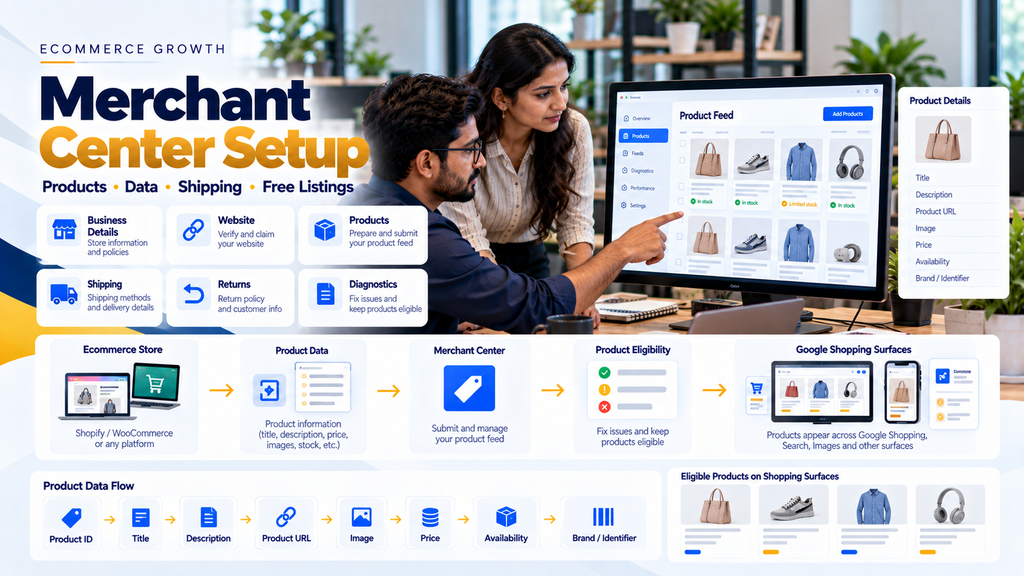
A typical setup can be understood as:
Ecommerce Website → Product Data → Google Merchant Center → Product Review / Eligibility → Google Shopping Experiences
However, creating an account and uploading products does not automatically guarantee that every product will appear on Google.
The website, product information, shipping details, return information and Merchant Center configuration need to remain accurate and consistent.
This guide explains Google Merchant Center setup for ecommerce businesses, including product data, website preparation, shipping, returns, product issues and ongoing maintenance.
What Is Google Merchant Center?
Google Merchant Center is a platform that ecommerce businesses can use to manage information about the products they want to make available through eligible Google shopping experiences.
The information submitted can include details such as:
- Product ID
- Product title
- Description
- Product URL
- Product image
- Price
- Availability
- Condition
- Brand
- Product identifiers where applicable
- Shipping information
The exact attributes required can depend on the product, target country and applicable Merchant Center requirements.
Why Should Ecommerce Businesses Consider Merchant Center?
Merchant Center can connect structured ecommerce product information with eligible Google shopping experiences.
Instead of Google understanding the store only from normal webpage content, businesses can provide structured product information directly through supported Merchant Center data sources.
Merchant Center Is Not the Same as Ecommerce SEO
Merchant Center and ecommerce SEO are related but different.
Ecommerce SEO focuses on improving website pages for organic search discovery.
Merchant Center focuses on supplying structured product information for eligible shopping experiences.
A broader ecommerce visibility strategy can therefore include both:
Ecommerce SEO + Merchant Center Product Data
Read Ecommerce Product Page SEO: How to Rank Products on Google.
Google Merchant Center Setup Process
A practical setup workflow can be:
Website Review → Merchant Center Account → Business Information → Website Verification → Product Data → Shipping → Returns → Product Review → Fix Issues → Monitor & Maintain
Step 1: Prepare the Ecommerce Website First
Merchant Center setup should not begin with an unfinished ecommerce website.
The website should provide customers with a functional and transparent shopping experience.
1. Use HTTPS
The ecommerce website should use secure HTTPS connections, particularly where customer or transaction information is handled.
2. Make Business Information Clear
Customers should be able to understand which business operates the ecommerce store.
Appropriate business and contact information should be available on the website.
3. Create a Contact Page
Provide genuine ways for customers to contact the business.
Depending on the business, this can include appropriate contact methods such as:
- Phone
- Contact form
- Business contact information
4. Publish Shipping Information
Customers should be able to understand applicable shipping conditions.
5. Publish Return and Refund Information
The website should clearly communicate the business’s actual return and refund terms.
Do not publish a generic policy copied from another ecommerce website if it does not reflect the real business process.
6. Keep Product Information Accurate
Product titles, images, prices and availability displayed on the website should accurately represent what customers can purchase.
7. Make Checkout Functional
If the store uses standard online ecommerce checkout, customers should be able to proceed through the intended purchase journey successfully.
8. Avoid Misleading Business Information
Business identity, products, pricing, availability, offers and purchasing conditions should be represented accurately.
Step 2: Create a Merchant Center Account
The business can create a Merchant Center account and complete the onboarding information requested for its setup.
9. Use the Correct Business Details
Enter information representing the actual business rather than temporary or misleading information.
10. Review the Target Market
Product availability, language, currency, shipping and other requirements should align with the markets the ecommerce business genuinely serves.
11. Maintain Account Access
Use appropriate business-controlled access rather than depending permanently on a developer’s or external agency’s personal account.
Merchant Center Ownership Best Practice
The ecommerce business should maintain appropriate ownership and administrative control of important digital assets.
This includes:
Domain + Ecommerce Platform + Analytics + Search Console + Merchant Center + Advertising Accounts
Agencies and developers can be provided with appropriate access when required.
Step 3: Add and Verify the Ecommerce Website
Merchant Center needs to associate the account with the ecommerce website being used for the products.
12. Use the Correct Website URL
Ensure the website entered in Merchant Center represents the actual ecommerce store.
13. Complete Website Verification
Follow the currently available verification method appropriate for the website setup.
14. Complete Website Claiming Where Required
Merchant Center setup includes associating the verified website with the merchant account as required by the current onboarding process.
15. Do Not Use an Unrelated Domain
Product destinations should lead customers to the legitimate ecommerce website represented by the merchant.
Step 4: Decide How Product Data Will Reach Merchant Center
Product information needs to be supplied through a supported data-source method.
The most suitable approach depends on the ecommerce platform, catalogue size and technical architecture.
16. Ecommerce Platform Integration
Some ecommerce platforms and supported applications can synchronize product information with Merchant Center.
17. Product Data File
Businesses can provide product information through supported file-based methods when appropriate.
18. Automated Product Sources
Depending on current Merchant Center capabilities and website configuration, Google may be able to discover or use product information from the website.
19. API-Based Integration
Larger or custom ecommerce systems may use supported APIs for more controlled product synchronization.
Choosing the Right Product Data Method
| Business Situation | Possible Approach |
|---|---|
| Small catalogue | Platform integration or manageable product data source |
| WooCommerce store | Compatible integration/plugin or custom data workflow |
| Shopify store | Supported platform integration |
| Large custom ecommerce store | Automated feed or API-based integration |
| Frequently changing inventory | Automated synchronization is generally preferable |
| Complex ERP-connected catalogue | Controlled integration based on the authoritative product-data source |
Step 5: Prepare Product Data
Product data is one of the most important parts of Merchant Center.
A simplified data flow can look like:
Product Database → Ecommerce Website → Merchant Center Data Source → Product Processing
20. Product ID
Each item should have a stable identifier according to the applicable product-data requirements.
21. Product Title
The title should accurately identify the product.
Avoid promotional keyword stuffing.
22. Product Description
Describe the actual product accurately and clearly.
23. Product Link
The submitted destination should lead to the relevant product landing page.
24. Product Image
Use an appropriate product image that accurately represents the item.
25. Price
The submitted product price should remain consistent with the applicable price customers see on the landing page.
26. Availability
Product availability should accurately reflect whether the product can be purchased according to the applicable Merchant Center values and requirements.
27. Condition
Provide the appropriate product condition where required.
28. Brand
Submit accurate brand information when applicable and required.
29. Product Identifiers
Products may require identifiers such as GTIN or other applicable identifiers depending on the product and Merchant Center requirements.
Do not invent identifiers when a legitimate identifier has not been assigned.
Step 6: Optimize Product Titles
Merchant Center product titles should accurately communicate what is being sold.
30. Put Important Product Information First
Make the actual product easy to identify.
31. Include Relevant Attributes
Depending on the product, useful information may include:
- Brand
- Product type
- Model
- Size
- Colour
- Material
- Capacity
32. Avoid Promotional Language
Do not turn the title into advertising copy filled with unnecessary promotional phrases.
33. Avoid Keyword Stuffing
Repeating the same keyword several times does not create better product data.
34. Match the Actual Product
The title should accurately correspond to the product shown on the destination page.
Step 7: Improve Product Descriptions
Descriptions should help systems and customers understand what the product is.
35. Describe the Actual Product
Focus on factual product information.
36. Include Relevant Features
Explain useful characteristics naturally.
37. Avoid Unrelated Keywords
Do not insert popular searches that do not describe the product.
38. Keep Product Data and Website Content Consistent
Major discrepancies between submitted information and landing-page information can create customer and Merchant Center issues.
Step 8: Prepare Product Images
Product imagery can strongly influence how useful ecommerce listings are to customers.
39. Use Clear Product Images
The main product should be easy to identify.
40. Use Sufficient Image Quality
Avoid unnecessarily blurry or low-quality images.
41. Keep Image URLs Accessible
The systems processing product data need to be able to access the submitted image.
42. Avoid Misleading Images
The image should accurately represent the listed product.
43. Keep Website Image SEO Strong Too
Merchant Center image requirements and normal ecommerce image SEO should be considered together.
Read Ecommerce Product Page SEO: How to Rank Products on Google.
Step 9: Keep Price Data Accurate
Price mismatches are a common type of ecommerce data problem.
A good architecture is:
Pricing Source → Ecommerce Website → Merchant Center
44. Define the Authoritative Price Source
Businesses using ERP, POS or ecommerce systems should know which system controls the final online selling price.
45. Synchronize Price Changes
When prices change frequently, automated synchronization can reduce stale product information.
46. Review Sale Pricing
Sale information should accurately represent the actual pricing available to customers and comply with applicable requirements.
47. Avoid Fake Discounts
Do not artificially inflate reference prices or create misleading promotional pricing.
Step 10: Keep Availability Accurate
A product marked available in Merchant Center should not consistently lead customers to a product they cannot purchase.
48. Connect Inventory Where Appropriate
Stores with frequently changing inventory should consider automated stock synchronization.
49. Handle Out-of-Stock Products
Update product availability appropriately instead of leaving stale in-stock information.
50. Handle Backorders Correctly
If the business genuinely supports backorders, represent availability according to the applicable Merchant Center requirements.
51. Avoid Overselling
Inventory synchronization should also support the ecommerce checkout process, not only Merchant Center.
Step 11: Configure Shipping
Shipping information is important because customers need to understand the costs and conditions associated with receiving an order.
52. Define Shipping Regions
Configure the areas the business genuinely serves.
53. Configure Shipping Costs
Shipping charges should reflect the actual ecommerce shipping model.
54. Configure Delivery Information Accurately
Do not promise delivery speeds that the business cannot consistently support.
55. Keep Website and Merchant Center Shipping Information Consistent
If customers see materially different shipping conditions during checkout, the configuration should be reviewed.
Shipping for Ecommerce Businesses in India
Businesses selling to customers in India should pay particular attention to shipping configuration.
Depending on the current Merchant Center setup and product-data method, shipping information can be configured through account-level settings or supported product-data attributes.
The ecommerce website, courier configuration and Merchant Center information should represent the actual shipping process.
Read Shipping and Courier API Integration for Ecommerce Websites.
Step 12: Configure Return Information
Returns can influence customer confidence and are an important part of ecommerce transparency.
56. Publish a Genuine Return Policy
The website should explain the business’s actual return process.
57. Explain Applicable Timeframes
If the business accepts returns within defined conditions or periods, communicate them accurately.
58. Explain Important Conditions
Customers should be able to understand relevant exclusions or product conditions before purchasing.
59. Keep Merchant Center Information Aligned
Merchant Center return settings should not contradict the actual policy customers receive from the ecommerce store.
Step 13: Review Website Trust and Transparency
Merchant Center setup is not only a product-feed exercise.
The destination website itself matters.
60. Business Identity
Clearly represent the business operating the store.
61. Contact Information
Provide genuine contact options.
62. Product Information
Describe products accurately.
63. Pricing
Do not hide or misrepresent material costs that customers need to understand before completing the purchase.
64. Shipping
Communicate shipping terms appropriately.
65. Returns and Refunds
Publish clear policies that reflect actual business practices.
66. Functional Checkout
The intended ecommerce purchase journey should work properly.
67. Secure Data Handling
Customer information should be handled through appropriate secure website practices.
Step 14: Enable Eligible Free Product Listings
Merchant Center can make eligible products available for free listing opportunities across supported Google surfaces.
Eligibility does not mean that every approved product will necessarily appear for every relevant search.
68. Complete Required Setup
Finish the applicable Merchant Center onboarding and product-data requirements.
69. Submit Accurate Product Information
Product data is used to understand and match products to relevant opportunities.
70. Follow Applicable Policies
Products and the destination website need to comply with relevant Merchant Center requirements.
71. Improve Product Data Quality
Complete, accurate and useful information can reduce preventable data issues.
Free Listings vs Shopping Ads
These should not be treated as the same thing.
| Free Listings | Shopping Ads |
|---|---|
| Eligible product visibility without paying for the listing placement | Paid advertising |
| Requires eligible product data and policy compliance | Requires applicable advertising setup in addition to Merchant Center |
| No guarantee of visibility | Ad delivery still depends on campaign configuration, eligibility and other advertising factors |
| Can complement ecommerce SEO | Can complement organic and free product visibility |
Step 15: Review Product Issues
Merchant Center can identify product or account issues that require attention.
72. Missing Attributes
Provide required information according to the relevant product-data specification.
73. Invalid Product Identifiers
Do not submit fabricated GTINs or incorrect brand information.
74. Price Mismatch
Compare the submitted price with the landing-page price and underlying ecommerce data.
75. Availability Mismatch
Check whether stock information is being synchronized correctly.
76. Image Problems
Review image accessibility, quality and compliance.
77. Landing-Page Problems
Ensure the submitted URL loads correctly and represents the advertised product.
78. Shipping Problems
Review whether shipping configuration matches the target country and business model.
79. Website Issues
Resolve broken checkout, incomplete business information or other destination problems rather than focusing only on feed attributes.
Step 16: Fix the Root Cause, Not Only the Merchant Center Error
A product-data issue may originate outside Merchant Center.
For example:
ERP Price → Ecommerce Database → Product Page → Merchant Center
If the wrong price originates in the ecommerce database, repeatedly editing Merchant Center manually may only hide the underlying problem temporarily.
80. Identify the Authoritative Data Source
Determine which system owns:
- Product title
- SKU
- Price
- Inventory
- Images
- Brand
- Product identifiers
81. Fix Synchronization Problems
Correct the integration when outdated data is repeatedly being transmitted.
82. Avoid Multiple Conflicting Sources
Do not allow several integrations to update the same product fields without a defined source-of-truth strategy.
Step 17: Use Structured Product Data on the Website
Product structured data can provide machine-readable information directly on ecommerce product pages.
83. Product Information
Markup should represent the actual product displayed on the page.
84. Price
Structured price information should remain consistent with visible customer pricing.
85. Availability
Availability markup should reflect the product’s real status.
86. Product Identifiers
Use legitimate identifiers where applicable.
87. Keep Structured Data Updated
Dynamic ecommerce information should not remain stale after the visible page changes.
Merchant Center and Product Structured Data
Product feeds and website structured data should not contradict each other.
A healthy architecture can be:
Product Database → Website Content + Structured Data + Merchant Center Data
with the ecommerce product database acting as an appropriate source of truth where the architecture supports it.
Step 18: Optimize the Ecommerce Product Pages
Merchant Center does not replace the need for good product pages.
88. Accurate Product Title
Clearly identify the item.
89. Useful Description
Give customers enough information to evaluate it.
90. Clear Product Images
Use imagery that accurately represents the product.
91. Accurate Price
Display the applicable selling price clearly.
92. Availability
Keep stock information current.
93. Shipping Information
Help customers understand fulfilment expectations.
94. Return Information
Make applicable policies easy to access.
95. Mobile Experience
Ensure customers arriving on smartphones can evaluate and purchase products comfortably.
Read Ecommerce Product Page SEO: How to Rank Products on Google.
Step 19: Optimize Ecommerce Categories Too
Merchant Center product setup should exist alongside a strong ecommerce website structure.
A useful website architecture remains:
Homepage → Category → Subcategory → Product
Read Ecommerce Category Page SEO: Complete Optimization Guide.
Step 20: Connect Merchant Center With the Wider Ecommerce Stack
For a growing ecommerce business, Merchant Center may become one component in a larger technology architecture.
For example:
ERP / Product Database → Ecommerce Store → Merchant Center
while:
Ecommerce Store → Payment Gateway
and:
Ecommerce Store → Shipping / Courier Integration
This architecture helps separate responsibilities.
Merchant Center + Inventory Integration
Stores with rapidly changing inventory should avoid depending entirely on occasional manual updates.
96. Define Inventory Source of Truth
Determine whether stock is controlled by the ecommerce platform, ERP, warehouse system or another authoritative system.
97. Synchronize Product Availability
Use an appropriate integration architecture when stock changes frequently.
98. Monitor Failed Updates
Synchronization errors should be visible to administrators rather than silently leaving stale data.
Merchant Center + Pricing Integration
Pricing can become complicated for stores using ERP, promotional pricing or multiple channels.
99. Define Pricing Ownership
One authoritative system should control the final online product price where possible.
100. Synchronize Price Changes
Automate updates when the catalogue changes frequently.
101. Validate Website Price
Check that customers see the intended price on the landing page.
102. Validate Merchant Center Price
Ensure the submitted data remains aligned with the ecommerce store.
Merchant Center Setup for WooCommerce
WooCommerce businesses can connect product information to Merchant Center using an appropriate supported integration or custom data workflow.
103. Clean the WooCommerce Catalogue First
Before synchronization, review:
- Product titles
- Descriptions
- SKUs
- Prices
- Stock
- Images
- Brands
- Identifiers
- Variations
104. Review Product Variations
Size, colour and other variants should be represented according to applicable product-data requirements.
105. Review Synchronization Frequency
Frequently changing catalogues may require more automated updates.
106. Avoid Plugin Conflicts
Do not allow several product-feed plugins to send conflicting versions of the same catalogue without understanding which integration controls the data.
Read WooCommerce Website Development for Businesses in Erode.
Merchant Center Setup for Shopify
Shopify stores can use supported integration methods to connect relevant product information with Merchant Center.
107. Review Product Data Before Connecting
Incorrect Shopify product information can become incorrect Merchant Center information after synchronization.
108. Review Variants
Ensure size, colour and other variant information is accurate.
109. Review Shipping
Shipping settings should reflect the business’s real fulfilment model.
110. Review Product Issues After Synchronization
Connecting the store is the beginning of maintenance, not the end.
Merchant Center for Custom Ecommerce Websites
Custom ecommerce systems can require a more deliberate integration architecture.
111. Product Database
Maintain structured product information.
112. Data Mapping
Map internal ecommerce fields to the applicable Merchant Center attributes.
113. Product Synchronization
Choose a supported data-source or API approach appropriate for the catalogue.
114. Error Logging
Record failed or rejected updates so administrators can investigate them.
115. Scheduled Updates
Keep price and stock information synchronized at a frequency suitable for the business.
116. Security
Protect API credentials and administrative access.
Merchant Center for Large Product Catalogues
Managing ten products manually is very different from managing tens of thousands of products.
117. Automate Repetitive Updates
Large catalogues generally need systematic product-data management.
118. Monitor Feed Health
Track errors and product issues instead of checking individual products manually.
119. Prioritize Important Errors
Resolve systemic issues affecting large portions of the catalogue before making small cosmetic adjustments.
120. Maintain Product Identifiers
Keep product identifiers stable and accurate.
121. Build Data Validation
Large ecommerce systems can validate required fields before products are sent to external channels.
Merchant Center for Multi-Vendor Marketplaces
Marketplace architecture can be more complicated because product information comes from multiple sellers.
122. Standardize Seller Product Data
Define required product fields during seller onboarding.
123. Validate Product Information
Do not automatically send incomplete seller listings to external product channels.
124. Control Categories and Brands
Standardized product taxonomy can reduce inconsistent data.
125. Validate Images
Seller-uploaded images should meet the marketplace’s applicable quality and policy requirements.
126. Define Marketplace Responsibility
Merchant Center configuration should reflect the actual marketplace business model and applicable policies.
Read Multi-Vendor Ecommerce Marketplace Development in Erode.
Merchant Center for B2B Ecommerce
Merchant Center may not suit every B2B product or sales model in the same way.
Businesses should first determine whether their products and purchase journey meet applicable Merchant Center requirements.
127. Review the Actual Purchase Model
Some B2B stores use:
- Public online pricing
- Login-based pricing
- Customer-specific pricing
- RFQ-based sales
- Minimum order quantities
- Offline quotations
128. Do Not Force Consumer Ecommerce Architecture Onto B2B
If the real sales process is quotation-based, evaluate whether and how Merchant Center fits the business before implementing it.
Merchant Center and Ecommerce Conversion Rate
Product visibility is only one part of ecommerce growth.
A broader journey is:
Product Discovery → Product Page → Trust → Cart → Checkout → Payment → Order
If the product page is unclear or checkout is difficult, additional visibility alone may not produce better business outcomes.
Read How to Increase Ecommerce Conversion Rate for Online Stores.
Merchant Center and Abandoned Cart Recovery
Merchant Center operates earlier in the customer journey.
Cart recovery operates after a customer has shown stronger purchase intent.
Together, the broader ecommerce funnel can be understood as:
Product Discovery → Website → Product → Cart → Checkout → Recovery if Appropriate → Purchase
Read Abandoned Cart Recovery Strategies for Ecommerce Businesses.
Merchant Center Setup Checklist
- Merchant Center account created
- Correct business information added
- Website verified and associated correctly
- HTTPS working
- Contact information visible
- Shipping information available
- Return/refund information available
- Checkout tested
- Product-data method selected
- Product IDs validated
- Titles reviewed
- Descriptions reviewed
- Product URLs validated
- Images checked
- Prices synchronized
- Availability synchronized
- Brands reviewed
- Product identifiers reviewed where applicable
- Variants mapped correctly
- Shipping configured
- Returns configured appropriately
- Free-listing eligibility/status reviewed
- Product issues reviewed
- Disapproved or limited products investigated
- Website/product-data mismatches fixed
- Ongoing monitoring process established
Common Google Merchant Center Mistakes
- Setting up Merchant Center before finishing the ecommerce website
- Using inaccurate business information
- Missing contact information
- Missing or unclear return information
- Incorrect shipping configuration
- Broken checkout
- Submitting incorrect product URLs
- Price mismatch between data and website
- Availability mismatch
- Poor product images
- Incorrect product identifiers
- Inventing GTIN values
- Keyword stuffing product titles
- Sending outdated inventory
- Using multiple conflicting feed integrations
- Ignoring product issues after initial setup
- Making misleading discount claims
- Assuming approved products are guaranteed to appear
- Assuming Merchant Center replaces ecommerce SEO
- Giving an agency permanent sole ownership of the account
Google Merchant Center Setup for Ecommerce Businesses in Erode
Ecommerce businesses in Erode can consider Merchant Center as part of a broader online product-discovery strategy.
It can be relevant to businesses operating ecommerce stores for retail products, textiles, garments, consumer goods, speciality products, D2C products and other eligible ecommerce categories.
Greap Technologies works with ecommerce businesses in Erode and nearby areas including Perundurai, Bhavani, Anthiyur, Chennimalai, Gobichettipalayam, Sathyamangalam, Modakkurichi, Kavindapadi, Kodumudi, Nambiyur and surrounding locations.
How Greap Technologies Can Help With Merchant Center Setup
Greap Technologies can approach Merchant Center as part of the complete ecommerce architecture rather than treating it as a one-time account creation task.
Depending on the ecommerce platform and business requirements, work can include:
- Ecommerce website readiness review
- Merchant Center setup assistance
- Website verification configuration
- Product-data setup
- WooCommerce product synchronization
- Shopify product synchronization
- Custom ecommerce data integration
- Product attribute mapping
- Variant-data review
- Price synchronization
- Inventory synchronization
- Shipping configuration review
- Return-information setup review
- Product issue investigation
- Product-page SEO
- Category-page SEO
- Product structured-data implementation
- Technical ecommerce SEO
- Website performance optimization
Explore Greap Technologies Ecommerce Development Services, SEO Services or visit Greap Technologies.
Recommended Ecommerce Product Visibility Architecture
Instead of depending on one channel, ecommerce businesses can build a broader structure:
Ecommerce Website
↓
Product & Category SEO
+
Structured Product Data
+
Merchant Center
+
Eligible Free Product Listings
+
Paid Shopping Campaigns Where Appropriate
↓
Relevant Product Discovery
↓
Product Page
↓
Cart → Checkout → Payment → Order
Conclusion
Google Merchant Center setup for ecommerce businesses is more than creating an account and uploading a spreadsheet of products.
A reliable setup connects:
Business Information → Website → Product Database → Product Data → Merchant Center → Product Eligibility → Monitoring
The quality of the underlying ecommerce website and product data matters.
Product titles, descriptions, images, prices, availability, shipping and other applicable information should remain accurate and consistent.
Businesses should also monitor Merchant Center after setup because product catalogues change continuously.
Prices change.
Stock changes.
Products are added.
Products are discontinued.
Shipping conditions change.
Integration errors can occur.
Merchant Center should therefore be treated as an ongoing ecommerce data channel rather than a one-time configuration.
It should also work alongside product-page SEO, category-page SEO, structured data, website performance and conversion optimization.
Merchant Center setup does not guarantee product visibility, traffic, sales or a particular position on Google. The goal is to provide accurate product information, maintain an eligible and trustworthy ecommerce destination and create a technically reliable product-data workflow.
Need Help Setting Up Google Merchant Center?
If you have a WooCommerce, Shopify or custom ecommerce website and need help preparing your product data, website, shipping configuration or Merchant Center integration, Greap Technologies can review the current ecommerce setup and recommend an appropriate implementation.
Discuss Your Merchant Center Setup
Frequently Asked Questions
1. What is Google Merchant Center?
Google Merchant Center is a platform ecommerce businesses can use to provide and manage product information for eligible Google shopping experiences.
2. Is Google Merchant Center free?
A Merchant Center account can be created without paying an account subscription fee, and eligible products may participate in supported free-listing opportunities. Paid advertising is a separate activity and can involve advertising costs.
3. Does Merchant Center automatically put my products on Google?
No. Products need to meet applicable data, website and policy requirements, and eligibility does not guarantee that a product will appear for a particular search or user.
4. What product information is needed for Merchant Center?
Product-data requirements vary by product, target market and feature, but commonly relevant information includes product identifiers, title, description, product URL, image, price, availability and other applicable attributes. Businesses should follow the current product-data specification for their particular catalogue.
5. Can WooCommerce connect to Google Merchant Center?
Yes. WooCommerce stores can use appropriate integrations or custom product-data workflows to provide product information to Merchant Center. The best approach depends on catalogue size, variations and existing systems.
6. Can Shopify connect to Google Merchant Center?
Yes. Shopify stores can use supported integration options to synchronize eligible product information. Businesses should still review the resulting product data and Merchant Center issues after connecting the store.
7. Why are Merchant Center products disapproved?
Products can have issues for various reasons, including missing or invalid attributes, incorrect identifiers, price or availability mismatches, image problems, destination problems, policy issues or other applicable requirements. The reported issue should be investigated rather than guessed.
8. Why does Merchant Center show a different price from my website?
This can happen when product data is outdated, synchronization is delayed, sale pricing is configured incorrectly or different systems are providing conflicting prices. Identify the authoritative pricing source and trace the data from that system to the website and Merchant Center.
9. Do I need shipping information in Merchant Center?
Shipping requirements depend on the target country and applicable Merchant Center program. For businesses targeting India, current Merchant Center guidance requires applicable shipping information to be provided through supported shipping settings or product data.
10. Do I need a return policy?
Ecommerce businesses should clearly communicate their actual return and refund conditions to customers. Merchant Center also provides return-policy configuration, and businesses should keep the information aligned with what the website genuinely offers.
11. Is Google Merchant Center good for ecommerce SEO?
Merchant Center and SEO are separate but complementary. Product and category SEO can improve the website’s organic search structure, while Merchant Center provides structured product information for eligible shopping experiences.
12. Can Google Merchant Center guarantee more ecommerce sales?
No. Merchant Center can support product discovery when products are eligible, but it cannot guarantee impressions, clicks, rankings or sales. Results also depend on the products, pricing, customer demand, website experience, competition and wider ecommerce strategy.