How to Improve Website Page Speed for Better SEO and Conversions
A customer searches for a product or service, opens a business website, and expects the information to appear quickly.
If the page takes too long to load, buttons respond slowly, or content shifts while the customer is reading, the experience becomes frustrating.
Some visitors may leave before exploring the business or submitting an enquiry.
This is why understanding how to improve website page speed matters for businesses that depend on online visibility and customer enquiries.
Website performance is not only a technical development concern. It is also connected to user experience, search engine optimization, and conversion opportunities.
For businesses in Erode and across Tamil Nadu, a fast, responsive website can help visitors access information, explore services, and complete important actions with fewer obstacles.
In this guide, we explain how website speed works, how to measure it, which problems commonly slow websites down, and how developers can improve performance across WordPress, Shopify, WooCommerce, and custom-built websites.
What Is Website Page Speed?
Website page speed describes how quickly a web page loads and becomes usable for visitors.
It is not represented by one universal number.
Different performance metrics measure different aspects of the user experience.
For example:
- How quickly the server begins responding
- How quickly important content appears
- How responsive the page is to user interactions
- Whether the layout moves unexpectedly
- How efficiently images, scripts, and styles load
A page may display some content quickly but still feel slow if important buttons do not respond promptly.
Why Website Speed Matters for Business Growth
1. Better User Experience
Visitors can explore a website more comfortably when important content loads promptly and the page responds smoothly.
2. Reduced Friction
Slow-loading forms, product pages, and enquiry buttons can interrupt the customer journey.
3. Mobile Accessibility
Visitors using mobile networks may experience different loading conditions from users on fast desktop connections.
4. Technical SEO
Google uses Core Web Vitals within its ranking systems, but good scores do not guarantee higher rankings.
5. Conversion Opportunities
Performance improvements can reduce obstacles in the journey from visitor to enquiry or purchase.
However, speed optimization alone cannot guarantee more leads or sales.
Website Speed, SEO, and Conversions: How They Connect
Consider a potential customer searching for website development services in Erode.
The customer opens a service page and wants to understand:
- What services are available?
- What types of websites can be developed?
- How does the development process work?
- How can the customer contact the company?
If the page is slow or difficult to use, the customer may not complete those steps.
A simplified customer journey is:
Google Search → Website Visit → Fast Content Access → Service Understanding → Contact Action → Enquiry
Website speed supports this journey, but the quality of the service information and call to action also matters.
What Are Core Web Vitals?
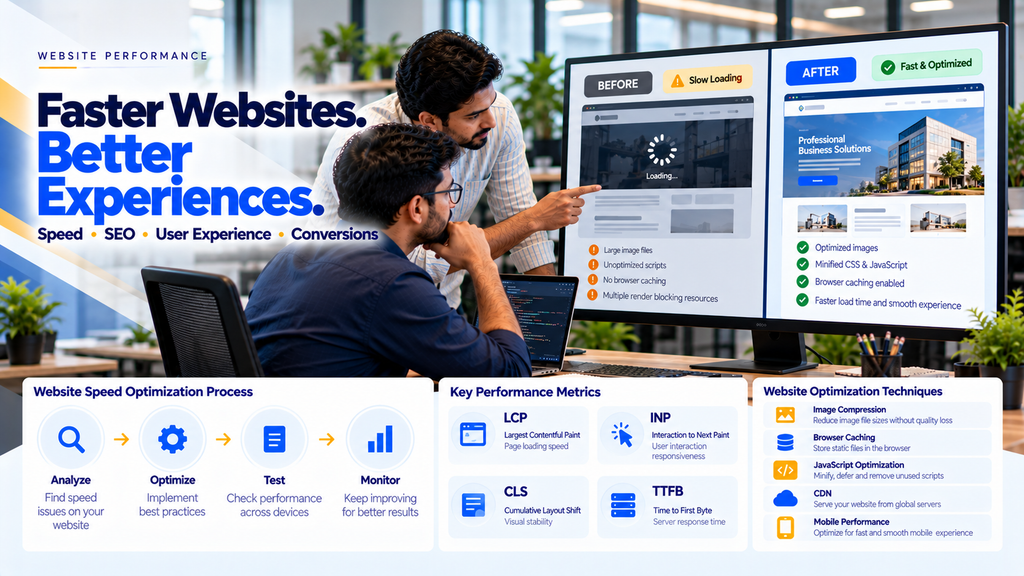
Core Web Vitals are user-experience metrics that Google uses to evaluate important aspects of loading performance, responsiveness, and visual stability.
The three current Core Web Vitals are:
- Largest Contentful Paint (LCP)
- Interaction to Next Paint (INP)
- Cumulative Layout Shift (CLS)
Core Web Vitals Benchmarks
| Metric | Good | Needs Improvement | Poor |
|---|---|---|---|
| LCP | 2.5 seconds or less | Over 2.5 to 4 seconds | Over 4 seconds |
| INP | 200 milliseconds or less | Over 200 to 500 milliseconds | Over 500 milliseconds |
| CLS | 0.1 or less | Over 0.1 to 0.25 | Over 0.25 |
These thresholds are generally evaluated at the 75th percentile of page visits using real-user data.
Read Core Web Vitals Optimization for Business Websites in Erode.
1. Improve Largest Contentful Paint (LCP)
LCP measures when the largest eligible visible content element finishes rendering in the viewport.
Common LCP elements include:
- Hero images
- Large headings
- Featured images
- Large content blocks
Slow LCP can make a website feel unresponsive during initial loading.
How to Improve LCP
- Optimize the primary hero image.
- Improve server response times.
- Reduce render-blocking resources.
- Use efficient image formats.
- Prioritize critical content.
- Avoid unnecessarily delaying the LCP resource.
2. Improve Interaction to Next Paint (INP)
INP evaluates responsiveness by observing user interactions and the time until the next visual update.
High INP values may indicate that a page feels slow when users click, tap, or type.
Common Causes of Poor INP
- Long JavaScript tasks
- Excessive third-party scripts
- Heavy event handlers
- Complex frontend rendering
- Expensive layout calculations
How to Improve INP
- Reduce unnecessary JavaScript.
- Break up long-running tasks.
- Optimize event handlers.
- Reduce excessive DOM complexity.
- Review third-party scripts.
- Test important user interactions on real devices.
3. Improve Cumulative Layout Shift (CLS)
CLS measures unexpected layout movement while users interact with a page.
For example, a customer may try to tap a contact button just as an image loads and moves the button to another position.
Common CLS Problems
- Images without reserved dimensions
- Advertisements inserted above existing content
- Dynamic banners
- Font-loading changes
- Embedded content without reserved space
How to Reduce CLS
- Specify image dimensions or aspect ratios.
- Reserve space for embeds.
- Avoid inserting content above existing elements.
- Use stable font-loading strategies.
- Test dynamic content carefully.
4. Measure Website Speed Before Making Changes
Website speed optimization should begin with measurement.
Useful tools include:
- Google PageSpeed Insights
- Lighthouse
- Google Search Console
- Chrome DevTools Performance panel
- Real-user monitoring tools
Use measurements to identify the actual bottlenecks instead of installing multiple optimization plugins without investigation.
5. Understand Field Data vs Lab Data
Performance tools may show different types of measurements.
| Data Type | Meaning |
|---|---|
| Field Data | Performance information collected from real users under actual browsing conditions |
| Lab Data | Performance measurements collected in a controlled test environment |
Field data is especially useful for understanding real-world Core Web Vitals performance.
Lab data helps developers reproduce and diagnose particular issues.
Differences between field and lab results are normal because devices, networks, page states, and test conditions vary.
6. Optimize Website Images
Images are a common source of unnecessary page weight.
Large banners, product photographs, portfolio images, and background images can increase loading times when they are not optimized.
Image Optimization Checklist
- Use appropriately sized images.
- Compress images without unacceptable visual degradation.
- Consider WebP or AVIF where supported.
- Use responsive image sources.
- Lazy-load suitable offscreen images.
- Prioritize important above-the-fold images.
- Specify image dimensions.
Responsive Image Example
<img
  src="/images/service-800.webp"
  srcset="
    /images/service-480.webp 480w,
    /images/service-800.webp 800w,
    /images/service-1200.webp 1200w"
  sizes="(max-width: 767px) 100vw, 800px"
  width="800"
  height="500"
  alt="Business website design example"
  loading="lazy"
  decoding="async"
>
This is an example for a below-the-fold image.
Do not automatically apply lazy loading to a hero image that is likely to become the LCP element.
7. Use Modern Image Formats
Modern image formats such as WebP and AVIF can provide efficient compression for many website images.
However, the best format depends on image content, browser support, quality requirements, and implementation.
Use actual file-size and visual-quality comparisons instead of assuming one format is always best.
8. Avoid Lazy Loading Critical Hero Images
Lazy loading can help reduce unnecessary early resource requests.
But applying it to an important hero image may delay its loading.
For an important image, developers may use appropriate loading priority.
<img
  src="/images/hero.webp"
  width="1200"
  height="675"
  alt="Professional business website"
  fetchpriority="high"
>
Use high priority selectively. Giving too many resources high priority can reduce its effectiveness.
9. Reduce Unnecessary JavaScript
JavaScript enables useful website functionality, but excessive scripts can slow rendering and interactions.
Common sources include:
- Unused plugins
- Multiple analytics scripts
- Heavy animations
- Third-party widgets
- Unnecessary tracking tags
- Large frontend libraries
Review which scripts are necessary for business functionality and remove those that provide insufficient value.
10. Use Defer and Async Appropriately
Script-loading attributes can influence how JavaScript affects HTML parsing.
Example:
<script src="/js/site.js" defer></script>The defer attribute allows an external classic script to download without blocking HTML parsing and executes it after parsing, while preserving ordering among deferred classic scripts.
The async attribute is useful for some independent scripts, but execution order is not guaranteed.
Choose the appropriate strategy based on script dependencies and functionality.
11. Reduce Render-Blocking Resources
Render-blocking resources can delay the browser’s initial display of page content.
Possible improvements include:
- Reducing unnecessary CSS
- Removing unused code
- Loading noncritical resources appropriately
- Prioritizing critical rendering resources
- Reducing dependency chains
Do not remove essential styles simply to improve a laboratory performance score.
12. Optimize CSS
Large stylesheets and unnecessary CSS rules can add overhead.
Developers can review:
- Unused styles
- Duplicate declarations
- Large CSS frameworks
- Excessive third-party styling
- Unnecessary animation rules
Minification can reduce transfer size, but it does not replace deeper CSS optimization.
13. Improve Server Response Time
Server response performance affects how quickly browsers can begin receiving page content.
Time to First Byte (TTFB) is a useful diagnostic metric.
Possible server-side improvements include:
- Reviewing hosting capacity
- Optimizing database queries
- Using appropriate server caching
- Reducing backend processing
- Improving application performance
- Monitoring server errors
TTFB is not one of the three Core Web Vitals, but it can influence loading performance.
14. Enable Browser Caching
Browser caching allows reusable resources to be stored locally for an appropriate period.
This can reduce repeated downloads when visitors navigate between pages or return to the website.
Common cacheable resources include:
- Images
- Stylesheets
- JavaScript files
- Fonts
Cache policies should account for resource updates and content freshness.
15. Use a Content Delivery Network (CDN)
A CDN can deliver suitable website resources from geographically distributed infrastructure.
Potential benefits include:
- Reduced network distance
- Efficient static asset delivery
- Reduced origin-server load
- Improved resource availability
A CDN does not automatically fix inefficient JavaScript, oversized images, or slow backend logic.
16. Optimize Website Fonts
Web fonts can affect both loading performance and layout stability.
Useful improvements include:
- Using fewer font weights where practical
- Reducing unnecessary font files
- Using suitable modern font formats
- Applying appropriate font-display behavior
- Preloading genuinely critical font resources when justified
For existing business websites, performance improvements should preserve the intended brand typography unless a design change is approved.
17. Reduce Third-Party Script Overhead
Third-party tools can provide useful features but may increase page weight and main-thread work.
Examples include:
- Live chat widgets
- Analytics platforms
- Advertising scripts
- Social media embeds
- Appointment widgets
- Marketing automation tools
Review whether each tool is necessary and whether it can be loaded more efficiently.
18. Optimize Mobile Website Speed
Mobile visitors may use devices with less processing power and less reliable connections.
Important mobile optimization areas include:
- Responsive image delivery
- Efficient JavaScript
- Stable mobile layouts
- Readable content
- Accessible navigation
- Responsive forms
- Appropriate tap targets
- Lightweight page components
Test important pages on representative mobile devices instead of relying only on desktop results.
19. Improve WordPress Website Speed
WordPress performance depends on the theme, plugins, hosting, media assets, and website configuration.
Common optimization opportunities include:
- Removing unused plugins
- Optimizing images
- Reviewing theme performance
- Configuring suitable caching
- Reducing unnecessary scripts
- Optimizing database queries
- Reviewing third-party integrations
Changes should be tested carefully to avoid breaking forms, checkout processes, or other functionality.
20. Improve Shopify Website Speed
Shopify performance can be affected by theme code, apps, media assets, and third-party scripts.
Useful areas to review include:
- Theme performance
- Unused app code
- Product image sizes
- Homepage sections
- Heavy animations
- Tracking scripts
- Product page functionality
Performance improvements should preserve essential ecommerce functionality.
21. Improve WooCommerce Website Speed
WooCommerce websites combine WordPress functionality with ecommerce operations.
Important areas include:
- Product image optimization
- Database performance
- Product variation handling
- Plugin overhead
- Appropriate page caching
- Checkout performance
- Cart and account functionality
Cart, checkout, and other personalized pages require careful caching rules to prevent incorrect or exposed customer information.
22. Improve Custom Website Performance
Custom-built websites can benefit from performance improvements at both frontend and backend levels.
Depending on the technology stack, opportunities may include:
- Efficient server-side rendering
- Code splitting
- Optimized asset loading
- API performance improvements
- Database query optimization
- Appropriate caching
- Reducing unnecessary hydration work
- Monitoring production performance
23. Website Speed for Ecommerce Conversions
Ecommerce customers often navigate through multiple pages before completing a purchase.
A typical journey may be:
Product Discovery → Product Page → Cart → Checkout → Payment
Performance issues at any stage can create friction.
Important areas to test include:
- Product listing pages
- Product detail pages
- Search and filtering
- Cart interactions
- Checkout forms
- Payment transitions
Read How to Increase Ecommerce Conversion Rate for Online Stores.
24. Website Speed for Lead Generation
Service businesses often depend on enquiries rather than direct online purchases.
Important conversion actions may include:
- Submitting a contact form
- Calling the business
- Opening WhatsApp
- Requesting a quotation
- Booking an appointment
These interactions should remain accessible and responsive.
Website speed optimization should be evaluated alongside form usability, service clarity, and call-to-action placement.
25. Does a Perfect PageSpeed Score Guarantee Better SEO?
No.
A high laboratory performance score can indicate that a page performs well under specific test conditions.
However, it does not guarantee:
- Higher Google rankings
- More organic traffic
- More enquiries
- More sales
- Good performance for every real user
Focus on meaningful user experience improvements rather than optimizing only for a perfect score.
26. Common Website Speed Optimization Mistakes
- Compressing images without checking visual quality
- Lazy-loading critical hero images
- Removing essential functionality
- Installing too many optimization plugins
- Applying aggressive caching to personalized pages
- Ignoring mobile performance
- Optimizing only the homepage
- Ignoring third-party scripts
- Changing several systems without testing
- Assuming CDN installation fixes every speed problem
- Ignoring real-user performance data
- Prioritizing laboratory scores over customer experience
27. Website Page Speed Optimization Workflow
Performance Audit
↓
Identify Slow Pages
↓
Review Core Web Vitals
↓
Find Technical Bottlenecks
↓
Prioritize Fixes
↓
Implement Improvements
↓
Test Mobile and Desktop
↓
Monitor Real-User Performance
28. Website Speed Optimization Checklist
- Measure baseline performance.
- Review mobile and desktop results.
- Check LCP, INP, and CLS.
- Investigate server response times.
- Optimize oversized images.
- Use responsive images.
- Prioritize the LCP resource.
- Review unnecessary JavaScript.
- Reduce long-running tasks.
- Remove unused CSS where practical.
- Review render-blocking resources.
- Configure appropriate caching.
- Review CDN opportunities.
- Optimize critical font loading.
- Reserve layout space for images and embeds.
- Review third-party scripts.
- Test forms and conversion actions.
- Test ecommerce checkout where applicable.
- Compare results against the baseline.
- Monitor performance after deployment.
29. Website Speed Optimization for Erode Businesses
Businesses serving customers across Erode district can benefit from reliable website performance.
This includes businesses operating in:
- Erode
- Perundurai
- Bhavani
- Anthiyur
- Gobichettipalayam
- Sathyamangalam
- Chennimalai
- Modakkurichi
- Kodumudi
- Nambiyur
- Kavindapadi
- Ammapettai
- Arachalur
- Sivagiri
- Punjai Puliampatti
Whether a business operates a corporate website, ecommerce store, product catalogue, or service website, important pages should be tested for practical usability across devices.
30. How Greap Technologies Can Help
Greap Technologies can support website performance optimization as part of an agreed website development, maintenance, or technical SEO project.
Depending on the website and scope, this may include:
- Website speed audit
- Core Web Vitals analysis
- PageSpeed Insights review
- Image optimization
- JavaScript performance improvements
- CSS optimization
- Mobile performance review
- Caching configuration
- Server performance investigation
- WordPress speed optimization
- Shopify performance review
- WooCommerce optimization
- Custom website performance improvements
- Conversion journey testing
- Post-deployment monitoring
Explore Greap Technologies SEO Services and Website Development Services.
31. How Much Does Website Speed Optimization Cost?
The cost depends on the existing website and the technical work required.
Factors include:
- Website platform
- Number of templates
- Hosting environment
- Existing performance problems
- Image and media volume
- Plugin and script complexity
- Backend development requirements
- Testing and monitoring scope
A small business website may need fewer changes than a large ecommerce platform or custom web application.
Conclusion
Learning how to improve website page speed is an important part of maintaining a professional business website.
Speed optimization involves more than reducing file sizes.
It requires understanding how the browser loads content, how quickly the website responds to user interactions, and whether the page remains visually stable.
A practical improvement process is:
Measure → Diagnose → Optimize → Test → Monitor
For businesses in Erode and across Tamil Nadu, a faster and more responsive website can support a better customer experience and reduce friction in the enquiry or purchase journey.
However, no website speed improvement can guarantee a specific Google ranking or conversion increase.
Is Your Business Website Loading Slowly?
Greap Technologies can help review your website’s performance, identify technical bottlenecks, and recommend appropriate optimization work.
Frequently Asked Questions
1. What is website page speed?
Website page speed describes how quickly a page loads, displays important content, and becomes responsive to users.
2. Does website speed affect Google SEO?
Google uses Core Web Vitals within its ranking systems, but good performance scores do not guarantee higher rankings.
3. What are the three Core Web Vitals?
The three Core Web Vitals are Largest Contentful Paint (LCP), Interaction to Next Paint (INP), and Cumulative Layout Shift (CLS).
4. What is a good LCP score?
An LCP of 2.5 seconds or less is considered good at the 75th percentile of page visits.
5. How can I make my website load faster?
Start by measuring performance. Common improvements include image optimization, reducing unnecessary JavaScript, caching, server optimization, and prioritizing critical resources.
6. Can image compression improve website speed?
Yes. Appropriately compressed and sized images can reduce transferred data and improve loading performance.
7. Does a CDN make every website faster?
No. A CDN can improve resource delivery in suitable situations, but it does not automatically fix inefficient code or slow application logic.
8. Can WordPress websites be optimized for speed?
Yes. WordPress performance can often be improved by reviewing themes, plugins, images, caching, hosting, and scripts.
9. How do I improve Shopify store speed?
Review theme performance, installed apps, image sizes, scripts, and important ecommerce interactions.
10. Does website speed improve conversions?
Better performance can reduce friction and support a smoother customer journey, but a conversion increase is not guaranteed.
11. Is a perfect PageSpeed Insights score necessary?
No. Real-user performance and website usability are more important than achieving a perfect laboratory score.
12. Does Greap Technologies provide website speed optimization in Erode?
Greap Technologies can assist with website performance audits, Core Web Vitals reviews, technical optimization, and suitable improvements according to project requirements.