
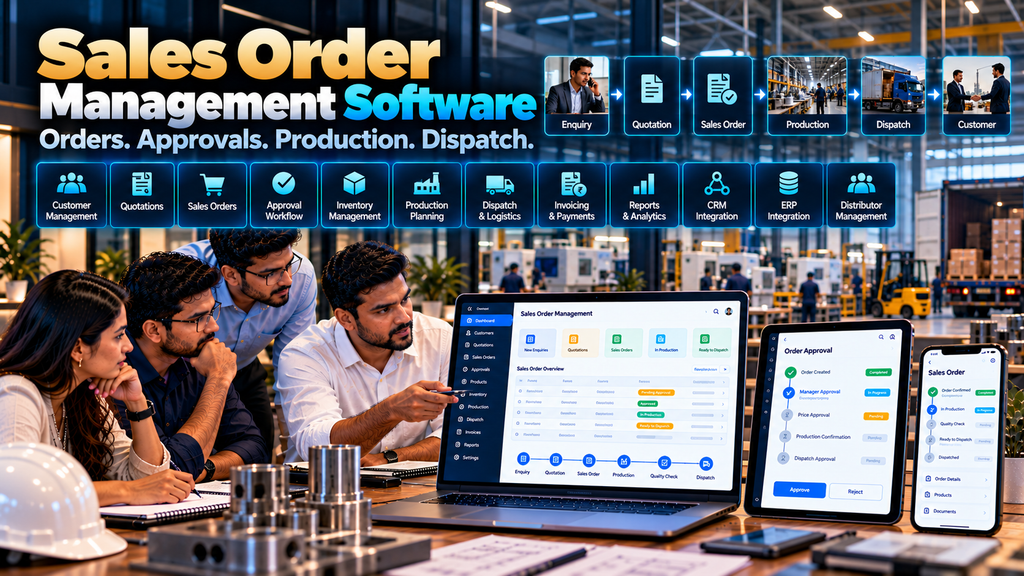
For a manufacturing company, receiving a customer order is only the beginning of the fulfilment process.
The order may need pricing validation, commercial approval, inventory checking, production planning, material coordination, warehouse processing, dispatch and invoicing before it is completed.
When these activities are managed through spreadsheets, phone calls, emails, messaging applications and separate software systems, sales and operations teams can find it difficult to maintain one clear view of each order.
Custom sales order management software in Erode can help manufacturing businesses create a structured digital workflow for capturing, reviewing, approving, processing and tracking customer sales orders.
The software can also connect with CRM, distributor management, inventory, production, warehouse, ERP, accounting or logistics systems where suitable integration methods are available.
However, sales order software should be designed around the manufacturer’s actual order process. A company producing standard stocked products may require a very different workflow from a make-to-order manufacturer.
This guide explains the important features, workflows, integrations, security considerations, cost factors and development decisions manufacturers should understand before developing a sales order management system.
At Greap Technologies, we develop custom business software, manufacturing systems, B2B portals and web applications for businesses in Erode and nearby areas.
What Is Sales Order Management Software?
Sales order management software is a digital system used to manage the business workflow that begins when a customer order is created and continues through the relevant internal processing stages.
Depending on the manufacturer, the system may support:
- Customer management
- Product selection
- Quotation references
- Sales order creation
- Pricing validation
- Quantity validation
- Commercial approvals
- Inventory checks
- Production coordination
- Order-status tracking
- Warehouse processing
- Dispatch coordination
- Order documents
- Notifications
- Reports
- CRM and ERP integrations
The exact modules should depend on the manufacturer’s existing workflow.
Why Sales Order Management Matters in Manufacturing
In a simple retail transaction, a product may already be available and ready to ship.
Manufacturing orders can involve additional dependencies.
A sales order may need to answer questions such as:
- Is the customer approved?
- Which price applies?
- Is the requested quantity valid?
- Is finished stock available?
- Does the product need manufacturing?
- Are materials available?
- Is approval required?
- Which warehouse will fulfil the order?
- When can the order be dispatched?
Sales order management software can provide a structured place to manage these decisions and their resulting workflow.
Sales Order Management vs General CRM
| CRM | Sales Order Management |
|---|---|
| Focuses mainly on customer relationships and opportunities | Focuses on confirmed or proposed order processing |
| Manages leads and follow-ups | Manages products, quantities, pricing and fulfilment workflow |
| Can track quotations and opportunities | Can connect approved quotations with orders |
| Primarily sales-oriented | Connects sales with operations, inventory, production and dispatch |
The two systems can work together rather than replacing each other.
Read WhatsApp CRM and Lead Follow-Up Software for Businesses in Erode.
Sales Order Management vs Distributor Management Software
Distributor management software manages the broader relationship and workflows associated with a distribution network.
Sales order management focuses more specifically on processing customer, dealer or distributor orders.
For a manufacturer, both may be connected:
Distributor → DMS / Portal → Sales Order → Production / Inventory → Warehouse → Dispatch
Read Distributor Management Software Development in Erode.
1. Map the Existing Order Process First
Before developing software, document how an order currently moves through the company.
A typical workflow could be:
Customer Requirement → Quotation → Purchase Order → Sales Order → Approval → Inventory / Production → Dispatch
Another manufacturer might use:
Dealer Order → Sales Review → Credit Review → Sales Order → Production Planning → Warehouse → Dispatch
There is no universal manufacturing order workflow.
2. Identify Every Source of Sales Orders
Orders may originate from:
- Direct customers
- Dealers
- Distributors
- Sales representatives
- B2B ecommerce
- Dealer portals
- Customer portals
- Approved imports or integrations
The system should define how each source creates or contributes to a sales order.
3. Customer Master
Sales orders require reliable customer information.
A customer master may contain approved fields such as:
- Customer code
- Business name
- Contact information
- Billing information
- Shipping locations
- Pricing group
- Sales territory
- Assigned sales representative
- Account status
4. Define the Customer Data Source
If customer records already exist in an ERP or CRM, determine which system should remain authoritative.
Duplicating customer information manually across several systems can create inconsistent records.
5. Product Master
A sales order requires accurate product information.
Depending on the business, product data can include:
- SKU or product code
- Product name
- Category
- Unit of measure
- Variant
- Product status
- Relevant order rules
6. Product Search
Sales teams should be able to locate products efficiently using relevant identifiers such as:
- Product name
- SKU
- Model number
- Category
- Customer-specific product reference where applicable
7. Product Availability
The order interface can display appropriate product-availability information when reliable inventory data is available.
The system should clearly distinguish between real-time information and periodically synchronized information.
8. Sales Order Creation
An authorized user can create a sales order by selecting:
- Customer
- Delivery location
- Products
- Quantities
- Approved prices
- Requested dates
- Relevant references
The exact fields should match the manufacturer’s process.
9. Sales Order Numbering
Each order should have a unique reference that can be used across relevant internal workflows.
Numbering rules can be designed according to the company’s existing conventions and systems.
10. Customer Purchase Order Reference
B2B customers may issue their own purchase-order number.
The sales order can retain this reference to help connect the customer’s document with the manufacturer’s internal order.
11. Quotation to Sales Order
When an order originates from an approved quotation, relevant quotation information can potentially be carried into the sales order.
A workflow might be:
Enquiry → Quotation → Customer Approval → Sales Order
Read Quotation and Invoice Management Software Development in Erode.
12. Avoid Re-Entering the Same Information
If customer, product, quantity and approved pricing data already exist in a quotation, manually typing everything again can introduce errors.
Where appropriate, software can reuse approved information while still validating current business rules.
13. Sales Order Pricing
Manufacturing businesses may use several pricing models.
Depending on requirements, pricing may be based on:
- Standard price lists
- Customer groups
- Distributor groups
- Quantity tiers
- Product-specific pricing
- Contract pricing
- Approved quotation pricing
14. Customer-Specific Pricing
Some customers may have approved commercial arrangements.
Where required, the software can retrieve the appropriate pricing rule for the selected customer and product.
These rules should come from the business’s approved commercial process.
15. Pricing Validation
Instead of allowing arbitrary price entry, the system can validate a proposed price against defined business rules.
Exceptions can then follow an approval process where required.
16. Discount Approval
If sales teams can request pricing exceptions or discounts, the software can route those requests to authorized roles.
A possible flow is:
Requested Price → Validation → Exception Detected → Approval → Accepted / Rejected
17. Quantity Validation
Products may have order rules such as:
- Minimum order quantity
- Pack quantity
- Batch quantity
- Other approved quantity restrictions
Where applicable, the software can validate these rules before the order proceeds.
18. Unit of Measure
Manufacturers may sell products in units such as pieces, boxes, kilograms, metres, rolls or other defined measures.
The order system should use the company’s approved units and conversion rules where conversions are required.
19. Sales Order Approval
Not every order requires approval.
Where approval is required, conditions might include:
- Pricing exception
- Large order quantity
- Special commercial terms
- Other predefined business conditions
The workflow should avoid adding unnecessary approval steps.
20. Multi-Level Approval
Some manufacturers may require several approvals for particular orders.
For example:
Sales → Sales Manager → Commercial / Finance → Approved Order
This should only be implemented when it reflects the real process.
21. Order Hold
Authorized users may need to place an order on hold for a defined business reason.
The system can record the status and relevant reason according to company policy.
22. Order Rejection
If an order cannot proceed, an authorized user can reject or cancel it according to the defined workflow.
Important changes can be included in an audit trail where required.
23. Order Status Management
A manufacturing sales order can move through several stages.
Example statuses might include:
- Draft
- Submitted
- Pending approval
- Approved
- Processing
- In production
- Ready for dispatch
- Partially dispatched
- Dispatched
- Completed
- Cancelled
Status names should reflect actual operations.
24. Avoid Too Many Statuses
A status should represent a meaningful stage that users need to understand or act upon.
Creating dozens of similar statuses can make the order workflow harder to use.
25. Inventory Check
After an order is validated, the business may need to determine whether finished goods are available.
A simplified decision can be:
Sales Order → Stock Available?
Yes → Warehouse / Dispatch
No → Production / Procurement Process
26. Inventory Integration
If inventory is maintained in an ERP or warehouse system, the sales order system can potentially retrieve approved availability information.
Integration feasibility depends on the source system’s technical capabilities.
27. Multi-Warehouse Inventory
Manufacturers with several warehouses may need to identify where finished goods are available.
Order allocation rules should reflect the company’s fulfilment process.
28. Reserved Inventory
When the business reserves inventory for approved sales orders, the system may need to distinguish between:
- Physical stock
- Reserved stock
- Available stock
The precise calculation should follow the authoritative inventory system.
29. Production Requirement
If sufficient finished stock is unavailable, an approved sales order may create or contribute to a production requirement.
A possible workflow is:
Sales Order → Shortage → Production Requirement → Production Planning
30. Production Management Integration
Sales order information can potentially connect with production-management software.
This can allow production teams to see approved demand without manually re-entering the complete customer order.
Read Production Management Software for Manufacturing Companies in Erode.
31. Make-to-Stock Manufacturing
Make-to-stock businesses produce products for inventory before receiving specific customer orders.
Sales order processing may therefore focus heavily on:
Order → Finished Goods Availability → Allocation → Dispatch
32. Make-to-Order Manufacturing
Make-to-order businesses may begin production after receiving an approved customer order.
The workflow may look more like:
Sales Order → Production Requirement → Manufacturing → Finished Goods → Dispatch
33. Configure-to-Order Workflows
Some products require approved options or configurations.
Where the rules are clearly defined, the sales order system can capture those selections before the order moves to production.
34. Custom Manufacturing Orders
Custom manufacturing may require additional information such as specifications, drawings or approved documents.
The system can associate these materials with the relevant order while applying appropriate access controls.
35. Order Attachments
Relevant documents may include:
- Customer purchase order
- Approved quotation
- Specifications
- Drawings
- Other order-related documents
Only necessary documents should be stored, with access appropriate to their sensitivity.
36. Order Revision
Customers may request changes after an order is created.
The software should define:
- When changes are allowed
- Who can make them
- Whether approval is required
- How previous information is retained where necessary
37. Avoid Silently Overwriting Important Order Data
For important changes, maintaining appropriate revision or audit information can make it easier to understand what changed and when.
38. Partial Fulfilment
Some manufacturers may fulfil an order in multiple parts.
The system can potentially track:
- Ordered quantity
- Allocated quantity
- Produced quantity
- Dispatched quantity
- Remaining quantity
The exact quantities required depend on the workflow.
39. Partial Dispatch
If a customer accepts multiple shipments, one sales order may have several dispatch records.
The order should continue to show the remaining quantity appropriately.
40. Warehouse Workflow
Once goods are ready, the order may move to warehouse fulfilment.
A possible flow is:
Approved Sales Order → Stock Allocation → Pick → Pack → Dispatch
Read Warehouse Management Software Development in Erode.
41. Warehouse Integration
If a warehouse management system already exists, approved sales orders can potentially be sent to that system rather than recreating warehouse functionality inside the order module.
42. Dispatch Management
Relevant dispatch information can be connected to the sales order.
Depending on requirements, this can include:
- Dispatch reference
- Dispatch date
- Quantity dispatched
- Shipment status
- Transport reference
43. Logistics Integration
Businesses with dedicated transport workflows may integrate sales-order and dispatch information with logistics-management software.
Read Transport and Logistics Management Software Development in Erode.
44. Invoice Integration
Once the relevant fulfilment conditions are met, sales-order information can potentially connect with invoicing or ERP workflows.
The exact invoice and tax rules should be defined by the business and its appropriate accounting or tax professionals.
45. Avoid Rebuilding Accounting Without a Business Need
If invoicing, taxation and accounting are already managed in an established system, the sales order application may only need to exchange relevant information with that system.
46. Payment Information
Where relevant, authorized users may need access to selected payment or account information from an appropriate financial system.
Financial data should be protected using suitable access controls.
47. Credit Rules
Some B2B manufacturers operate with customer credit arrangements.
If credit status affects order processing, the rules should come from the company’s approved finance process rather than an arbitrary software-generated assessment.
48. Dealer and Distributor Orders
Manufacturers working through channel partners may receive orders from authorized dealers or distributors.
These orders can enter the same sales-order workflow after the relevant account, pricing and commercial rules are validated.
49. Dealer Portal Integration
A dealer portal can provide the external ordering interface while sales order software manages internal processing.
The connected flow can be:
Dealer Login → Product Catalogue → Order → Sales Order System → Approval → Inventory / Production → Dispatch
Read Dealer Portal Development for Manufacturers and Distributors in Erode.
50. Distributor Management Integration
For manufacturers with a distributor network, distributor accounts, territories and pricing can potentially connect with the sales-order process.
Read Distributor Management Software Development in Erode.
51. B2B Ecommerce Integration
Manufacturers offering digital B2B ordering may allow approved online orders to enter the internal sales-order workflow.
Relevant functionality may include:
- Business accounts
- Product catalogues
- Account-specific pricing
- MOQ rules
- Bulk ordering
- Purchase-order references
- Order history
Read B2B Ecommerce Website Development for Wholesalers and Manufacturers in Erode.
52. Field Sales Integration
Field sales representatives may need to capture customer requirements or orders while working with customers.
Where appropriate, an approved mobile workflow can connect these records with the sales order system.
Read Field Sales Management Software for Businesses in Erode.
53. CRM Integration
A CRM can manage the customer relationship before an order is confirmed.
A connected flow could be:
Lead → Opportunity → Quotation → Customer Approval → Sales Order
This can reduce repeated data entry when supported integrations are available.
54. ERP Integration
An ERP may already contain customer, product, pricing, inventory, production or financial information.
Potential sales-order integration areas include:
- Customer master
- Product master
- Pricing
- Inventory
- Orders
- Production
- Dispatch
- Invoices
Integration feasibility depends on available APIs or other supported integration methods, permissions, documentation and system architecture.
55. Define a Source of Truth
For every important data type, identify which system is authoritative.
| Data | Possible Source |
|---|---|
| Customers | ERP / CRM |
| Products | ERP / Product Master |
| Pricing | ERP / Approved Pricing System |
| Sales Opportunities | CRM |
| Inventory | ERP / Warehouse System |
| Production | ERP / Production System |
| Financial Information | ERP / Accounting System |
The actual source depends on the manufacturer’s software environment.
56. API Integration
When systems provide supported APIs, software can exchange relevant information between applications.
Integration planning should review:
- Available endpoints
- Authentication
- Permissions
- Data structure
- Rate limits
- Error handling
- Synchronization requirements
57. Integration Failure Handling
An integration should not assume that every external service will always be available.
The system should appropriately handle failed requests, validation errors and temporary service interruptions according to the importance of the workflow.
58. Notifications
Users can receive notifications for relevant events such as:
- Order submitted
- Approval required
- Order approved
- Order placed on hold
- Production status change
- Order ready for dispatch
- Dispatch completed
Notifications should be useful and actionable rather than excessive.
59. Email Notifications
Email can be used for appropriate transactional communication related to orders and approvals.
Templates should clearly identify the relevant order and required action without exposing unnecessary information.
60. Business Messaging Integration
Where business messaging is required, integrations should use official supported business messaging technologies and follow applicable platform requirements.
61. Sales Order Dashboard
A dashboard can summarize current operational information.
Useful sections might include:
- Orders awaiting approval
- Approved orders
- Orders in production
- Orders ready for dispatch
- Orders on hold
The dashboard should prioritize actionable information instead of decorative metrics.
62. Sales Order Reports
Reports can organize order information by relevant dimensions such as:
- Period
- Customer
- Product
- Category
- Sales representative
- Region
- Order status
63. Open Order Report
An open-order report can help authorized teams identify orders that have not yet completed the required fulfilment workflow.
The definition of an open order should match the company’s process.
64. Order Ageing
Where useful, the system can show how long orders have remained in particular workflow stages.
This information can help teams investigate delays, but it should be interpreted with context because custom production, customer changes and other legitimate factors can affect timelines.
65. Product Demand Information
Aggregated sales-order data can provide information about ordered quantities by product and period.
This can support planning discussions, but historical orders do not automatically predict future demand.
66. Customer Order History
Authorized users can review previous orders for a customer when relevant to service or sales operations.
Access should follow role and account permissions.
67. Exporting Reports
Where required, selected reports can be exported for legitimate business analysis.
Export permissions should be controlled because order reports can contain commercially sensitive information.
68. Role-Based Access Control
Different users may require different permissions.
Possible roles include:
- Sales user
- Sales manager
- Commercial user
- Production user
- Warehouse user
- Dispatch user
- Finance user
- Administrator
Roles should reflect responsibilities rather than providing every user with full access.
69. Authentication and Authorization
Authentication verifies user identity.
Authorization determines which customers, orders, pricing information and actions the authenticated user is permitted to access.
Both are important in a sales order system.
70. Audit Trail
For important order actions, the system may record:
- Order creation
- Pricing changes
- Approvals
- Status changes
- Quantity changes
- Cancellations
- Other defined administrative actions
71. Protect Commercial Information
Sales orders can contain customer-specific prices, product quantities and commercial terms.
Access should therefore be limited to appropriate users.
72. Data Privacy
Only customer and user information required for legitimate business functionality should be collected.
Appropriate access, retention and deletion practices should be established according to business requirements and applicable obligations.
73. Backup and Recovery
The business should understand:
- What order data is backed up
- How frequently backups occur
- Where backups are stored
- How restoration works
74. Mobile-Friendly Order Management
Sales managers and authorized teams may need to review selected order information from phones or tablets.
A responsive web application can support workflows such as:
- Order lookup
- Approval review
- Status checks
- Customer lookup
- Product lookup
75. Web Application vs Mobile App
A responsive web application may be sufficient for many sales order workflows.
A dedicated mobile app may be appropriate where the company requires mobile-specific capabilities or offline functionality.
Read Mobile App Development Company in Erode: What Businesses Should Know.
76. Software Performance
Sales order systems may need to handle large product catalogues, many customers, historical orders and external integrations.
Development can consider:
- Database design
- Indexes
- Efficient queries
- Pagination
- Caching where appropriate
- API performance
- Background processing where appropriate
77. Scalability
Architecture should consider reasonable future growth such as:
- More customers
- More products
- More sales users
- More orders
- Additional branches
- Additional warehouses
- New integrations
78. Data Migration
Existing order information may be stored in spreadsheets, ERP systems or legacy applications.
Before migration, determine which historical information genuinely needs to move to the new system.
79. Clean Master Data
Customer and product records should be reviewed for issues such as:
- Duplicates
- Inactive records
- Missing codes
- Inconsistent names
- Outdated information
Moving poor-quality data into new software does not solve the underlying data problem.
80. Start With an MVP Where Appropriate
A first version of sales order software may focus on the core workflow:
Customer → Products → Sales Order → Approval → Status → Dispatch
Additional integrations and modules can be introduced after the core process has been validated.
81. Sales Order Management Software Development Cost in Erode
There is no universal fixed cost for custom sales order software.
Development cost can depend on:
- Customer structure
- Product catalogue complexity
- Pricing rules
- Approval workflows
- Order types
- Inventory integration
- Production integration
- Warehouse integration
- ERP integration
- CRM integration
- Distributor or dealer integration
- Reports
- Data migration
- Security requirements
- Support requirements
A basic internal order-entry application and an integrated manufacturing order platform have very different scopes.
82. Why Development Quotations Differ
When comparing quotations, check whether they include:
- Requirement analysis
- UI/UX
- Custom pricing logic
- Approvals
- Integrations
- Migration
- Testing
- Training
- Deployment
- Maintenance
Compare the complete scope rather than only the final project price.
83. Development Timeline
Timeline depends on factors such as:
- Workflow complexity
- Pricing rules
- Approval levels
- Number of modules
- Integration availability
- Existing data quality
- Testing
- User acceptance
84. Sales Order Software Development Process
A structured process can follow:
Business Study → Requirements → Order Workflow Mapping → Data & Integration Review → Architecture → UI/UX → Development → Integration → Migration → Testing → UAT → Deployment → Training → Support
85. Requirement Analysis
Before development, document:
- Order sources
- Customer types
- Product structure
- Pricing rules
- Quantity rules
- Approval conditions
- Inventory process
- Production process
- Warehouse process
- Dispatch process
- Existing systems
86. UI/UX Design
Important screens can include:
- Dashboard
- Customer search
- Product search
- Sales order entry
- Order review
- Approval queue
- Order details
- Order history
- Dispatch information
- Reports
87. Testing
Testing should cover representative scenarios such as:
- Customer selection
- Product selection
- Pricing
- Quantity validation
- Approvals
- Order revisions
- Inventory integration
- Production integration
- Warehouse workflow
- Dispatch
- Permissions
- Reports
- External integrations
88. User Acceptance Testing
Real business users from relevant departments should test representative sales-order scenarios before full deployment.
This can include users from sales, production, warehouse, commercial and other teams involved in the workflow.
89. Training
Training should be role-specific.
A sales user may need to learn order entry, while a manager may primarily need approval and reporting workflows.
90. Maintenance and Support
After launch, sales order software may require:
- Bug fixes
- Security updates
- Backup monitoring
- Performance improvements
- Integration maintenance
- Compatibility updates
- Feature enhancements
How to Choose a Sales Order Management Software Development Company in Erode
A development partner should understand both software development and the operational relationships between sales, production, inventory, warehouse and dispatch.
Evaluate whether the company can handle:
- Requirement analysis
- Manufacturing workflows
- Custom order processing
- B2B pricing
- Approval workflows
- Role-based access
- ERP and CRM integrations
- Production integration
- Warehouse integration
- Data migration
- Testing
- Maintenance and support
Read Software Development Company in Erode: Services, Cost and How to Choose.
Questions to Ask Before Developing Sales Order Software
- Where do our orders currently come from?
- Who creates a sales order?
- Where is customer master data maintained?
- Where is product master data maintained?
- How is customer pricing determined?
- Which quantity rules apply?
- Which orders need approval?
- How are pricing exceptions approved?
- Where is inventory maintained?
- Do we operate multiple warehouses?
- What happens when finished stock is unavailable?
- Does an order need to create a production requirement?
- How are partial orders handled?
- How is dispatch managed?
- Where are invoices generated?
- Does the system need CRM integration?
- Does it need ERP integration?
- Do dealers or distributors need portal access?
- What historical data should be migrated?
- What maintenance is required after launch?
Sales Order Management Software Checklist
| Area | What to Define |
|---|---|
| Customers | Master data and account rules |
| Products | Product source, units and order rules |
| Pricing | Standard, customer and exception pricing |
| Orders | Creation, validation, revision and status |
| Approvals | Conditions and authorized approvers |
| Inventory | Availability and allocation |
| Production | Demand connection where required |
| Warehouse | Fulfilment and dispatch workflow |
| Integrations | CRM, ERP and other business systems |
| Security | Roles, authorization and audit requirements |
| Reports | Operational reports users actually need |
| Support | Maintenance and future enhancements |
Common Sales Order Management Software Mistakes
- Starting development without mapping the full order lifecycle
- Duplicating customer and product master data unnecessarily
- Allowing uncontrolled pricing changes
- Creating too many approval levels
- Using too many unclear order statuses
- Displaying synchronized inventory as real-time
- Ignoring partial fulfilment
- Ignoring order revisions
- Re-entering quotation data manually
- Building production logic without production-team input
- Rebuilding existing ERP functions unnecessarily
- Assuming every external system provides integration APIs
- Ignoring authorization between users and departments
- Migrating poor-quality historical data
- Ignoring training and post-launch support
Sales Order Software for Make-to-Order Manufacturers in Erode
Make-to-order manufacturers can use an approved sales order as an input to relevant production planning workflows.
A potential process is:
Customer Order → Sales Order → Approval → Production Requirement → Manufacturing → Warehouse → Dispatch
Sales Order Software for Make-to-Stock Manufacturers
For manufacturers producing finished goods for inventory, the order process may focus more on allocation and fulfilment:
Sales Order → Inventory Check → Allocation → Warehouse → Dispatch
Sales Order Software for Manufacturers With Dealer Networks
Manufacturers selling through dealers or distributors can connect channel ordering with internal order processing:
Dealer / Distributor → Portal → Sales Order → Approval → Inventory / Production → Dispatch
Sales Order Management Software Development in Erode and Nearby Areas
Greap Technologies develops custom business software for manufacturing and B2B companies in Erode and nearby areas including Perundurai, Bhavani, Gobichettipalayam, Sathyamangalam, Anthiyur, Chennimalai, Modakkurichi, Kavindapadi, Kodumudi, Nambiyur and surrounding locations.
The software scope should be based on the manufacturer’s actual sales and fulfilment workflow rather than adding generic modules simply to make the system larger.
Why Consider Greap Technologies for Sales Order Management Software?
Greap Technologies develops custom software around business workflows and integration requirements.
Depending on the project, sales order management software can include:
- Customer management
- Product management
- Quotation conversion
- Sales order creation
- Customer-specific pricing
- Quantity validation
- Discount approvals
- Order approvals
- Order revisions
- Order-status tracking
- Inventory integration
- Production integration
- Warehouse integration
- Dispatch information
- Dealer and distributor integration
- CRM integration
- ERP integration
- Notifications
- Dashboards
- Reports
- Role-based access
- Audit trails
- Data migration
- Responsive web application development
- Maintenance and support
The appropriate modules should be selected after studying the company’s sales, production, inventory, warehouse and dispatch processes.
Explore Greap Technologies, Website Development Services, Ecommerce Development Services and Digital Marketing Services.
Final Checklist Before Starting Sales Order Software Development
- Map the sales order lifecycle
- Identify all order sources
- Define customer master ownership
- Define product master ownership
- Document pricing rules
- Document quantity rules
- Define approval conditions
- Define order statuses
- Plan order revision handling
- Plan partial fulfilment
- Identify inventory source
- Define production integration
- Define warehouse workflow
- Define dispatch workflow
- Identify CRM requirements
- Identify ERP requirements
- Define roles and permissions
- Prepare migration data
- Plan user acceptance testing
- Plan maintenance and support
Conclusion
Effective sales order management software for manufacturing businesses in Erode should connect the commercial order with the operational processes required to fulfil it.
For a straightforward stocked product, the workflow may be:
Customer → Sales Order → Approval → Inventory → Warehouse → Dispatch
For a make-to-order manufacturer, it may become:
Customer → Quotation → Sales Order → Approval → Production → Warehouse → Dispatch
For manufacturers operating through channel partners:
Dealer / Distributor → Portal → Sales Order → ERP / DMS → Production or Inventory → Dispatch
The objective is not to force every department into one oversized application. Instead, the sales order system should provide a reliable order workflow and exchange information with existing systems where integration makes operational sense.
By defining customer data, products, pricing, approvals, inventory, production and fulfilment rules before development begins, manufacturers can build software that reflects how their business actually processes orders.
Looking for Sales Order Management Software Development in Erode?
If your manufacturing business currently manages customer orders across spreadsheets, messages and disconnected systems, Greap Technologies can study your sales-to-dispatch workflow and plan a custom sales order management solution.
Discuss Your Sales Order Software on WhatsApp
Frequently Asked Questions
1. What is sales order management software?
Sales order management software helps businesses create, validate, approve, process and track customer sales orders through relevant fulfilment stages.
2. How can sales order software help a manufacturing company?
It can connect customer orders with relevant pricing, approvals, inventory, production, warehouse and dispatch workflows while reducing repeated manual data entry where appropriate.
3. Can sales order software integrate with production management?
Potentially. Approved order demand can connect with production workflows when compatible systems and suitable integration methods are available.
4. Can it check inventory before processing an order?
Yes, when reliable inventory information is available through the system or an integration. The software should accurately represent whether inventory information is real-time or periodically synchronized.
5. Can customer-specific pricing be managed?
Yes. The system can support approved customer-specific, group-based, quantity-based or quotation-based pricing rules according to the manufacturer’s commercial process.
6. Can sales orders require approval?
Yes. Approval workflows can be configured for relevant conditions such as pricing exceptions or other predefined business rules.
7. Can dealers and distributors place orders?
Yes. An authorized dealer or distributor portal can potentially submit orders into the internal sales-order workflow.
8. Can sales order software integrate with ERP?
Potentially. ERP integration depends on available APIs or other supported integration methods, permissions, documentation and the required data exchange.
9. Can the system handle partial dispatch?
Yes. Where required, the software can track ordered, fulfilled, dispatched and remaining quantities across multiple fulfilment events.
10. Can sales order software work on mobile devices?
Yes. A responsive web application can provide selected order-management functionality across supported desktop, tablet and mobile devices.
11. How much does sales order management software development cost in Erode?
Cost depends on order complexity, pricing rules, approval workflows, inventory and production requirements, integrations, reporting, migration, security and support. A detailed requirement study is needed before estimating a custom system.
12. Does Greap Technologies develop sales order management software in Erode?
Yes. Greap Technologies develops custom business software and integrated web applications for manufacturers and other businesses in Erode and nearby areas.


