Your business website may have professional design, useful content and relevant services, but search performance can still be affected when the technical foundation has problems.
Search engines need to be able to discover, access, process and understand the pages you intend to make available in search.
Problems involving crawling, indexing, redirects, canonical URLs, XML sitemaps, mobile usability, website speed or JavaScript can make this process more difficult.
This is where technical SEO services in Erode can help.
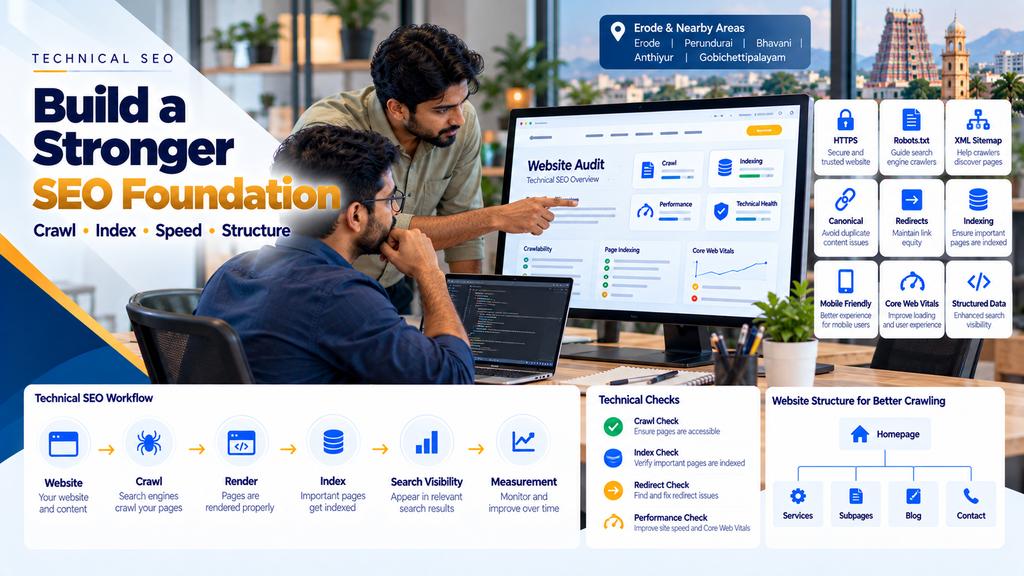
A simplified technical SEO journey can be understood as:
Website → Discovery → Crawl → Render → Index → Search Eligibility → Measurement
Technical SEO does not guarantee rankings. Instead, it helps create a technically accessible, organized and efficient foundation on which content, on-page SEO, local SEO and other search strategies can operate.
This guide explains what technical SEO is, why businesses in Erode may need it, common technical problems, what an audit should include and what to check before choosing a technical SEO provider.
What Is Technical SEO?
Technical SEO focuses on the technical elements of a website that can affect how search engines access, process and understand its pages.
Depending on the website, technical SEO work can include:
- Crawlability
- Indexability
- HTTP status codes
- Robots directives
- robots.txt configuration
- XML sitemaps
- Canonical tags
- Redirects
- Duplicate URL management
- HTTPS
- Website architecture
- Internal technical linking
- JavaScript rendering
- Mobile usability
- Website performance
- Core Web Vitals
- Image performance
- Structured data
- Pagination and faceted navigation where applicable
- International targeting where applicable
- Search Console issue investigation
Why Does Your Business Website Need Technical SEO?
SEO content has limited value if important pages cannot be accessed or indexed as intended.
For example, imagine that a business creates a detailed service page targeting potential customers in Erode.
The content is useful.
The page has a clear title.
The H1 is relevant.
Internal links point to it.
But the page accidentally contains a noindex directive.
The problem is no longer primarily content quality.
It is technical.
Technical SEO helps identify these kinds of problems.
Technical SEO Is the Foundation, Not the Entire SEO Strategy
Technical SEO alone does not make a website rank for competitive searches.
A stronger SEO strategy connects several areas:
Technical SEO + On-Page SEO + Useful Content + Internal Linking + Local SEO + Relevant External Signals + User Experience
Technical SEO helps ensure the foundation supports the rest of this work.
How Search Engines Process Website Pages
A simplified search-engine process can be represented as:
Discover URL → Crawl → Render / Process → Understand → Index Where Appropriate → Serve for Relevant Searches
Technical problems can interfere with different stages of this process.
1. Website Discovery
Search engines can discover URLs through mechanisms such as internal links, external links and sitemaps.
Important pages should not depend on obscure or inaccessible paths for discovery.
2. Crawling
Crawling involves search-engine systems requesting and accessing website resources.
Technical configurations can affect whether important pages and resources can be accessed.
3. Rendering and Processing
Modern websites may depend on JavaScript to generate or modify content.
The implementation should be reviewed when important content or links depend heavily on client-side rendering.
4. Indexing
After processing a page, a search engine may decide whether and how to include it in its index.
Making a page crawlable does not guarantee that it will be indexed.
5. Search Visibility
Being indexed does not guarantee that a page will rank prominently.
Relevance, content quality, competition and many other signals also matter.
Step 1: Perform a Technical SEO Audit
A technical SEO project should normally begin by understanding the existing website rather than immediately installing plugins or changing settings.
The audit can review:
- Important URLs
- HTTP status codes
- Crawlability
- Indexability
- robots.txt
- Meta robots directives
- Canonicals
- Redirects
- XML sitemaps
- Internal links
- Broken links
- Duplicate URLs
- HTTPS
- Mobile experience
- Performance
- Core Web Vitals
- Structured data
- JavaScript dependencies
- Search Console information
Step 2: Check Website Crawlability
Important website pages need to be accessible to search-engine crawlers when the business intends those pages to participate in search.
Review robots.txt
The robots.txt file can control crawler access to certain website paths.
A configuration mistake can unintentionally block resources or sections that should remain accessible.
Review Internal Links
Important pages should be connected through normal crawlable internal links.
Review Authentication Requirements
Content behind login systems generally serves a different purpose from publicly accessible SEO landing pages.
Step 3: Check Indexability
Crawlability and indexability are not the same thing.
A page may be accessible but still contain instructions affecting whether it should be indexed.
Check Meta Robots Directives
Important pages should not accidentally contain a noindex directive.
Check HTTP Headers
Indexing-related directives can also be communicated through HTTP headers in some implementations.
Check Canonical Configuration
A page may accidentally reference another URL as canonical.
Step 4: Review robots.txt Carefully
The robots.txt file should be managed deliberately.
It should not be treated as a universal method for removing URLs from search results.
Its main role is controlling crawler access according to the applicable protocol.
Common robots.txt Problems
- Blocking important website sections
- Leaving staging rules on a production website
- Blocking resources required for proper rendering
- Assuming a robots.txt block automatically removes an already known URL from search
- Using overly broad wildcard rules without testing them
Step 5: Review XML Sitemaps
An XML sitemap can help search engines discover important URLs.
A sitemap should generally represent the URLs the website wants search engines to process as canonical search pages.
Include Important Canonical URLs
Service pages, product pages, categories and useful content intended for search can be included where appropriate.
Avoid Redirecting URLs
URLs that permanently redirect elsewhere generally should not remain as active sitemap entries.
Avoid Error URLs
Broken URLs should not fill the sitemap.
Avoid Unwanted Noindex URLs
A sitemap should not continually advertise pages the website simultaneously says should not be indexed.
Step 6: Review HTTP Status Codes
HTTP status codes communicate how a server responds to a request.
200 — Successful Response
Important live pages normally need to return an appropriate successful response.
301 — Permanent Redirect
A permanent redirect can be used when a URL has permanently moved to another relevant location.
404 — Not Found
A 404 indicates that the requested resource was not found.
5xx — Server Errors
Server-side errors can prevent users and crawlers from accessing pages successfully.
Step 7: Find Broken Links
Broken internal links create poor navigation and can waste crawling effort.
A technical audit should identify links pointing to:
- Deleted pages
- Incorrect URLs
- Old migrated URLs
- Broken images
- Unavailable resources
Step 8: Fix Redirect Problems
Redirects are useful when implemented correctly, but poor redirect architecture can create unnecessary complexity.
Avoid Long Redirect Chains
For example:
URL A → URL B → URL C → URL D
Where possible and appropriate, internal links and redirects should point more directly to the final destination.
Avoid Redirect Loops
A loop can prevent a destination from loading successfully.
Update Internal Links
If an internal link still points to an old URL that redirects, consider updating the link to the current destination.
Step 9: Review Canonical Tags
A canonical tag can help indicate a preferred URL among duplicate or substantially similar pages.
Self-Referencing Canonicals
Many canonical pages can appropriately reference themselves, depending on the website architecture.
Duplicate URLs
When multiple URLs expose substantially the same content, canonicalization may form part of the solution.
Avoid Unrelated Canonicals
A service page should not accidentally canonicalize to the homepage or an unrelated service.
Keep Signals Consistent
Canonical tags, redirects, internal links and sitemaps should not send unnecessarily conflicting signals about the preferred URL.
Step 10: Identify Duplicate URL Problems
A single page can sometimes become accessible through multiple URL variations.
Possible causes include:
- URL parameters
- Filters
- Sorting options
- Tracking parameters
- HTTP and HTTPS variations
- WWW and non-WWW variations
- Trailing-slash inconsistencies
- Uppercase and lowercase URL differences
- CMS-generated duplicate paths
The correct solution depends on why the duplicate URLs exist.
Step 11: Ensure HTTPS Is Configured Correctly
Business websites should use HTTPS appropriately to protect data transmitted between users and the website.
Redirect HTTP to HTTPS
Old HTTP versions should be handled consistently.
Check Mixed Content
An HTTPS page should not unnecessarily load insecure HTTP resources.
Check Canonicals
Canonical URLs should normally reflect the preferred secure URL version.
Check Internal Links
Internal links should not repeatedly send users through unnecessary HTTP-to-HTTPS redirects.
Step 12: Review Website Architecture
Website architecture affects both user navigation and search-engine discovery.
A simple business website structure can look like:
Homepage → Main Services → Specific Services → Supporting Content → Contact
Keep Important Pages Accessible
Priority pages should not be buried unnecessarily deep within the website.
Create Logical Relationships
Related services and supporting articles should be connected naturally.
Avoid Orphan Pages
An important page should not exist without useful internal links pointing to it.
Step 13: Improve Internal Linking
Internal linking overlaps technical and on-page SEO.
Links can help search engines discover URLs and understand the website’s structure while also helping users navigate between relevant content.
Read On-Page SEO Services in Erode: Complete Business Guide.
Step 14: Check Mobile Usability
Business websites should work properly across mobile devices.
Responsive Layout
Content should adapt to different screen sizes.
Readable Text
Users should be able to read content comfortably.
Usable Buttons and Links
Interactive elements should work well on touchscreens.
No Unwanted Horizontal Scrolling
Tables, images and components should not unnecessarily overflow the viewport.
Mobile Navigation
Users should be able to reach important services and contact options easily.
Step 15: Improve Website Speed
Website performance affects user experience and can overlap with technical SEO.
Common causes of slow pages include:
- Large images
- Unoptimized video
- Too many scripts
- Heavy page builders
- Unused JavaScript
- Unused CSS
- Slow server response
- Too many third-party integrations
- Unoptimized fonts
- Large DOM structures
Read Website Speed Optimization Services in Erode.
Step 16: Review Core Web Vitals
Core Web Vitals measure important aspects of real-world page experience.
The current metrics focus on loading performance, responsiveness and visual stability.
Largest Contentful Paint (LCP)
LCP relates to loading performance and how quickly important main content becomes visible.
Interaction to Next Paint (INP)
INP relates to how responsive a page is to user interactions.
Cumulative Layout Shift (CLS)
CLS measures unexpected visual movement while a page is being used.
Read Core Web Vitals Optimization for Business Websites in Erode.
Step 17: Optimize Images Technically
Images are often among the largest resources on business websites.
Resize Images
Serve dimensions appropriate for their actual display requirements.
Compress Images
Reduce unnecessary file size while maintaining acceptable visual quality.
Consider Modern Image Formats
Formats such as WebP and AVIF can be useful depending on browser support and website architecture.
Lazy Load Appropriate Images
Images below the initial viewport can often be deferred until they are needed.
Critical above-the-fold images should be handled carefully so that lazy loading does not unnecessarily delay important visual content.
Define Image Dimensions
Providing appropriate dimensions can help reduce unexpected layout movement.
Step 18: Review JavaScript SEO
JavaScript-heavy websites may require additional technical review.
Important content should not unintentionally disappear when scripts fail or when rendering behaves differently from the developer’s expectation.
Check Rendered Content
Verify whether important text and links are available after rendering.
Check Navigation Links
Critical navigation should use implementation patterns that search engines and users can reliably follow.
Check Client-Side Routing
Single-page applications and JavaScript frameworks require careful URL and routing implementation.
Check Server Responses
A visually displayed error page should not incorrectly return a successful HTTP status.
Step 19: Review Structured Data
Structured data can provide explicit machine-readable information about supported entities on a webpage.
Depending on the site, relevant markup may include:
- Organization
- LocalBusiness
- BreadcrumbList
- Product
- Article
Structured Data Must Match the Website
Do not create markup containing fake or misleading business information.
Do Not Create Fake Reviews
Review and rating information should not be fabricated for SEO.
Validate the Implementation
Syntax and eligibility issues should be reviewed using appropriate validation tools.
Rich Results Are Not Guaranteed
Valid structured data does not guarantee that a search engine will display a particular search feature.
Step 20: Implement Breadcrumbs Properly
Breadcrumbs can communicate the hierarchical relationship between pages.
For example:
Home → SEO Services → Technical SEO
They can improve navigation and create additional contextual internal links.
Step 21: Review Pagination
Large ecommerce, blog and catalogue websites may divide collections across multiple pages.
Pagination should allow users and search engines to navigate the relevant collection effectively.
Products or articles should not become difficult to discover because they only appear deep inside poorly connected pagination.
Step 22: Review Ecommerce Filters and Faceted Navigation
Ecommerce websites can generate many URLs from filters.
For example:
Category → Brand → Colour → Size → Price → Sort
Uncontrolled combinations can produce a very large number of low-value or duplicate URL variations.
Decide Which Filter Pages Need Search Visibility
Not every possible filter combination needs to become an indexed landing page.
Control Crawling Carefully
Choose the technical approach based on the ecommerce platform and search strategy.
Keep Canonicalization Consistent
Do not create conflicting canonical, internal-link and indexation signals.
Step 23: Review Ecommerce Technical SEO
Ecommerce websites can have additional technical challenges because they contain many dynamic pages.
Important areas include:
- Category URLs
- Product URLs
- Product variants
- Out-of-stock products
- Discontinued products
- Filters
- Sorting
- Pagination
- Internal search URLs
- Product structured data
- Canonicalization
- Duplicate descriptions
- Product images
- Site performance
Read Ecommerce Category Page SEO: Complete Optimization Guide and Ecommerce Product Page SEO: How to Rank Products on Google.
Step 24: Handle Deleted Pages Correctly
Businesses frequently remove old services, products or articles.
The correct treatment depends on what happened to the content.
Relevant Replacement Exists
A permanent redirect to a genuinely relevant replacement may be appropriate.
No Relevant Replacement Exists
A proper not-found or gone response may be more appropriate than redirecting every deleted page to the homepage.
Avoid Mass Homepage Redirects
Sending every removed URL to the homepage can confuse users and does not preserve relevance automatically.
Step 25: Review 404 Pages
A custom 404 page can help users recover when they reach a missing URL.
Useful elements can include:
- Clear explanation
- Homepage link
- Main navigation
- Relevant service or category links
- Search functionality where useful
The missing URL should still return an appropriate HTTP status.
Step 26: Review Website Migrations
Website redesigns and migrations can create significant SEO problems when URLs change without proper planning.
A migration process can include:
Old URL Inventory → New URL Mapping → Redirect Plan → Content Migration → Technical Validation → Launch → Monitoring
Map Old URLs to Relevant New URLs
Do not redirect everything to the homepage.
Preserve Important Content
Do not accidentally remove valuable content during a visual redesign.
Update Internal Links
Point internal links directly to new destinations.
Update Sitemaps
The new sitemap should reflect the current canonical URL structure.
Monitor After Launch
Check crawling, indexing, redirects and search performance after migration.
Step 27: Review WordPress Technical SEO
WordPress websites can develop technical problems through themes, plugins and configuration choices.
Common areas to review include:
- SEO plugin settings
- Sitemap configuration
- Category and tag archives
- Author archives
- Media URLs
- Canonical settings
- Redirect plugins
- Page-builder performance
- Unused plugins
- Database overhead
- Caching
- Image optimization
Read WordPress Maintenance Services in Erode.
Step 28: Review Shopify Technical SEO
Shopify handles many infrastructure tasks, but stores can still require technical SEO review.
Areas can include:
- Collection structure
- Product URLs
- Internal linking
- Duplicate content patterns
- Canonical behavior
- Theme performance
- App-generated scripts
- Image performance
- Structured data
- Redirects
Step 29: Review Custom Website Technical SEO
Custom websites give developers greater control but also place more responsibility on the implementation.
Review areas such as:
- Server-side responses
- Routing
- Rendering
- Metadata generation
- Canonical generation
- Sitemap generation
- Robots directives
- Structured data
- Image handling
- Caching
- Performance
- Error handling
Step 30: Connect Search Console
Google Search Console can provide useful information about how Google interacts with a website.
Depending on the property and available reports, businesses can review areas such as:
- Search performance
- Indexing
- Sitemaps
- URL inspection
- Core Web Vitals
- Enhancement reports where applicable
- Security-related information
Step 31: Investigate Indexing Problems
When a page is not appearing in Google’s index, do not immediately assume that submitting it repeatedly will solve the problem.
Investigate:
- HTTP status
- Robots directives
- Canonical URL
- Internal links
- Content duplication
- Page quality
- Rendering
- Sitemap inclusion
- Website-wide technical issues
Step 32: Monitor Server Errors
Persistent server errors can affect both users and crawling.
Businesses should investigate recurring:
- 500 errors
- 502 errors
- 503 errors
- 504 errors
- Timeouts
The correct solution depends on the application, server and infrastructure.
Step 33: Monitor Website Uptime
A website that is repeatedly unavailable can create problems for customers and search-engine access.
Businesses should maintain appropriate hosting, monitoring, backups and maintenance processes.
Read Website Maintenance Services in Erode: What Businesses Need.
Step 34: Review Hosting Performance
Technical optimization cannot always compensate for inadequate infrastructure.
Hosting considerations can include:
- Server resources
- Server response time
- Application configuration
- Database performance
- Caching
- Traffic requirements
- Geographic delivery
- CDN requirements
Step 35: Avoid Plugin-Only Technical SEO
SEO plugins can help manage settings, but installing a plugin does not automatically solve every technical SEO problem.
A plugin cannot independently fix issues such as:
- Poor website architecture
- Incorrect redirects outside its control
- Server errors
- Slow custom code
- Broken JavaScript rendering
- Weak internal linking
- Duplicate business content
- Bad migration planning
Technical SEO for Local Businesses in Erode
Local business websites may be smaller than ecommerce websites, but technical problems can still affect their important service and location pages.
A useful local-business architecture can be:
Homepage → Services → Specific Services → Useful Location Pages → Supporting Content → Contact
Technical SEO should ensure the intended pages are accessible and correctly connected.
Technical SEO for Manufacturing Websites in Erode
Manufacturing websites may contain product catalogues, technical pages, industries, applications and enquiry pages.
Important technical considerations can include:
- Product catalogue architecture
- Product URL consistency
- Duplicate specifications
- PDF handling
- Image optimization
- Internal linking
- Pagination
- Structured data where appropriate
- Mobile usability
- Performance
Technical SEO for Ecommerce Websites in Erode
Ecommerce websites typically require deeper technical management because the number of URLs can grow quickly.
A single store may contain:
Categories + Subcategories + Products + Variants + Filters + Sorting + Search + Pagination + Cart + Checkout + Customer Pages
Not all of these URLs need the same search treatment.
Technical SEO helps define which URLs should be crawlable, indexable, canonical and internally linked.
Technical SEO vs On-Page SEO
| Technical SEO | On-Page SEO |
|---|---|
| Crawlability | Search intent |
| Indexability | Keyword mapping |
| Robots directives | Title tags |
| Canonicals | Meta descriptions |
| Redirects | H1 and headings |
| XML sitemaps | Page content |
| Rendering | Content relevance |
| Performance | Contextual internal linking |
The two areas work together rather than competing with each other.
Read On-Page SEO Services in Erode: Complete Business Guide.
Technical SEO vs Website Development
Technical SEO and website development also overlap.
An SEO specialist may identify a problem, but a developer may need to implement the solution.
Examples include:
- Server redirects
- Rendering changes
- Performance optimization
- Image delivery
- Template changes
- Structured data
- Routing changes
- Sitemap generation
- Canonical logic
SEO and development teams should therefore work together on technically complex websites.
What Should a Technical SEO Audit Include?
- Website crawl
- Indexability review
- robots.txt review
- Meta robots review
- HTTP status analysis
- Redirect analysis
- Canonical review
- XML sitemap review
- HTTPS review
- Duplicate URL analysis
- Internal-link analysis
- Orphan-page identification
- Broken-link analysis
- Website architecture review
- Mobile usability review
- Performance review
- Core Web Vitals review
- Image optimization review
- JavaScript rendering review where relevant
- Structured-data review
- Pagination review where relevant
- Faceted-navigation review where relevant
- Search Console review
- Migration issues where relevant
Technical SEO Checklist for Business Websites
- HTTPS working correctly
- Preferred domain version established
- HTTP redirects correctly
- Important pages return appropriate successful responses
- robots.txt reviewed
- Important pages crawlable as intended
- Important pages indexable as intended
- Canonical tags reviewed
- XML sitemap clean
- Sitemap submitted where appropriate
- Redirect chains minimized
- Redirect loops removed
- Broken internal links fixed
- Orphan pages reviewed
- Website architecture logical
- Mobile layout working
- Website performance reviewed
- Core Web Vitals monitored
- Images optimized
- Structured data validated where used
- JavaScript rendering checked where relevant
- 404 handling reviewed
- Server errors monitored
- Search Console monitored
- Backups and website maintenance established
Common Technical SEO Mistakes
- Accidentally leaving the website noindexed after development
- Blocking important pages in robots.txt
- Assuming robots.txt removes pages from Google’s index
- Submitting broken URLs in XML sitemaps
- Including redirected URLs in sitemaps
- Incorrect canonical tags
- Canonicalizing important pages to the homepage
- Creating long redirect chains
- Creating redirect loops
- Leaving broken internal links
- Creating orphan pages
- Using both HTTP and HTTPS inconsistently
- Ignoring mobile usability
- Uploading unnecessarily large images
- Loading excessive third-party scripts
- Ignoring Core Web Vitals
- Creating uncontrolled ecommerce filter URLs
- Using incorrect HTTP status codes
- Redirecting every deleted page to the homepage
- Ignoring JavaScript-rendered content
- Adding inaccurate structured data
- Assuming an SEO plugin automatically fixes technical SEO
- Launching a redesigned website without URL mapping
- Ignoring Search Console after launch
How Much Do Technical SEO Services Cost in Erode?
Technical SEO pricing depends on the complexity of the website and the amount of implementation required.
Factors can include:
- Number of URLs
- Website platform
- WordPress, Shopify or custom development
- Ecommerce complexity
- JavaScript framework
- Existing technical problems
- Website migration requirements
- Performance issues
- Structured-data requirements
- Developer implementation work
- Ongoing monitoring requirements
A small business website and a large ecommerce platform should not be expected to require the same technical SEO scope.
How Long Does Technical SEO Take?
The implementation timeline depends on the website.
Some problems may be configuration changes.
Others can require development, testing and deployment.
For example, correcting an individual metadata configuration can be very different from restructuring thousands of ecommerce URLs or migrating a custom website.
The time required to implement a technical fix should also not be confused with the time required for search engines to recrawl, process or reflect changes.
How to Choose a Technical SEO Company in Erode
1. Do They Audit Before Making Changes?
The provider should understand the existing website first.
2. Can They Explain the Problem?
A technical recommendation should explain what is wrong, why it matters and what needs to change.
3. Do They Understand Website Development?
Many technical SEO problems require knowledge of HTML, HTTP, servers, CMS platforms or JavaScript.
4. Do They Prioritize Issues?
Not every audit warning deserves the same urgency.
5. Can They Work With Developers?
Technical SEO recommendations often need developer implementation.
6. Do They Test After Implementation?
A fix should be validated after deployment.
7. Do They Monitor Search Console?
Post-implementation monitoring can help identify whether additional problems remain.
8. Do They Guarantee Rankings?
Technical fixes can improve the website’s SEO foundation, but they cannot responsibly guarantee a particular search position.
Technical SEO Services Across Erode District
Greap Technologies works with businesses in Erode and surrounding locations, including:
- Erode
- Perundurai
- Bhavani
- Anthiyur
- Gobichettipalayam
- Sathyamangalam
- Modakkurichi
- Kodumudi
- Nambiyur
- Chennimalai
- Kavindapadi
- Ammapettai
- Arachalur
- Sivagiri
- Punjai Puliampatti
- Thalavadi
- Nasiyanur
- Surampatti
- Veerappanchatram
These locations should be used naturally according to genuine service coverage rather than repeatedly inserted into unrelated website content.
How Greap Technologies Can Help With Technical SEO
Greap Technologies can combine SEO review with website-development knowledge, allowing technical recommendations and implementation requirements to be considered together.
Depending on the website, technical SEO work can include:
- Technical SEO audit
- Crawlability review
- Indexability review
- robots.txt review
- XML sitemap optimization
- Canonical review
- Redirect implementation
- Broken-link fixes
- 404 review
- Website architecture review
- Internal-link review
- HTTPS checks
- Mobile usability review
- Website speed optimization
- Core Web Vitals optimization
- Image optimization
- Structured-data implementation
- WordPress technical SEO
- Shopify technical SEO
- Custom website technical SEO
- Ecommerce technical SEO
- Website migration SEO
- Search Console review
- Post-launch technical monitoring
Explore Greap Technologies SEO Services, Website Development Services or visit Greap Technologies.
Recommended Technical SEO Workflow
A structured technical SEO project can follow:
Website Audit
↓
Crawl & Index Review
↓
Prioritize Technical Issues
↓
SEO + Development Plan
↓
Implementation
↓
Testing
↓
Search Console Validation
↓
Monitoring & Improvement
Technical SEO Should Connect With Your Complete SEO Strategy
A stronger search strategy can be represented as:
Technical SEO
↓
Crawlable + Indexable Website
+
On-Page SEO
+
Useful Content
+
Internal Linking
+
Local SEO
+
Relevant External Signals
+
Good User Experience
↓
Relevant Search Visibility → Website Visits → Enquiries
Conclusion
Technical SEO services in Erode can help businesses identify website problems that may not be visible from the design alone.
A technically healthy website should make it easier for search engines to discover and process the pages the business intends to make available in search.
The process includes more than installing an SEO plugin.
It can involve:
Crawling → Indexing → Canonicals → Redirects → Sitemaps → Website Architecture → Mobile → Performance → Structured Data → Monitoring
Technical SEO should also work together with on-page optimization, content, local SEO and conversion-focused website design.
A technically perfect website with weak or irrelevant content will not automatically rank.
Likewise, excellent content can face unnecessary limitations when important pages are accidentally blocked, duplicated, redirected incorrectly or poorly connected.
The objective is therefore to build a technically reliable foundation that supports the wider SEO strategy.
No technical SEO provider can responsibly guarantee a specific Google ranking. Improvements should instead focus on accessibility, crawlability, indexability, performance, website structure and the removal of genuine technical barriers.
Need a Technical SEO Audit for Your Website?
If your business website has indexing problems, speed issues, redirect errors, duplicate URLs, Core Web Vitals problems or unexplained technical SEO issues, Greap Technologies can review the current website and identify priority improvements.
Discuss Your Technical SEO Requirements
Frequently Asked Questions
1. What are technical SEO services?
Technical SEO services identify and improve technical website factors that can affect crawling, rendering, indexing, performance and search-engine understanding. The exact work depends on the website platform and problems found during the audit.
2. Why does my business website need technical SEO?
A technically problematic website can make it harder for search engines to access or process important pages as intended. Technical SEO helps identify barriers such as accidental noindex directives, incorrect canonicals, broken links, redirects, sitemap problems and performance issues.
3. What is included in a technical SEO audit?
An audit can review crawlability, indexability, HTTP status codes, robots directives, XML sitemaps, canonical tags, redirects, broken links, duplicate URLs, website architecture, mobile usability, performance, Core Web Vitals, structured data and JavaScript rendering where relevant.
4. What is the difference between technical SEO and on-page SEO?
Technical SEO focuses more heavily on crawling, indexing, website architecture, rendering and technical implementation. On-page SEO focuses more on search intent, keyword mapping, titles, headings, content and page relevance. Both areas overlap and should work together.
5. Can technical SEO fix Google indexing problems?
Technical SEO can identify and fix technical causes of indexing problems, such as accidental noindex directives, canonical errors or crawl restrictions. However, fixing a technical issue does not guarantee that a search engine will index a particular page.
6. Does website speed affect technical SEO?
Website performance is an important part of technical optimization and user experience. Speed work can include images, scripts, CSS, server response, caching, fonts and third-party resources.
7. What are Core Web Vitals?
Core Web Vitals are page-experience metrics that currently focus on loading performance, interaction responsiveness and visual stability through LCP, INP and CLS.
8. Is an SEO plugin enough for technical SEO?
No. An SEO plugin can manage useful settings, but it cannot automatically solve every issue involving servers, website architecture, JavaScript rendering, redirects, performance, migrations or custom development.
9. How often should a technical SEO audit be done?
There is no universal schedule. Reviews are especially useful before or after website redesigns, migrations, major platform changes, significant catalogue expansion or when crawling, indexing or performance problems appear.
10. How much do technical SEO services cost in Erode?
Pricing depends on the website size, platform, number and complexity of technical issues, development requirements and whether ongoing monitoring is required. A small business website and a large ecommerce platform usually require very different scopes.
11. How long does technical SEO take to work?
Some technical fixes can be implemented quickly, while complex architecture or development changes take longer. Search engines may also need time to recrawl and process changes after implementation, so there is no fixed ranking timeline.
12. Can technical SEO guarantee first-page rankings?
No. Technical SEO can improve the technical foundation and remove barriers, but rankings also depend on relevance, content, competition and many other signals. A specific search position cannot responsibly be guaranteed.