
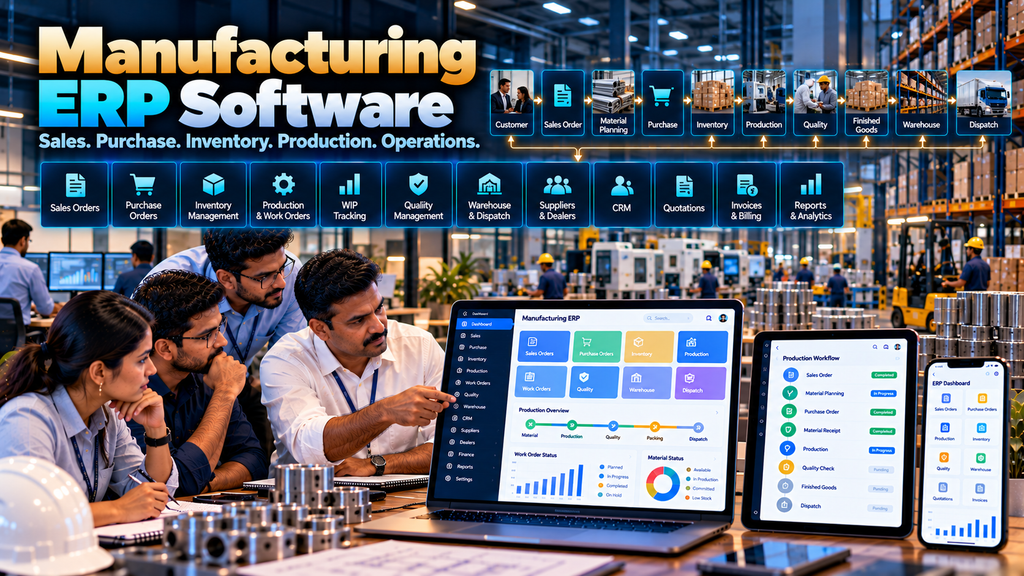
Manufacturing companies rarely operate through a single business process.
Sales teams manage customer enquiries and orders. Procurement teams purchase raw materials and components. Stores teams maintain inventory. Production teams convert materials into finished goods. Quality teams inspect products. Warehouse teams manage storage and dispatch, while management needs reliable information across the entire operation.
When these activities are managed through separate spreadsheets, paper records and disconnected software, the same information may need to be entered multiple times and teams can end up working with different versions of operational data.
Custom manufacturing ERP software development in Erode can help connect selected business functions through a structured software platform designed around the manufacturer’s actual processes.
A manufacturing ERP can potentially connect customer enquiries, quotations, sales orders, procurement, suppliers, inventory, production planning, work orders, production tracking, quality, warehouse operations, dispatch and management reporting.
However, implementing ERP does not mean putting every possible business activity into one oversized application. The objective should be to establish clear workflows, define reliable master data and connect the systems that genuinely need to exchange information.
This guide explains manufacturing ERP modules, workflows, integrations, implementation planning, security, migration, development costs and the questions companies should evaluate before developing a custom ERP system.
At Greap Technologies, we develop custom business and manufacturing software for companies in Erode and nearby areas.
What Is Manufacturing ERP Software?
Manufacturing ERP software is a business system that connects selected operational functions involved in running a manufacturing company.
Depending on business requirements, modules can include:
- Customer and CRM management
- Quotation management
- Sales order management
- Dealer and distributor management
- Product master
- Material master
- Supplier management
- Purchase requests
- Purchase orders
- Inventory management
- Production planning
- Production orders
- Work orders
- Production tracking
- Work-in-progress tracking
- Quality workflows
- Warehouse management
- Finished-goods management
- Dispatch workflows
- Invoice-related workflows
- Reports and dashboards
The appropriate ERP scope depends on how the manufacturer actually operates.
How Manufacturing ERP Connects Business Operations
A connected manufacturing workflow can look like:
Customer Enquiry → Quotation → Sales Order → Material Requirement → Purchase → Inventory → Production → Quality → Finished Goods → Warehouse → Dispatch
Each stage can generate information required by the next stage.
The value of ERP architecture is therefore not simply having many modules. It is creating controlled information flow between relevant business processes.
Manufacturing ERP vs Separate Software Applications
| Separate Applications | Connected ERP Approach |
|---|---|
| Different systems may maintain overlapping data | Important master data can have defined ownership |
| Information may require repeated entry | Relevant information can flow between modules |
| Reporting may require manual consolidation | Connected data can support broader reporting |
| Integration can be limited | Modules can follow a planned architecture |
Separate applications are not automatically wrong. A company may already have specialized software that works well.
In that situation, integration may be more appropriate than replacing everything.
1. Start With Business Process Mapping
Manufacturing ERP development should begin with the business process rather than a feature list.
Map how information currently moves through:
- Sales
- Procurement
- Inventory
- Production
- Quality
- Warehouse
- Dispatch
- Finance-related workflows
- Management reporting
2. Identify Existing Software
Before replacing systems, identify what the company already uses.
This may include:
- Accounting software
- CRM
- Inventory software
- Production software
- Warehouse software
- Payroll software
- Legacy ERP
- Spreadsheets
- Custom internal applications
3. Decide What Should Be Replaced and What Should Be Integrated
A good ERP project does not require rebuilding every existing system.
If an existing accounting or specialist application already performs its function effectively and provides suitable integration methods, keeping it and integrating the required data may be more practical.
4. Define Master Data
Reliable ERP workflows depend on consistent master data.
Manufacturing master data may include:
- Customers
- Dealers
- Distributors
- Suppliers
- Products
- Materials
- Units of measure
- Warehouses
- Production stages
- Other business classifications
5. Product Master
The product master can maintain standardized information about products manufactured or sold by the company.
Depending on requirements, this may include product codes, names, categories, units, variants and relevant operational information.
6. Material Master
The material master can maintain raw materials, components, packaging materials, consumables and other production inputs.
Consistent material codes can reduce confusion across procurement, inventory and production workflows.
7. Customer Management
Manufacturers may need a central customer record that can be referenced by quotations, sales orders and other approved workflows.
Customer information should be accessible according to role and legitimate business requirements.
8. CRM Integration
The sales process may begin before an order exists.
A connected workflow can be:
Lead → Requirement → Follow-Up → Quotation → Sales Order
CRM functionality can either be part of the ERP or connected to an existing CRM system.
Read WhatsApp CRM and Lead Follow-Up Software for Businesses in Erode.
9. Quotation Management
Quotation software can help sales teams prepare and manage commercial proposals according to approved company processes.
A quotation can later contribute to sales-order creation when accepted.
Read Quotation and Invoice Management Software Development in Erode.
10. Sales Order Management
Once a customer order is confirmed, the sales order can become an important source of downstream operational information.
A sales order may contain:
- Customer
- Products
- Quantities
- Approved prices
- Delivery requirements
- Commercial references
- Current status
Read Sales Order Management Software for Manufacturing Businesses in Erode.
11. Sales Order to Production
For make-to-order manufacturing, an approved sales order can contribute to the production requirement.
A workflow can be:
Sales Order → Production Requirement → Material Check → Production Order
12. Make-to-Stock Manufacturing
Not every production order originates from a customer order.
Make-to-stock manufacturers may produce based on approved inventory or planning requirements.
The ERP should support the company’s actual production model.
13. Dealer Management
Manufacturers selling through dealer networks may require dealer accounts, product access, ordering and order-status workflows.
Dealer information can connect with sales-order and distribution processes.
Read Dealer Portal Development for Manufacturers and Distributors in Erode.
14. Distributor Management
Businesses with distributor networks may require functionality for distributor records, order workflows, product access, territories or other legitimate channel-management requirements.
Read Dealer and Distributor Management Software Development in Erode.
15. Supplier Management
ERP software can maintain approved supplier records used by procurement workflows.
Supplier data can connect with RFQs, quotations, purchase orders and goods receipts.
16. Purchase Request Management
Departments can create structured purchase requests where the company’s procurement process requires them.
A request may originate from production, inventory, maintenance or another approved business requirement.
17. Purchase Order Management
Approved procurement requirements can move into purchase-order workflows.
A typical flow can be:
Requirement → Purchase Request → Approval → Supplier → Purchase Order → Goods Receipt
Read Purchase Order Management Software Development in Erode.
18. Supplier RFQ Management
Where procurement policy requires supplier quotations, ERP functionality can support RFQ creation and quotation recording.
Software can organize comparable information while authorized users make purchasing decisions according to company policy.
19. Material Requirement Planning
Production planning may identify materials required for approved production.
Relevant material requirements can be compared with reliable inventory information.
Any shortage can then contribute to an approved procurement process.
20. Avoid Blind Automatic Purchasing
A calculated shortage does not necessarily mean the system should automatically create and issue a supplier purchase order.
Open orders, substitute materials, production priorities, existing reservations and commercial decisions may require human review.
21. Inventory Management
Inventory is a central connection point between procurement, production, warehouse and sales.
Depending on requirements, the ERP may maintain or integrate information about:
- Raw materials
- Components
- Consumables
- Work in progress
- Finished goods
- Relevant stock movements
22. Define Inventory Ownership
If inventory is already managed by an established ERP or warehouse system, decide whether the new application should replace it or integrate with it.
Avoid creating multiple conflicting stock figures.
23. Multiple Warehouse Management
Companies operating several warehouses may need inventory records associated with specific locations.
Permissions and workflows should reflect the company’s physical operations.
24. Warehouse Management
Warehouse operations can connect procurement, production and dispatch.
A workflow can include:
Purchase Receipt → Warehouse → Material Issue → Production → Finished Goods → Warehouse → Dispatch
Read Warehouse Management Software Development in Erode.
25. Goods Receipt
Materials received from suppliers can be recorded against relevant purchase orders according to the company’s receiving process.
The workflow may also include incoming quality checks.
26. Material Issue to Production
Materials can be issued to approved production or work orders where the manufacturing process requires traceability between material movement and production.
27. Production Planning
Production planning helps determine what needs to be manufactured and when, based on approved business requirements.
The appropriate planning model depends on the manufacturer.
28. Production Order Management
A production order can define the product and quantity authorized for manufacturing.
It can reference sales demand, stock requirements or another approved planning source.
29. Work Order Management
Production orders may generate one or more work orders depending on the manufacturing process.
Work orders can move through defined production stages.
30. Production Management Software
Manufacturing ERP can incorporate or connect with a broader production-management module.
Read Production Management Software for Manufacturing Companies in Erode.
31. Production Tracking
Production tracking focuses on visibility into the status and progress of active manufacturing work.
It can track information such as:
- Production order
- Work order
- Current stage
- Planned quantity
- Completed quantity
- Remaining quantity
- WIP
- Material status
- Quality status
- Completion status
Read Production Tracking Software for Manufacturing Companies in Erode.
32. Work-in-Progress Tracking
WIP tracking can provide visibility into production that has started but has not yet reached the defined finished-goods stage.
The definition of WIP should match the company’s operational and relevant accounting processes.
33. Multi-Stage Production
Manufacturing ERP can support production that moves through multiple defined stages.
For example:
Material → Cutting → Processing → Assembly → Finishing → Quality → Packing
The actual route should reflect the manufacturer’s production process.
34. Product-Specific Production Routes
Different products may follow different manufacturing routes.
The ERP should not assume every product follows the same sequence.
35. Batch Tracking
Where operationally required, production and inventory records can be associated with batch references.
Batch requirements depend on the product and business process.
36. Serial Number Tracking
Manufacturers that need individual product traceability may associate relevant records with serial numbers.
The required level of traceability should be established during process analysis.
37. Barcode and QR Workflows
Barcode or QR identifiers can support selected warehouse and production workflows where appropriate.
They can help identify materials, products, work orders or other records but do not replace authorization and validation within the ERP.
38. Quality Management Workflows
Quality processes can occur at several points.
For example:
- Incoming material inspection
- In-process quality checks
- Final inspection
- Finished-goods approval
The ERP can support the workflow defined by the manufacturer’s appropriate quality team.
39. Quality Hold
Materials or production quantities requiring review can be placed into an appropriate status so they are not unintentionally treated as approved stock.
40. Rework Workflow
Where rework is part of the manufacturing process, ERP software can record the relevant quantity and workflow.
Rework information should support operational processes rather than automatically being used to assign individual blame.
41. Finished Goods
Once manufacturing and required quality processes are completed, accepted quantities can enter the defined finished-goods workflow.
42. Finished Goods to Warehouse
A connected process can be:
Production Complete → Quality Approval → Finished Goods → Warehouse
The system should clearly define the point at which completed production becomes available inventory.
43. Sales Order Allocation
For make-to-order or allocated-stock workflows, finished goods can potentially be associated with relevant sales orders according to business rules.
44. Dispatch Management
Approved sales orders and available finished goods can contribute to the dispatch workflow.
A simplified process might be:
Sales Order → Stock / Production Completion → Warehouse → Dispatch
45. Transport and Logistics Integration
Businesses managing their own delivery or logistics workflows may connect dispatch information with transport-management software.
Read Transport and Logistics Management Software Development in Erode.
46. Invoice Workflows
ERP software can exchange relevant order and dispatch information with approved invoicing or accounting workflows.
Financial and tax treatment should follow the company’s accounting processes and applicable professional guidance.
47. Accounting Integration
A custom manufacturing ERP does not necessarily need to replace established accounting software.
Where suitable supported integrations exist, relevant operational information can be exchanged with the accounting system.
48. Avoid Rebuilding Accounting Without a Clear Reason
Accounting and tax workflows can involve specialized requirements.
If the existing accounting platform already meets the company’s needs, integration may be more practical than rebuilding those functions inside a manufacturing ERP.
49. Employee Attendance Integration
Where relevant, an ERP can integrate with attendance or payroll software for approved administrative workflows.
Read Employee Attendance and Payroll Software Development in Erode.
50. Role-Based Access Control
ERP software contains information from multiple departments, making role-based access important.
Possible roles can include:
- Sales user
- Sales manager
- Procurement user
- Warehouse user
- Production user
- Production manager
- Quality user
- Finance user
- Management user
- Administrator
Actual roles should reflect the company’s responsibilities.
51. Department-Level Permissions
Users should not automatically receive access to every ERP module simply because the information exists in one system.
Access should be based on legitimate business responsibilities.
52. Approval Workflows
Manufacturing ERP can support approvals for selected activities such as:
- Purchase requests
- Purchase orders
- Selected quotations
- Sales exceptions
- Inventory adjustments
- Other controlled transactions
Approval levels should follow company policy rather than adding unnecessary bureaucracy.
53. Audit Trails
Important ERP actions may require appropriate audit records.
Depending on requirements, these can cover:
- Approvals
- Status changes
- Order revisions
- Inventory adjustments
- Production updates
- Quality changes
- Administrative changes
54. ERP Security
A manufacturing ERP can contain commercially sensitive information about customers, suppliers, prices, inventory, production and operations.
Security planning can include:
- Secure authentication
- Role-based authorization
- Server-side access controls
- Secure application architecture
- Protected API access
- Appropriate logging
- Backup planning
- Software updates
55. ERP Dashboard
A dashboard should provide information relevant to the user’s role rather than attempting to show the entire company on one screen.
Management dashboards might summarize selected information across sales, purchase, inventory and production.
56. Sales Dashboard
Sales users may need information about quotations, sales orders, relevant order statuses and customer follow-ups.
57. Procurement Dashboard
Procurement users may need information about purchase requests, supplier quotations, purchase orders and relevant material requirements.
58. Production Dashboard
Production users may need visibility into:
- Production orders
- Work orders
- Production stages
- WIP
- Material status
- Quality status
- Completion
59. Warehouse Dashboard
Warehouse users may need relevant information about receipts, material movements, finished goods and dispatch requirements.
60. Management Reporting
Connected ERP data can support reporting across operational areas.
Reports may be organized by:
- Sales orders
- Purchase orders
- Suppliers
- Customers
- Products
- Materials
- Inventory
- Production orders
- Work orders
- Warehouse activity
- Defined time periods
61. Avoid Dashboard Overload
More KPIs and charts do not automatically create better management decisions.
Each report or dashboard element should answer a defined business question.
62. Notifications
ERP notifications can support meaningful workflow events such as:
- Approval required
- Purchase order status
- Material issue requiring attention
- Production status change
- Quality action required
- Sales order ready for the next operational step
Notifications should remain actionable rather than becoming constant background noise.
63. Web-Based Manufacturing ERP
A web-based ERP can provide authorized access through supported browsers without requiring a traditional desktop application on every device.
The architecture should still be selected based on the manufacturer’s security, connectivity and operational requirements.
64. Mobile-Friendly ERP
Selected ERP workflows can be designed responsively for tablets and mobile devices.
For example, managers may need approval screens while warehouse or production teams may require simplified operational interfaces.
65. Dedicated ERP Mobile App
A dedicated mobile application may be useful when specific device capabilities, offline functionality or specialized workflows are required.
A mobile app is not automatically necessary for every ERP project.
Read Mobile App Development Company in Erode: What Businesses Should Know.
66. Multi-Plant ERP
Manufacturers operating more than one plant may need transactions and permissions associated with the relevant production location.
Architecture should account for how products, materials and workflows are shared between facilities.
67. Multi-Warehouse ERP
ERP software can support multiple warehouses where required.
Stock ownership, movements and user permissions should be clearly defined for each location.
68. Multi-Company Requirements
Businesses operating multiple legal entities or companies may require more complex data separation, permissions and reporting.
This should be identified before architecture and database design.
69. ERP Integration With Existing Systems
A custom ERP may need to connect with third-party or existing business applications.
Potential integrations can include:
- Accounting software
- CRM
- Ecommerce platforms
- Dealer portals
- Warehouse systems
- Logistics applications
- Legacy ERP systems
- Supported business messaging services
- Other internal software
70. API Integration
Integration feasibility depends on the external system.
Before promising an integration, review:
- API availability
- Documentation
- Authentication
- Permissions
- Data formats
- Rate limits
- Synchronization requirements
- Error handling
71. Define the ERP Source of Truth
One of the most important architecture decisions is determining which system owns each type of data.
| Data | Possible Authoritative System |
|---|---|
| Customer Master | ERP / CRM |
| Supplier Master | ERP / Procurement |
| Product Master | ERP |
| Material Master | ERP |
| Sales Orders | ERP / Sales System |
| Purchase Orders | ERP / Procurement System |
| Inventory | ERP / Warehouse System |
| Production Progress | ERP / Production System |
| Accounting Records | Accounting / Financial System |
The actual design depends on the company’s software architecture.
72. ERP Data Migration
Manufacturing businesses may have years of information spread across spreadsheets and older software.
Migration should begin by deciding what genuinely needs to move into the new ERP.
73. Do Not Migrate Every Old Record Automatically
Historical systems may contain duplicates, obsolete products, inactive suppliers and inconsistent codes.
Migrating poor-quality data without review can carry old problems into the new system.
74. Data Cleaning
Before migration, review:
- Customer duplicates
- Supplier duplicates
- Product codes
- Material codes
- Units of measure
- Inactive records
- Warehouse records
- Other important master data
75. ERP Performance
Manufacturing ERP systems can accumulate substantial operational data.
Technical planning can include:
- Appropriate database architecture
- Database indexing
- Efficient queries
- Pagination
- Background processing
- Caching where appropriate
- API optimization
- File-storage planning
- Archival strategy where appropriate
76. ERP Scalability
The system may need to support future growth in:
- Users
- Customers
- Suppliers
- Products
- Materials
- Sales orders
- Purchase orders
- Production orders
- Warehouses
- Plants
- Integrations
77. Backup and Recovery
A manufacturing company should understand how ERP data is backed up and restored.
Backup planning should define frequency, retention, storage and restoration procedures according to business requirements.
78. Start With an ERP MVP Where Appropriate
Trying to implement every possible ERP module in the first release can increase project complexity.
A manufacturer may begin with a focused workflow such as:
Sales Order → Purchase / Inventory → Production → Finished Goods → Warehouse
Additional modules can be introduced in planned phases.
79. Phased ERP Implementation
A phased approach might look like:
Phase 1: Master Data + Sales + Purchase + Inventory
Phase 2: Production + Work Orders + Production Tracking
Phase 3: Quality + Warehouse + Dispatch
Phase 4: Additional integrations, portals and advanced reporting
The correct phases depend entirely on business priorities.
80. Avoid Big-Bang ERP Implementation Without Planning
Replacing multiple critical business processes simultaneously can increase implementation risk.
Migration, testing, user training, cutover and fallback planning should be considered carefully.
81. Manufacturing ERP Software Development Cost in Erode
There is no single fixed cost for custom manufacturing ERP development.
Cost can depend on:
- Number of ERP modules
- Number of users
- Manufacturing-process complexity
- Sales workflows
- Purchase workflows
- Inventory requirements
- Production requirements
- Quality workflows
- Warehouse requirements
- Dealer or distributor workflows
- Reports and dashboards
- Third-party integrations
- Data migration
- Multi-plant requirements
- Multi-company requirements
- Security requirements
- Training
- Maintenance and support
82. Why ERP Development Quotations Can Differ Significantly
A small manufacturing ERP covering sales, purchase and inventory is very different from a multi-plant system containing production planning, WIP, quality, warehouse, dealer management and several external integrations.
Compare project scope, architecture, implementation, migration, testing, training and support rather than only comparing the final price.
83. ERP Development Timeline
Timeline can depend on:
- Project scope
- Number of modules
- Workflow complexity
- Number of integrations
- Existing data quality
- Migration requirements
- Testing
- User acceptance
- Implementation strategy
A detailed requirement study should come before a reliable custom ERP estimate.
84. Manufacturing ERP Development Process
A structured ERP development process can follow:
Business Study → Process Mapping → Gap Analysis → Requirements → Architecture → Module Planning → UI/UX → Development → Integration → Migration → Testing → UAT → Training → Deployment → Support
85. Business Study
ERP development should involve understanding how departments currently work and where information crosses departmental boundaries.
This can require discussions with relevant users from sales, procurement, stores, production, quality, warehouse, management and other involved teams.
86. Gap Analysis
Compare the existing workflow with the proposed digital process.
Not every manual process needs to be copied exactly into software. At the same time, existing controls should not be removed without understanding why they exist.
87. ERP Architecture
Architecture decisions may include:
- Web application structure
- Database design
- Module boundaries
- API architecture
- Authentication
- Authorization
- File storage
- Integration patterns
- Backup strategy
- Deployment architecture
88. ERP UI/UX Design
ERP interfaces should prioritize clarity and efficient task completion.
Users should not need to navigate through unrelated modules to perform routine work.
89. ERP Testing
Testing should cover complete business flows rather than only individual screens.
Representative scenarios can include:
- Quotation to sales order
- Sales order to production
- Material shortage to purchase order
- Purchase order to goods receipt
- Inventory to production issue
- Production to quality
- Production to finished goods
- Finished goods to dispatch
- Approvals
- Permissions
- Reports
- External integrations
90. User Acceptance Testing
Actual business users should test realistic workflows before full deployment.
UAT can identify process issues that purely technical testing may not reveal.
91. ERP Training
Training should be role-specific.
A warehouse user does not need the same training as a procurement manager or production planner.
Training can focus on each user’s normal workflows and responsibilities.
92. ERP Deployment
Deployment planning should consider:
- Data migration
- User creation
- Permissions
- Integrations
- Training
- Cutover timing
- Operational support
93. ERP Maintenance and Support
ERP development does not end at launch.
Ongoing work may include:
- Bug fixes
- Security updates
- Backup monitoring
- Performance improvements
- Integration maintenance
- Compatibility updates
- Workflow changes
- Reports
- Feature enhancements
Custom ERP vs Ready-Made ERP
There is no universal answer that makes custom ERP or ready-made ERP better for every manufacturer.
| Custom ERP | Ready-Made ERP |
|---|---|
| Can be designed around specific workflows | Provides established standard functionality |
| Scope can focus on required modules | Can offer many modules from the beginning |
| Custom integrations may be developed | Integration depends on available platform capabilities |
| Requires custom development and maintenance planning | Often involves licensing, configuration and vendor ecosystem considerations |
A ready-made ERP may be appropriate when its standard workflows fit the business well.
Custom ERP may be considered when important operational processes require functionality or integration that standard systems do not adequately support.
Questions to Ask Before Developing Manufacturing ERP Software
- Which business problem are we trying to solve?
- Which departments need to be connected?
- What software do we already use?
- Which systems should remain?
- Which systems should be replaced?
- Where should customer master data live?
- Where should supplier master data live?
- Where should product and material masters live?
- How are sales orders created?
- How does demand reach production?
- How are material shortages handled?
- How are purchase orders created?
- Where is inventory maintained?
- How is WIP defined?
- How are quality processes managed?
- When does production become finished-goods inventory?
- How does dispatch work?
- Which systems require integration?
- What historical data must be migrated?
- Which modules should be implemented first?
Manufacturing ERP Software Checklist
| ERP Area | Key Requirement |
|---|---|
| Master Data | Customers, suppliers, products and materials |
| CRM | Lead and follow-up workflow where required |
| Sales | Quotation and sales-order management |
| Purchase | Requests, suppliers, RFQs and purchase orders |
| Inventory | Reliable stock and material movements |
| Production | Production orders and work orders |
| Tracking | Stages, WIP and completion |
| Quality | Required inspection workflows |
| Warehouse | Receipts, storage and finished goods |
| Dispatch | Order-to-dispatch workflow |
| Integration | Existing ERP, accounting, CRM and other systems |
| Security | Roles, permissions and audit controls |
| Reporting | Operationally useful dashboards and reports |
| Implementation | Migration, UAT, training and support |
Common Manufacturing ERP Development Mistakes
- Starting development without process mapping
- Trying to build every module in the first release
- Copying inefficient manual processes directly into software
- Creating duplicate customer, supplier or material masters
- Maintaining conflicting inventory figures
- Ignoring product-specific production routes
- Ignoring WIP and partial production
- Ignoring quality workflows
- Assuming every external application provides an API
- Rebuilding accounting functionality unnecessarily
- Creating excessive approval layers
- Creating too many dashboards and reports
- Using simplistic production metrics to judge individual employees
- Migrating poor-quality historical data without review
- Ignoring user training
- Ignoring post-launch maintenance
Manufacturing ERP Software for SMEs in Erode
ERP does not have to mean implementing an extremely large enterprise platform.
A small or medium manufacturing company can begin with the processes that create the most operational value.
For example:
Sales Orders → Purchase → Inventory → Production → Finished Goods
Additional functionality can be introduced as requirements become clearer.
Manufacturing ERP for Make-to-Order Companies
Make-to-order manufacturers can connect customer demand directly with production.
A workflow may look like:
Enquiry → Quotation → Sales Order → Material Check → Purchase → Production → Quality → Finished Goods → Dispatch
Manufacturing ERP for Make-to-Stock Companies
Make-to-stock manufacturers can connect planning and inventory requirements with production.
A simplified workflow can be:
Stock / Planning Requirement → Material Check → Purchase → Production → Finished Goods → Warehouse → Sales Order
Manufacturing ERP for Multi-Stage Production
Companies with several manufacturing processes can use ERP to maintain a connected view as work moves through defined stages.
The software should support product-specific routes where different products follow different processes.
Manufacturing ERP Software Development in Erode and Nearby Areas
Greap Technologies develops custom business and manufacturing software for companies in Erode and nearby areas including Perundurai, Bhavani, Gobichettipalayam, Sathyamangalam, Anthiyur, Chennimalai, Modakkurichi, Kavindapadi, Kodumudi, Nambiyur and surrounding locations.
The appropriate ERP should be designed around real operational requirements rather than adding modules simply to create a larger feature list.
Why Consider Greap Technologies for Manufacturing ERP Software Development?
Greap Technologies develops custom software around business workflows and integration requirements.
Depending on project scope, a manufacturing ERP solution can include:
- CRM
- Customer management
- Quotation management
- Sales-order management
- Dealer and distributor workflows
- Supplier management
- Purchase requests
- Purchase orders
- Inventory management
- Production planning
- Production orders
- Work orders
- Production tracking
- WIP tracking
- Quality workflows
- Warehouse management
- Finished-goods management
- Dispatch workflows
- Role-based access
- Approval workflows
- Dashboards and reports
- Third-party integrations
- Data migration
- Responsive web applications
- Maintenance and support
The modules should be selected after understanding the company’s current processes, existing software and future operational requirements.
Explore Greap Technologies and our Website Development Services, Ecommerce Development Services and Digital Marketing Services.
Final Checklist Before Starting Manufacturing ERP Development
- Map the complete business workflow
- Identify existing applications
- Decide what should remain and what should be replaced
- Define master-data ownership
- Clean customer, supplier, product and material data
- Define sales-order workflows
- Define procurement workflows
- Define inventory ownership
- Map production routes
- Define WIP
- Define quality processes
- Define finished-goods workflows
- Define warehouse and dispatch workflows
- Identify required integrations
- Define user roles and permissions
- Define approval workflows
- Select genuinely useful reports
- Plan data migration
- Plan realistic UAT and training
- Plan phased implementation where appropriate
- Plan ongoing support and maintenance
Conclusion
Manufacturing ERP software development in Erode can help manufacturers connect important business processes that would otherwise operate through separate spreadsheets, documents and applications.
A complete operational flow may look like:
Customer → Quotation → Sales Order → Material Requirement → Purchase Order → Inventory → Production Order → Work Orders → Production Tracking → Quality → Finished Goods → Warehouse → Dispatch
The purpose of ERP is not simply to place every department inside one large application. A well-planned ERP architecture establishes reliable master data, connects related workflows, defines system ownership and gives authorized teams access to the information required for their responsibilities.
For some manufacturers, that may mean developing a complete custom ERP. For others, the better architecture may be a custom manufacturing platform integrated with existing accounting, CRM, warehouse or other specialist software.
Starting with process mapping and implementing modules in sensible phases can help keep the ERP aligned with real manufacturing operations.
Looking for Manufacturing ERP Software Development in Erode?
If your manufacturing business currently manages sales, purchasing, inventory, production, warehouse operations and reporting through disconnected systems, Greap Technologies can study your workflow and plan a custom manufacturing ERP solution based on your operational requirements.
Discuss Your Manufacturing ERP Requirements on WhatsApp
Frequently Asked Questions
1. What is manufacturing ERP software?
Manufacturing ERP software connects selected business processes such as sales, procurement, inventory, production, quality, warehouse and reporting through a structured software platform.
2. Can ERP connect sales orders with production?
Yes. For appropriate manufacturing workflows, approved sales-order information can contribute to production requirements and production-order creation.
3. Can manufacturing ERP manage purchase orders?
Yes. Custom ERP can support purchase requests, supplier workflows, RFQs, purchase orders, approvals and goods-receipt processes according to business requirements.
4. Can ERP track production and WIP?
Yes. Manufacturing ERP can include production orders, work orders, production stages, completed quantities, WIP and relevant production-status tracking.
5. Can manufacturing ERP manage multiple warehouses?
Yes. Custom ERP can support multiple warehouses when stock ownership, movements, user permissions and related workflows are clearly defined.
6. Can ERP integrate with existing accounting software?
Potentially. Integration depends on whether the accounting platform provides suitable supported APIs or other integration methods and whether the required permissions and data are available.
7. Does a company need to replace all existing software when implementing ERP?
No. Existing applications that already meet business requirements can potentially remain in use and exchange relevant information with the ERP through supported integrations.
8. Can manufacturing ERP support dealer and distributor workflows?
Yes. Depending on requirements, ERP can include or integrate dealer accounts, distributor records, product access, ordering and related sales workflows.
9. Can manufacturing ERP work on mobile and tablet devices?
Yes. Selected workflows can be provided through a responsive web application. A dedicated mobile app can also be considered where specific device or offline requirements justify it.
10. Is custom ERP better than ready-made ERP?
Neither option is universally better. Ready-made ERP can work well when its standard workflows match the business, while custom ERP may be considered when the manufacturer has specialized processes or integration requirements that require tailored functionality.
11. How much does manufacturing ERP software development cost in Erode?
Cost depends on modules, workflows, users, manufacturing complexity, integrations, migration, security, reporting, implementation and support requirements. A detailed requirement study is needed before estimating a custom ERP project.
12. Does Greap Technologies develop manufacturing ERP software in Erode?
Yes. Greap Technologies develops custom business and manufacturing software for companies in Erode and nearby areas based on their operational processes and integration requirements.


