Shopify and WooCommerce can both support successful ecommerce businesses, but they take different approaches to building and operating an online store.
Shopify provides a hosted ecommerce environment where much of the core platform infrastructure is managed within the service. WooCommerce is built around WordPress and gives businesses a different level of control over their website, hosting environment, plugins and custom development.
Because of these differences, some businesses eventually consider a Shopify to WooCommerce migration.
That does not mean every Shopify business should move to WooCommerce. Migration introduces development work, data transfer, SEO considerations, integration changes, testing and ongoing maintenance responsibilities.
The right question is therefore not simply:
“Is WooCommerce better than Shopify?”
A more useful question is:
“Does WooCommerce better match the way our business now needs to operate?”
This guide explains which businesses may consider moving from Shopify to WooCommerce, which businesses may be better staying on Shopify, and what should be planned if migration becomes the right decision.
What Is Shopify to WooCommerce Migration?
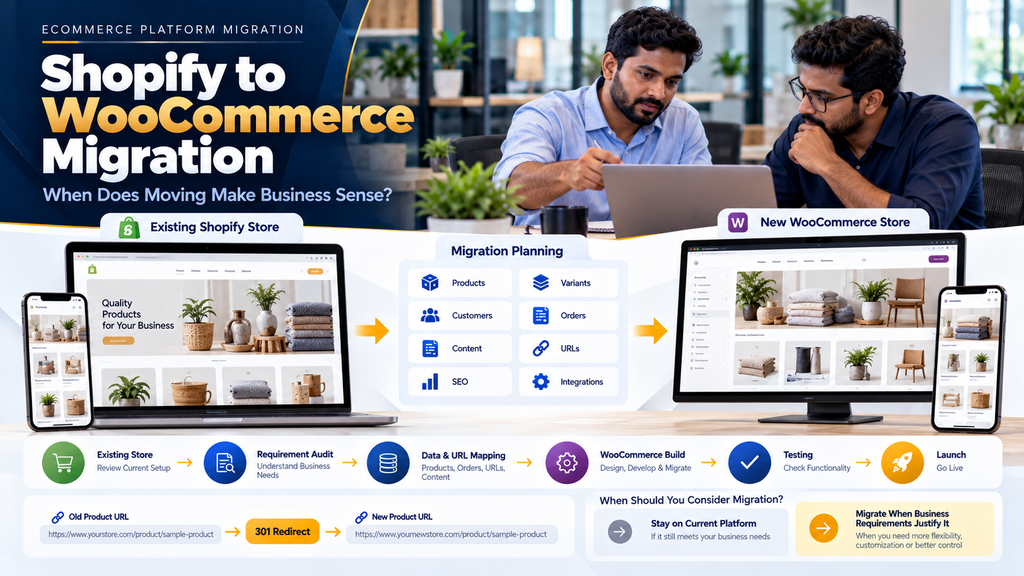
Shopify to WooCommerce migration is the process of moving an existing Shopify ecommerce store into a WordPress website using WooCommerce.
Depending on the existing store, migration can involve:
- Products
- Product variants
- Collections and categories
- Product images
- Customers
- Customer addresses
- Historical orders
- Pages
- Blog content
- SEO metadata
- URLs
- Redirects
- Payment configuration
- Shipping configuration
- Analytics
- Apps and integrations
- Custom business functionality
Migration should begin with a requirements and data audit rather than immediately exporting products.
Shopify vs WooCommerce: Different Ecommerce Approaches
| Shopify | WooCommerce |
|---|---|
| Hosted ecommerce platform | WordPress ecommerce plugin |
| Core hosting is part of the platform environment | Business chooses and manages its hosting environment |
| Uses Shopify themes and apps | Uses WordPress themes and plugins |
| Customization follows Shopify architecture | Greater WordPress-level development control |
| Platform manages much of the core infrastructure | Site owner has greater infrastructure responsibility |
| Can reduce some technical administration | Can provide greater technical flexibility but requires appropriate maintenance |
Neither model is automatically correct for every business.
For a broader comparison, read Shopify vs WooCommerce: Which Is Better for Erode Businesses?.
Which Businesses Should Consider Shopify to WooCommerce Migration?
Migration may deserve consideration when specific business requirements are becoming difficult to support efficiently within the current Shopify setup.
The following situations can indicate that a detailed platform review is worthwhile.
1. Businesses Requiring Greater Website-Level Control
Some businesses want deeper control over their overall website architecture rather than operating primarily within an ecommerce platform’s predefined environment.
WooCommerce operates within WordPress, allowing ecommerce to become part of a broader WordPress website.
2. Businesses With Complex Content Requirements
Some ecommerce websites are also large content websites.
For example, a company may require:
- Detailed service pages
- Large blog sections
- Industry resources
- Case studies
- Documentation
- Landing pages
- Educational content
- Custom content types
A WordPress-based architecture may be worth considering when content management is a major part of the website strategy.
3. Businesses Requiring Highly Customized Workflows
Some ecommerce operations extend beyond standard product-cart-checkout workflows.
Examples can include:
- Custom quotation processes
- Specialized product configurations
- Dealer ordering
- Distributor ordering
- Business-specific approval workflows
- Custom account dashboards
- Specialized product relationships
- Internal software integrations
WooCommerce may be considered when WordPress-level custom development provides a better fit for these requirements.
4. B2B Ecommerce Businesses
B2B ecommerce can require functionality beyond a normal retail store.
Requirements may include:
- Business registration
- Account approval
- Customer-specific pricing
- Dealer pricing
- Distributor pricing
- Bulk ordering
- Minimum order quantities
- RFQs
- Purchase-order references
- Account-specific catalogues
The correct platform depends on the specific B2B architecture rather than the B2B label alone.
Read B2B Ecommerce Website Development for Wholesalers and Manufacturers in Erode.
5. Wholesale Ecommerce Businesses
Wholesale companies may need specialized ordering workflows, quantities, account pricing and repeat-order functionality.
Businesses should compare the implementation options available on both platforms before deciding whether migration is justified.
Read Wholesale Ecommerce Website Development: B2B Features Businesses Need.
6. Manufacturers Selling Online
Manufacturers may require their ecommerce website to connect with product catalogues, dealer networks, quotations, inventory, production or ERP systems.
When ecommerce becomes part of a larger custom business system, the required integration architecture becomes an important platform-selection factor.
7. Businesses Requiring Custom ERP Integration
A company may consider migration when it needs specialized integration between ecommerce and internal business software.
This does not mean WooCommerce automatically integrates better with every ERP.
Integration feasibility depends on the APIs, supported integration methods, authentication, permissions and architecture of both systems.
8. Businesses Requiring Custom Inventory Workflows
Some businesses maintain inventory across:
- Multiple warehouses
- Retail locations
- Factories
- Dealer stock
- External ERP systems
The ecommerce platform should fit the authoritative inventory architecture rather than creating a second conflicting inventory source.
9. Businesses Requiring Specialized Product Structures
Some products require more complex information or relationships than a typical retail catalogue.
Examples can include industrial products, configurable products, technical products and products with extensive specifications.
10. Businesses Requiring Custom Product Enquiry Workflows
Not every ecommerce visitor is ready to click “Buy Now.”
Some businesses need:
Product → Enquiry → Requirement → Quotation → Approval → Order
A custom WooCommerce implementation may be considered when this workflow is central to the business.
11. Businesses Combining Ecommerce and Lead Generation
Some companies need one website to support both online purchasing and service enquiries.
A WordPress/WooCommerce architecture can be considered when content, lead generation and ecommerce need to work closely together.
12. Businesses With Strong WordPress Requirements
A company may already use WordPress extensively for content, marketing or another part of its web presence.
Consolidating ecommerce into the same environment may be worth evaluating if it simplifies the overall website architecture.
13. Businesses Wanting Greater Hosting Choice
WooCommerce allows the business to choose its WordPress hosting environment.
This creates flexibility, but it also creates responsibility for selecting, configuring, monitoring and maintaining suitable infrastructure.
14. Businesses Wanting Greater Code-Level Control
WooCommerce can provide developers with extensive access to the WordPress application environment.
This can be valuable for genuinely custom requirements, but greater control also means greater responsibility for code quality, security, compatibility and maintenance.
15. Businesses Reviewing Long-Term Platform Dependencies
Some businesses may want to reassess how dependent their ecommerce operation is on a specific platform, theme, app ecosystem or pricing model.
This can justify a platform review, but migration should still be evaluated against the total cost and operational impact of the replacement architecture.
Which Businesses May Be Better Staying on Shopify?
A balanced platform decision also requires understanding when migration may provide little practical benefit.
16. Businesses Happy With Their Current Shopify Store
If the current store supports the catalogue, customer experience, integrations and operational workflows effectively, migration may introduce unnecessary cost and risk.
17. Businesses Without a Clear Migration Reason
“We heard WooCommerce is more flexible” is not enough by itself to justify migration.
The business should identify specific requirements that the new architecture will solve.
18. Businesses Wanting Less Infrastructure Responsibility
Companies that prefer a hosted platform model may value Shopify’s approach.
Moving to WooCommerce means the business must also plan WordPress hosting, updates, backups, security and maintenance.
19. Small Stores With Standard Requirements
A straightforward store that already works well may gain little from a complex platform migration.
20. Businesses Without WordPress Maintenance Resources
WooCommerce requires ongoing technical maintenance.
Businesses should account for this before migration rather than considering only the initial development project.
21. Businesses Dependent on Shopify-Specific Functionality
If critical business workflows depend on Shopify capabilities or third-party apps without suitable replacements, migration may require significant redevelopment.
22. Businesses Planning Migration Only to Reduce One Fee
Platform cost should be evaluated as a complete total-cost picture.
WooCommerce may involve costs for:
- Hosting
- Premium plugins
- Development
- Security
- Maintenance
- Backups
- Monitoring
- Performance optimization
A lower cost in one area does not automatically mean a lower total operating cost.
Shopify to WooCommerce Migration Decision Checklist
| Requirement | What to Evaluate |
|---|---|
| Current store works well | Migration may not be necessary |
| Complex WordPress content | WooCommerce may deserve evaluation |
| Highly custom workflows | Compare implementation options carefully |
| Custom B2B requirements | Evaluate both platforms against exact workflows |
| Custom ERP integration | Review APIs and architecture first |
| Greater hosting control | WooCommerce may fit, with added responsibility |
| Low technical-maintenance preference | Hosted platform model may remain attractive |
| No clear business problem | Avoid migrating only for the sake of migration |
What Needs to Be Migrated From Shopify to WooCommerce?
Once the business decides that migration is justified, the next step is creating a migration inventory.
23. Product Migration
Product migration can include:
- Product titles
- Descriptions
- SKUs
- Prices
- Images
- Product types
- Variants
- Inventory references
- SEO information
24. Product Variant Migration
Variants should be mapped carefully because Shopify and WooCommerce can represent product options differently.
25. Preserve Important SKUs
If SKUs already connect ecommerce with warehouse, ERP or accounting systems, unnecessary changes can create operational problems.
26. Product Image Migration
Images should be transferred and associated with the correct products and variants.
27. Collections to Categories
The Shopify catalogue structure should be reviewed when planning WooCommerce product categories, tags and other product organization.
28. Do Not Blindly Reproduce the Old Catalogue
Migration can be an opportunity to improve confusing or outdated catalogue structures.
Any structural changes should also be included in URL and SEO planning.
29. Customer Migration
Relevant customer information can be transferred according to the supported source and destination data structures.
30. Protect Customer Data
Customer exports, addresses and other personal information should be handled securely throughout the migration.
31. Customer Password Migration
Authentication systems should be reviewed separately.
Passwords should never be converted to insecure plaintext simply to make a migration easier.
32. Historical Order Migration
Businesses should determine whether historical Shopify orders need to be available inside WooCommerce.
33. Order Status Mapping
Order and fulfilment concepts can differ between platforms, so historical statuses should be mapped intentionally.
34. Preserve Historical Meaning
Migration should not accidentally turn a completed historical transaction into a new active order.
35. Page Migration
Important informational and commercial pages can be recreated within WordPress.
36. Shopify Blog Migration
Existing blog articles can be migrated where they remain valuable to users and the business.
37. Content Cleanup
Migration is a useful time to remove obsolete content rather than automatically transferring every old page.
38. Shopify App Audit
Every important Shopify app should be documented before migration.
39. Map Business Functions, Not App Names
Instead of searching for a WordPress plugin with the same name as a Shopify app, identify the business function that needs to continue.
40. WooCommerce Plugin Selection
The required functionality can potentially be implemented through:
- WooCommerce core functionality
- WordPress functionality
- Appropriate plugins
- Custom development
- External business systems
41. Avoid Plugin Overload
Installing a large number of plugins without architectural planning can increase compatibility, performance, security and maintenance complexity.
42. Shopify Theme Cannot Simply Move to WordPress
Shopify themes and WordPress themes use different platform architectures.
The storefront generally needs to be rebuilt or redesigned for WordPress/WooCommerce.
43. Preserve the Brand, Not Necessarily the Old Code
The new website can preserve branding, customer expectations and important layouts without attempting to reuse incompatible theme code.
44. WooCommerce Website Design
The replacement store should be designed around the business’s current requirements rather than reproducing outdated design decisions.
45. Mobile Responsive Design
Product discovery, product pages, cart, checkout and customer-account workflows should work effectively across relevant screen sizes.
46. WordPress Hosting
Unlike Shopify’s hosted platform model, WooCommerce requires a suitable WordPress hosting environment.
47. Hosting Should Match Store Requirements
Hosting requirements can depend on catalogue size, traffic patterns, plugins, integrations, caching and other technical factors.
48. HTTPS Configuration
The production ecommerce website should use correctly configured HTTPS.
49. WordPress Security
Security planning can include:
- WordPress updates
- WooCommerce updates
- Plugin updates
- Theme updates
- Secure authentication
- Administrative access control
- Backups
- Monitoring
- Recovery planning
50. WooCommerce Maintenance
Migration to WooCommerce also means accepting responsibility for maintaining the WordPress environment.
Read WordPress Maintenance Services in Erode.
51. Plugin Compatibility
WordPress and WooCommerce updates should be managed with awareness of plugin and theme compatibility.
52. Backup Strategy
Regular backups should cover the relevant database, website files and configuration required for recovery.
53. Performance Optimization
A flexible WordPress architecture still needs performance engineering.
54. Avoid Unnecessary Plugins and Scripts
Every additional component should have a clear purpose.
55. Image Optimization
Product and content images should use suitable dimensions, formats and compression.
56. Caching
Caching should be planned according to the hosting and ecommerce architecture without incorrectly caching personalized or transactional content.
57. Core Web Vitals
The WooCommerce website should aim for efficient loading, responsive interaction and stable layouts.
Read Core Web Vitals Optimization for Business Websites in Erode.
58. Website Speed Optimization
Performance should be tested using the actual production architecture rather than assuming a platform change automatically makes a website faster.
Read Website Speed Optimization Services in Erode.
59. Shopify to WooCommerce SEO Migration
SEO should be included in the migration plan before the new WooCommerce website goes live.
60. Create an Inventory of Shopify URLs
Important URLs can include:
- Homepage
- Products
- Collections
- Pages
- Blog articles
- Other useful indexable URLs
61. Shopify and WooCommerce URL Structures Differ
Moving platforms can result in URL changes even when the product itself remains the same.
62. Preserve URLs Where Practical
Where a valuable existing URL can reasonably remain unchanged, unnecessary changes can be avoided.
63. Create an Old-to-New URL Map
When URLs change, create a mapping such as:
Old Shopify URL → Relevant New WooCommerce URL
64. Implement Relevant 301 Redirects
Where an old URL permanently moves to an appropriate replacement, a permanent redirect can help users and search engines reach the new location.
65. Do Not Redirect Every Page to the Homepage
Redirect destinations should be genuinely relevant.
66. Avoid Redirect Chains
Where possible:
Old Shopify URL → Final WooCommerce URL
is preferable to unnecessarily passing through multiple intermediate redirects.
67. Update Internal Links
The new website should link directly to its current URLs rather than relying on old Shopify redirects internally.
68. Preserve Useful Product Content
Useful descriptions, specifications and customer information should not disappear simply because the design or platform changes.
69. Metadata Migration
Useful titles and meta descriptions can be preserved or intentionally improved.
70. Heading Review
Important page headings should be reviewed after the WooCommerce templates are implemented.
71. Canonical URLs
Canonical configuration should reflect the intended WooCommerce architecture.
72. XML Sitemap
The new website should expose the intended indexable URLs through appropriate XML sitemap functionality.
73. Robots and Indexing Controls
Development and production indexing settings should be checked carefully during launch.
74. Do Not Accidentally Leave WordPress on Noindex
Development websites are often configured to discourage indexing. Production settings should be reviewed before launch so intended pages are not accidentally blocked from search.
75. Structured Data
Structured data should accurately represent the new website’s content and ecommerce functionality.
76. Search Monitoring
After migration, monitor crawling, indexing and unexpected missing URLs.
77. Can Shopify to WooCommerce Migration Affect Rankings?
Yes. Any significant ecommerce platform migration can coincide with changes in crawling, indexing and organic visibility, particularly when URLs, content, internal linking or site architecture change.
Careful migration planning can reduce avoidable technical problems, but rankings and traffic should never be guaranteed to remain unchanged.
78. Payment Gateway Migration
Payment functionality needs to be configured within the WooCommerce environment according to the selected provider’s supported integration.
79. Do Not Copy Sensitive Payment Data
Sensitive payment information should remain within appropriate secure payment systems rather than being manually exported and imported during migration.
80. Shipping Migration
Document existing Shopify shipping workflows before recreating the required behaviour in WooCommerce.
81. Courier Integrations
Existing courier integrations should be checked for WooCommerce support or rebuilt using supported methods.
82. Tax Configuration
Applicable tax requirements should be configured appropriately and reviewed with qualified professionals where necessary.
83. Inventory Integration
Businesses using ERP or warehouse software should define the authoritative inventory source.
84. Avoid Multiple Stock Sources
Shopify, WooCommerce, ERP and warehouse systems should not independently modify the same inventory without clearly defined synchronization rules.
85. ERP Integration
The WooCommerce store can potentially connect with ERP or other internal systems where supported integration methods are available.
86. Product Master Integration
If ERP owns the product master, define which information WooCommerce receives and which fields can be edited on the website.
87. Pricing Integration
Businesses using centrally managed pricing should define how approved prices reach WooCommerce.
88. Order Integration
New WooCommerce orders can potentially be transferred to the appropriate operational system.
89. Integration Failure Handling
Failed synchronization should be logged and recoverable rather than silently creating missing or duplicate records.
90. Warehouse Integration
Ecommerce orders can connect with warehouse workflows where appropriate.
Read Warehouse Management Software Development in Erode.
91. B2B WooCommerce Migration
B2B businesses should test their complete commercial workflow rather than focusing only on product import.
92. Customer-Specific Pricing
Existing Shopify B2B pricing requirements should be mapped to the planned WooCommerce architecture.
93. Dealer and Distributor Accounts
Channel businesses may require specialized customer roles, products, prices and ordering permissions.
94. Bulk Ordering
Wholesale customers may benefit from SKU-based or quantity-focused ordering interfaces.
95. Request for Quotation
Businesses selling configurable or negotiated products can potentially use:
Product → RFQ → Quotation → Approval → Order
96. Purchase Order References
B2B orders can capture appropriate customer purchase-order references where required.
97. Ecommerce and Dealer Portal Integration
Manufacturers may require ecommerce to work alongside a dedicated dealer or distributor portal.
Read Dealer Portal Development for Manufacturers and Distributors in Erode.
98. Analytics Migration
The new WooCommerce website should have analytics configured and tested before production launch.
99. Ecommerce Event Tracking
Important customer events should be validated rather than assumed to work because the same analytics account is retained.
100. Conversion Tracking
Purchase, enquiry and other relevant conversions should be tested after implementation.
101. Marketing Integrations
Required advertising, email, CRM and marketing integrations should be reviewed as part of the platform migration.
102. Security During Migration
Exports containing customer and order information should be handled securely.
103. Secure Staging Website
The WordPress staging environment should have appropriate access controls and should not expose sensitive migrated information publicly.
104. Remove Temporary Migration Files
Exports and import files should not remain publicly accessible after they are no longer required.
105. Backup Before Cutover
Relevant Shopify exports and the new WooCommerce environment should be backed up appropriately before final migration activities.
106. Test Migration
A trial import can identify mapping issues before the final cutover.
107. Validate Product Records
Check representative simple and variable products after migration.
108. Validate Product Images
Confirm that images belong to the correct products and variants.
109. Validate Customers
Review representative customer accounts and addresses.
110. Validate Historical Orders
Check different order types and statuses.
111. Validate Inventory
Compare inventory against the authoritative source before launch.
112. Validate Pricing
Check representative retail, wholesale and customer-specific pricing where applicable.
113. WooCommerce Functional Testing
The new store should be tested as a complete customer journey.
114. Navigation Testing
Customers should be able to locate important categories and products efficiently.
115. Search Testing
Test store search against actual catalogue terminology.
116. Cart Testing
Test product quantities, variants, removal and relevant discount behaviour.
117. Checkout Testing
Test representative checkout scenarios.
118. Payment Testing
Use payment-provider-supported testing methods before production use.
119. Shipping Testing
Test representative shipping destinations and order combinations.
120. Customer Account Testing
Test registration, login, password workflows and relevant account functionality.
121. Mobile Testing
Test the full purchasing journey across relevant screen sizes.
122. Redirect Testing
Check important Shopify URLs against the old-to-new migration map.
123. Integration Testing
Verify ERP, inventory, shipping, CRM and other required connections.
124. User Acceptance Testing
Representative business users should test real operational scenarios before launch.
125. Final Data Synchronization
If customers continue placing orders in Shopify while WooCommerce is being developed, the migration needs a strategy for data created after the initial export.
126. Cutover Planning
A simplified launch flow can look like:
Final Data Update → Production Configuration → Redirects → Domain / DNS Changes Where Required → Verification → WooCommerce Launch
127. Reduce Ecommerce Downtime
Launch should be planned around the actual technical architecture and business operations rather than assuming zero interruption is always possible.
128. Rollback Planning
The project should define how critical launch problems will be handled.
129. Post-Migration Order Monitoring
After launch, verify that production orders are created correctly.
130. Payment Monitoring
Check real payment workflows through the appropriate payment-provider systems.
131. Inventory Monitoring
Look for unexpected synchronization differences.
132. Integration Monitoring
Review operational integrations for failures after launch.
133. 404 Monitoring
Unexpected missing URLs can reveal gaps in redirect mapping or internal links.
134. Search Monitoring
Review crawling and indexing after the platform change.
135. Analytics Monitoring
Confirm that expected website and ecommerce events continue to be recorded.
136. Common Shopify to WooCommerce Migration Mistakes
- Migrating without a clear business reason
- Assuming WooCommerce is automatically cheaper
- Assuming WooCommerce is automatically better for SEO
- Ignoring WordPress maintenance requirements
- Choosing inadequate hosting
- Installing too many plugins
- Trying to copy Shopify apps one by one
- Trying to reuse incompatible Shopify theme code
- Importing poor catalogue data
- Changing SKUs unnecessarily
- Ignoring historical orders
- Handling customer data insecurely
- Ignoring customer authentication differences
- Changing URLs without redirect planning
- Redirecting everything to the homepage
- Removing useful product content
- Ignoring ERP and inventory integrations
- Failing to test checkout
- Launching without a final synchronization strategy
- Failing to monitor the website after launch
137. Is WooCommerce Better for SEO Than Shopify?
Neither platform should be treated as an automatic ranking advantage.
Organic search performance depends on many factors including useful content, website architecture, internal linking, crawlability, indexability, page experience, competition and overall search relevance.
WooCommerce can provide extensive control over a WordPress website, but simply migrating to WordPress does not guarantee better rankings.
138. Is WooCommerce Cheaper Than Shopify?
Not necessarily.
A meaningful comparison should consider total cost rather than only one subscription or hosting charge.
| Shopify Cost Considerations | WooCommerce Cost Considerations |
|---|---|
| Platform plan | Hosting |
| Apps | Premium plugins |
| Theme/customization | Theme/customization |
| Development | Development |
| Integration costs | Integration costs |
| Ongoing platform-related costs | Maintenance, security and technical support |
139. Shopify to WooCommerce Migration Cost
Migration cost depends on the actual store rather than simply the name of the source and destination platforms.
Factors can include:
- Number of products
- Number of variants
- Customer records
- Historical orders
- Images
- Pages
- Blog articles
- Shopify apps
- Custom functionality
- WooCommerce design
- WordPress development
- B2B functionality
- SEO migration
- URL redirects
- Payment integration
- Shipping integration
- ERP integration
- Inventory integration
- Data cleanup
- Testing
- Launch support
140. Shopify to WooCommerce Migration Timeline
The implementation timeline depends on catalogue size, functionality, content, integrations, data quality and the complexity of the replacement WooCommerce website.
A platform audit and requirement study should be completed before estimating a reliable project timeline.
141. Phased Shopify to WooCommerce Migration
A structured project can be divided into phases.
Phase 1: Shopify Audit + Business Requirements + Migration Decision
Phase 2: Data Inventory + URL Inventory + WooCommerce Architecture
Phase 3: WordPress / WooCommerce Development + Data Migration
Phase 4: Integrations + SEO Mapping + Redirects + Testing
Phase 5: Final Data Synchronization + Launch + Monitoring
142. Questions to Answer Before Leaving Shopify
- What problem are we trying to solve?
- Can that problem be solved without migrating?
- Why are we considering WooCommerce?
- Which Shopify features are essential?
- Which apps are essential?
- Do we require custom WordPress functionality?
- Do we have complex content requirements?
- Do we require B2B workflows?
- Do we need custom ERP integration?
- Who will manage WordPress maintenance?
- What hosting environment will WooCommerce use?
- How many products and variants need migration?
- Do customers need migration?
- Do historical orders need migration?
- Which Shopify URLs are important?
- Which URLs will change?
- Which redirects are required?
- Which payment and shipping integrations are needed?
- How will orders created during migration be handled?
- Who will monitor the website after launch?
Shopify to WooCommerce Migration for Businesses in Erode
Businesses in Erode may consider moving from Shopify to WooCommerce when they require a different level of website control, WordPress content management, custom workflows or business-software integration.
However, migration should not be recommended simply because a business is currently using Shopify.
Greap Technologies can first evaluate the current ecommerce architecture and requirements to determine whether migration is justified.
We work with businesses in Erode and nearby areas including Perundurai, Chennimalai, Bhavani, Anthiyur, Gobichettipalayam, Sathyamangalam, Modakkurichi, Kavindapadi, Kodumudi, Nambiyur and surrounding locations.
Why Consider Greap Technologies for Shopify to WooCommerce Migration?
Greap Technologies develops ecommerce websites and custom business software with an emphasis on selecting architecture based on actual requirements.
Depending on the project, Shopify to WooCommerce migration can include:
- Existing Shopify audit
- Migration feasibility assessment
- WooCommerce architecture planning
- WordPress development
- Custom ecommerce UI/UX
- Product migration
- Variant migration
- Customer migration
- Historical order migration
- Page migration
- Blog migration
- Shopify app functionality review
- WooCommerce plugin planning
- Custom functionality development
- URL mapping
- 301 redirects
- SEO migration
- Payment integration
- Shipping integration
- ERP integration
- Inventory integration
- Analytics setup
- Testing
- Launch support
- Post-migration monitoring
- WordPress maintenance planning
Learn more about WooCommerce Website Development for Businesses in Erode and Greap Technologies Ecommerce Development Services.
Final Shopify to WooCommerce Migration Checklist
- Define the reason for migration
- Check whether migration is actually necessary
- Audit Shopify products
- Audit Shopify apps
- Audit custom functionality
- Plan WooCommerce architecture
- Select appropriate WordPress hosting
- Plan website maintenance
- Inventory products and variants
- Clean catalogue data
- Plan customer migration
- Plan historical order migration
- Plan page and blog migration
- Inventory important Shopify URLs
- Create URL mapping
- Plan redirects
- Preserve useful SEO content
- Plan payment integration
- Plan shipping integration
- Define inventory ownership
- Plan ERP integrations
- Configure analytics
- Test products
- Test customer accounts
- Test cart
- Test checkout
- Test payments
- Test shipping
- Test redirects
- Test integrations
- Test mobile experience
- Prepare final synchronization
- Prepare backups
- Prepare contingency plan
- Launch WooCommerce
- Monitor orders and integrations
- Monitor SEO and analytics
Conclusion
A Shopify to WooCommerce migration can make sense for businesses whose requirements have moved beyond what they want to implement within their existing Shopify architecture.
Potential reasons can include greater WordPress-level control, complex content requirements, specialized B2B workflows, custom product processes and deeper business-software integration.
However, WooCommerce also introduces responsibilities for hosting, WordPress maintenance, plugin management, security, backups and technical support.
That is why the migration decision should follow this process:
Business Requirement → Current Platform Audit → Gap Analysis → Compare Solutions → Migration Decision
Only after migration is justified should the project move into:
Data Mapping → WooCommerce Development → SEO Mapping → Integration → Testing → Launch → Monitoring
If your business is still deciding between the platforms, read Shopify vs WooCommerce: Which Is Better for Erode Businesses?. For the broader migration process, see Ecommerce Website Migration Services in Erode.
Considering Moving From Shopify to WooCommerce?
If your current Shopify store no longer matches your website, B2B, integration or customization requirements, Greap Technologies can review the existing setup before recommending whether migration is necessary.
Discuss Your Shopify to WooCommerce Migration
Frequently Asked Questions
1. Can a Shopify store be migrated to WooCommerce?
Yes. Relevant products, customers, orders, images and content can potentially be migrated from Shopify into a WooCommerce environment. The exact migration scope depends on the existing store and required WooCommerce architecture.
2. Who should consider moving from Shopify to WooCommerce?
Businesses may consider migration when they require WordPress-level website control, complex content, specialized workflows, custom B2B functionality or integrations that are better suited to their planned WooCommerce architecture.
3. Should every Shopify business move to WooCommerce?
No. If Shopify already supports the business’s catalogue, customer experience and operational requirements effectively, migration may introduce unnecessary cost and complexity.
4. Can Shopify products be migrated to WooCommerce?
Relevant product information can be mapped to WooCommerce, including titles, descriptions, SKUs, prices, images and supported product options. Complex configurations may require additional development.
5. Can Shopify customers and orders be migrated?
Relevant customer and historical order information can potentially be migrated, subject to the data available from the source and the structure planned for WooCommerce.
6. Can Shopify apps be transferred to WooCommerce?
No. Shopify apps cannot simply be installed on WordPress. The business functionality they provide needs to be recreated using WooCommerce, WordPress plugins, custom development or external systems.
7. Will Shopify to WooCommerce migration affect SEO?
It can. Platform migration may change URLs, architecture, internal links and other technical elements. Careful mapping, redirects, content preservation and monitoring can reduce avoidable problems, but unchanged rankings cannot be guaranteed.
8. Is WooCommerce better for SEO than Shopify?
Not automatically. Search performance depends on the quality and relevance of the website, technical implementation, content, architecture, competition and many other factors. Changing platforms alone does not guarantee improved rankings.
9. Is WooCommerce cheaper than Shopify?
Not necessarily. WooCommerce has hosting, development, plugin, maintenance, security and support costs that should be considered alongside Shopify’s platform, app and development costs.
10. Can WooCommerce integrate with ERP and inventory software?
Potentially. Integration depends on the APIs or other supported integration methods, authentication, documentation and architecture of the systems involved.
11. How much does Shopify to WooCommerce migration cost?
Cost depends on products, variants, customers, historical orders, apps, custom functionality, WordPress development, SEO migration, integrations and testing. The existing Shopify store should be reviewed before estimating the project.
12. Does Greap Technologies provide Shopify to WooCommerce migration services in Erode?
Yes. Greap Technologies can review Shopify stores and develop WooCommerce migration solutions for businesses in Erode and nearby areas based on their ecommerce and integration requirements.